VRChat tricks, part 2
Let your shader see other players with Material Contacts
A VRChat contact receiver can now write the nearest hands and heads into your material every frame. Let's see how a shader reads them and keeps the effect steady.
A shader could see its own mesh, the camera and the light. The hand reaching toward it? Never. Material Contacts change that. A contact receiver writes the nearest hands, fingers and heads straight into your material, every frame. Let’s look at what arrives, how a shader reads it, and the small habits that keep an effect steady.
Turn on JavaScript to run this demo.
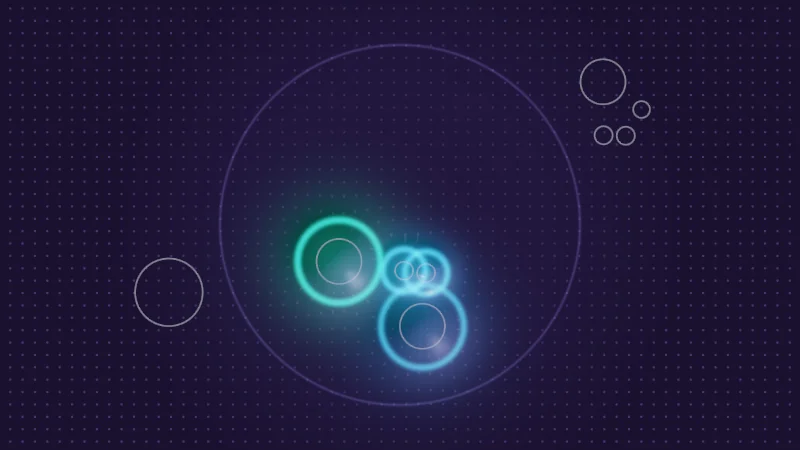
Rendered in Unity 2022.3.22f1 from the Copy for Unity shader, with the settings this demo starts with.
// A stand-in for VRChat's contact data: one sphere receiver seen from above and nine senders from three players.
// Player 1 is the hand you drag; players 2 and 3 move on their own.

#define SENDERS 9
#define MAX_TARGETS 8
#define RECEIVER_R 0.8

// Tag bits, in the order of the receiver's tag list: Hand, FingerIndex, FingerMiddle, FingerLittle, Head.
#define TAG_HAND 1
#define TAG_INDEX 2
#define TAG_MIDDLE 4
#define TAG_LITTLE 8
#define TAG_HEAD 16

// What VRChat would write this frame, filled in by contactScene().
static float2 cPos[SENDERS];       // sender center, seen from above
static float cRadius[SENDERS];     // true sender size: VRChat does not send it, so the effect demos guess it from the tag
static int cPlayer[SENDERS];
static int cTags[SENDERS];
static float cProximity[SENDERS];  // 1 when the sender reaches the receiver's center, 0 at its edge
static int cSlot[SENDERS];         // where VRChat writes it; -1 out of range, -2 in range but past the eighth
static float2 cOut[SENDERS];       // which way is "outside" for a label: away from the rest of the hand
static int cCount;

void mcSet(int i, float2 pos, float r, int player, int tags, float2 outward)
{
    cPos[i] = pos;
    cOut[i] = outward;
    cRadius[i] = r;
    cPlayer[i] = player;
    cTags[i] = tags;
}

// A palm with up to three fingertips ahead of it.
void mcHand(int first, float2 center, float2 dir, int player, int fingers)
{
    float2 side = float2(dir.y, -dir.x);
    float2 index = dir * 0.22 + side * 0.09, middle = dir * 0.26, little = dir * 0.18 - side * 0.11;
    mcSet(first, center, 0.1, player, TAG_HAND, -dir);
    mcSet(first + 1, center + index, 0.04, player, TAG_INDEX, normalize(index));
    if (fingers > 1) mcSet(first + 2, center + middle, 0.04, player, TAG_MIDDLE, dir);
    if (fingers > 2) mcSet(first + 3, center + little, 0.037, player, TAG_LITTLE, normalize(little));
}

void contactScene(float t, float2 drag)
{
    mcHand(0, drag, mul(rot2(0.35 * sin(0.8 * t)), float2(0.0, 1.0)), 1, 2);
    float2 h2 = float2(1.0 * sin(0.29 * t + 0.4), 0.38 + 0.3 * sin(0.41 * t));
    mcHand(3, h2, mul(rot2(0.5 * sin(0.37 * t)), float2(0.0, -1.0)), 2, 3);
    float a = 0.17 * t + 3.0;
    mcSet(7, (0.88 + 0.2 * sin(0.5 * t)) * float2(cos(a), sin(a)), 0.15, 3, TAG_HEAD, float2(0.0, 1.0));
    mcSet(8, float2(-0.62 + 0.35 * sin(0.6 * t), -0.3 + 0.32 * cos(0.45 * t)), 0.1, 3, TAG_HAND, float2(0.0, -1.0));

    // Proximity of a sphere receiver: 1 minus the gap to the sender's surface over the radius.
    for (int i = 0; i < SENDERS; i++)
    {
        float gap = length(cPos[i]) - cRadius[i];
        cProximity[i] = gap < RECEIVER_R ? 1.0 - saturate(gap / RECEIVER_R) : 0.0;
        cSlot[i] = gap < RECEIVER_R ? 0 : -1;
    }
    // Rank by proximity, nearest first: each pair adds one to the rank of the farther sender.
    for (int i = 0; i < SENDERS; i++)
    {
        for (int j = i + 1; j < SENDERS; j++)
        {
            if (cSlot[i] < 0 || cSlot[j] < 0) continue;
            if (cProximity[j] > cProximity[i]) cSlot[i]++;
            else cSlot[j]++;
        }
    }
    cCount = 0;
    for (int i = 0; i < SENDERS; i++)
    {
        if (cSlot[i] >= MAX_TARGETS) cSlot[i] = -2;
        if (cSlot[i] >= 0) cCount++;
    }
}

// ---------- Numbers drawn with seven segments ----------

float mcSegment(float2 p, float2 a, float2 b)
{
    float2 pa = p - a, ba = b - a;
    return length(pa - ba * saturate(dot(pa, ba) / dot(ba, ba)));
}

// Which of the seven segments the digit n lights, one bit each.
int digitMask(int n)
{
    int masks[10];
    masks[0] = 63; masks[1] = 6; masks[2] = 91; masks[3] = 79; masks[4] = 102;
    masks[5] = 109; masks[6] = 125; masks[7] = 7; masks[8] = 127; masks[9] = 111;
    return masks[clamp(n, 0, 9)];
}

// Distance to the digit n (0 to 9) in a box 0.5 wide and 1 tall, centerd on the origin.
float sdDigit(float2 p, int n)
{
    int m = digitMask(n);
    float2 q = p + float2(0.25, 0.5);
    const float g = 0.07;
    float d = 1e5;
    if ((m & 1) != 0) d = min(d, mcSegment(q, float2(g, 1.0), float2(0.5 - g, 1.0)));
    if ((m & 2) != 0) d = min(d, mcSegment(q, float2(0.5, 1.0 - g), float2(0.5, 0.5 + g)));
    if ((m & 4) != 0) d = min(d, mcSegment(q, float2(0.5, 0.5 - g), float2(0.5, g)));
    if ((m & 8) != 0) d = min(d, mcSegment(q, float2(g, 0.0), float2(0.5 - g, 0.0)));
    if ((m & 16) != 0) d = min(d, mcSegment(q, float2(0.0, g), float2(0.0, 0.5 - g)));
    if ((m & 32) != 0) d = min(d, mcSegment(q, float2(0.0, 0.5 + g), float2(0.0, 1.0 - g)));
    if ((m & 64) != 0) d = min(d, mcSegment(q, float2(g, 0.5), float2(0.5 - g, 0.5)));
    return d - 0.08;
}

// Label size in pixels: smaller on a phone so the labels keep clear of the shapes.
float digitPx() { return clamp(0.065 / pixelSize(), 9.0, 13.0); }

// A digit heightPx pixels tall centerd on `at`, the same size on every screen.
float3 drawDigit(float3 col, float2 p, float2 at, float heightPx, int n, float3 ink)
{
    float h = heightPx * pixelSize();
    float2 q = (p - at) / h;
    if (abs(q.x) > 0.5 || abs(q.y) > 0.7) return col;
    return lerp(col, ink, saturate(0.5 - sdDigit(q, n) * heightPx));
}

float3 playerColor(int player)
{
    return player == 1 ? series1() : (player == 2 ? series2() : series3());
}


// ----

// The look the effect demos share: a soft glossy surface that dents and glows under each written contact.
// Like a real shader, it only uses what VRChat writes: each slot's position, player and tags.

float3 contactGlow(int player)
{
    return player == 1 ? float3(0.1, 0.55, 1.0) : (player == 2 ? float3(1.0, 0.38, 0.06) : float3(0.08, 0.85, 0.7));
}

// VRChat does not send a sender's size, so pick one from its tag.
float tagRadius(int tags)
{
    return (tags & TAG_HEAD) != 0 ? 0.15 : ((tags & TAG_HAND) != 0 ? 0.1 : 0.04);
}

// Linear color of the surface at p. `on` scales the whole reaction, 0 draws the surface at rest.
float3 contactSurface(float2 p, float on)
{
    float2 grad = float2(0.0, 0.0);
    float3 glow = float3(0.0, 0.0, 0.0);
    for (int i = 0; i < SENDERS; i++)
    {
        if (cSlot[i] < 0) continue;
        float2 q = p - cPos[i];
        float r = tagRadius(cTags[i]);
        // How near the sender is to the receiver's center, worked out from its position.
        float near = 1.0 - saturate((length(cPos[i]) - r) / RECEIVER_R);
        float w = r * 1.3 + 0.03;
        float e = exp(-dot(q, q) / (w * w));
        float depth = 0.09 * (0.4 + 0.6 * near) * on;
        grad += depth * e * 2.0 * q / (w * w);
        float d = length(q);
        float k = (d - 1.15 * w) / 0.014;
        float ring = exp(-k * k);
        glow += contactGlow(cPlayer[i]) * near * on * (0.2 * exp(-d * d / (2.6 * w * w)) + 0.8 * ring);
    }

    // A fine dot pattern, pulled toward each dent so the surface looks pressed.
    float2 uv = (p + grad * 0.15) / 0.055;
    float2 cell = frac(uv) - 0.5;
    float dots = fillAA(length(cell) - 0.09);
    float3 base = lerp(float3(0.018, 0.012, 0.035), float3(0.06, 0.04, 0.11), dots);
    base = lerp(base, float3(0.03, 0.02, 0.06), 0.5 * smoothstep(RECEIVER_R + 0.6, RECEIVER_R - 0.2, length(p)));

    float3 n = normalize(float3(-grad, 1.0));
    float3 l = normalize(float3(-0.5, 0.6, 0.65));
    float3 h = normalize(l + float3(0.0, 0.0, 1.0));
    float3 col = base * (0.25 + 1.3 * max(dot(n, l), 0.0));
    // Relief: the slope facing the light brightens, the other side falls into shade.
    col = max(col + float3(0.12, 0.1, 0.22) * (dot(n, l) - l.z), 0.0);
    col += float3(0.75, 0.7, 1.0) * 0.2 * pow(max(dot(n, h), 0.0), 140.0);
    col += glow;
    // The receiver's reach as a faint line.
    float edge = (length(p) - RECEIVER_R) / 0.006;
    col += float3(0.25, 0.2, 0.5) * 0.12 * exp(-edge * edge);
    return col;
}

// The real senders as thin ghost outlines, whether or not the shader sees them.
float3 drawSenderGhosts(float3 col, float2 p)
{
    for (int i = 0; i < SENDERS; i++)
    {
        float d = length(p - cPos[i]) - cRadius[i];
        col = lerp(col, float3(0.6, 0.6, 0.75), 0.35 * strokeAA(d, 1.5 * pixelSize()));
    }
    return col;
}


// ----

// Hands from three players over a receiver. Only the eight nearest senders reach the shader;
// each one dents the surface and lights a ring in its player's color.

float4 shade(float2 uv)
{
    float2 p = centered(uv);
    contactScene(_Time.y, pointerCentered());
    float3 col = contactSurface(p, 1.0);
    col = tonemapACES(col);
    col = drawSenderGhosts(col, p);
    return float4(col, 1.0);
}
// A stand-in for VRChat's contact data: one sphere receiver seen from above and nine senders from three players.
// Player 1 is the hand you drag; players 2 and 3 move on their own.
#define SENDERS 9
#define MAX_TARGETS 8
#define RECEIVER_R 0.8
// Tag bits, in the order of the receiver's tag list: Hand, FingerIndex, FingerMiddle, FingerLittle, Head.
#define TAG_HAND 1
#define TAG_INDEX 2
#define TAG_MIDDLE 4
#define TAG_LITTLE 8
#define TAG_HEAD 16
// What VRChat would write this frame, filled in by contactScene().
vec2 cPos[SENDERS]; // sender center, seen from above
float cRadius[SENDERS]; // true sender size: VRChat does not send it, so the effect demos guess it from the tag
int cPlayer[SENDERS];
int cTags[SENDERS];
float cProximity[SENDERS]; // 1 when the sender reaches the receiver's center, 0 at its edge
int cSlot[SENDERS]; // where VRChat writes it; -1 out of range, -2 in range but past the eighth
vec2 cOut[SENDERS]; // which way is "outside" for a label: away from the rest of the hand
int cCount;
void mcSet(int i, vec2 pos, float r, int player, int tags, vec2 outward)
{
cPos[i] = pos;
cOut[i] = outward;
cRadius[i] = r;
cPlayer[i] = player;
cTags[i] = tags;
}
// A palm with up to three fingertips ahead of it.
void mcHand(int first, vec2 center, vec2 dir, int player, int fingers)
{
vec2 side = vec2(dir.y, -dir.x);
vec2 index = dir * 0.22 + side * 0.09, middle = dir * 0.26, little = dir * 0.18 - side * 0.11;
mcSet(first, center, 0.1, player, TAG_HAND, -dir);
mcSet(first + 1, center + index, 0.04, player, TAG_INDEX, normalize(index));
if (fingers > 1) mcSet(first + 2, center + middle, 0.04, player, TAG_MIDDLE, dir);
if (fingers > 2) mcSet(first + 3, center + little, 0.037, player, TAG_LITTLE, normalize(little));
}
void contactScene(float t, vec2 drag)
{
mcHand(0, drag, (vec2(0.0, 1.0) * rot2(0.35 * sin(0.8 * t))), 1, 2);
vec2 h2 = vec2(1.0 * sin(0.29 * t + 0.4), 0.38 + 0.3 * sin(0.41 * t));
mcHand(3, h2, (vec2(0.0, -1.0) * rot2(0.5 * sin(0.37 * t))), 2, 3);
float a = 0.17 * t + 3.0;
mcSet(7, (0.88 + 0.2 * sin(0.5 * t)) * vec2(cos(a), sin(a)), 0.15, 3, TAG_HEAD, vec2(0.0, 1.0));
mcSet(8, vec2(-0.62 + 0.35 * sin(0.6 * t), -0.3 + 0.32 * cos(0.45 * t)), 0.1, 3, TAG_HAND, vec2(0.0, -1.0));
// Proximity of a sphere receiver: 1 minus the gap to the sender's surface over the radius.
for (int i = 0; i < SENDERS; i++)
{
float gap = length(cPos[i]) - cRadius[i];
cProximity[i] = gap < RECEIVER_R ? 1.0 - saturate(gap / RECEIVER_R) : 0.0;
cSlot[i] = gap < RECEIVER_R ? 0 : -1;
}
// Rank by proximity, nearest first: each pair adds one to the rank of the farther sender.
for (int i = 0; i < SENDERS; i++)
{
for (int j = i + 1; j < SENDERS; j++)
{
if (cSlot[i] < 0 || cSlot[j] < 0) continue;
if (cProximity[j] > cProximity[i]) cSlot[i]++;
else cSlot[j]++;
}
}
cCount = 0;
for (int i = 0; i < SENDERS; i++)
{
if (cSlot[i] >= MAX_TARGETS) cSlot[i] = -2;
if (cSlot[i] >= 0) cCount++;
}
}
// ---------- Numbers drawn with seven segments ----------
float mcSegment(vec2 p, vec2 a, vec2 b)
{
vec2 pa = p - a, ba = b - a;
return length(pa - ba * saturate(dot(pa, ba) / dot(ba, ba)));
}
// Which of the seven segments the digit n lights, one bit each.
int digitMask(int n)
{
int masks[10];
masks[0] = 63; masks[1] = 6; masks[2] = 91; masks[3] = 79; masks[4] = 102;
masks[5] = 109; masks[6] = 125; masks[7] = 7; masks[8] = 127; masks[9] = 111;
return masks[clamp(n, 0, 9)];
}
// Distance to the digit n (0 to 9) in a box 0.5 wide and 1 tall, centerd on the origin.
float sdDigit(vec2 p, int n)
{
int m = digitMask(n);
vec2 q = p + vec2(0.25, 0.5);
const float g = 0.07;
float d = 1e5;
if ((m & 1) != 0) d = min(d, mcSegment(q, vec2(g, 1.0), vec2(0.5 - g, 1.0)));
if ((m & 2) != 0) d = min(d, mcSegment(q, vec2(0.5, 1.0 - g), vec2(0.5, 0.5 + g)));
if ((m & 4) != 0) d = min(d, mcSegment(q, vec2(0.5, 0.5 - g), vec2(0.5, g)));
if ((m & 8) != 0) d = min(d, mcSegment(q, vec2(g, 0.0), vec2(0.5 - g, 0.0)));
if ((m & 16) != 0) d = min(d, mcSegment(q, vec2(0.0, g), vec2(0.0, 0.5 - g)));
if ((m & 32) != 0) d = min(d, mcSegment(q, vec2(0.0, 0.5 + g), vec2(0.0, 1.0 - g)));
if ((m & 64) != 0) d = min(d, mcSegment(q, vec2(g, 0.5), vec2(0.5 - g, 0.5)));
return d - 0.08;
}
// Label size in pixels: smaller on a phone so the labels keep clear of the shapes.
float digitPx() { return clamp(0.065 / pixelSize(), 9.0, 13.0); }
// A digit heightPx pixels tall centerd on `at`, the same size on every screen.
vec3 drawDigit(vec3 col, vec2 p, vec2 at, float heightPx, int n, vec3 ink)
{
float h = heightPx * pixelSize();
vec2 q = (p - at) / h;
if (abs(q.x) > 0.5 || abs(q.y) > 0.7) return col;
return mix(col, ink, saturate(0.5 - sdDigit(q, n) * heightPx));
}
vec3 playerColor(int player)
{
return player == 1 ? series1() : (player == 2 ? series2() : series3());
}
// ----
// The look the effect demos share: a soft glossy surface that dents and glows under each written contact.
// Like a real shader, it only uses what VRChat writes: each slot's position, player and tags.
vec3 contactGlow(int player)
{
return player == 1 ? vec3(0.1, 0.55, 1.0) : (player == 2 ? vec3(1.0, 0.38, 0.06) : vec3(0.08, 0.85, 0.7));
}
// VRChat does not send a sender's size, so pick one from its tag.
float tagRadius(int tags)
{
return (tags & TAG_HEAD) != 0 ? 0.15 : ((tags & TAG_HAND) != 0 ? 0.1 : 0.04);
}
// Linear color of the surface at p. `on` scales the whole reaction, 0 draws the surface at rest.
vec3 contactSurface(vec2 p, float on)
{
vec2 grad = vec2(0.0, 0.0);
vec3 glow = vec3(0.0, 0.0, 0.0);
for (int i = 0; i < SENDERS; i++)
{
if (cSlot[i] < 0) continue;
vec2 q = p - cPos[i];
float r = tagRadius(cTags[i]);
// How near the sender is to the receiver's center, worked out from its position.
float near = 1.0 - saturate((length(cPos[i]) - r) / RECEIVER_R);
float w = r * 1.3 + 0.03;
float e = exp(-dot(q, q) / (w * w));
float depth = 0.09 * (0.4 + 0.6 * near) * on;
grad += depth * e * 2.0 * q / (w * w);
float d = length(q);
float k = (d - 1.15 * w) / 0.014;
float ring = exp(-k * k);
glow += contactGlow(cPlayer[i]) * near * on * (0.2 * exp(-d * d / (2.6 * w * w)) + 0.8 * ring);
}
// A fine dot pattern, pulled toward each dent so the surface looks pressed.
vec2 uv = (p + grad * 0.15) / 0.055;
vec2 cell = fract(uv) - 0.5;
float dots = fillAA(length(cell) - 0.09);
vec3 base = mix(vec3(0.018, 0.012, 0.035), vec3(0.06, 0.04, 0.11), dots);
base = mix(base, vec3(0.03, 0.02, 0.06), 0.5 * hlslSmoothstep(RECEIVER_R + 0.6, RECEIVER_R - 0.2, length(p)));
vec3 n = normalize(vec3(-grad, 1.0));
vec3 l = normalize(vec3(-0.5, 0.6, 0.65));
vec3 h = normalize(l + vec3(0.0, 0.0, 1.0));
vec3 col = base * (0.25 + 1.3 * max(dot(n, l), 0.0));
// Relief: the slope facing the light brightens, the other side falls into shade.
col = max(col + vec3(0.12, 0.1, 0.22) * (dot(n, l) - l.z), 0.0);
col += vec3(0.75, 0.7, 1.0) * 0.2 * pow(max(dot(n, h), 0.0), 140.0);
col += glow;
// The receiver's reach as a faint line.
float edge = (length(p) - RECEIVER_R) / 0.006;
col += vec3(0.25, 0.2, 0.5) * 0.12 * exp(-edge * edge);
return col;
}
// The real senders as thin ghost outlines, whether or not the shader sees them.
vec3 drawSenderGhosts(vec3 col, vec2 p)
{
for (int i = 0; i < SENDERS; i++)
{
float d = length(p - cPos[i]) - cRadius[i];
col = mix(col, vec3(0.6, 0.6, 0.75), 0.35 * strokeAA(d, 1.5 * pixelSize()));
}
return col;
}
// ----
// Hands from three players over a receiver. Only the eight nearest senders reach the shader;
// each one dents the surface and lights a ring in its player's color.
vec4 shade(vec2 uv)
{
vec2 p = centered(uv);
contactScene(_Time.y, pointerCentered());
vec3 col = contactSurface(p, 1.0);
col = tonemapACES(col);
col = drawSenderGhosts(col, p);
return vec4(col, 1.0);
}Names in this code (45)
_Time- Time since the level loaded, from Unity. _Time.y is seconds.
centered- float2 centered(float2 uv). Square coordinates with the origin in the middle: the short side of the picture spans -1..1. (common library)
col- Declared on line 8: float3 col = contactSurface(p, 1.0);
contactGlow- float3 contactGlow(int player) (this article's helper code)
contactScene- void contactScene(float t, float2 drag) (this article's helper code)
contactSurface- float3 contactSurface(float2 p, float on). Linear color of the surface at p. `on` scales the whole reaction, 0 draws the surface at rest. (this article's helper code)
digitMask- int digitMask(int n). Which of the seven segments the digit n lights, one bit each. (this article's helper code)
digitPx- float digitPx(). Label size in pixels: smaller on a phone so the labels keep clear of the shapes. (this article's helper code)
drawDigit- float3 drawDigit(float3 col, float2 p, float2 at, float heightPx, int n, float3 ink). A digit heightPx pixels tall centerd on `at`, the same size on every screen. (this article's helper code)
drawSenderGhosts- float3 drawSenderGhosts(float3 col, float2 p). The real senders as thin ghost outlines, whether or not the shader sees them. (this article's helper code)
fillAA- float fillAA(float d). Anti-aliased coverage of a signed distance: 1 inside, 0 outside, a one pixel ramp at the edge. (common library)
frac- The part after the decimal point, in HLSL. GLSL calls it fract.
lerp- HLSL's blend from a (t = 0) to b (t = 1). GLSL calls it mix.
mcHand- void mcHand(int first, float2 center, float2 dir, int player, int fingers). A palm with up to three fingertips ahead of it. (this article's helper code)
mcSegment- float mcSegment(float2 p, float2 a, float2 b) (this article's helper code)
mcSet- void mcSet(int i, float2 pos, float r, int player, int tags, float2 outward) (this article's helper code)
mul- Matrix times vector or matrix times matrix in HLSL. mul(M, v) applies M to v.
p- Declared on line 6: float2 p = centered(uv);
pixelSize- float pixelSize() (common library)
playerColor- float3 playerColor(int player) (this article's helper code)
pointerCentered- float2 pointerCentered(). The pointer (or the _Pointer material setting in Unity) in the same coordinates as centered(). (common library)
rot2- float2x2 rot2(float a). Turns a point by a radians, counterclockwise: mul(rot2(a), p). (common library)
saturate- An HLSL function that clamps a value between 0 and 1.
sdDigit- float sdDigit(float2 p, int n). Distance to the digit n (0 to 9) in a box 0.5 wide and 1 tall, centerd on the origin. (this article's helper code)
series1- float3 series1() (common library)
series2- float3 series2() (common library)
series3- float3 series3() (common library)
shade- float4 shade(float2 uv)
strokeAA- float strokeAA(float d, float width). Anti-aliased line of a given width (same units as d) around the zero line of d. (common library)
tagRadius- float tagRadius(int tags). VRChat does not send a sender's size, so pick one from its tag. (this article's helper code)
tonemapACES- float3 tonemapACES(float3 x). Rolls HDR values above 1 off softly instead of clipping them. (common library)
uv- A parameter of shade(), line 4: float2 uv.
abs- abs(x) is x without its minus sign. abs(-0.3) = 0.3.
clamp- clamp(x, lo, hi) holds x between lo and hi.
cos- cos(a) is the cosine of the angle a, in radians.
define- With #define NAME value, every NAME in the code is replaced by value before compiling.
dot- dot(a, b) multiplies matching parts and adds them up. For unit vectors it is the cosine of the angle between them.
exp- exp(x) is e to the power x. exp(0) = 1, and it falls towards 0 as x goes negative.
length- length(v) says how long the vector v is, sqrt(x² + y²).
max- max(a, b) picks the larger of the two.
min- min(a, b) picks the smaller of the two.
normalize- normalize(v) keeps the direction of v and makes its length 1.
pow- pow(x, y) is x to the power y, and undefined for x < 0.
sin- sin(a) is the sine of the angle a, in radians.
smoothstep- smoothstep(e0, e1, x) is 0 below e0, 1 above e1, and an S curve t² (3 - 2t) in between, where t = (x - e0) / (e1 - e0). GLSL leaves e0 >= e1 undefined.
Your browser has no VRChat inside it (sadly), so these demos fake the contact data. You look down on one receiver, with your hand under the pointer and two players who move around on their own. Drag the blue hand. Each sender the shader receives presses a soft dent and lights a ring in its player’s color. The thin gray circles show where the hands really are, and the ones without a ring didn’t make it into the material.
A receiver that writes into your material
Every avatar carries small invisible shapes on its head, hands, fingers and more. These are contact senders, and creators can add their own too. A contact receiver is the VRChat component that notices them. I like to picture it as a net around part of your avatar:
- Its shape, usually a sphere, is the net. Only senders inside it count.
- Its Collision Tags (Hand, Finger, Head and so on) say which body parts it catches.
- Allow Others catches other players’ senders, Allow Self your own.
Until now, a receiver on an avatar could only drive an animator parameter. Here’s the new part. Set its type to Proximity, turn on Write to Materials (the docs call it Write to Shaders) and list up to four renderers. From then on, every frame, VRChat writes a short list into those materials, one row per caught sender. I call each row a slot:
| Slot | What VRChat writes |
|---|---|
| 0 to 7 | one sender each, telling where it is and which way it points, whose it is (the player id, a number VRChat gives each player in the instance) and which of the receiver’s tags it has |
| 8 | the receiver itself, telling where it is (its Root Transform if set, without the shape’s offset) and how many of slots 0 to 7 are filled |
In the shader, the list arrives as two arrays (numbered lists) of nine entries: _VRChatContact_Transforms_ and _VRChatContact_Data_, each followed by the receiver’s Parameter text.
Slot 0 holds the sender nearest the receiver’s center, and the others follow roughly in order (measured from the receiver’s center to the sender’s surface). Senders outside the receiver, and any past the eighth, don’t make the list. The tags arrive as tag bits, one on or off flag per tag in the receiver’s list. They are only filled when Write Matching Tag Bitflags is on, so don’t forget that one.
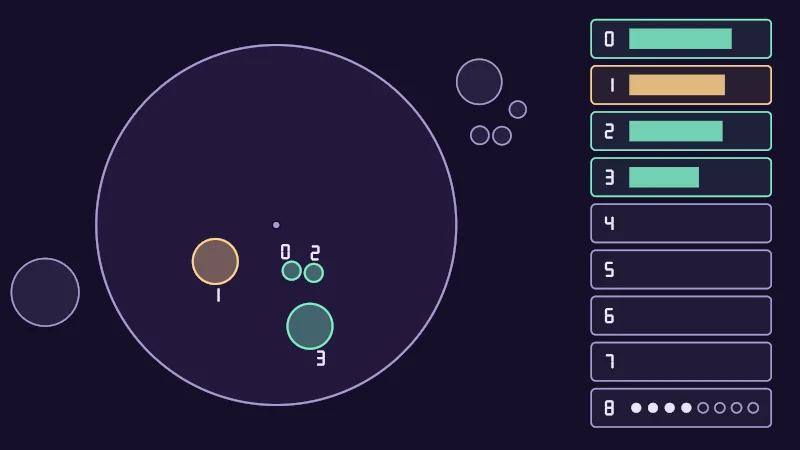
Turn on JavaScript to run this demo.
Rendered in Unity 2022.3.22f1 from the Copy for Unity shader, with the settings this demo starts with.
// Uses the helper code shown with an earlier figure on this page.

// ----

// Which sender lands in which slot: the scene from above on the left, the nine slots on the right.
#include "sdf2d"
#include "diagram"

static const float2 ORIGIN = float2(-0.55, 0.0);
static const float BOX_X0 = 0.85, BOX_X1 = 1.65, BOX_TOP = 0.93, BOX_PITCH = 0.205, BOX_H = 0.17;

float4 shade(float2 uv)
{
    float2 p = centered(uv);
    float2 q = p - ORIGIN;
    // Keep the dragged hand clear of the slot list.
    float2 drag = pointerCentered() - ORIGIN;
    contactScene(_Time.y, float2(min(drag.x, 1.1), drag.y));
    float px = pixelSize();

    float3 col = themeSurface();
    col = fillShape(col, length(q) - RECEIVER_R, themeGrid(), 0.6);
    col = drawCircle(col, q, float2(0.0, 0.0), RECEIVER_R, 2.0, themeMuted());
    col = drawDot(col, q, float2(0.0, 0.0), 3.0, themeMuted());

    // Senders: filled when written, a dashed outline in range but past the eighth slot, grey out of range.
    int who[MAX_TARGETS];
    for (int s = 0; s < MAX_TARGETS; s++) who[s] = -1;
    for (int i = 0; i < SENDERS; i++)
    {
        float d = length(q - cPos[i]) - cRadius[i];
        bool written = cSlot[i] >= 0;
        if (cSlot[i] == -2)
        {
            float2 r = q - cPos[i];
            float dash = saturate(0.5 + 2.0 * sin(atan2(r.y, r.x) * 10.0));
            col = lerp(col, playerColor(cPlayer[i]), dash * saturate(1.0 - abs(d) / px));
            continue;
        }
        float3 ink = written ? playerColor(cPlayer[i]) : themeMuted();
        col = fillShape(col, d, ink, written ? 0.35 : 0.12);
        col = strokeShape(col, d, written ? 2.0 : 1.5, ink);
        if (written)
        {
            who[cSlot[i]] = i;
            float2 at = cPos[i] + cOut[i] * (cRadius[i] + 0.85 * digitPx() * px);
            col = drawDigit(col, q, at, digitPx(), cSlot[i], themeInk());
        }
    }

    // The slot list: one box per slot. The bar shows how near the sender written there is, which sets the order;
    // VRChat does not write that number, a shader works it out from the position.
    float fk = (BOX_TOP - p.y) / BOX_PITCH;
    int k = int(floor(fk));
    if (k >= 0 && k <= MAX_TARGETS && p.x > BOX_X0 - 0.05)
    {
        float yc = BOX_TOP - (float(k) + 0.5) * BOX_PITCH;
        float2 bc = float2(0.5 * (BOX_X0 + BOX_X1), yc);
        float box = sdRoundedBox(p - bc, float2(0.5 * (BOX_X1 - BOX_X0), 0.5 * BOX_H), 0.02);
        float3 ink = themeMuted();
        float barX0 = BOX_X0 + 0.17, barX1 = BOX_X1 - 0.05;
        if (k < MAX_TARGETS)
        {
            int i = who[k];
            if (i >= 0)
            {
                ink = playerColor(cPlayer[i]);
                float x1 = lerp(barX0, barX1, cProximity[i]);
                float bar = sdBox(p - float2(0.5 * (barX0 + x1), yc), float2(0.5 * (x1 - barX0), 0.045));
                col = fillShape(col, bar, ink, 0.85);
            }
        }
        else
        {
            // Slot 8: the receiver itself, and the count as eight pips.
            for (int n = 0; n < MAX_TARGETS; n++)
            {
                float x = lerp(barX0 + 0.03, barX1 - 0.03, float(n) / 7.0);
                float pip = length(p - float2(x, yc)) - 0.022;
                col = n < cCount ? fillShape(col, pip, themeInk(), 1.0) : strokeShape(col, pip, 1.5, themeMuted());
            }
        }
        col = fillShape(col, box, ink, 0.08);
        col = strokeShape(col, box, 1.5, ink);
        col = drawDigit(col, p, float2(BOX_X0 + 0.08, yc), digitPx(), k, themeInk());
    }
    return float4(col, 1.0);
}
// Uses the helper code shown with an earlier figure on this page.
// ----
// Which sender lands in which slot: the scene from above on the left, the nine slots on the right.
#include "sdf2d"
#include "diagram"
const vec2 ORIGIN = vec2(-0.55, 0.0);
const float BOX_X0 = 0.85, BOX_X1 = 1.65, BOX_TOP = 0.93, BOX_PITCH = 0.205, BOX_H = 0.17;
vec4 shade(vec2 uv)
{
vec2 p = centered(uv);
vec2 q = p - ORIGIN;
// Keep the dragged hand clear of the slot list.
vec2 drag = pointerCentered() - ORIGIN;
contactScene(_Time.y, vec2(min(drag.x, 1.1), drag.y));
float px = pixelSize();
vec3 col = themeSurface();
col = fillShape(col, length(q) - RECEIVER_R, themeGrid(), 0.6);
col = drawCircle(col, q, vec2(0.0, 0.0), RECEIVER_R, 2.0, themeMuted());
col = drawDot(col, q, vec2(0.0, 0.0), 3.0, themeMuted());
// Senders: filled when written, a dashed outline in range but past the eighth slot, grey out of range.
int who[MAX_TARGETS];
for (int s = 0; s < MAX_TARGETS; s++) who[s] = -1;
for (int i = 0; i < SENDERS; i++)
{
float d = length(q - cPos[i]) - cRadius[i];
bool written = cSlot[i] >= 0;
if (cSlot[i] == -2)
{
vec2 r = q - cPos[i];
float dash = saturate(0.5 + 2.0 * sin(atan(r.y, r.x) * 10.0));
col = mix(col, playerColor(cPlayer[i]), dash * saturate(1.0 - abs(d) / px));
continue;
}
vec3 ink = written ? playerColor(cPlayer[i]) : themeMuted();
col = fillShape(col, d, ink, written ? 0.35 : 0.12);
col = strokeShape(col, d, written ? 2.0 : 1.5, ink);
if (written)
{
who[cSlot[i]] = i;
vec2 at = cPos[i] + cOut[i] * (cRadius[i] + 0.85 * digitPx() * px);
col = drawDigit(col, q, at, digitPx(), cSlot[i], themeInk());
}
}
// The slot list: one box per slot. The bar shows how near the sender written there is, which sets the order;
// VRChat does not write that number, a shader works it out from the position.
float fk = (BOX_TOP - p.y) / BOX_PITCH;
int k = int(floor(fk));
if (k >= 0 && k <= MAX_TARGETS && p.x > BOX_X0 - 0.05)
{
float yc = BOX_TOP - (float(k) + 0.5) * BOX_PITCH;
vec2 bc = vec2(0.5 * (BOX_X0 + BOX_X1), yc);
float box = sdRoundedBox(p - bc, vec2(0.5 * (BOX_X1 - BOX_X0), 0.5 * BOX_H), 0.02);
vec3 ink = themeMuted();
float barX0 = BOX_X0 + 0.17, barX1 = BOX_X1 - 0.05;
if (k < MAX_TARGETS)
{
int i = who[k];
if (i >= 0)
{
ink = playerColor(cPlayer[i]);
float x1 = mix(barX0, barX1, cProximity[i]);
float bar = sdBox(p - vec2(0.5 * (barX0 + x1), yc), vec2(0.5 * (x1 - barX0), 0.045));
col = fillShape(col, bar, ink, 0.85);
}
}
else
{
// Slot 8: the receiver itself, and the count as eight pips.
for (int n = 0; n < MAX_TARGETS; n++)
{
float x = mix(barX0 + 0.03, barX1 - 0.03, float(n) / 7.0);
float pip = length(p - vec2(x, yc)) - 0.022;
col = n < cCount ? fillShape(col, pip, themeInk(), 1.0) : strokeShape(col, pip, 1.5, themeMuted());
}
}
col = fillShape(col, box, ink, 0.08);
col = strokeShape(col, box, 1.5, ink);
col = drawDigit(col, p, vec2(BOX_X0 + 0.08, yc), digitPx(), k, themeInk());
}
return vec4(col, 1.0);
}Names in this code (53)
_Time- Time since the level loaded, from Unity. _Time.y is seconds.
at- Declared on line 42: float2 at = cPos[i] + cOut[i] * (cRadius[i] + 0.85 * digitPx() * px);
atan2- The angle of the point (x, y), written atan2(y, x) in HLSL. GLSL calls it atan(y, x).
bar- Declared on line 65: float bar = sdBox(p - float2(0.5 * (barX0 + x1), yc), float2(0.5 * (x1 - barX0), 0.045));
barX0- Declared on line 57: float barX0 = BOX_X0 + 0.17, barX1 = BOX_X1 - 0.05;
bc- Declared on line 54: float2 bc = float2(0.5 * (BOX_X0 + BOX_X1), yc);
box- Declared on line 55: float box = sdRoundedBox(p - bc, float2(0.5 * (BOX_X1 - BOX_X0), 0.5 * BOX_H), 0.02);
BOX_X0- Declared on line 6: static const float BOX_X0 = 0.85, BOX_X1 = 1.65, BOX_TOP = 0.93, BOX_PITCH = 0.205, BOX_H = 0.17;
centered- float2 centered(float2 uv). Square coordinates with the origin in the middle: the short side of the picture spans -1..1. (common library)
col- Declared on line 17: float3 col = themeSurface();
contactScene- void contactScene(float t, float2 drag) (this article's helper code)
d- Declared on line 27: float d = length(q - cPos[i]) - cRadius[i];
dash- Declared on line 32: float dash = saturate(0.5 + 2.0 * sin(atan2(r.y, r.x) * 10.0));
digitPx- float digitPx(). Label size in pixels: smaller on a phone so the labels keep clear of the shapes. (this article's helper code)
drag- Declared on line 13: float2 drag = pointerCentered() - ORIGIN;
drawCircle- float3 drawCircle(float3 col, float2 p, float2 c, float r, float widthPx, float3 ink) (diagram library)
drawDigit- float3 drawDigit(float3 col, float2 p, float2 at, float heightPx, int n, float3 ink). A digit heightPx pixels tall centerd on `at`, the same size on every screen. (this article's helper code)
drawDot- float3 drawDot(float3 col, float2 p, float2 c, float radiusPx, float3 ink). A dot with a ring in the surface color around it. (diagram library)
fillShape- float3 fillShape(float3 col, float d, float3 ink, float alpha). Fill or outline any signed distance d (in centered() units). alpha tints evenly for the eye; the edge itself blends in linear light like any coverage. (diagram library)
fk- Declared on line 49: float fk = (BOX_TOP - p.y) / BOX_PITCH;
i- Declared on line 60: int i = who[k];
include- Pulls another file into this one, for example UnityCG.cginc.
ink- Declared on line 36: float3 ink = written ? playerColor(cPlayer[i]) : themeMuted();
k- Declared on line 50: int k = int(floor(fk));
lerp- HLSL's blend from a (t = 0) to b (t = 1). GLSL calls it mix.
ORIGIN- Declared on line 5: static const float2 ORIGIN = float2(-0.55, 0.0);
p- Declared on line 10: float2 p = centered(uv);
pip- Declared on line 75: float pip = length(p - float2(x, yc)) - 0.022;
pixelSize- float pixelSize() (common library)
playerColor- float3 playerColor(int player) (this article's helper code)
pointerCentered- float2 pointerCentered(). The pointer (or the _Pointer material setting in Unity) in the same coordinates as centered(). (common library)
px- Declared on line 15: float px = pixelSize();
q- Declared on line 11: float2 q = p - ORIGIN;
r- Declared on line 31: float2 r = q - cPos[i];
saturate- An HLSL function that clamps a value between 0 and 1.
sdBox- float sdBox(float2 p, float2 halfSize) (sdf2d library)
sdRoundedBox- float sdRoundedBox(float2 p, float2 halfSize, float r) (sdf2d library)
shade- float4 shade(float2 uv)
strokeShape- float3 strokeShape(float3 col, float d, float widthPx, float3 ink) (diagram library)
themeGrid- float3 themeGrid() (common library)
themeInk- float3 themeInk() (common library)
themeMuted- float3 themeMuted() (common library)
themeSurface- float3 themeSurface(). The dusk stage colors, in linear light. Series colors are used in this order: mint, pink, butter. (common library)
uv- A parameter of shade(), line 8: float2 uv.
written- Declared on line 28: bool written = cSlot[i] >= 0;
x- Declared on line 74: float x = lerp(barX0 + 0.03, barX1 - 0.03, float(n) / 7.0);
x1- Declared on line 64: float x1 = lerp(barX0, barX1, cProximity[i]);
yc- Declared on line 53: float yc = BOX_TOP - (float(k) + 0.5) * BOX_PITCH;
abs- abs(x) is x without its minus sign. abs(-0.3) = 0.3.
floor- floor(x) rounds down to the largest whole number not above x. floor(2.7) = 2, floor(-0.5) = -1.
length- length(v) says how long the vector v is, sqrt(x² + y²).
min- min(a, b) picks the smaller of the two.
sin- sin(a) is the sine of the angle a, in radians.
Drag the mint hand around. Each sender that got a slot carries its slot number. A dashed one is inside the receiver but past the eighth slot, so it missed out; a plain lilac one is out of range. On the right, each bar is a sender’s proximity. It reads 1 when the sender reaches the receiver’s center and 0 at its edge. Proximity decides the order, but VRChat doesn’t write it. Box 8 shows the count as dots.
Reading the slots in a shader
VRChat ships a small helper file with the SDK. These are the lines I use most:
#define VRC_CONTACT_MAX_TARGETS 8
#define VRC_CONTACT_MAX_TAGS 16
#define VRC_CONTACT_BUFFER_SIZE 9 // MAX_TARGETS, plus one extra for SELF
#define VRC_CONTACT_SELF_INDEX VRC_CONTACT_MAX_TARGETS
// ...
#define VRC_CONTACT_DECLARE(name) \
uniform float4x4 _VRChatContact_Transforms_##name[VRC_CONTACT_BUFFER_SIZE]; \
uniform float4 _VRChatContact_Data_##name[VRC_CONTACT_BUFFER_SIZE]
#define VRC_CONTACT_TARGETCOUNT(name) (asint(_VRChatContact_Data_##name[VRC_CONTACT_SELF_INDEX].y))
// ...
#define VRC_CONTACT_WORLDPOS(name, i) (_VRChatContact_Transforms_##name[i]._m03_m13_m23)
// ...
#define VRC_CONTACT_PLAYERID(name, i) (asint(_VRChatContact_Data_##name[i].x))
// ...
#define VRC_CONTACT_TAGS(name, i) (asuint(_VRChatContact_Data_##name[i].y))
That’s a lot of capital letters, so let’s go through it slowly. VRC_CONTACT_DECLARE creates both arrays of 9 entries; slot 8 is the receiver’s own. For name, type the receiver’s Parameter text exactly, the same name its animator parameter has. After that, four macros (named shortcuts that expand into code) cover most effects:
VRC_CONTACT_TARGETCOUNT(name)tells you how many slots are filled.VRC_CONTACT_WORLDPOS(name, i)gives the position of the sender in sloti.VRC_CONTACT_PLAYERID(name, i)says whose sender it is.VRC_CONTACT_TAGS(name, i)shows which of your tags it has.
Each transform is a matrix, a 4 by 4 block of numbers that stores where something is, which way it points and how big it is. Its last column is the position, which VRC_CONTACT_WORLDPOS reads.
There’s one trap to watch for. The count is stored as the raw bits of a whole number. Read as an ordinary number, a count of 1 looks like a tiny fraction close to 0. So always read it through VRC_CONTACT_TARGETCOUNT, and never compare the value directly.
How far is the nearest contact?
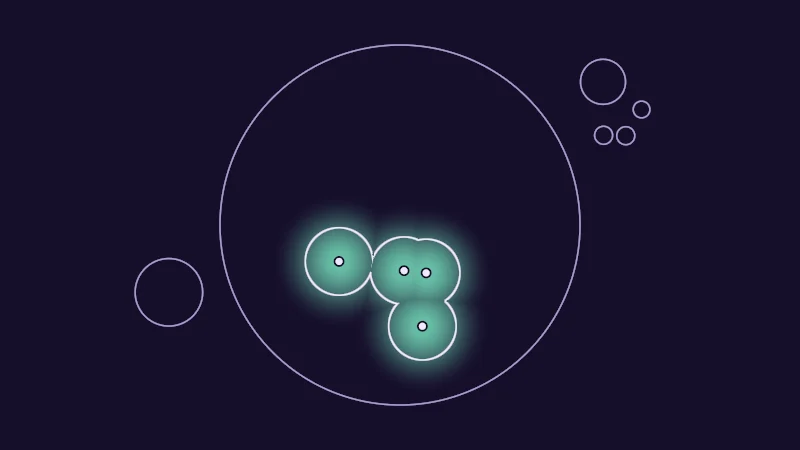
VRChat sends where each sender is, not how big it is. So the simplest effect asks one question. How far is this pixel from the nearest one? It’s an old friend, the union of circles from Drawing shapes with distance, softened with smoothstep:
is the point on the surface and the position in slot . is the distance to the closest filled slot ( means the smallest over all slots). (Reach r) is how far from a contact the effect fades to nothing, and is how strong the effect is. Taking only the nearest keeps every spot the same size; adding them all up lets close contacts melt together.
Turn on JavaScript to run this demo.
Rendered in Unity 2022.3.22f1 from the Copy for Unity shader, with the settings this demo starts with.
// Uses the helper code shown with an earlier figure on this page.

// ----

// A falloff around the written contacts: the distance to the nearest one, or every one added up.
#include "diagram"

uniform float _Reach; // @range 0.1 0.6 0.01 = 0.3 | Reach r | How far from a contact the effect fades to nothing.
uniform float _Mode;  // @select = 0 | Combine | Nearest only=0, Add all=1 | Use the closest contact, or add up the falloff of every contact.

float4 shade(float2 uv)
{
    float2 p = centered(uv);
    contactScene(_Time.y, pointerCentered());

    // Only written slots reach the shader, and only their centers.
    float dMin = 1e5, sum = 0.0;
    for (int i = 0; i < SENDERS; i++)
    {
        if (cSlot[i] < 0) continue;
        float d = length(p - cPos[i]);
        dMin = min(dMin, d);
        sum += 1.0 - smoothstep(0.0, _Reach, d);
    }
    float f = _Mode < 0.5 ? 1.0 - smoothstep(0.0, _Reach, dMin) : saturate(sum);

    float3 col = themeSurface();
    col = drawCircle(col, p, float2(0.0, 0.0), RECEIVER_R, 1.5, themeMuted());
    col = tint(col, series1(), 0.8 * f);
    // A line where the falloff is one half.
    col = strokeShape(col, (f - 0.5) / max(fwidth(f), 1e-4) * pixelSize(), 1.5, themeInk());

    for (int i = 0; i < SENDERS; i++)
    {
        float d = length(p - cPos[i]) - cRadius[i];
        if (cSlot[i] < 0) col = strokeShape(col, d, 1.5, themeMuted());
        else col = drawDot(col, p, cPos[i], 3.5, themeInk());
    }
    return float4(col, 1.0);
}
// Uses the helper code shown with an earlier figure on this page.
// ----
// A falloff around the written contacts: the distance to the nearest one, or every one added up.
#include "diagram"
uniform float _Reach; // @range 0.1 0.6 0.01 = 0.3 | Reach r | How far from a contact the effect fades to nothing.
uniform float _Mode; // @select = 0 | Combine | Nearest only=0, Add all=1 | Use the closest contact, or add up the falloff of every contact.
vec4 shade(vec2 uv)
{
vec2 p = centered(uv);
contactScene(_Time.y, pointerCentered());
// Only written slots reach the shader, and only their centers.
float dMin = 1e5, sum = 0.0;
for (int i = 0; i < SENDERS; i++)
{
if (cSlot[i] < 0) continue;
float d = length(p - cPos[i]);
dMin = min(dMin, d);
sum += 1.0 - hlslSmoothstep(0.0, _Reach, d);
}
float f = _Mode < 0.5 ? 1.0 - hlslSmoothstep(0.0, _Reach, dMin) : saturate(sum);
vec3 col = themeSurface();
col = drawCircle(col, p, vec2(0.0, 0.0), RECEIVER_R, 1.5, themeMuted());
col = tint(col, series1(), 0.8 * f);
// A line where the falloff is one half.
col = strokeShape(col, (f - 0.5) / max(fwidth(f), 1e-4) * pixelSize(), 1.5, themeInk());
for (int i = 0; i < SENDERS; i++)
{
float d = length(p - cPos[i]) - cRadius[i];
if (cSlot[i] < 0) col = strokeShape(col, d, 1.5, themeMuted());
else col = drawDot(col, p, cPos[i], 3.5, themeInk());
}
return vec4(col, 1.0);
}Names in this code (29)
_Mode- Choice "Combine". Use the closest contact, or add up the falloff of every contact.
_Reach- Slider "Reach r". How far from a contact the effect fades to nothing. From 0.1 to 0.6, starts at 0.3.
_Time- Time since the level loaded, from Unity. _Time.y is seconds.
centered- float2 centered(float2 uv). Square coordinates with the origin in the middle: the short side of the picture spans -1..1. (common library)
col- Declared on line 23: float3 col = themeSurface();
contactScene- void contactScene(float t, float2 drag) (this article's helper code)
d- Declared on line 17: float d = length(p - cPos[i]);
dMin- Declared on line 13: float dMin = 1e5, sum = 0.0;
drawCircle- float3 drawCircle(float3 col, float2 p, float2 c, float r, float widthPx, float3 ink) (diagram library)
drawDot- float3 drawDot(float3 col, float2 p, float2 c, float radiusPx, float3 ink). A dot with a ring in the surface color around it. (diagram library)
f- Declared on line 21: float f = _Mode < 0.5 ? 1.0 - smoothstep(0.0, _Reach, dMin) : saturate(sum);
include- Pulls another file into this one, for example UnityCG.cginc.
p- Declared on line 9: float2 p = centered(uv);
pixelSize- float pixelSize() (common library)
pointerCentered- float2 pointerCentered(). The pointer (or the _Pointer material setting in Unity) in the same coordinates as centered(). (common library)
saturate- An HLSL function that clamps a value between 0 and 1.
series1- float3 series1() (common library)
shade- float4 shade(float2 uv)
strokeShape- float3 strokeShape(float3 col, float d, float widthPx, float3 ink) (diagram library)
themeInk- float3 themeInk() (common library)
themeMuted- float3 themeMuted() (common library)
themeSurface- float3 themeSurface(). The dusk stage colors, in linear light. Series colors are used in this order: mint, pink, butter. (common library)
tint- float3 tint(float3 a, float3 b, float t). Blends two colors in steps that look even to the eye (in sRGB), for value ramps such as distance bands. Edges and coverage still blend with lerp, in linear light, as light really adds up. (common library)
uv- A parameter of shade(), line 7: float2 uv.
fwidth- fwidth(v) says how much v changes from this pixel to its neighbours, |dFdx(v)| + |dFdy(v)|. Edges one pixel wide are made with it.
length- length(v) says how long the vector v is, sqrt(x² + y²).
max- max(a, b) picks the larger of the two.
min- min(a, b) picks the smaller of the two.
smoothstep- smoothstep(e0, e1, x) is 0 below e0, 1 above e1, and an S curve t² (3 - 2t) in between, where t = (x - e0) / (e1 - e0). GLSL leaves e0 >= e1 undefined.
Drag your hand and play with Reach r. Those small dots are all the shader receives. Set Combine to Add all and watch overlapping contacts add up and melt into smooth shapes.
A slot is a place, not a name
This one is sneaky, so let’s take it slow. Think of the slots as places in a race. Slot 0 is whoever is nearest right now, slot 1 the next. VRChat sorts the list again every frame, so when two fingers pass each other, they swap places. What stays the same is the name on the runner’s shirt. Here that’s the player id and the tag bits, which say whose sender it is and which body part.
| Slot 0 | Slot 1 | |
|---|---|---|
| This frame | Player 2’s index finger | Player 2’s middle finger |
| Next frame, the middle finger came closer | Player 2’s middle finger | Player 2’s index finger |
So it comes down to two cases:
- Only positions matter, as for a glow or a dent. Then you look at every filled slot. The order doesn’t matter, so the swapping can’t hurt you.
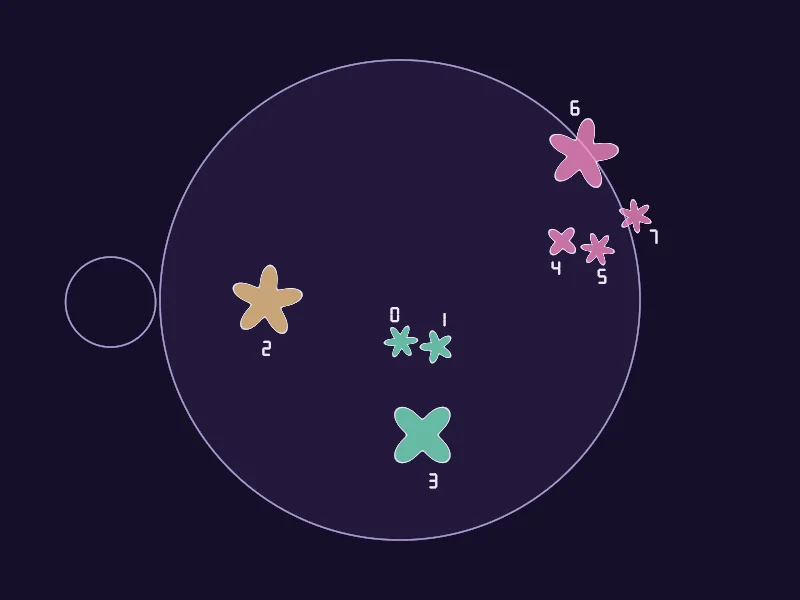
- Something must stay with one sender, such as a random color or shape. Make it from the player id and the tag bits, never from the slot number. A random look grows from a number called a seed (the noise lesson shows how). Seed it from the slot, and the look hops over to the other finger at every swap.
One more catch is that tags only tell apart what you list. Both hands carry Hand, so also list HandL and FingerL to tell left from right. Senders that still match need a steady order of their own, such as their place along the palm.
Turn on JavaScript to run this demo.
Rendered in Unity 2022.3.22f1 from the Copy for Unity shader, with the settings this demo starts with.
// Uses the helper code shown with an earlier figure on this page.

// ----

// A little random flower for every written contact, filled in its player's color. The seed picks only the
// petal count and the turn. Seeded by the slot number, the shapes jump between senders whenever the
// order changes; seeded by player and tag, each sender keeps its own.
#include "diagram"

uniform float _Seed; // @select = 0 | Seed from | Slot number=0, Player and tag=1 | What the random look of each contact is based on.

float4 shade(float2 uv)
{
    float2 p = centered(uv);
    // Slower than the other demos, so a flower changes at most about three times a second.
    contactScene(0.35 * _Time.y, pointerCentered());

    float3 col = themeSurface();
    col = fillShape(col, length(p) - RECEIVER_R, themeGrid(), 0.6);
    col = drawCircle(col, p, float2(0.0, 0.0), RECEIVER_R, 1.5, themeMuted());

    for (int i = 0; i < SENDERS; i++)
    {
        float2 q = p - cPos[i];
        if (cSlot[i] < 0)
        {
            col = strokeShape(col, length(q) - cRadius[i], 1.5, themeMuted());
            continue;
        }
        float seed = _Seed < 0.5 ? float(cSlot[i]) : float(cPlayer[i]) * 31.0 + float(cTags[i]);
        float h1 = hash11(seed * 7.13 + 1.0), h2 = hash11(seed * 3.71 + 5.0);
        float petals = 3.0 + floor(h1 * 5.0);
        // Fingertips sit close together: draw their flowers a little further out so each stays readable.
        bool tip = cRadius[i] < 0.06;
        float size = tip ? 0.055 : cRadius[i] + 0.02;
        float2 at = cPos[i] + (tip ? cOut[i] * 0.06 : float2(0.0, 0.0));
        q = p - at;
        float a = atan2(q.y, q.x) + h2 * TAU;
        float d = length(q) - size * (0.72 + 0.28 * cos(petals * a));
        col = fillShape(col, d * 0.8, playerColor(cPlayer[i]), 0.75);
        col = strokeShape(col, d * 0.8, 1.0, themeInk());
        col = drawDigit(col, p, at + cOut[i] * (size + 0.85 * digitPx() * pixelSize()), digitPx(), cSlot[i], themeInk());
    }
    return float4(col, 1.0);
}
// Uses the helper code shown with an earlier figure on this page.
// ----
// A little random flower for every written contact, filled in its player's color. The seed picks only the
// petal count and the turn. Seeded by the slot number, the shapes jump between senders whenever the
// order changes; seeded by player and tag, each sender keeps its own.
#include "diagram"
uniform float _Seed; // @select = 0 | Seed from | Slot number=0, Player and tag=1 | What the random look of each contact is based on.
vec4 shade(vec2 uv)
{
vec2 p = centered(uv);
// Slower than the other demos, so a flower changes at most about three times a second.
contactScene(0.35 * _Time.y, pointerCentered());
vec3 col = themeSurface();
col = fillShape(col, length(p) - RECEIVER_R, themeGrid(), 0.6);
col = drawCircle(col, p, vec2(0.0, 0.0), RECEIVER_R, 1.5, themeMuted());
for (int i = 0; i < SENDERS; i++)
{
vec2 q = p - cPos[i];
if (cSlot[i] < 0)
{
col = strokeShape(col, length(q) - cRadius[i], 1.5, themeMuted());
continue;
}
float seed = _Seed < 0.5 ? float(cSlot[i]) : float(cPlayer[i]) * 31.0 + float(cTags[i]);
float h1 = hash11(seed * 7.13 + 1.0), h2 = hash11(seed * 3.71 + 5.0);
float petals = 3.0 + floor(h1 * 5.0);
// Fingertips sit close together: draw their flowers a little further out so each stays readable.
bool tip = cRadius[i] < 0.06;
float size = tip ? 0.055 : cRadius[i] + 0.02;
vec2 at = cPos[i] + (tip ? cOut[i] * 0.06 : vec2(0.0, 0.0));
q = p - at;
float a = atan(q.y, q.x) + h2 * TAU;
float d = length(q) - size * (0.72 + 0.28 * cos(petals * a));
col = fillShape(col, d * 0.8, playerColor(cPlayer[i]), 0.75);
col = strokeShape(col, d * 0.8, 1.0, themeInk());
col = drawDigit(col, p, at + cOut[i] * (size + 0.85 * digitPx() * pixelSize()), digitPx(), cSlot[i], themeInk());
}
return vec4(col, 1.0);
}Names in this code (35)
_Seed- Choice "Seed from". What the random look of each contact is based on.
_Time- Time since the level loaded, from Unity. _Time.y is seconds.
a- Declared on line 34: float a = atan2(q.y, q.x) + h2 * TAU;
at- Declared on line 32: float2 at = cPos[i] + (tip ? cOut[i] * 0.06 : float2(0.0, 0.0));
atan2- The angle of the point (x, y), written atan2(y, x) in HLSL. GLSL calls it atan(y, x).
centered- float2 centered(float2 uv). Square coordinates with the origin in the middle: the short side of the picture spans -1..1. (common library)
col- Declared on line 14: float3 col = themeSurface();
contactScene- void contactScene(float t, float2 drag) (this article's helper code)
d- Declared on line 35: float d = length(q) - size * (0.72 + 0.28 * cos(petals * a));
digitPx- float digitPx(). Label size in pixels: smaller on a phone so the labels keep clear of the shapes. (this article's helper code)
drawCircle- float3 drawCircle(float3 col, float2 p, float2 c, float r, float widthPx, float3 ink) (diagram library)
drawDigit- float3 drawDigit(float3 col, float2 p, float2 at, float heightPx, int n, float3 ink). A digit heightPx pixels tall centerd on `at`, the same size on every screen. (this article's helper code)
fillShape- float3 fillShape(float3 col, float d, float3 ink, float alpha). Fill or outline any signed distance d (in centered() units). alpha tints evenly for the eye; the edge itself blends in linear light like any coverage. (diagram library)
h1- Declared on line 27: float h1 = hash11(seed * 7.13 + 1.0), h2 = hash11(seed * 3.71 + 5.0);
hash11- float hash11(float p). Cheap hashes: one random number per input. Dave Hoskins, Hash without Sine (MIT License). (common library)
include- Pulls another file into this one, for example UnityCG.cginc.
p- Declared on line 10: float2 p = centered(uv);
petals- Declared on line 28: float petals = 3.0 + floor(h1 * 5.0);
pixelSize- float pixelSize() (common library)
playerColor- float3 playerColor(int player) (this article's helper code)
pointerCentered- float2 pointerCentered(). The pointer (or the _Pointer material setting in Unity) in the same coordinates as centered(). (common library)
q- Declared on line 20: float2 q = p - cPos[i];
seed- Declared on line 26: float seed = _Seed < 0.5 ? float(cSlot[i]) : float(cPlayer[i]) * 31.0 + float(cTags[i]);
shade- float4 shade(float2 uv)
size- Declared on line 31: float size = tip ? 0.055 : cRadius[i] + 0.02;
strokeShape- float3 strokeShape(float3 col, float d, float widthPx, float3 ink) (diagram library)
themeGrid- float3 themeGrid() (common library)
themeInk- float3 themeInk() (common library)
themeMuted- float3 themeMuted() (common library)
themeSurface- float3 themeSurface(). The dusk stage colors, in linear light. Series colors are used in this order: mint, pink, butter. (common library)
tip- Declared on line 30: bool tip = cRadius[i] < 0.06;
uv- A parameter of shade(), line 8: float2 uv.
cos- cos(a) is the cosine of the angle a, in radians.
floor- floor(x) rounds down to the largest whole number not above x. floor(2.7) = 2, floor(-0.5) = -1.
length- length(v) says how long the vector v is, sqrt(x² + y²).
With Seed from on Slot number, watch the flowers when two senders swap slots. The petal count and the turn jump to another sender. Switch to Player and tag, and each sender keeps its own flower however the race goes. Fingertip flowers sit a little outside the fingertip so they stay readable.
Switching it off leaves a ghost
Here’s a surprise. Switching a receiver off is like pausing a video, because the material keeps showing the last picture. VRChat stops writing to the material, but it doesn’t clear it. The arrays keep the last frame they got, and the effect freezes where the hands were. The receiver’s own animator parameter drops to 0, but the shader never sees it.
So the effect needs its own off signal. One way is a material property, _On, that the menu toggle’s animation sets to 0 while it switches the receiver off. Another is to leave the receiver on and move it far away, so it keeps writing an empty list. That one also suits shaders that lock their material values at upload, like Poiyomi.
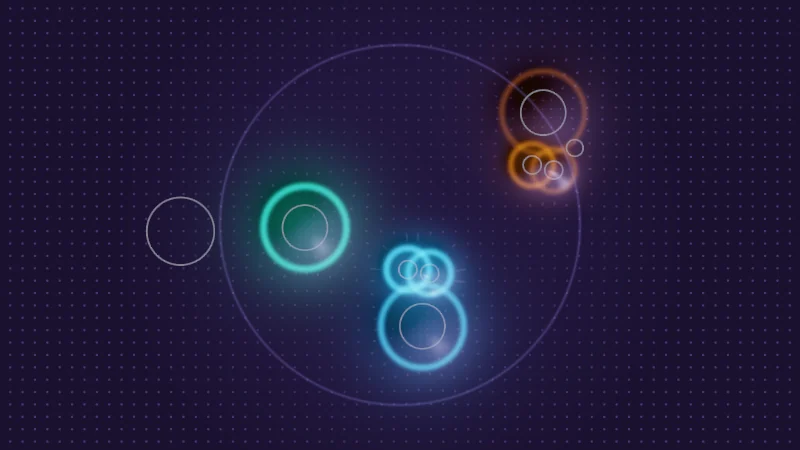
Turn on JavaScript to run this demo.
Rendered in Unity 2022.3.22f1 from the Copy for Unity shader, with the settings this demo starts with.
// Uses the helper code shown with an earlier figure on this page.

// ----

// Uses the helper code shown with an earlier figure on this page.

// ----

// Switching the receiver off. VRChat stops writing, but the material keeps the last values it got,
// so the glow stays where the hands were. An extra material value that the toggle also sets clears it.
// A demo has no memory, so here players 2 and 3 stand still and the blue hand starts at the
// spot where the material froze.

uniform float _Receiver; // @toggle = 1 | Receiver on | Turn the contact receiver on or off, as a menu toggle would.
uniform float _Off;      // @toggle = 0 | Off signal | The toggle also sets a material value that tells the shader to stop.

static const float SCENE_TIME = 1.0;
static const float2 HAND_START = float2(0.1, -0.45); // the page's starting pointer, in centered() units

float4 shade(float2 uv)
{
    float2 p = centered(uv);
    float2 hand = pointerCentered();

    // What the material holds: this frame's contacts, or the last frame written before the switch.
    bool live = _Receiver > 0.5;
    contactScene(SCENE_TIME, live ? hand : HAND_START);
    float on = live || _Off < 0.5 ? 1.0 : 0.0;
    float3 col = contactSurface(p, on);
    col = tonemapACES(col);

    // Where the hands really are now.
    contactScene(SCENE_TIME, hand);
    col = drawSenderGhosts(col, p);
    return float4(col, 1.0);
}
// Uses the helper code shown with an earlier figure on this page.
// ----
// Uses the helper code shown with an earlier figure on this page.
// ----
// Switching the receiver off. VRChat stops writing, but the material keeps the last values it got,
// so the glow stays where the hands were. An extra material value that the toggle also sets clears it.
// A demo has no memory, so here players 2 and 3 stand still and the blue hand starts at the
// spot where the material froze.
uniform float _Receiver; // @toggle = 1 | Receiver on | Turn the contact receiver on or off, as a menu toggle would.
uniform float _Off; // @toggle = 0 | Off signal | The toggle also sets a material value that tells the shader to stop.
const float SCENE_TIME = 1.0;
const vec2 HAND_START = vec2(0.1, -0.45); // the page's starting pointer, in centered() units
vec4 shade(vec2 uv)
{
vec2 p = centered(uv);
vec2 hand = pointerCentered();
// What the material holds: this frame's contacts, or the last frame written before the switch.
bool live = _Receiver > 0.5;
contactScene(SCENE_TIME, live ? hand : HAND_START);
float on = live || _Off < 0.5 ? 1.0 : 0.0;
vec3 col = contactSurface(p, on);
col = tonemapACES(col);
// Where the hands really are now.
contactScene(SCENE_TIME, hand);
col = drawSenderGhosts(col, p);
return vec4(col, 1.0);
}Names in this code (17)
_Off- Switch "Off signal". The toggle also sets a material value that tells the shader to stop.
_Receiver- Switch "Receiver on". Turn the contact receiver on or off, as a menu toggle would.
centered- float2 centered(float2 uv). Square coordinates with the origin in the middle: the short side of the picture spans -1..1. (common library)
col- Declared on line 21: float3 col = contactSurface(p, on);
contactScene- void contactScene(float t, float2 drag) (this article's helper code)
contactSurface- float3 contactSurface(float2 p, float on). Linear color of the surface at p. `on` scales the whole reaction, 0 draws the surface at rest. (this article's helper code)
drawSenderGhosts- float3 drawSenderGhosts(float3 col, float2 p). The real senders as thin ghost outlines, whether or not the shader sees them. (this article's helper code)
hand- Declared on line 15: float2 hand = pointerCentered();
HAND_START- Declared on line 10: static const float2 HAND_START = float2(0.1, -0.45); // the page's starting pointer, in centered() units
live- Declared on line 18: bool live = _Receiver > 0.5;
on- Declared on line 20: float on = live || _Off < 0.5 ? 1.0 : 0.0;
p- Declared on line 14: float2 p = centered(uv);
pointerCentered- float2 pointerCentered(). The pointer (or the _Pointer material setting in Unity) in the same coordinates as centered(). (common library)
SCENE_TIME- Declared on line 9: static const float SCENE_TIME = 1.0;
shade- float4 shade(float2 uv)
tonemapACES- float3 tonemapACES(float3 x). Rolls HDR values above 1 off softly instead of clipping them. (common library)
uv- A parameter of shade(), line 12: float2 uv.
Leave the blue hand where it is, turn off Receiver on, then drag it away. The glow stays behind like a ghost. Turn on Off signal and the frozen glow is gone. This demo can’t remember anything, so the other players stand still and the frozen frame is the one at the starting spot.
In practice
Here’s a setup that works, for a receiver named Glow:
- The receiver on its own child object, so a toggle never touches the renderer.
- Shape Sphere, its Radius the reach. Type Proximity.
- Collision Tags Hand and Finger, and Head if heads should count.
- Allow Others on, Allow Self only if your own hands should count.
- Write to Materials on, your renderer in the list, Parameter
Glow.
A minimal glow, in my own example code:
#include "Packages/com.vrchat.base/ShaderLibrary/VRCContacts.cginc"
VRC_CONTACT_DECLARE(Glow);
float _On;     // set by the same toggle as the receiver
float _Reach;  // in meters

float ContactGlow(float3 worldPos)
{
    int n = clamp(VRC_CONTACT_TARGETCOUNT(Glow), 0, VRC_CONTACT_MAX_TARGETS);
    float nearest = 1e5;
    [loop] for (int i = 0; i < VRC_CONTACT_MAX_TARGETS; i++)
    {
        if (i >= n) break;
        nearest = min(nearest, distance(worldPos, VRC_CONTACT_WORLDPOS(Glow, i)));
    }
    return _On * (1.0 - smoothstep(0.0, _Reach, nearest));
}
And that’s the whole glow. It’s one loop, a min and a smoothstep, all times _On.
One check helps. A matrix VRChat wrote always ends in 1 (_m33), and an array that was never written holds zeros. So VRC_CONTACT_TRANSFORM_SELF(Glow)._m33 < 0.5, another macro in the same file, means no data ever arrived. That happens in Unity’s edit mode, or for a viewer whose client doesn’t have the feature yet. A loop over the count like this one then draws nothing anyway, but a preview can use the check.
My Goo Strands and Skin Touch are built on this. Goo Strands stretches sticky strands between your palm and another player’s hand as you pull apart (yes, as gooey as it sounds). Skin Touch makes skin dent softly where a finger presses. Both use the full matrix in each slot, so they know which way a finger points, not only where it is.
A few things to watch for in Unity and VRChat:
- One name per receiver. The Parameter becomes part of the property names, so use letters, digits and
_only. Two receivers with one name on one renderer overwrite each other every frame. Modular Avatar’s parameter renaming and a VRCFury Full Controller can rename the Parameter at upload. VRChat then writes under the new name and the shader receives nothing, so keep receiver names out of those lists. - Toggle the receiver, not the renderer. One case is known in the beta client. A target renderer started switched off, with Cast Shadows off, and its receiver stopped writing on the wearer’s own client until the avatar was reset. To be safe, keep target renderers on with shadows on.
- Keep optimizers away. An empty entry in the renderer list switches writing off. Add the receiver’s Parameter as a Float to your FX controller so Avatar Optimizer keeps the receiver, and exclude target renderers from d4rk Avatar Optimizer’s merging.
- A shader has no memory. It lives in the moment and sees only this frame’s eight slots, so it cannot know how long a hand stayed. Anything that must last after the hand leaves needs something that remembers. An animator state can keep counting a material value after the touch ends, or you can use a texture that remembers.
- Both players must allow it. Avatar Interactions must let the other player touch you, and viewers only see the effect on a client that has the feature.
Credits
- Material Contacts and
VRCContacts.cgincare by VRChat, part of the VRChat SDK. Their beta documentation describes the receiver settings. - The random numbers in the flower demo come from Dave Hoskins’ Hash without Sine (MIT License); the noise lesson explains it.
- A Proximity receiver with Write to Materials puts up to 8 nearby senders into your material every frame, roughly nearest first.
- A slot is a place in a race that changes every frame. Seed anything random from the player id and tags, never the slot.
- A switched off receiver leaves its last frame behind like a ghost, so give the effect its own off signal.