Foundations, part 2
Why a clean edge needs one pixel of blur
A hard inside or outside test draws jagged stairs. Here's how I blur every edge over about one pixel with smoothstep and fwidth, so it stays clean at any size.
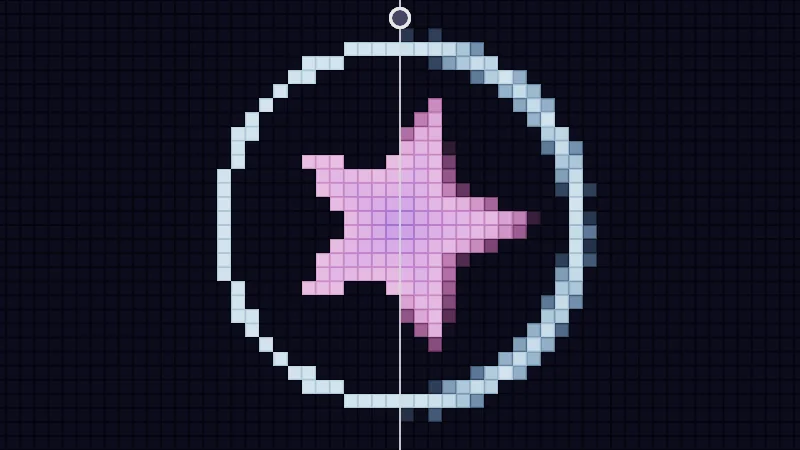
Smoothstep is a small tool, and it’s behind the clean edges in my shaders. Here’s why an edge needs it. A screen is a grid of tiny square pixels, and each pixel shows one color. When a shape’s edge cuts right through a pixel, a hard yes or no to “is this pixel inside?” turns every curve into stairs. Let’s meet smoothstep, measure one pixel with fwidth, and blur each edge over about that one pixel.
Turn on JavaScript to run this demo.
Rendered in Unity 2022.3.22f1 from the Copy for Unity shader, with the settings this demo starts with.
// A pretend low resolution screen: the canvas is cut into big square pixels, n across its short side.
// Each big pixel is shaded once, at its centre, the way a real pixel is.

float bigPixelSize(float n) { return 2.0 / n; }
float2 bigPixelIndex(float2 p, float n) { return floor(p / bigPixelSize(n)); }
float2 bigPixelCenter(float2 idx, float n) { return (idx + 0.5) * bigPixelSize(n); }

// 1 inside a big pixel, falling to 0 on the thin gaps between them. The gaps fade out when big pixels get small.
float bigPixelGaps(float2 p, float n)
{
    float s = bigPixelSize(n) / pixelSize();
    float2 f = (0.5 - abs(frac(p / bigPixelSize(n)) - 0.5)) * s;
    float border = min(f.x, f.y);
    float show = saturate((s - 6.0) / 6.0);
    return 1.0 - show * (1.0 - saturate(border - 0.5));
}

// The GPU shades pixels in 2x2 blocks. This is the bottom left pixel of the block that holds big pixel idx.
float2 quadBase(float2 idx) { return 2.0 * floor(0.5 * idx); }

// fwidth as the GPU works it out inside one block: the change to the right neighbour plus the change to the one above.
float quadWidth(float d00, float d10, float d01) { return abs(d10 - d00) + abs(d01 - d00); }


// ----

// A star and a ring on a pretend screen of big pixels. Left of the divider every pixel makes a hard choice,
// right of it every edge is blurred over one pixel.
#include "sdf2d"

uniform float _Pixels; // @range 22 96 1 = 32 | Pixels across | How many big pixels fit across the short side of the picture.

float star(float2 p) { return sdStar5(mul(rot2(0.12 * _Time.y), p), 0.56, 0.46); }
float ring(float2 p) { return abs(length(p) - 0.8) - 0.03; }

// Coverage of one big pixel: a hard step, or one pixel of blur sized by the fwidth of its 2x2 block.
float cover(float d, float w, bool soft)
{
    return soft ? saturate(0.5 - d / max(w, 1e-5)) : (d < 0.0 ? 1.0 : 0.0);
}

float4 shade(float2 uv)
{
    float2 p = centered(uv);
    float n = _Pixels;
    float s = bigPixelSize(n);
    float2 idx = bigPixelIndex(p, n);
    float2 c = bigPixelCenter(idx, n);
    float2 b = quadBase(idx);
    float2 c00 = bigPixelCenter(b, n), c10 = bigPixelCenter(b + float2(1.0, 0.0), n), c01 = bigPixelCenter(b + float2(0.0, 1.0), n);

    float split = s * floor(clamp(pointerCentered().x, -1.0, 1.0) / s + 0.5);
    bool soft = c.x > split;

    float dS = star(c), dR = ring(c);
    float wS = quadWidth(star(c00), star(c10), star(c01));
    float wR = quadWidth(ring(c00), ring(c10), ring(c01));

    float3 col = float3(0.010, 0.010, 0.022);
    float3 inside = lerp(float3(1.0, 0.38, 0.82), float3(0.42, 0.22, 1.0), saturate(-dS * 4.0));
    col = lerp(col, inside, cover(dS, wS, soft));
    col = lerp(col, float3(0.55, 0.85, 1.25), cover(dR, wR, soft));
    col *= lerp(0.5, 1.0, bigPixelGaps(p, n));

    float divider = saturate(1.0 - abs(p.x - split) / pixelSize());
    float knob = length(p - float2(split, 0.92)) / pixelSize();
    col = lerp(col, float3(1.0, 1.0, 1.0), max(divider * 0.85, saturate(11.5 - knob)));
    col = lerp(col, float3(0.06, 0.06, 0.10), saturate(8.5 - knob));
    return float4(tonemapACES(col), 1.0);
}
// A pretend low resolution screen: the canvas is cut into big square pixels, n across its short side.
// Each big pixel is shaded once, at its centre, the way a real pixel is.
float bigPixelSize(float n) { return 2.0 / n; }
vec2 bigPixelIndex(vec2 p, float n) { return floor(p / bigPixelSize(n)); }
vec2 bigPixelCenter(vec2 idx, float n) { return (idx + 0.5) * bigPixelSize(n); }
// 1 inside a big pixel, falling to 0 on the thin gaps between them. The gaps fade out when big pixels get small.
float bigPixelGaps(vec2 p, float n)
{
float s = bigPixelSize(n) / pixelSize();
vec2 f = (0.5 - abs(fract(p / bigPixelSize(n)) - 0.5)) * s;
float border = min(f.x, f.y);
float show = saturate((s - 6.0) / 6.0);
return 1.0 - show * (1.0 - saturate(border - 0.5));
}
// The GPU shades pixels in 2x2 blocks. This is the bottom left pixel of the block that holds big pixel idx.
vec2 quadBase(vec2 idx) { return 2.0 * floor(0.5 * idx); }
// fwidth as the GPU works it out inside one block: the change to the right neighbour plus the change to the one above.
float quadWidth(float d00, float d10, float d01) { return abs(d10 - d00) + abs(d01 - d00); }
// ----
// A star and a ring on a pretend screen of big pixels. Left of the divider every pixel makes a hard choice,
// right of it every edge is blurred over one pixel.
#include "sdf2d"
uniform float _Pixels; // @range 22 96 1 = 32 | Pixels across | How many big pixels fit across the short side of the picture.
float star(vec2 p) { return sdStar5((p * rot2(0.12 * _Time.y)), 0.56, 0.46); }
float ring(vec2 p) { return abs(length(p) - 0.8) - 0.03; }
// Coverage of one big pixel: a hard step, or one pixel of blur sized by the fwidth of its 2x2 block.
float cover(float d, float w, bool soft)
{
return soft ? saturate(0.5 - d / max(w, 1e-5)) : (d < 0.0 ? 1.0 : 0.0);
}
vec4 shade(vec2 uv)
{
vec2 p = centered(uv);
float n = _Pixels;
float s = bigPixelSize(n);
vec2 idx = bigPixelIndex(p, n);
vec2 c = bigPixelCenter(idx, n);
vec2 b = quadBase(idx);
vec2 c00 = bigPixelCenter(b, n), c10 = bigPixelCenter(b + vec2(1.0, 0.0), n), c01 = bigPixelCenter(b + vec2(0.0, 1.0), n);
float split = s * floor(clamp(pointerCentered().x, -1.0, 1.0) / s + 0.5);
bool soft = c.x > split;
float dS = star(c), dR = ring(c);
float wS = quadWidth(star(c00), star(c10), star(c01));
float wR = quadWidth(ring(c00), ring(c10), ring(c01));
vec3 col = vec3(0.010, 0.010, 0.022);
vec3 inside = mix(vec3(1.0, 0.38, 0.82), vec3(0.42, 0.22, 1.0), saturate(-dS * 4.0));
col = mix(col, inside, cover(dS, wS, soft));
col = mix(col, vec3(0.55, 0.85, 1.25), cover(dR, wR, soft));
col *= mix(0.5, 1.0, bigPixelGaps(p, n));
float divider = saturate(1.0 - abs(p.x - split) / pixelSize());
float knob = length(p - vec2(split, 0.92)) / pixelSize();
col = mix(col, vec3(1.0, 1.0, 1.0), max(divider * 0.85, saturate(11.5 - knob)));
col = mix(col, vec3(0.06, 0.06, 0.10), saturate(8.5 - knob));
return vec4(tonemapACES(col), 1.0);
}Names in this code (48)
_Pixels- Slider "Pixels across". How many big pixels fit across the short side of the picture. From 22 to 96, starts at 32.
_Time- Time since the level loaded, from Unity. _Time.y is seconds.
b- Declared on line 23: float2 b = quadBase(idx);
bigPixelCenter- float2 bigPixelCenter(float2 idx, float n) (this article's helper code)
bigPixelGaps- float bigPixelGaps(float2 p, float n). 1 inside a big pixel, falling to 0 on the thin gaps between them. The gaps fade out when big pixels get small. (this article's helper code)
bigPixelIndex- float2 bigPixelIndex(float2 p, float n) (this article's helper code)
bigPixelSize- float bigPixelSize(float n) (this article's helper code)
c- Declared on line 22: float2 c = bigPixelCenter(idx, n);
c00- Declared on line 24: float2 c00 = bigPixelCenter(b, n), c10 = bigPixelCenter(b + float2(1.0, 0.0), n), c01 = bigPixelCenter(b + float2(0.0, 1.0), n);
centered- float2 centered(float2 uv). Square coordinates with the origin in the middle: the short side of the picture spans -1..1. (common library)
col- Declared on line 33: float3 col = float3(0.010, 0.010, 0.022);
cover- float cover(float d, float w, bool soft). Coverage of one big pixel: a hard step, or one pixel of blur sized by the fwidth of its 2x2 block.
d- A parameter of cover(), line 11: float d.
divider- Declared on line 39: float divider = saturate(1.0 - abs(p.x - split) / pixelSize());
dS- Declared on line 29: float dS = star(c), dR = ring(c);
frac- The part after the decimal point, in HLSL. GLSL calls it fract.
idx- Declared on line 21: float2 idx = bigPixelIndex(p, n);
include- Pulls another file into this one, for example UnityCG.cginc.
inside- Declared on line 34: float3 inside = lerp(float3(1.0, 0.38, 0.82), float3(0.42, 0.22, 1.0), saturate(-dS * 4.0));
knob- Declared on line 40: float knob = length(p - float2(split, 0.92)) / pixelSize();
lerp- HLSL's blend from a (t = 0) to b (t = 1). GLSL calls it mix.
mul- Matrix times vector or matrix times matrix in HLSL. mul(M, v) applies M to v.
n- Declared on line 19: float n = _Pixels;
p- A parameter of star(), line 7: float2 p.
pixelSize- float pixelSize() (common library)
pointerCentered- float2 pointerCentered(). The pointer (or the _Pointer material setting in Unity) in the same coordinates as centered(). (common library)
quadBase- float2 quadBase(float2 idx). The GPU shades pixels in 2x2 blocks. This is the bottom left pixel of the block that holds big pixel idx. (this article's helper code)
quadWidth- float quadWidth(float d00, float d10, float d01). fwidth as the GPU works it out inside one block: the change to the right neighbour plus the change to the one above. (this article's helper code)
ring- float ring(float2 p)
rot2- float2x2 rot2(float a). Turns a point by a radians, counterclockwise: mul(rot2(a), p). (common library)
s- Declared on line 20: float s = bigPixelSize(n);
saturate- An HLSL function that clamps a value between 0 and 1.
sdStar5- float sdStar5(float2 p, float r, float rf) (sdf2d library)
shade- float4 shade(float2 uv)
soft- A parameter of cover(), line 11: bool soft.
split- Declared on line 26: float split = s * floor(clamp(pointerCentered().x, -1.0, 1.0) / s + 0.5);
star- float star(float2 p)
tonemapACES- float3 tonemapACES(float3 x). Rolls HDR values above 1 off softly instead of clipping them. (common library)
uv- A parameter of shade(), line 16: float2 uv.
w- A parameter of cover(), line 11: float w.
wR- Declared on line 31: float wR = quadWidth(ring(c00), ring(c10), ring(c01));
wS- Declared on line 30: float wS = quadWidth(star(c00), star(c10), star(c01));
abs- abs(x) is x without its minus sign. abs(-0.3) = 0.3.
clamp- clamp(x, lo, hi) holds x between lo and hi.
floor- floor(x) rounds down to the largest whole number not above x. floor(2.7) = 2, floor(-0.5) = -1.
length- length(v) says how long the vector v is, sqrt(x² + y²).
max- max(a, b) picks the larger of the two.
min- min(a, b) picks the smaller of the two.
I made the pixels huge on purpose. Drag the divider and compare the two sides. On the left each pixel is either in or out, while on the right a pixel on the edge gets an in-between shade. Lower Pixels across for even bigger stairs.
A curve with soft shoulders
First, the star of the show. smoothstep(a, b, x) is 0 before , 1 after , and a soft S curve in between:
Let’s take it one piece at a time. is the value you test (in the plot, the horizontal axis) and is what comes out. and are the two edges, called Edge a and Edge b in the plot. is a straight ramp from 0 to 1, and saturate keeps it between 0 and 1. Then the part bends the ramp so it starts and ends flat. Those flat ends are the soft shoulders, and they leave no visible corner where the edge begins or ends.
Turn on JavaScript to run this demo.
- f1(x):
smoothstep(_A, _B, x) - f2(x):
saturate((x - _A) / (_B - _A)) - f3(x):
step(0.5, smoothstep(_A, _B, x))
#define PLOT_X_RANGE float2(-0.1, 1.1)
#define PLOT_Y_RANGE float2(-0.1, 1.1)
#define PLOT_TICK float2(0.2, 0.2)
#include "plot"
uniform float _A; // @range 0 1 0.01 = 0.3 | Edge a | Where the curve starts to rise.
uniform float _B; // @range 0 1 0.01 = 0.7 | Edge b | Where the curve reaches 1.
float curve0(float x) { return smoothstep(_A, _B, x); }
float curve1(float x) { return saturate((x - _A) / (_B - _A)); }
float curve2(float x) { return step(0.5, smoothstep(_A, _B, x)); }
float4 shade(float2 uv)
{
    float2 p = plotCoord(uv);
    float3 col = plotBackground(p);
    float h = plotPixel().x;
    col = plotGuideX(col, p, _A, themeMuted());
    col = plotGuideX(col, p, _B, themeMuted());
    col = plotCurveStyled(col, p, curve0(p.x), plotSlope(curve0(p.x - h), curve0(p.x), curve0(p.x + h), h), series1(), 0);
    col = plotCurveStyled(col, p, curve1(p.x), plotSlope(curve1(p.x - h), curve1(p.x), curve1(p.x + h), h), series2(), 1);
    col = plotCurveStyled(col, p, curve2(p.x), plotSlope(curve2(p.x - h), curve2(p.x), curve2(p.x + h), h), series3(), 2);
    return float4(col, 1.0);
}#define PLOT_X_RANGE vec2(-0.1, 1.1)
#define PLOT_Y_RANGE vec2(-0.1, 1.1)
#define PLOT_TICK vec2(0.2, 0.2)
#include "plot"
uniform float _A; // @range 0 1 0.01 = 0.3 | Edge a | Where the curve starts to rise.
uniform float _B; // @range 0 1 0.01 = 0.7 | Edge b | Where the curve reaches 1.
float curve0(float x) { return hlslSmoothstep(_A, _B, x); }
float curve1(float x) { return saturate((x - _A) / (_B - _A)); }
float curve2(float x) { return step(0.5, hlslSmoothstep(_A, _B, x)); }
vec4 shade(vec2 uv)
{
vec2 p = plotCoord(uv);
vec3 col = plotBackground(p);
float h = plotPixel().x;
col = plotGuideX(col, p, _A, themeMuted());
col = plotGuideX(col, p, _B, themeMuted());
col = plotCurveStyled(col, p, curve0(p.x), plotSlope(curve0(p.x - h), curve0(p.x), curve0(p.x + h), h), series1(), 0);
col = plotCurveStyled(col, p, curve1(p.x), plotSlope(curve1(p.x - h), curve1(p.x), curve1(p.x + h), h), series2(), 1);
col = plotCurveStyled(col, p, curve2(p.x), plotSlope(curve2(p.x - h), curve2(p.x), curve2(p.x + h), h), series3(), 2);
return vec4(col, 1.0);
}Names in this code (26)
_A- Slider "Edge a". Where the curve starts to rise. From 0 to 1, starts at 0.3.
_B- Slider "Edge b". Where the curve reaches 1. From 0 to 1, starts at 0.7.
col- Declared on line 13: float3 col = plotBackground(p);
curve0- float curve0(float x)
curve1- float curve1(float x)
curve2- float curve2(float x)
h- Declared on line 14: float h = plotPixel().x;
include- Pulls another file into this one, for example UnityCG.cginc.
p- Declared on line 12: float2 p = plotCoord(uv);
plotBackground- float3 plotBackground(float2 p) (plot library)
plotCoord- float2 plotCoord(float2 uv) (plot library)
plotCurveStyled- float3 plotCurveStyled(float3 col, float2 p, float y, float slope, float3 ink, int style). The same line, solid (style 0), dashed (1) or dotted (2), so curves differ by more than color. (plot library)
plotGuideX- float3 plotGuideX(float3 col, float2 p, float x, float3 ink). Dashed vertical guide at x. (plot library)
plotPixel- float2 plotPixel(). Size of one pixel in data units. (plot library)
plotSlope- float plotSlope(float before, float here, float after, float h). f'(x) from f one pixel before, at and after x. Where f jumps (a step, a saw tooth), one side changes by many pixels and the other hardly at all: then the gentler side wins, so the line ends on each side of the jump instead of smearing up and down through it. (plot library)
saturate- An HLSL function that clamps a value between 0 and 1.
series1- float3 series1() (common library)
series2- float3 series2() (common library)
series3- float3 series3() (common library)
shade- float4 shade(float2 uv)
themeMuted- float3 themeMuted() (common library)
uv- A parameter of shade(), line 10: float2 uv.
x- A parameter of curve0(), line 7: float x.
define- With #define NAME value, every NAME in the code is replaced by value before compiling.
smoothstep- smoothstep(e0, e1, x) is 0 below e0, 1 above e1, and an S curve t² (3 - 2t) in between, where t = (x - e0) / (e1 - e0). GLSL leaves e0 >= e1 undefined.
step- A hard switch. step(edge, x) is 0 when x < edge, otherwise 1.
Drag Edge a past Edge b and watch the curve flip over. Now it falls from 1 to 0.
Swap the edges like that, with past , and smoothstep falls instead of rising. Unity’s HLSL is happy with this, but some shader languages are not. To be safe everywhere, 1 - smoothstep(b, a, x) gives the same falling curve.
Where the stairs come from
A quick reminder first. Each pixel knows its signed distance to the edge, negative inside and positive outside. Now the catch. A pixel runs the shader only once, at its centre. With a hard test like , all it learns is which side its centre is on. So a slanted edge jumps a whole pixel at a time, and the jumps line up into stairs that crawl when the shape moves. This is called aliasing, and softening it is anti-aliasing, or AA for short.
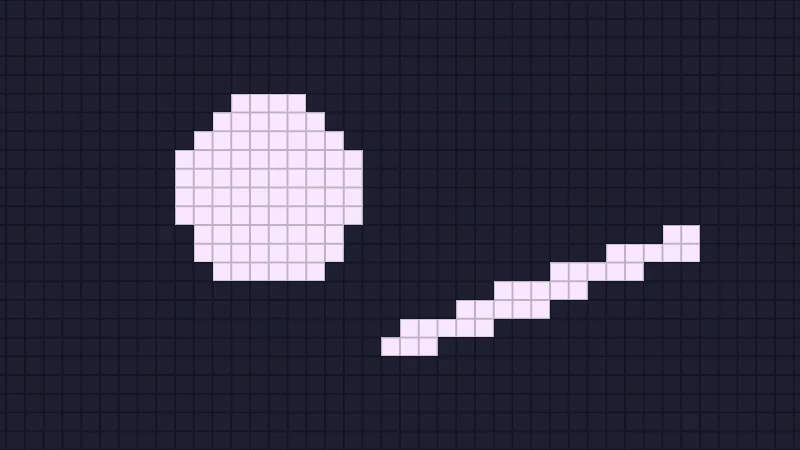
The fix is to ask “how much?” instead of “yes or no?”. Let’s turn into a coverage , meaning how much of the pixel the shape fills, with a ramp one pixel wide:
is the size of one pixel, in the same units as (finding it is the next section). A pixel whose centre sits right on the edge gets 0.5, and the ramp fades to 0 and 1 half a pixel either side. Look familiar? It’s the straight ramp from the plot above, turned to fall and squeezed into one pixel. Smoothstep over the same pixel works too and looks a touch softer. I use it further down for soft edges.
Turn on JavaScript to run this demo.
Rendered in Unity 2022.3.22f1 from the Copy for Unity shader, with the settings this demo starts with.
// Uses the helper code shown with an earlier figure on this page.

// ----

// A disc and a slanted bar on a pretend screen of big pixels, with three ways to shade the edge.
#include "sdf2d"

uniform float _Pixels; // @range 8 160 1 = 24 | Pixels across | How many big pixels fit across the short side. Fewer pixels is like seeing the shape from further away.
uniform float _Mode;   // @select = 0 | Edge | Hard step=0, Fixed blur=1, One pixel=2 | How each big pixel turns the distance at its centre into a brightness.
uniform float _True;   // @toggle = 0 | True outline | Draws the exact edge of the shape on top.

float field(float2 p)
{
    p = mul(rot2(0.3 * sin(0.25 * _Time.y)), p);
    float disc = sdCircle(p - float2(-0.6, 0.05), 0.42);
    float bar = sdSegment(p, float2(0.05, -0.55), float2(1.25, 0.15)) - 0.07;
    return min(disc, bar);
}

float4 shade(float2 uv)
{
    float2 p = centered(uv);
    float n = _Pixels;
    float2 idx = bigPixelIndex(p, n);
    float2 b = quadBase(idx);
    float d = field(bigPixelCenter(idx, n));
    float outline = strokeAA(field(p), 2.0 * pixelSize());

    int mode = int(_Mode + 0.5);
    float m;
    if (mode == 0)
    {
        m = d < 0.0 ? 1.0 : 0.0;
    }
    else if (mode == 1)
    {
        m = smoothstep(0.04, -0.04, d);
    }
    else
    {
        float w = quadWidth(field(bigPixelCenter(b, n)), field(bigPixelCenter(b + float2(1.0, 0.0), n)), field(bigPixelCenter(b + float2(0.0, 1.0), n)));
        m = saturate(0.5 - d / max(w, 1e-5));
    }

    float3 bg = float3(0.012, 0.014, 0.03);
    float3 ink = float3(0.95, 0.80, 1.0);
    float3 col = lerp(bg, ink, m);
    col *= lerp(0.55, 1.0, bigPixelGaps(p, n));
    if (_True > 0.5) col = lerp(col, float3(1.0, 0.35, 0.2), outline);
    return float4(col, 1.0);
}
// Uses the helper code shown with an earlier figure on this page.
// ----
// A disc and a slanted bar on a pretend screen of big pixels, with three ways to shade the edge.
#include "sdf2d"
uniform float _Pixels; // @range 8 160 1 = 24 | Pixels across | How many big pixels fit across the short side. Fewer pixels is like seeing the shape from further away.
uniform float _Mode; // @select = 0 | Edge | Hard step=0, Fixed blur=1, One pixel=2 | How each big pixel turns the distance at its centre into a brightness.
uniform float _True; // @toggle = 0 | True outline | Draws the exact edge of the shape on top.
float field(vec2 p)
{
p = (p * rot2(0.3 * sin(0.25 * _Time.y)));
float disc = sdCircle(p - vec2(-0.6, 0.05), 0.42);
float bar = sdSegment(p, vec2(0.05, -0.55), vec2(1.25, 0.15)) - 0.07;
return min(disc, bar);
}
vec4 shade(vec2 uv)
{
vec2 p = centered(uv);
float n = _Pixels;
vec2 idx = bigPixelIndex(p, n);
vec2 b = quadBase(idx);
float d = field(bigPixelCenter(idx, n));
float outline = strokeAA(field(p), 2.0 * pixelSize());
int mode = int(_Mode + 0.5);
float m;
if (mode == 0)
{
m = d < 0.0 ? 1.0 : 0.0;
}
else if (mode == 1)
{
m = hlslSmoothstep(0.04, -0.04, d);
}
else
{
float w = quadWidth(field(bigPixelCenter(b, n)), field(bigPixelCenter(b + vec2(1.0, 0.0), n)), field(bigPixelCenter(b + vec2(0.0, 1.0), n)));
m = saturate(0.5 - d / max(w, 1e-5));
}
vec3 bg = vec3(0.012, 0.014, 0.03);
vec3 ink = vec3(0.95, 0.80, 1.0);
vec3 col = mix(bg, ink, m);
col *= mix(0.55, 1.0, bigPixelGaps(p, n));
if (_True > 0.5) col = mix(col, vec3(1.0, 0.35, 0.2), outline);
return vec4(col, 1.0);
}Names in this code (40)
_Mode- Choice "Edge". How each big pixel turns the distance at its centre into a brightness.
_Pixels- Slider "Pixels across". How many big pixels fit across the short side. Fewer pixels is like seeing the shape from further away. From 8 to 160, starts at 24.
_Time- Time since the level loaded, from Unity. _Time.y is seconds.
_True- Switch "True outline". Draws the exact edge of the shape on top.
b- Declared on line 21: float2 b = quadBase(idx);
bar- Declared on line 12: float bar = sdSegment(p, float2(0.05, -0.55), float2(1.25, 0.15)) - 0.07;
bg- Declared on line 41: float3 bg = float3(0.012, 0.014, 0.03);
bigPixelCenter- float2 bigPixelCenter(float2 idx, float n) (this article's helper code)
bigPixelGaps- float bigPixelGaps(float2 p, float n). 1 inside a big pixel, falling to 0 on the thin gaps between them. The gaps fade out when big pixels get small. (this article's helper code)
bigPixelIndex- float2 bigPixelIndex(float2 p, float n) (this article's helper code)
centered- float2 centered(float2 uv). Square coordinates with the origin in the middle: the short side of the picture spans -1..1. (common library)
col- Declared on line 43: float3 col = lerp(bg, ink, m);
d- Declared on line 22: float d = field(bigPixelCenter(idx, n));
disc- Declared on line 11: float disc = sdCircle(p - float2(-0.6, 0.05), 0.42);
field- float field(float2 p)
idx- Declared on line 20: float2 idx = bigPixelIndex(p, n);
include- Pulls another file into this one, for example UnityCG.cginc.
ink- Declared on line 42: float3 ink = float3(0.95, 0.80, 1.0);
lerp- HLSL's blend from a (t = 0) to b (t = 1). GLSL calls it mix.
m- Declared on line 26: float m;
mode- Declared on line 25: int mode = int(_Mode + 0.5);
mul- Matrix times vector or matrix times matrix in HLSL. mul(M, v) applies M to v.
n- Declared on line 19: float n = _Pixels;
outline- Declared on line 23: float outline = strokeAA(field(p), 2.0 * pixelSize());
p- A parameter of field(), line 8: float2 p.
pixelSize- float pixelSize() (common library)
quadBase- float2 quadBase(float2 idx). The GPU shades pixels in 2x2 blocks. This is the bottom left pixel of the block that holds big pixel idx. (this article's helper code)
quadWidth- float quadWidth(float d00, float d10, float d01). fwidth as the GPU works it out inside one block: the change to the right neighbour plus the change to the one above. (this article's helper code)
rot2- float2x2 rot2(float a). Turns a point by a radians, counterclockwise: mul(rot2(a), p). (common library)
saturate- An HLSL function that clamps a value between 0 and 1.
sdCircle- float sdCircle(float2 p, float r) (sdf2d library)
sdSegment- float sdSegment(float2 p, float2 a, float2 b) (sdf2d library)
shade- float4 shade(float2 uv)
strokeAA- float strokeAA(float d, float width). Anti-aliased line of a given width (same units as d) around the zero line of d. (common library)
uv- A parameter of shade(), line 16: float2 uv.
w- Declared on line 37: float w = quadWidth(field(bigPixelCenter(b, n)), field(bigPixelCenter(b + float2(1.0, 0.0), n)), field(bigPixelCenter(b + float2(0.0, 1.0), n)));
max- max(a, b) picks the larger of the two.
min- min(a, b) picks the smaller of the two.
sin- sin(a) is the sine of the angle a, in radians.
smoothstep- smoothstep(e0, e1, x) is 0 below e0, 1 above e1, and an S curve t² (3 - 2t) in between, where t = (x - e0) / (e1 - e0). GLSL leaves e0 >= e1 undefined.
Try all three Edge modes at a few Pixels across values, and turn on True outline to see where the real edge runs. The hard step is jagged at every size. The fixed blur goes mushy with many pixels and jagged with few. One pixel never breaks the bar and never gets mushy. It’s as clean as those pixels allow. That’s the one you want.
Peeking at the neighbours with fwidth
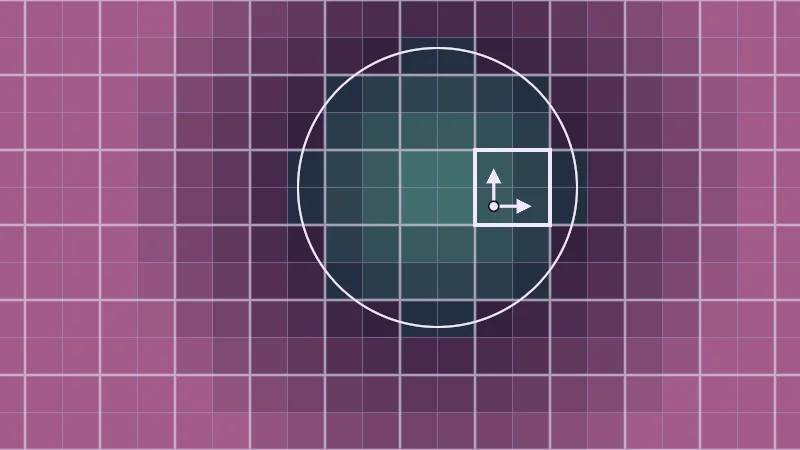
But how does a pixel know how big it is? This is my favourite part. The graphics card shades pixels in little blocks of 2 by 2, side by side, so each pixel can peek at its neighbours’ values. dFdx is how much a value changes from the left pixel of the block to the right one, and dFdy from the bottom one to the top one. HLSL, the language of Unity shaders, calls them ddx and ddy, and there ddy often points down.
The bars drop the sign, so a step left counts the same as a step right. For a distance, this is how much changes over one pixel. There’s the the ramp was waiting for! It is exactly one pixel’s worth of distance where the edge runs along the pixel grid. Where the edge runs diagonally, it is up to about 1.4 pixels’ worth, so diagonal edges come out a little softer.
Turn on JavaScript to run this demo.
Rendered in Unity 2022.3.22f1 from the Copy for Unity shader, with the settings this demo starts with.
// Uses the helper code shown with an earlier figure on this page.

// ----

// Big pixels grouped in 2x2 blocks. Each pixel compares its distance with its neighbours in the block.
#include "sdf2d"
#include "diagram"

uniform float _Show; // @select = 0 | Show | Distance d=0, fwidth(d)=1 | Color each pixel by its distance, or by how much the distance changes across its block.

static const float N = 12.0;

float field(float2 p) { return sdCircle(p - float2(1.0 / 6.0, 1.0 / 6.0), 0.62); }

float4 shade(float2 uv)
{
    float2 p = centered(uv);
    float s = bigPixelSize(N);
    float2 idx = bigPixelIndex(p, N);
    float2 b = quadBase(idx);
    float d = field(bigPixelCenter(idx, N));
    float d00 = field(bigPixelCenter(b, N));
    float d10 = field(bigPixelCenter(b + float2(1.0, 0.0), N));
    float d01 = field(bigPixelCenter(b + float2(0.0, 1.0), N));
    float w = quadWidth(d00, d10, d01);

    float3 col;
    if (_Show < 0.5)
    {
        col = tint(themeSurface(), d > 0.0 ? series2() : series1(), lerp(0.12, 0.6, saturate(abs(d) / 0.8)));
    }
    else
    {
        col = tint(themeSurface(), series3(), lerp(0.1, 0.85, saturate((w / s - 1.0) / 0.42)));
    }

    // Thin lines between pixels, thick lines between 2x2 blocks.
    float2 fp = abs(p - s * round(p / s)) / pixelSize();
    float2 fq = abs(p - 2.0 * s * round(p / (2.0 * s))) / pixelSize();
    col = lerp(col, tint(col, themeMuted(), 0.45), saturate(1.0 - min(fp.x, fp.y)));
    col = lerp(col, tint(col, themeInk(), 0.5), saturate(1.75 - min(fq.x, fq.y)));
    col = strokeShape(col, field(p), 2.0, themeInk());

    // The block under the pointer and the two steps the GPU measures inside it.
    float2 hb = quadBase(bigPixelIndex(pointerCentered(), N));
    float2 a = bigPixelCenter(hb, N);
    float2 lo = hb * s, hi = (hb + 2.0) * s;
    float box = max(max(lo.x - p.x, p.x - hi.x), max(lo.y - p.y, p.y - hi.y));
    col = strokeShape(col, box, 4.0, themeInk());
    float2 ax = bigPixelCenter(hb + float2(1.0, 0.0), N), ay = bigPixelCenter(hb + float2(0.0, 1.0), N);
    col = drawArrow(col, p, a, ax, 3.0, themeInk());
    col = drawArrow(col, p, a, ay, 3.0, themeInk());
    col = drawDot(col, p, a, 4.0, themeInk());
    return float4(col, 1.0);
}
// Uses the helper code shown with an earlier figure on this page.
// ----
// Big pixels grouped in 2x2 blocks. Each pixel compares its distance with its neighbours in the block.
#include "sdf2d"
#include "diagram"
uniform float _Show; // @select = 0 | Show | Distance d=0, fwidth(d)=1 | Color each pixel by its distance, or by how much the distance changes across its block.
const float N = 12.0;
float field(vec2 p) { return sdCircle(p - vec2(1.0 / 6.0, 1.0 / 6.0), 0.62); }
vec4 shade(vec2 uv)
{
vec2 p = centered(uv);
float s = bigPixelSize(N);
vec2 idx = bigPixelIndex(p, N);
vec2 b = quadBase(idx);
float d = field(bigPixelCenter(idx, N));
float d00 = field(bigPixelCenter(b, N));
float d10 = field(bigPixelCenter(b + vec2(1.0, 0.0), N));
float d01 = field(bigPixelCenter(b + vec2(0.0, 1.0), N));
float w = quadWidth(d00, d10, d01);
vec3 col;
if (_Show < 0.5)
{
col = tint(themeSurface(), d > 0.0 ? series2() : series1(), mix(0.12, 0.6, saturate(abs(d) / 0.8)));
}
else
{
col = tint(themeSurface(), series3(), mix(0.1, 0.85, saturate((w / s - 1.0) / 0.42)));
}
// Thin lines between pixels, thick lines between 2x2 blocks.
vec2 fp = abs(p - s * round(p / s)) / pixelSize();
vec2 fq = abs(p - 2.0 * s * round(p / (2.0 * s))) / pixelSize();
col = mix(col, tint(col, themeMuted(), 0.45), saturate(1.0 - min(fp.x, fp.y)));
col = mix(col, tint(col, themeInk(), 0.5), saturate(1.75 - min(fq.x, fq.y)));
col = strokeShape(col, field(p), 2.0, themeInk());
// The block under the pointer and the two steps the GPU measures inside it.
vec2 hb = quadBase(bigPixelIndex(pointerCentered(), N));
vec2 a = bigPixelCenter(hb, N);
vec2 lo = hb * s, hi = (hb + 2.0) * s;
float box = max(max(lo.x - p.x, p.x - hi.x), max(lo.y - p.y, p.y - hi.y));
col = strokeShape(col, box, 4.0, themeInk());
vec2 ax = bigPixelCenter(hb + vec2(1.0, 0.0), N), ay = bigPixelCenter(hb + vec2(0.0, 1.0), N);
col = drawArrow(col, p, a, ax, 3.0, themeInk());
col = drawArrow(col, p, a, ay, 3.0, themeInk());
col = drawDot(col, p, a, 4.0, themeInk());
return vec4(col, 1.0);
}Names in this code (48)
_Show- Choice "Show". Color each pixel by its distance, or by how much the distance changes across its block.
a- Declared on line 42: float2 a = bigPixelCenter(hb, N);
ax- Declared on line 46: float2 ax = bigPixelCenter(hb + float2(1.0, 0.0), N), ay = bigPixelCenter(hb + float2(0.0, 1.0), N);
b- Declared on line 16: float2 b = quadBase(idx);
bigPixelCenter- float2 bigPixelCenter(float2 idx, float n) (this article's helper code)
bigPixelIndex- float2 bigPixelIndex(float2 p, float n) (this article's helper code)
bigPixelSize- float bigPixelSize(float n) (this article's helper code)
box- Declared on line 44: float box = max(max(lo.x - p.x, p.x - hi.x), max(lo.y - p.y, p.y - hi.y));
centered- float2 centered(float2 uv). Square coordinates with the origin in the middle: the short side of the picture spans -1..1. (common library)
col- Declared on line 23: float3 col;
d- Declared on line 17: float d = field(bigPixelCenter(idx, N));
d00- Declared on line 18: float d00 = field(bigPixelCenter(b, N));
d01- Declared on line 20: float d01 = field(bigPixelCenter(b + float2(0.0, 1.0), N));
d10- Declared on line 19: float d10 = field(bigPixelCenter(b + float2(1.0, 0.0), N));
drawArrow- float3 drawArrow(float3 col, float2 p, float2 a, float2 b, float widthPx, float3 ink) (diagram library)
drawDot- float3 drawDot(float3 col, float2 p, float2 c, float radiusPx, float3 ink). A dot with a ring in the surface color around it. (diagram library)
field- float field(float2 p)
fp- Declared on line 34: float2 fp = abs(p - s * round(p / s)) / pixelSize();
fq- Declared on line 35: float2 fq = abs(p - 2.0 * s * round(p / (2.0 * s))) / pixelSize();
hb- Declared on line 41: float2 hb = quadBase(bigPixelIndex(pointerCentered(), N));
idx- Declared on line 15: float2 idx = bigPixelIndex(p, N);
include- Pulls another file into this one, for example UnityCG.cginc.
lerp- HLSL's blend from a (t = 0) to b (t = 1). GLSL calls it mix.
lo- Declared on line 43: float2 lo = hb * s, hi = (hb + 2.0) * s;
N- Declared on line 7: static const float N = 12.0;
p- A parameter of field(), line 9: float2 p.
pixelSize- float pixelSize() (common library)
pointerCentered- float2 pointerCentered(). The pointer (or the _Pointer material setting in Unity) in the same coordinates as centered(). (common library)
quadBase- float2 quadBase(float2 idx). The GPU shades pixels in 2x2 blocks. This is the bottom left pixel of the block that holds big pixel idx. (this article's helper code)
quadWidth- float quadWidth(float d00, float d10, float d01). fwidth as the GPU works it out inside one block: the change to the right neighbour plus the change to the one above. (this article's helper code)
s- Declared on line 14: float s = bigPixelSize(N);
saturate- An HLSL function that clamps a value between 0 and 1.
sdCircle- float sdCircle(float2 p, float r) (sdf2d library)
series1- float3 series1() (common library)
series2- float3 series2() (common library)
series3- float3 series3() (common library)
shade- float4 shade(float2 uv)
strokeShape- float3 strokeShape(float3 col, float d, float widthPx, float3 ink) (diagram library)
themeInk- float3 themeInk() (common library)
themeMuted- float3 themeMuted() (common library)
themeSurface- float3 themeSurface(). The dusk stage colors, in linear light. Series colors are used in this order: mint, pink, butter. (common library)
tint- float3 tint(float3 a, float3 b, float t). Blends two colors in steps that look even to the eye (in sRGB), for value ramps such as distance bands. Edges and coverage still blend with lerp, in linear light, as light really adds up. (common library)
uv- A parameter of shade(), line 11: float2 uv.
w- Declared on line 21: float w = quadWidth(d00, d10, d01);
abs- abs(x) is x without its minus sign. abs(-0.3) = 0.3.
max- max(a, b) picks the larger of the two.
min- min(a, b) picks the smaller of the two.
round- round(x) is the nearest whole number to x.
Move over the picture to pick a block. The arrows are the two steps that block measures. Mint pixels are inside the circle, pink ones outside. Then switch Show to fwidth(d). Now the faint pixels are exactly one pixel’s worth of distance, and the bright ones go up to 1.4 where the circle runs diagonally.
One pixel, in any units you like
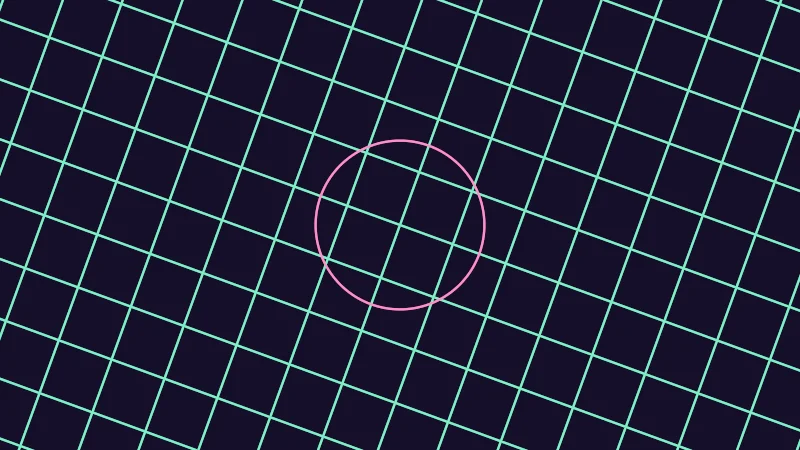
Here’s a nice bonus. fwidth works on any value, not only distances. Below, the lines are drawn on their own grid, which you can zoom and turn. A point on that grid is , a bit like the UV coordinates of a mesh. Its two numbers are u.x across the grid and u.y up the grid. fwidth(u.x) is how much u.x changes from one screen pixel to the next. Let’s average the two:
So is the size of one screen pixel, measured on the grid. With it, a line can be a set number of pixels wide, whatever its size on screen. On an avatar, is often the UV of the mesh, and it shrinks on screen as you walk away.
Turn on JavaScript to run this demo.
Rendered in Unity 2022.3.22f1 from the Copy for Unity shader, with the settings this demo starts with.
// Grid lines and a circle drawn in their own units u, which you can zoom and turn.
// The line width is either fixed in u, or set in screen pixels: fwidth(u) is the size of one pixel in u.
#include "sdf2d"
#include "diagram"

uniform float _Zoom; // @range 0.25 4 0.01 = 1 | Zoom | How large one unit of u looks on screen.
uniform float _Turn; // @range 0 45 1 = 20 | Turn | Rotates the u coordinates, in degrees.
uniform float _Mode; // @select = 0 | Width | Fixed in u=0, In pixels=1 | Fixed in u keeps the lines 0.04 units of u wide, and In pixels sets their width in screen pixels with fwidth.

float4 shade(float2 uv)
{
    float2 p = centered(uv);
    float2 u = mul(rot2(radians(_Turn)), p) * 4.0 / _Zoom;
    float w = 0.5 * (fwidth(u.x) + fwidth(u.y));

    float2 g = abs(u - round(u));
    float dGrid = min(g.x, g.y);
    float dCircle = abs(length(u) - 1.5);

    float lineGrid, lineCircle;
    if (_Mode < 0.5)
    {
        lineGrid = smoothstep(0.03, 0.01, dGrid);
        lineCircle = smoothstep(0.03, 0.01, dCircle);
    }
    else
    {
        lineGrid = saturate(1.25 - dGrid / w);
        lineCircle = saturate(1.75 - dCircle / w);
    }

    float3 col = themeSurface();
    col = lerp(col, series1(), lineGrid);
    col = lerp(col, series2(), lineCircle);
    return float4(col, 1.0);
}
// Grid lines and a circle drawn in their own units u, which you can zoom and turn.
// The line width is either fixed in u, or set in screen pixels: fwidth(u) is the size of one pixel in u.
#include "sdf2d"
#include "diagram"
uniform float _Zoom; // @range 0.25 4 0.01 = 1 | Zoom | How large one unit of u looks on screen.
uniform float _Turn; // @range 0 45 1 = 20 | Turn | Rotates the u coordinates, in degrees.
uniform float _Mode; // @select = 0 | Width | Fixed in u=0, In pixels=1 | Fixed in u keeps the lines 0.04 units of u wide, and In pixels sets their width in screen pixels with fwidth.
vec4 shade(vec2 uv)
{
vec2 p = centered(uv);
vec2 u = (p * rot2(radians(_Turn))) * 4.0 / _Zoom;
float w = 0.5 * (fwidth(u.x) + fwidth(u.y));
vec2 g = abs(u - round(u));
float dGrid = min(g.x, g.y);
float dCircle = abs(length(u) - 1.5);
float lineGrid, lineCircle;
if (_Mode < 0.5)
{
lineGrid = hlslSmoothstep(0.03, 0.01, dGrid);
lineCircle = hlslSmoothstep(0.03, 0.01, dCircle);
}
else
{
lineGrid = saturate(1.25 - dGrid / w);
lineCircle = saturate(1.75 - dCircle / w);
}
vec3 col = themeSurface();
col = mix(col, series1(), lineGrid);
col = mix(col, series2(), lineCircle);
return vec4(col, 1.0);
}Names in this code (28)
_Mode- Choice "Width". Fixed in u keeps the lines 0.04 units of u wide, and In pixels sets their width in screen pixels with fwidth.
_Turn- Slider "Turn". Rotates the u coordinates, in degrees. From 0 to 45, starts at 20.
_Zoom- Slider "Zoom". How large one unit of u looks on screen. From 0.25 to 4, starts at 1.
centered- float2 centered(float2 uv). Square coordinates with the origin in the middle: the short side of the picture spans -1..1. (common library)
col- Declared on line 32: float3 col = themeSurface();
dCircle- Declared on line 18: float dCircle = abs(length(u) - 1.5);
dGrid- Declared on line 17: float dGrid = min(g.x, g.y);
g- Declared on line 16: float2 g = abs(u - round(u));
include- Pulls another file into this one, for example UnityCG.cginc.
lerp- HLSL's blend from a (t = 0) to b (t = 1). GLSL calls it mix.
mul- Matrix times vector or matrix times matrix in HLSL. mul(M, v) applies M to v.
p- Declared on line 12: float2 p = centered(uv);
rot2- float2x2 rot2(float a). Turns a point by a radians, counterclockwise: mul(rot2(a), p). (common library)
saturate- An HLSL function that clamps a value between 0 and 1.
series1- float3 series1() (common library)
series2- float3 series2() (common library)
shade- float4 shade(float2 uv)
themeSurface- float3 themeSurface(). The dusk stage colors, in linear light. Series colors are used in this order: mint, pink, butter. (common library)
u- Declared on line 13: float2 u = mul(rot2(radians(_Turn)), p) * 4.0 / _Zoom;
uv- A parameter of shade(), line 10: float2 uv.
w- Declared on line 14: float w = 0.5 * (fwidth(u.x) + fwidth(u.y));
abs- abs(x) is x without its minus sign. abs(-0.3) = 0.3.
fwidth- fwidth(v) says how much v changes from this pixel to its neighbours, |dFdx(v)| + |dFdy(v)|. Edges one pixel wide are made with it.
length- length(v) says how long the vector v is, sqrt(x² + y²).
min- min(a, b) picks the smaller of the two.
radians- radians(deg) converts degrees to radians.
round- round(x) is the nearest whole number to x.
smoothstep- smoothstep(e0, e1, x) is 0 below e0, 1 above e1, and an S curve t² (3 - 2t) in between, where t = (x - e0) / (e1 - e0). GLSL leaves e0 >= e1 undefined.
With Width on Fixed in u, zoom in and the lines get chunky. Zoom out and they get thinner than a pixel, then start to break up. Now switch to In pixels and zoom again. This time the lines keep the same width on screen.
Soft edges that never get sharper than a pixel
Not every edge wants to be crisp. A soft dot or a thin glowing ring gets a softness you pick by hand, for example 0.004 units, where the picture is 2 units tall. This one is sneaky. Far away, one pixel can be much wider than that, and your soft edge turns back into a hard step. Stairs again, plus dots that vanish and thin rings that fall apart. The cure is to never blur less than one pixel:
is the blur the edge really gets. It’s your chosen softness , or one pixel when that is wider. As before, is the signed distance and the coverage, how much of the pixel the shape fills. The flips the curve, so the inside, where is below 0, comes out as 1.
Turn on JavaScript to run this demo.
- f1(x):
smoothstep(0.01, -0.01, x) - f2(x):
softEdge(x, 0.02, _W)
#define PLOT_X_RANGE float2(-0.07, 0.07)
#define PLOT_Y_RANGE float2(-0.1, 1.1)
#define PLOT_TICK float2(0.025, 0.2)
#include "plot"
uniform float _W; // @range 0.001 0.1 0.001 = 0.05 | Pixel w | The size of one pixel in the units of d. It grows as the shape gets further away.
float softEdge(float d, float s, float w)
{
  float b = max(s, w);
  return 1.0 - smoothstep(-0.5 * b, 0.5 * b, d);
}
float curve0(float x) { return smoothstep(0.01, -0.01, x); }
float curve1(float x) { return softEdge(x, 0.02, _W); }
float4 shade(float2 uv)
{
    float2 p = plotCoord(uv);
    float3 col = plotBackground(p);
    float h = plotPixel().x;
    col = plotGuideX(col, p, -0.01, themeMuted());
    col = plotGuideX(col, p, 0.01, themeMuted());
    col = plotCurveStyled(col, p, curve0(p.x), plotSlope(curve0(p.x - h), curve0(p.x), curve0(p.x + h), h), series1(), 0);
    col = plotCurveStyled(col, p, curve1(p.x), plotSlope(curve1(p.x - h), curve1(p.x), curve1(p.x + h), h), series2(), 1);
    return float4(col, 1.0);
}#define PLOT_X_RANGE vec2(-0.07, 0.07)
#define PLOT_Y_RANGE vec2(-0.1, 1.1)
#define PLOT_TICK vec2(0.025, 0.2)
#include "plot"
uniform float _W; // @range 0.001 0.1 0.001 = 0.05 | Pixel w | The size of one pixel in the units of d. It grows as the shape gets further away.
float softEdge(float d, float s, float w)
{
float b = max(s, w);
return 1.0 - hlslSmoothstep(-0.5 * b, 0.5 * b, d);
}
float curve0(float x) { return hlslSmoothstep(0.01, -0.01, x); }
float curve1(float x) { return softEdge(x, 0.02, _W); }
vec4 shade(vec2 uv)
{
vec2 p = plotCoord(uv);
vec3 col = plotBackground(p);
float h = plotPixel().x;
col = plotGuideX(col, p, -0.01, themeMuted());
col = plotGuideX(col, p, 0.01, themeMuted());
col = plotCurveStyled(col, p, curve0(p.x), plotSlope(curve0(p.x - h), curve0(p.x), curve0(p.x + h), h), series1(), 0);
col = plotCurveStyled(col, p, curve1(p.x), plotSlope(curve1(p.x - h), curve1(p.x), curve1(p.x + h), h), series2(), 1);
return vec4(col, 1.0);
}Names in this code (27)
_W- Slider "Pixel w". The size of one pixel in the units of d. It grows as the shape gets further away. From 0.001 to 0.1, starts at 0.05.
b- Declared on line 8: float b = max(s, w);
col- Declared on line 16: float3 col = plotBackground(p);
curve0- float curve0(float x)
curve1- float curve1(float x)
d- A parameter of softEdge(), line 6: float d.
h- Declared on line 17: float h = plotPixel().x;
include- Pulls another file into this one, for example UnityCG.cginc.
p- Declared on line 15: float2 p = plotCoord(uv);
plotBackground- float3 plotBackground(float2 p) (plot library)
plotCoord- float2 plotCoord(float2 uv) (plot library)
plotCurveStyled- float3 plotCurveStyled(float3 col, float2 p, float y, float slope, float3 ink, int style). The same line, solid (style 0), dashed (1) or dotted (2), so curves differ by more than color. (plot library)
plotGuideX- float3 plotGuideX(float3 col, float2 p, float x, float3 ink). Dashed vertical guide at x. (plot library)
plotPixel- float2 plotPixel(). Size of one pixel in data units. (plot library)
plotSlope- float plotSlope(float before, float here, float after, float h). f'(x) from f one pixel before, at and after x. Where f jumps (a step, a saw tooth), one side changes by many pixels and the other hardly at all: then the gentler side wins, so the line ends on each side of the jump instead of smearing up and down through it. (plot library)
s- A parameter of softEdge(), line 6: float s.
series1- float3 series1() (common library)
series2- float3 series2() (common library)
shade- float4 shade(float2 uv)
softEdge- float softEdge(float d, float s, float w)
themeMuted- float3 themeMuted() (common library)
uv- A parameter of shade(), line 13: float2 uv.
w- A parameter of softEdge(), line 6: float w.
x- A parameter of curve0(), line 11: float x.
define- With #define NAME value, every NAME in the code is replaced by value before compiling.
max- max(a, b) picks the larger of the two.
smoothstep- smoothstep(e0, e1, x) is 0 below e0, 1 above e1, and an S curve t² (3 - 2t) in between, where t = (x - e0) / (e1 - e0). GLSL leaves e0 >= e1 undefined.
Drag Pixel w. The plot uses a softness of 0.02 so the curve is wide enough to see. Below a Pixel w of 0.02, the two curves are the same. Above it, the edge spreads over one pixel.
Turn on JavaScript to run this demo.
Rendered in Unity 2022.3.22f1 from the Copy for Unity shader, with the settings this demo starts with.
// Uses the helper code shown with an earlier figure on this page.

// ----

// A small planet with a thin ring and a few stars, on a pretend screen of big pixels. Every edge has a softness
// chosen by hand; the second mode widens an edge to one pixel whenever a pixel is wider than that softness.
#include "sdf2d"

uniform float _Pixels; // @range 8 200 1 = 32 | Pixels across | How many big pixels fit across the short side. Fewer pixels is like seeing the picture from further away.
uniform float _Mode;   // @select = 0 | Edges | Fixed softness=0, At least a pixel=1 | With Fixed softness every edge keeps its hand chosen softness. With At least a pixel no edge gets narrower than one pixel.

// Coverage of the shape d < 0 with a soft edge s wide, never narrower than one pixel w.
float softEdge(float d, float s, float w)
{
    float b = max(s, w);
    return 1.0 - smoothstep(-0.5 * b, 0.5 * b, d);
}

float edge(float d, float s, float w)
{
    return _Mode < 0.5 ? 1.0 - smoothstep(-0.5 * s, 0.5 * s, d) : softEdge(d, s, w);
}

float star(float2 c, float2 at, float w) { return edge(sdCircle(c - at, 0.014), 0.004, w); }

float4 shade(float2 uv)
{
    float2 p = centered(uv);
    float n = _Pixels;
    float2 c = bigPixelCenter(bigPixelIndex(p, n), n);
    float w = bigPixelSize(n);

    float3 col = float3(0.010, 0.010, 0.024);
    float stars = star(c, float2(-1.40, 0.70), w) + star(c, float2(-0.90, -0.75), w) + star(c, float2(1.35, 0.62), w)
                + star(c, float2(0.70, 0.80), w) + star(c, float2(1.50, -0.55), w) + star(c, float2(0.30, -0.82), w);
    col += float3(1.2, 1.2, 1.2) * stars;

    float3 ringCol = float3(0.45, 0.75, 1.3);
    float ring = edge(abs(sdEllipse(c, float2(1.15, 0.34))) - 0.012, 0.004, w);
    float front = c.y < 0.0 ? 1.0 : 0.0;
    col = lerp(col, ringCol, ring * (1.0 - front));

    float dPlanet = sdCircle(c, 0.42);
    float3 planet = lerp(float3(1.0, 0.45, 0.12), float3(0.22, 0.04, 0.12), saturate(0.5 + 1.1 * dot(c, float2(0.6, -0.6))));
    col = lerp(col, planet, edge(dPlanet, 0.012, w));

    col = lerp(col, ringCol, ring * front);
    col *= lerp(0.55, 1.0, bigPixelGaps(p, n));
    return float4(tonemapACES(col), 1.0);
}
// Uses the helper code shown with an earlier figure on this page.
// ----
// A small planet with a thin ring and a few stars, on a pretend screen of big pixels. Every edge has a softness
// chosen by hand; the second mode widens an edge to one pixel whenever a pixel is wider than that softness.
#include "sdf2d"
uniform float _Pixels; // @range 8 200 1 = 32 | Pixels across | How many big pixels fit across the short side. Fewer pixels is like seeing the picture from further away.
uniform float _Mode; // @select = 0 | Edges | Fixed softness=0, At least a pixel=1 | With Fixed softness every edge keeps its hand chosen softness. With At least a pixel no edge gets narrower than one pixel.
// Coverage of the shape d < 0 with a soft edge s wide, never narrower than one pixel w.
float softEdge(float d, float s, float w)
{
float b = max(s, w);
return 1.0 - hlslSmoothstep(-0.5 * b, 0.5 * b, d);
}
float edge(float d, float s, float w)
{
return _Mode < 0.5 ? 1.0 - hlslSmoothstep(-0.5 * s, 0.5 * s, d) : softEdge(d, s, w);
}
float star(vec2 c, vec2 at, float w) { return edge(sdCircle(c - at, 0.014), 0.004, w); }
vec4 shade(vec2 uv)
{
vec2 p = centered(uv);
float n = _Pixels;
vec2 c = bigPixelCenter(bigPixelIndex(p, n), n);
float w = bigPixelSize(n);
vec3 col = vec3(0.010, 0.010, 0.024);
float stars = star(c, vec2(-1.40, 0.70), w) + star(c, vec2(-0.90, -0.75), w) + star(c, vec2(1.35, 0.62), w)
+ star(c, vec2(0.70, 0.80), w) + star(c, vec2(1.50, -0.55), w) + star(c, vec2(0.30, -0.82), w);
col += vec3(1.2, 1.2, 1.2) * stars;
vec3 ringCol = vec3(0.45, 0.75, 1.3);
float ring = edge(abs(sdEllipse(c, vec2(1.15, 0.34))) - 0.012, 0.004, w);
float front = c.y < 0.0 ? 1.0 : 0.0;
col = mix(col, ringCol, ring * (1.0 - front));
float dPlanet = sdCircle(c, 0.42);
vec3 planet = mix(vec3(1.0, 0.45, 0.12), vec3(0.22, 0.04, 0.12), saturate(0.5 + 1.1 * dot(c, vec2(0.6, -0.6))));
col = mix(col, planet, edge(dPlanet, 0.012, w));
col = mix(col, ringCol, ring * front);
col *= mix(0.55, 1.0, bigPixelGaps(p, n));
return vec4(tonemapACES(col), 1.0);
}Names in this code (37)
_Mode- Choice "Edges". With Fixed softness every edge keeps its hand chosen softness. With At least a pixel no edge gets narrower than one pixel.
_Pixels- Slider "Pixels across". How many big pixels fit across the short side. Fewer pixels is like seeing the picture from further away. From 8 to 200, starts at 32.
at- A parameter of star(), line 20: float2 at.
b- Declared on line 11: float b = max(s, w);
bigPixelCenter- float2 bigPixelCenter(float2 idx, float n) (this article's helper code)
bigPixelGaps- float bigPixelGaps(float2 p, float n). 1 inside a big pixel, falling to 0 on the thin gaps between them. The gaps fade out when big pixels get small. (this article's helper code)
bigPixelIndex- float2 bigPixelIndex(float2 p, float n) (this article's helper code)
bigPixelSize- float bigPixelSize(float n) (this article's helper code)
c- A parameter of star(), line 20: float2 c.
centered- float2 centered(float2 uv). Square coordinates with the origin in the middle: the short side of the picture spans -1..1. (common library)
col- Declared on line 29: float3 col = float3(0.010, 0.010, 0.024);
d- A parameter of softEdge(), line 9: float d.
dPlanet- Declared on line 39: float dPlanet = sdCircle(c, 0.42);
edge- float edge(float d, float s, float w)
front- Declared on line 36: float front = c.y < 0.0 ? 1.0 : 0.0;
include- Pulls another file into this one, for example UnityCG.cginc.
lerp- HLSL's blend from a (t = 0) to b (t = 1). GLSL calls it mix.
n- Declared on line 25: float n = _Pixels;
p- Declared on line 24: float2 p = centered(uv);
planet- Declared on line 40: float3 planet = lerp(float3(1.0, 0.45, 0.12), float3(0.22, 0.04, 0.12), saturate(0.5 + 1.1 * dot(c, float2(0.6, -0.6))));
ring- Declared on line 35: float ring = edge(abs(sdEllipse(c, float2(1.15, 0.34))) - 0.012, 0.004, w);
ringCol- Declared on line 34: float3 ringCol = float3(0.45, 0.75, 1.3);
s- A parameter of softEdge(), line 9: float s.
saturate- An HLSL function that clamps a value between 0 and 1.
sdCircle- float sdCircle(float2 p, float r) (sdf2d library)
sdEllipse- float sdEllipse(float2 p, float2 r). Fast approximation; good near the edge, which is all anti-aliasing needs. (sdf2d library)
shade- float4 shade(float2 uv)
softEdge- float softEdge(float d, float s, float w). Coverage of the shape d < 0 with a soft edge s wide, never narrower than one pixel w.
star- float star(float2 c, float2 at, float w)
stars- Declared on line 30: float stars = star(c, float2(-1.40, 0.70), w) + star(c, float2(-0.90, -0.75), w) + star(c, float2(1.35, 0.62), w)
tonemapACES- float3 tonemapACES(float3 x). Rolls HDR values above 1 off softly instead of clipping them. (common library)
uv- A parameter of shade(), line 22: float2 uv.
w- A parameter of softEdge(), line 9: float w.
abs- abs(x) is x without its minus sign. abs(-0.3) = 0.3.
dot- dot(a, b) multiplies matching parts and adds them up. For unit vectors it is the cosine of the angle between them.
max- max(a, b) picks the larger of the two.
smoothstep- smoothstep(e0, e1, x) is 0 below e0, 1 above e1, and an S curve t² (3 - 2t) in between, where t = (x - e0) / (e1 - e0). GLSL leaves e0 >= e1 undefined.
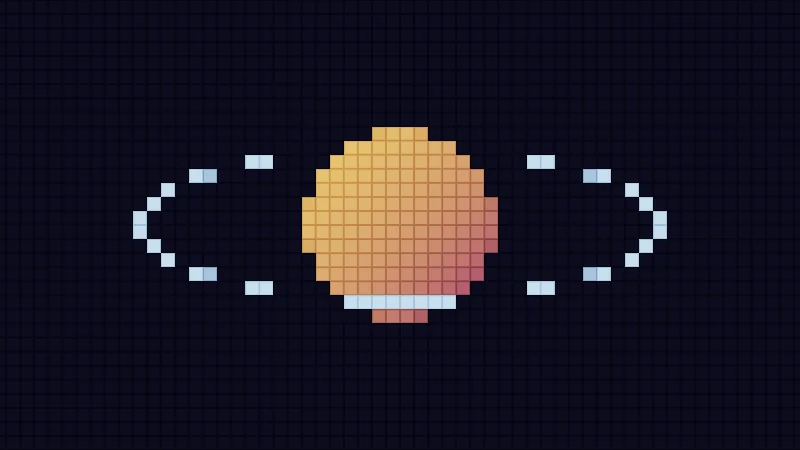
With Edges on Fixed softness and the starting 32 Pixels across, the ring breaks into pieces and the stars vanish. Poor stars. Switch to At least a pixel and watch the ring hold together and every star come back. Then raise Pixels across to 200. The planet looks the same in both modes, because its softness is already wider than a pixel, but the thin ring and the stars still need the wider blur.
In practice
You’ll find this blur wherever a shader draws shapes from math instead of a texture, like eyes, glowing marks on clothing, spell circles and the stars in a sky. Here’s my own example in HLSL:
// 1 inside, 0 outside, a one pixel edge.
float fillAA(float d)
{
    // never divide by zero
    float w = max(fwidth(d), 1e-5);
    return saturate(0.5 - d / w);
}
Sky Rift, my spell effect, gets the pixel size (called px there) handed in ready made, and uses a falling smoothstep from to . That’s the S curve version of the one pixel ramp, spread over about two pixels so it looks a touch softer.
inline float srCoverPx(float d, float px)
{
    px = max(px, 1e-6);
    return smoothstep(px, -px, d);
}
Three little traps to watch for in Unity and VRChat:
- Measure once, at the top. With an
if, a shader can take different paths for different pixels. Butfwidthneeds all four pixels of a 2 by 2 block on the same path, so when it sits inside anif, Unity’s shader compiler runs both paths on every pixel, which is slower. So I work out once, before anyif, and reuse it. - MSAA does not help. Sadly, the anti-aliasing setting in VRChat only smooths the outline of the mesh, not edges drawn inside a shader. Those need their own one pixel blur.
- Wider means brighter. A thin bright line widened to one pixel covers more pixels, so far away it adds light. To keep the same total light, dim it by the same factor you widened it by.
Credits
The star, disc, bar and ellipse in the demos use Inigo Quilez’s 2D distance functions (MIT). Widening a thin line to one pixel and dimming it to match comes from Emil Persson’s (Humus) Phone-wire AA.
smoothstepis a ramp with soft, flat ends. Swap its edges, or use1 - smoothstep, to make it fall.- A hard inside test makes stairs. A ramp one pixel wide, with the pixel size from
fwidth, gives you clean edges at any zoom. - Never let a soft edge get narrower than one pixel. Blur by , the larger of your softness and one pixel.