VRChat tricks, part 1
Small shader tricks for VRChat avatars
My little bag of shader tricks for VRChat, from spotting mirrors and cameras to hiding meshes cheaply and keeping outlines one size at any scale.
A shader can’t run scripts, but it’s a curious little thing all the same. It can find out whether it’s drawn into a mirror or a photo, for a headset or a screen, and at what size. It can also hide a mesh in some views for almost nothing. Here they are, from most to least used.
Turn on JavaScript to run this demo.
Rendered in Unity 2022.3.22f1 from the Copy for Unity shader, with the settings this demo starts with.
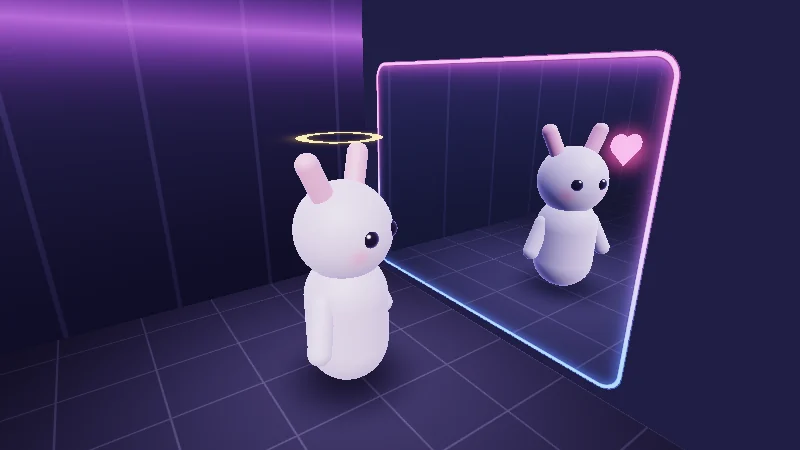
Meet the test bunny. Its halo and its heart each have their own material and mode. Set Halo and Heart to Always, Hide in mirror or Only in mirror, then drag to peek from another spot. The mirror here is only a reflected ray. In VRChat it’s a whole second camera.
Mirror, camera or your own eyes
Here’s something fun to picture. A VRChat mirror is a second camera that draws the world again, your avatar included, with the same shaders. The handheld camera is one more. So how does a shader tell the views apart?
Before it draws each view, VRChat sets a few globals, values that every shader can read by name. Two of them, _VRChatMirrorMode and _VRChatCameraMode, tell you which view it is (from VRChat Shader Globals):
| Value | Mirror mode | Camera mode |
|---|---|---|
| 0 | not a mirror | normal view |
| 1 | mirror, VR viewer | VR handheld camera |
| 2 | mirror, Desktop viewer | Desktop handheld camera |
| 3 | screenshot |
A stream has no value of its own and counts as the handheld camera. In Unity, both are 0.
Turn on JavaScript to run this demo.
Rendered in Unity 2022.3.22f1 from the Copy for Unity shader, with the settings this demo starts with.
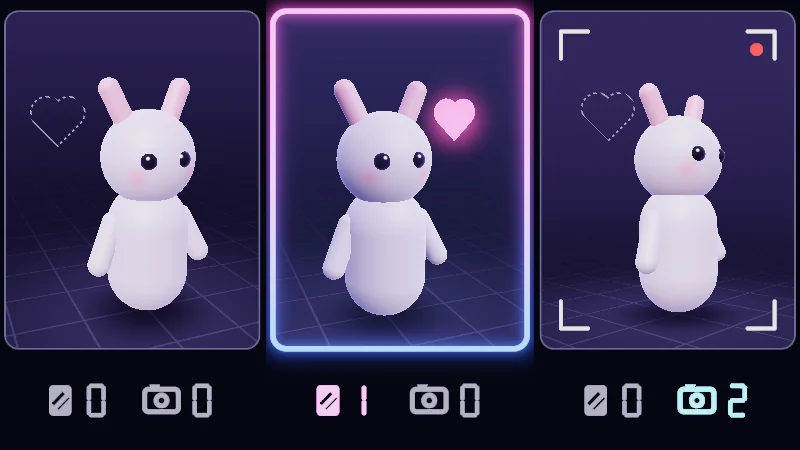
The two numbers under each view are mirror mode, then camera mode, set the way VRChat would set them. Play with Mirror viewer, Camera and Heart mode, and look for a dashed outline where a heart is hiding. Drag to spin the bunny around.
The mirror gives itself away in the projection matrix
The mirror camera stands behind the glass. So that nothing behind the glass gets in the way, its near plane, the surface where drawing starts, is moved onto the glass. That changes its projection matrix, the 4 by 4 grid of numbers that turns 3D positions into screen positions.
A quick heads-up first. Shader code counts rows and columns from 0, so row 2 is the third row. For a normal camera, depth depends only on how far ahead a point is. That’s why the first two cells of row 2 are always 0. A mirror camera fills them in:
is how much the glass faces sideways (Mirror turn), how much it faces up or down (Mirror tilt), and is a scale that also depends on Distance. Don’t worry about the exact values. For the check, all that matters is whether they’re 0.
Turn on JavaScript to run this demo.
Rendered in Unity 2022.3.22f1 from the Copy for Unity shader, with the settings this demo starts with.
// Uses the helper code shown with an earlier figure on this page.

// ----

// A camera's projection matrix, live. A mirror camera's tilted near plane rewrites row 2; a VR eye only moves [0][2].
#include "diagram"

uniform float _Mirror; // @toggle = 1 | Mirror camera | On puts the near plane on the glass, as a mirror does. Off is a plain camera.
uniform float _Turn;   // @range -60 60 1 = 25 | Mirror turn | Turns the glass left or right, in degrees. The top view shows this.
uniform float _Tilt;   // @range -60 60 1 = 0 | Mirror tilt | Leans the glass up or down, in degrees. A top view cannot show this.
uniform float _Dist;   // @range 0.5 4 0.1 = 2 | Distance | How far the glass is from the camera, in metres.
uniform float _Eye;    // @range -0.3 0.3 0.01 = 0 | Eye off-centre | A VR eye's view is shifted to one side. This is that shift.

static const float NEAR = 0.05, FAR = 100.0;
static const float HALF_Y = 0.57735; // tan(30 degrees): a 60 degree tall view
static const float ASPECT = 16.0 / 9.0;

static float P[16];

void buildMatrix()
{
    float hx = HALF_Y * ASPECT;
    for (int i = 0; i < 16; i++) P[i] = 0.0;
    P[0] = 1.0 / hx;
    P[2] = _Eye;                       // off-centre view: (right + left) / (right - left)
    P[5] = 1.0 / HALF_Y;
    P[10] = -(FAR + NEAR) / (FAR - NEAR);
    P[11] = -2.0 * FAR * NEAR / (FAR - NEAR);
    P[14] = -1.0;
    if (_Mirror < 0.5) return;
    // The glass as a plane in camera space (the camera looks down -z). Points beyond it give C.v > 0.
    float yaw = radians(_Turn), pitch = radians(_Tilt);
    float3 n = float3(sin(yaw) * cos(pitch), sin(pitch), cos(yaw) * cos(pitch));
    float4 C = float4(-n, -_Dist * n.z);
    // Lengyel's oblique near plane: replace row 2 so the near plane becomes C.
    float4 Q = float4((sign(C.x) + P[2]) / P[0], (sign(C.y) + P[6]) / P[5], -1.0, (1.0 + P[10]) / P[11]);
    float4 row = C * (2.0 / dot(C, Q)) + float4(0.0, 0.0, 1.0, 0.0);
    P[8] = row.x; P[9] = row.y; P[10] = row.z; P[11] = row.w;
}

float4 shade(float2 uv)
{
    float2 p = centered(uv);
    buildMatrix();
    float3 col = themeSurface();
    bool mirror = _Mirror > 0.5;

    // ---- Top view of the camera, left ----
    const float S = 0.36;                      // diagram units per metre
    float2 cam = float2(-1.1, -0.82);
    float hx = HALF_Y * ASPECT;
    float2 dirR = normalize(float2(hx * (1.0 + _Eye), 1.0));
    float2 dirL = normalize(float2(-hx * (1.0 - _Eye), 1.0));
    float panel = sdRoundedBox(p - float2(-1.1, 0.0), float2(0.64, 0.94), 0.06);
    if (panel < 0.0)
    {
        col = drawGrid(col, p, 0.25);
        float yaw = radians(_Turn);
        float2 mc = cam + float2(0.0, _Dist * S);
        float2 mt = float2(cos(yaw), sin(yaw));       // along the glass, seen from above
        float2 mn = float2(-sin(yaw), cos(yaw));      // the back of the glass, away from the camera
        float2 rel = p - cam;
        float inView = step(0.0, dirR.x * rel.y - dirR.y * rel.x) * step(0.0, rel.x * dirL.y - rel.y * dirL.x);
        float beyond = dot(p - mc, mn);
        col = tint(col, series1(), 0.08 * inView);
        if (mirror)
        {
            float stripes = step(0.55, frac((p.x + p.y) / (8.0 * pixelSize())));
            col = tint(col, series2(), inView * step(beyond, 0.0) * (0.1 + 0.18 * stripes));
        }
        col = drawLine(col, p, cam, cam + dirR * 3.0, 1.5, series1());
        col = drawLine(col, p, cam, cam + dirL * 3.0, 1.5, series1());
        // The glass: thin outside the view, thick where it is the near plane.
        col = drawLine(col, p, mc - mt * 2.0, mc + mt * 2.0, 1.5, themeMuted());
        if (mirror)
        {
            float onGlass = inView * step(abs(beyond), 4.0 * pixelSize());
            col = lerp(col, series2(), onGlass * saturate(3.0 - abs(beyond) / pixelSize()));
        }
        else
        {
            float nearY = 0.09;
            float2 a = cam + dirL * nearY / dirL.y, b = cam + dirR * nearY / dirR.y;
            col = drawLine(col, p, a, b, 3.5, series2());
        }
        col = drawArrow(col, p, cam, cam + float2(0.0, 0.3), 2.5, series1());
        col = drawDot(col, p, cam, 6.0, series1());
    }
    col = lerp(col, themeSurface(), saturate(panel / pixelSize() + 0.5));
    col = strokeShape(col, panel, 1.0, themeGrid());

    // ---- The matrix, right ----
    float2 q = p - float2(0.68, 0.0);
    const float2 CELL = float2(0.48, 0.37);
    int j = int(clamp(floor(q.x / CELL.x + 2.0), 0.0, 3.0));
    int i = int(clamp(floor(-q.y / CELL.y + 2.0), 0.0, 3.0));
    float2 cc = float2((float(j) - 1.5) * CELL.x, -(float(i) - 1.5) * CELL.y);
    float2 local = q - cc;
    float v = P[i * 4 + j];
    bool nonZero = abs(v) >= 0.005;
    float cellBox = sdRoundedBox(local, CELL * 0.5 - float2(0.02, 0.025), 0.05);

    float rowBox = sdRoundedBox(q - float2(0.0, 0.5 * CELL.y * -1.0), float2(2.0 * CELL.x - 0.01, 0.5 * CELL.y - 0.01), 0.07);
    if (mirror) col = fillShape(col, rowBox, series2(), 0.1);
    bool watch = (i == 2 && j < 2) || (i == 0 && j == 2);
    float3 hot = i == 2 ? series2() : series1();
    if (watch && nonZero)
    {
        col = fillShape(col, cellBox, hot, 0.22);
        col = strokeShape(col, cellBox, 2.0, hot);
    }
    else if (watch)
    {
        col = strokeShape(col, cellBox, 1.0, themeMuted());
    }
    float3 ink = nonZero ? themeInk() : themeMuted();
    const float H = 0.095;
    col = fillShape(col, sdNumber(local / H, v, 2) * H, ink, 1.0);

    // Brackets.
    float side = abs(abs(q.x) - (2.0 * CELL.x + 0.03));
    float leg = max(side, abs(q.y) - (2.0 * CELL.y + 0.02));
    float tip = max(abs(abs(q.y) - (2.0 * CELL.y + 0.02)), abs(abs(q.x) - (2.0 * CELL.x + 0.03 - 0.035)) - 0.035);
    col = strokeShape(col, min(leg, tip), 2.0, themeInk());

    return float4(col, 1.0);
}
// Uses the helper code shown with an earlier figure on this page.
// ----
// A camera's projection matrix, live. A mirror camera's tilted near plane rewrites row 2; a VR eye only moves [0][2].
#include "diagram"
uniform float _Mirror; // @toggle = 1 | Mirror camera | On puts the near plane on the glass, as a mirror does. Off is a plain camera.
uniform float _Turn; // @range -60 60 1 = 25 | Mirror turn | Turns the glass left or right, in degrees. The top view shows this.
uniform float _Tilt; // @range -60 60 1 = 0 | Mirror tilt | Leans the glass up or down, in degrees. A top view cannot show this.
uniform float _Dist; // @range 0.5 4 0.1 = 2 | Distance | How far the glass is from the camera, in metres.
uniform float _Eye; // @range -0.3 0.3 0.01 = 0 | Eye off-centre | A VR eye's view is shifted to one side. This is that shift.
const float NEAR = 0.05, FAR = 100.0;
const float HALF_Y = 0.57735; // tan(30 degrees): a 60 degree tall view
const float ASPECT = 16.0 / 9.0;
float P[16];
void buildMatrix()
{
float hx = HALF_Y * ASPECT;
for (int i = 0; i < 16; i++) P[i] = 0.0;
P[0] = 1.0 / hx;
P[2] = _Eye; // off-centre view: (right + left) / (right - left)
P[5] = 1.0 / HALF_Y;
P[10] = -(FAR + NEAR) / (FAR - NEAR);
P[11] = -2.0 * FAR * NEAR / (FAR - NEAR);
P[14] = -1.0;
if (_Mirror < 0.5) return;
// The glass as a plane in camera space (the camera looks down -z). Points beyond it give C.v > 0.
float yaw = radians(_Turn), pitch = radians(_Tilt);
vec3 n = vec3(sin(yaw) * cos(pitch), sin(pitch), cos(yaw) * cos(pitch));
vec4 C = vec4(-n, -_Dist * n.z);
// Lengyel's oblique near plane: replace row 2 so the near plane becomes C.
vec4 Q = vec4((sign(C.x) + P[2]) / P[0], (sign(C.y) + P[6]) / P[5], -1.0, (1.0 + P[10]) / P[11]);
vec4 row = C * (2.0 / dot(C, Q)) + vec4(0.0, 0.0, 1.0, 0.0);
P[8] = row.x; P[9] = row.y; P[10] = row.z; P[11] = row.w;
}
vec4 shade(vec2 uv)
{
vec2 p = centered(uv);
buildMatrix();
vec3 col = themeSurface();
bool mirror = _Mirror > 0.5;
// ---- Top view of the camera, left ----
const float S = 0.36; // diagram units per metre
vec2 cam = vec2(-1.1, -0.82);
float hx = HALF_Y * ASPECT;
vec2 dirR = normalize(vec2(hx * (1.0 + _Eye), 1.0));
vec2 dirL = normalize(vec2(-hx * (1.0 - _Eye), 1.0));
float panel = sdRoundedBox(p - vec2(-1.1, 0.0), vec2(0.64, 0.94), 0.06);
if (panel < 0.0)
{
col = drawGrid(col, p, 0.25);
float yaw = radians(_Turn);
vec2 mc = cam + vec2(0.0, _Dist * S);
vec2 mt = vec2(cos(yaw), sin(yaw)); // along the glass, seen from above
vec2 mn = vec2(-sin(yaw), cos(yaw)); // the back of the glass, away from the camera
vec2 rel = p - cam;
float inView = step(0.0, dirR.x * rel.y - dirR.y * rel.x) * step(0.0, rel.x * dirL.y - rel.y * dirL.x);
float beyond = dot(p - mc, mn);
col = tint(col, series1(), 0.08 * inView);
if (mirror)
{
float stripes = step(0.55, fract((p.x + p.y) / (8.0 * pixelSize())));
col = tint(col, series2(), inView * step(beyond, 0.0) * (0.1 + 0.18 * stripes));
}
col = drawLine(col, p, cam, cam + dirR * 3.0, 1.5, series1());
col = drawLine(col, p, cam, cam + dirL * 3.0, 1.5, series1());
// The glass: thin outside the view, thick where it is the near plane.
col = drawLine(col, p, mc - mt * 2.0, mc + mt * 2.0, 1.5, themeMuted());
if (mirror)
{
float onGlass = inView * step(abs(beyond), 4.0 * pixelSize());
col = mix(col, series2(), onGlass * saturate(3.0 - abs(beyond) / pixelSize()));
}
else
{
float nearY = 0.09;
vec2 a = cam + dirL * nearY / dirL.y, b = cam + dirR * nearY / dirR.y;
col = drawLine(col, p, a, b, 3.5, series2());
}
col = drawArrow(col, p, cam, cam + vec2(0.0, 0.3), 2.5, series1());
col = drawDot(col, p, cam, 6.0, series1());
}
col = mix(col, themeSurface(), saturate(panel / pixelSize() + 0.5));
col = strokeShape(col, panel, 1.0, themeGrid());
// ---- The matrix, right ----
vec2 q = p - vec2(0.68, 0.0);
const vec2 CELL = vec2(0.48, 0.37);
int j = int(clamp(floor(q.x / CELL.x + 2.0), 0.0, 3.0));
int i = int(clamp(floor(-q.y / CELL.y + 2.0), 0.0, 3.0));
vec2 cc = vec2((float(j) - 1.5) * CELL.x, -(float(i) - 1.5) * CELL.y);
vec2 local = q - cc;
float v = P[i * 4 + j];
bool nonZero = abs(v) >= 0.005;
float cellBox = sdRoundedBox(local, CELL * 0.5 - vec2(0.02, 0.025), 0.05);
float rowBox = sdRoundedBox(q - vec2(0.0, 0.5 * CELL.y * -1.0), vec2(2.0 * CELL.x - 0.01, 0.5 * CELL.y - 0.01), 0.07);
if (mirror) col = fillShape(col, rowBox, series2(), 0.1);
bool watch = (i == 2 && j < 2) || (i == 0 && j == 2);
vec3 hot = i == 2 ? series2() : series1();
if (watch && nonZero)
{
col = fillShape(col, cellBox, hot, 0.22);
col = strokeShape(col, cellBox, 2.0, hot);
}
else if (watch)
{
col = strokeShape(col, cellBox, 1.0, themeMuted());
}
vec3 ink = nonZero ? themeInk() : themeMuted();
const float H = 0.095;
col = fillShape(col, sdNumber(local / H, v, 2) * H, ink, 1.0);
// Brackets.
float side = abs(abs(q.x) - (2.0 * CELL.x + 0.03));
float leg = max(side, abs(q.y) - (2.0 * CELL.y + 0.02));
float tip = max(abs(abs(q.y) - (2.0 * CELL.y + 0.02)), abs(abs(q.x) - (2.0 * CELL.x + 0.03 - 0.035)) - 0.035);
col = strokeShape(col, min(leg, tip), 2.0, themeInk());
return vec4(col, 1.0);
}Names in this code (85)
_Dist- Slider "Distance". How far the glass is from the camera, in metres. From 0.5 to 4, starts at 2.
_Eye- Slider "Eye off-centre". A VR eye's view is shifted to one side. This is that shift. From -0.3 to 0.3, starts at 0.
_Mirror- Switch "Mirror camera". On puts the near plane on the glass, as a mirror does. Off is a plain camera.
_Tilt- Slider "Mirror tilt". Leans the glass up or down, in degrees. A top view cannot show this. From -60 to 60, starts at 0.
_Turn- Slider "Mirror turn". Turns the glass left or right, in degrees. The top view shows this. From -60 to 60, starts at 25.
a- Declared on line 79: float2 a = cam + dirL * nearY / dirL.y, b = cam + dirR * nearY / dirR.y;
ASPECT- Declared on line 12: static const float ASPECT = 16.0 / 9.0;
beyond- Declared on line 60: float beyond = dot(p - mc, mn);
buildMatrix- void buildMatrix()
C- Declared on line 30: float4 C = float4(-n, -_Dist * n.z);
cam- Declared on line 46: float2 cam = float2(-1.1, -0.82);
cc- Declared on line 93: float2 cc = float2((float(j) - 1.5) * CELL.x, -(float(i) - 1.5) * CELL.y);
CELL- Declared on line 90: const float2 CELL = float2(0.48, 0.37);
cellBox- Declared on line 97: float cellBox = sdRoundedBox(local, CELL * 0.5 - float2(0.02, 0.025), 0.05);
centered- float2 centered(float2 uv). Square coordinates with the origin in the middle: the short side of the picture spans -1..1. (common library)
col- Declared on line 41: float3 col = themeSurface();
dirL- Declared on line 49: float2 dirL = normalize(float2(-hx * (1.0 - _Eye), 1.0));
dirR- Declared on line 48: float2 dirR = normalize(float2(hx * (1.0 + _Eye), 1.0));
drawArrow- float3 drawArrow(float3 col, float2 p, float2 a, float2 b, float widthPx, float3 ink) (diagram library)
drawDot- float3 drawDot(float3 col, float2 p, float2 c, float radiusPx, float3 ink). A dot with a ring in the surface color around it. (diagram library)
drawGrid- float3 drawGrid(float3 col, float2 p, float spacing) (diagram library)
drawLine- float3 drawLine(float3 col, float2 p, float2 a, float2 b, float widthPx, float3 ink) (diagram library)
fillShape- float3 fillShape(float3 col, float d, float3 ink, float alpha). Fill or outline any signed distance d (in centered() units). alpha tints evenly for the eye; the edge itself blends in linear light like any coverage. (diagram library)
frac- The part after the decimal point, in HLSL. GLSL calls it fract.
H- Declared on line 113: const float H = 0.095;
HALF_Y- Declared on line 11: static const float HALF_Y = 0.57735; // tan(30 degrees): a 60 degree tall view
hot- Declared on line 102: float3 hot = i == 2 ? series2() : series1();
hx- Declared on line 18: float hx = HALF_Y * ASPECT;
i- Declared on line 92: int i = int(clamp(floor(-q.y / CELL.y + 2.0), 0.0, 3.0));
include- Pulls another file into this one, for example UnityCG.cginc.
ink- Declared on line 112: float3 ink = nonZero ? themeInk() : themeMuted();
inView- Declared on line 59: float inView = step(0.0, dirR.x * rel.y - dirR.y * rel.x) * step(0.0, rel.x * dirL.y - rel.y * dirL.x);
j- Declared on line 91: int j = int(clamp(floor(q.x / CELL.x + 2.0), 0.0, 3.0));
leg- Declared on line 118: float leg = max(side, abs(q.y) - (2.0 * CELL.y + 0.02));
lerp- HLSL's blend from a (t = 0) to b (t = 1). GLSL calls it mix.
local- Declared on line 94: float2 local = q - cc;
mc- Declared on line 55: float2 mc = cam + float2(0.0, _Dist * S);
mirror- Declared on line 42: bool mirror = _Mirror > 0.5;
mn- Declared on line 57: float2 mn = float2(-sin(yaw), cos(yaw)); // the back of the glass, away from the camera
mt- Declared on line 56: float2 mt = float2(cos(yaw), sin(yaw)); // along the glass, seen from above
n- Declared on line 29: float3 n = float3(sin(yaw) * cos(pitch), sin(pitch), cos(yaw) * cos(pitch));
NEAR- Declared on line 10: static const float NEAR = 0.05, FAR = 100.0;
nearY- Declared on line 78: float nearY = 0.09;
nonZero- Declared on line 96: bool nonZero = abs(v) >= 0.005;
onGlass- Declared on line 73: float onGlass = inView * step(abs(beyond), 4.0 * pixelSize());
p- Declared on line 39: float2 p = centered(uv);
panel- Declared on line 50: float panel = sdRoundedBox(p - float2(-1.1, 0.0), float2(0.64, 0.94), 0.06);
pixelSize- float pixelSize() (common library)
q- Declared on line 89: float2 q = p - float2(0.68, 0.0);
Q- Declared on line 32: float4 Q = float4((sign(C.x) + P[2]) / P[0], (sign(C.y) + P[6]) / P[5], -1.0, (1.0 + P[10]) / P[11]);
rel- Declared on line 58: float2 rel = p - cam;
row- Declared on line 33: float4 row = C * (2.0 / dot(C, Q)) + float4(0.0, 0.0, 1.0, 0.0);
rowBox- Declared on line 99: float rowBox = sdRoundedBox(q - float2(0.0, 0.5 * CELL.y * -1.0), float2(2.0 * CELL.x - 0.01, 0.5 * CELL.y - 0.01), 0.07);
S- Declared on line 45: const float S = 0.36; // diagram units per metre
saturate- An HLSL function that clamps a value between 0 and 1.
sdNumber- float sdNumber(float2 p, float v, int decimals). A number centred on the origin, characters 1 unit tall. Values that round to zero show as "0". (this article's helper code)
sdRoundedBox- float sdRoundedBox(float2 p, float2 halfSize, float r) (sdf2d library)
series1- float3 series1() (common library)
series2- float3 series2() (common library)
shade- float4 shade(float2 uv)
side- Declared on line 117: float side = abs(abs(q.x) - (2.0 * CELL.x + 0.03));
stripes- Declared on line 64: float stripes = step(0.55, frac((p.x + p.y) / (8.0 * pixelSize())));
strokeShape- float3 strokeShape(float3 col, float d, float widthPx, float3 ink) (diagram library)
themeGrid- float3 themeGrid() (common library)
themeInk- float3 themeInk() (common library)
themeMuted- float3 themeMuted() (common library)
themeSurface- float3 themeSurface(). The dusk stage colors, in linear light. Series colors are used in this order: mint, pink, butter. (common library)
tint- float3 tint(float3 a, float3 b, float t). Blends two colors in steps that look even to the eye (in sRGB), for value ramps such as distance bands. Edges and coverage still blend with lerp, in linear light, as light really adds up. (common library)
tip- Declared on line 119: float tip = max(abs(abs(q.y) - (2.0 * CELL.y + 0.02)), abs(abs(q.x) - (2.0 * CELL.x + 0.03 - 0.035)) - 0.035);
uv- A parameter of shade(), line 37: float2 uv.
v- Declared on line 95: float v = P[i * 4 + j];
watch- Declared on line 101: bool watch = (i == 2 && j < 2) || (i == 0 && j == 2);
yaw- Declared on line 28: float yaw = radians(_Turn), pitch = radians(_Tilt);
abs- abs(x) is x without its minus sign. abs(-0.3) = 0.3.
clamp- clamp(x, lo, hi) holds x between lo and hi.
cos- cos(a) is the cosine of the angle a, in radians.
dot- dot(a, b) multiplies matching parts and adds them up. For unit vectors it is the cosine of the angle between them.
floor- floor(x) rounds down to the largest whole number not above x. floor(2.7) = 2, floor(-0.5) = -1.
max- max(a, b) picks the larger of the two.
min- min(a, b) picks the smaller of the two.
normalize- normalize(v) keeps the direction of v and makes its length 1.
radians- radians(deg) converts degrees to radians.
sign- sign(x) gives -1 for negative x, 0 for zero and 1 for positive x.
sin- sin(a) is the sine of the angle a, in radians.
step- A hard switch. step(edge, x) is 0 when x < edge, otherwise 1.
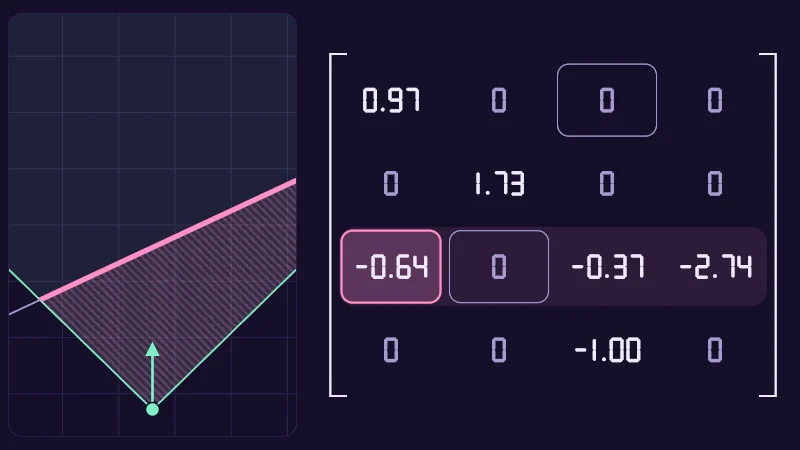
On the left you see it all from above, with the lilac glass and the hatched area that never gets drawn. Move Mirror turn and Mirror tilt and watch row 2’s pink cells light up. Eye off-centre shifts the view like one headset lens. It fills [0][2] (top row, third column), but it never wakes a pink cell that sits at 0.
My helper checks both the global and the matrix, unity_CameraProjection, because each one can miss. The global has been seen at 0 inside a mirror, and the matrix misses a mirror seen straight on. Two checks, fewer surprises.
inline bool vrcInMirror()
{
    return _VRChatMirrorMode > 0.5 || unity_CameraProjection[2][0] != 0.0 || unity_CameraProjection[2][1] != 0.0;
}
Hiding a mesh before the pixels even start
An animator toggle hides a mesh in every view. A shader can be pickier and hide a mesh only in mirrors, or only in photos. Its vertex shader runs once per corner and places it on screen. Its pixel shader runs once per covered pixel and picks its colour. Pixels far outnumber corners, so the earlier you stop, the less work. Here are three ways to hide a mesh:
- Alpha 0. Every pixel is still worked out in full, then blended into nothing.
- Discard. The pixel shader runs, then throws its result away.
- NaN. The vertex shader writes NaN, “not a number” (what 0 divided by 0 gives), into the corner’s screen position. The GPU drops any triangle with a NaN corner before it makes a single pixel. The condition is the same for every corner, so the whole mesh vanishes.
Turn on JavaScript to run this demo.
Rendered in Unity 2022.3.22f1 from the Copy for Unity shader, with the settings this demo starts with.
// Three ways to hide a mesh. Only a NaN position stops the pixel shader from running at all.
#include "sdf2d"
#include "diagram"

uniform float _Method; // @select = 2 | Hide by | Not hidden=0, Alpha 0=1, Discard=2, NaN position=3, NaN on one corner=4 | How the mesh is hidden. With one corner, click a corner to pick it.

static const float SIDE = 0.2;           // triangle side
static const float H = 0.8660254;        // sqrt(3) / 2
static const float2 LEFT = float2(-0.9, -0.08), RIGHT = float2(0.9, -0.08);

// Lattice coordinates of the corner nearest to p.
float2 nearestCorner(float2 p)
{
    float v = p.y / (SIDE * H);
    float u = p.x / SIDE - 0.5 * v;
    float2 best = float2(0.0, 0.0);
    float bestD = 1e9;
    for (int k = 0; k < 4; k++)
    {
        float2 c = floor(float2(u, v)) + float2(k % 2, k / 2);
        float2 pos = float2((c.x + 0.5 * c.y) * SIDE, c.y * SIDE * H);
        float d = length(p - pos);
        if (d < bestD) { bestD = d; best = c; }
    }
    return best;
}
float2 cornerPos(float2 c) { return float2((c.x + 0.5 * c.y) * SIDE, c.y * SIDE * H); }
bool sameCorner(float2 a, float2 b) { return a.x == b.x && a.y == b.y; }

float4 shade(float2 uv)
{
    float2 p = centered(uv);
    int method = int(_Method + 0.5);
    bool right = p.x > 0.0;
    float2 q = p - (right ? RIGHT : LEFT);

    // The triangle under this pixel and its three corners, in lattice coordinates.
    float v = q.y / (SIDE * H);
    float u = q.x / SIDE - 0.5 * v;
    float2 cell = floor(float2(u, v));
    bool upper = frac(u) + frac(v) > 1.0;
    float2 c0 = upper ? cell + float2(1.0, 0.0) : cell;
    float2 c1 = upper ? cell + float2(0.0, 1.0) : cell + float2(1.0, 0.0);
    float2 c2 = upper ? cell + float2(1.0, 1.0) : cell + float2(0.0, 1.0);
    float2 a = cornerPos(c0), b = cornerPos(c1), c = cornerPos(c2);
    float R = 3.0 * SIDE * H;
    bool inMesh = sdHexagon((a + b + c) / 3.0, R) < 0.0;

    // The corner that gets the NaN, picked with the pointer.
    float2 ptr = pointerCentered();
    float2 nanCorner = nearestCorner(ptr - (ptr.x > 0.0 ? RIGHT : LEFT));
    if (sdHexagon(cornerPos(nanCorner), R + 0.01) > 0.0) nanCorner = float2(99.0, 99.0);
    bool touchesNan = sameCorner(c0, nanCorner) || sameCorner(c1, nanCorner) || sameCorner(c2, nanCorner);

    bool dropped = method == 3 || (method == 4 && touchesNan);
    bool seen = inMesh && !dropped && (method == 0 || method == 4);
    bool works = inMesh && !dropped;

    float3 col = drawGrid(themeSurface(), p, 0.25);
    float edges = min(min(dgSegment(q, a, b), dgSegment(q, b, c)), dgSegment(q, c, a));
    float hex = sdHexagon(q, R);
    bool fill = right ? works : seen;
    float3 tone = right ? series2() : series1();
    if (fill) col = tint(col, tone, 0.55);
    if (inMesh || hex < 2.0 * pixelSize())
    {
        float3 ink = fill ? themeInk() : themeMuted();
        float w = fill ? 1.5 : 1.0;
        float edge = saturate(0.5 * w + 0.5 - edges / pixelSize());
        col = lerp(col, tint(col, ink, fill ? 0.9 : 0.45), edge);
    }
    col = strokeShape(col, hex, 1.0, themeMuted());

    // Corners: crossed out where they hold NaN.
    float2 near = nearestCorner(q);
    float2 cp = cornerPos(near);
    if (sdHexagon(cp, R + 0.01) < 0.0)
    {
        bool isNan = method == 3 || (method == 4 && sameCorner(near, nanCorner));
        if (isNan)
        {
            float2 rel = q - cp;
            float2 d = mul(rot2(0.785398), rel);
            float mark = min(sdBox(d, float2(0.035, 0.007)), sdBox(d, float2(0.007, 0.035)));
            col = lerp(col, themeSurface(), fillAA(mark - 2.0 * pixelSize()));
            col = lerp(col, series2(), fillAA(mark));
        }
        else
        {
            col = drawDot(col, p, cp + (right ? RIGHT : LEFT), 2.5, fill || seen ? themeInk() : themeMuted());
        }
    }

    // A line between the two halves.
    col = lerp(col, themeGrid(), saturate(1.5 - abs(p.x) / pixelSize()));
    return float4(col, 1.0);
}
// Three ways to hide a mesh. Only a NaN position stops the pixel shader from running at all.
#include "sdf2d"
#include "diagram"
uniform float _Method; // @select = 2 | Hide by | Not hidden=0, Alpha 0=1, Discard=2, NaN position=3, NaN on one corner=4 | How the mesh is hidden. With one corner, click a corner to pick it.
const float SIDE = 0.2; // triangle side
const float H = 0.8660254; // sqrt(3) / 2
const vec2 LEFT = vec2(-0.9, -0.08), RIGHT = vec2(0.9, -0.08);
// Lattice coordinates of the corner nearest to p.
vec2 nearestCorner(vec2 p)
{
float v = p.y / (SIDE * H);
float u = p.x / SIDE - 0.5 * v;
vec2 best = vec2(0.0, 0.0);
float bestD = 1e9;
for (int k = 0; k < 4; k++)
{
vec2 c = floor(vec2(u, v)) + vec2(k % 2, k / 2);
vec2 pos = vec2((c.x + 0.5 * c.y) * SIDE, c.y * SIDE * H);
float d = length(p - pos);
if (d < bestD) { bestD = d; best = c; }
}
return best;
}
vec2 cornerPos(vec2 c) { return vec2((c.x + 0.5 * c.y) * SIDE, c.y * SIDE * H); }
bool sameCorner(vec2 a, vec2 b) { return a.x == b.x && a.y == b.y; }
vec4 shade(vec2 uv)
{
vec2 p = centered(uv);
int method = int(_Method + 0.5);
bool right = p.x > 0.0;
vec2 q = p - (right ? RIGHT : LEFT);
// The triangle under this pixel and its three corners, in lattice coordinates.
float v = q.y / (SIDE * H);
float u = q.x / SIDE - 0.5 * v;
vec2 cell = floor(vec2(u, v));
bool upper = fract(u) + fract(v) > 1.0;
vec2 c0 = upper ? cell + vec2(1.0, 0.0) : cell;
vec2 c1 = upper ? cell + vec2(0.0, 1.0) : cell + vec2(1.0, 0.0);
vec2 c2 = upper ? cell + vec2(1.0, 1.0) : cell + vec2(0.0, 1.0);
vec2 a = cornerPos(c0), b = cornerPos(c1), c = cornerPos(c2);
float R = 3.0 * SIDE * H;
bool inMesh = sdHexagon((a + b + c) / 3.0, R) < 0.0;
// The corner that gets the NaN, picked with the pointer.
vec2 ptr = pointerCentered();
vec2 nanCorner = nearestCorner(ptr - (ptr.x > 0.0 ? RIGHT : LEFT));
if (sdHexagon(cornerPos(nanCorner), R + 0.01) > 0.0) nanCorner = vec2(99.0, 99.0);
bool touchesNan = sameCorner(c0, nanCorner) || sameCorner(c1, nanCorner) || sameCorner(c2, nanCorner);
bool dropped = method == 3 || (method == 4 && touchesNan);
bool seen = inMesh && !dropped && (method == 0 || method == 4);
bool works = inMesh && !dropped;
vec3 col = drawGrid(themeSurface(), p, 0.25);
float edges = min(min(dgSegment(q, a, b), dgSegment(q, b, c)), dgSegment(q, c, a));
float hex = sdHexagon(q, R);
bool fill = right ? works : seen;
vec3 tone = right ? series2() : series1();
if (fill) col = tint(col, tone, 0.55);
if (inMesh || hex < 2.0 * pixelSize())
{
vec3 ink = fill ? themeInk() : themeMuted();
float w = fill ? 1.5 : 1.0;
float edge = saturate(0.5 * w + 0.5 - edges / pixelSize());
col = mix(col, tint(col, ink, fill ? 0.9 : 0.45), edge);
}
col = strokeShape(col, hex, 1.0, themeMuted());
// Corners: crossed out where they hold NaN.
vec2 near = nearestCorner(q);
vec2 cp = cornerPos(near);
if (sdHexagon(cp, R + 0.01) < 0.0)
{
bool isNan = method == 3 || (method == 4 && sameCorner(near, nanCorner));
if (isNan)
{
vec2 rel = q - cp;
vec2 d = (rel * rot2(0.785398));
float mark = min(sdBox(d, vec2(0.035, 0.007)), sdBox(d, vec2(0.007, 0.035)));
col = mix(col, themeSurface(), fillAA(mark - 2.0 * pixelSize()));
col = mix(col, series2(), fillAA(mark));
}
else
{
col = drawDot(col, p, cp + (right ? RIGHT : LEFT), 2.5, fill || seen ? themeInk() : themeMuted());
}
}
// A line between the two halves.
col = mix(col, themeGrid(), saturate(1.5 - abs(p.x) / pixelSize()));
return vec4(col, 1.0);
}Names in this code (75)
_Method- Choice "Hide by". How the mesh is hidden. With one corner, click a corner to pick it.
a- A parameter of sameCorner(), line 28: float2 a.
b- A parameter of sameCorner(), line 28: float2 b.
best- Declared on line 16: float2 best = float2(0.0, 0.0);
bestD- Declared on line 17: float bestD = 1e9;
c- Declared on line 20: float2 c = floor(float2(u, v)) + float2(k % 2, k / 2);
c0- Declared on line 42: float2 c0 = upper ? cell + float2(1.0, 0.0) : cell;
c1- Declared on line 43: float2 c1 = upper ? cell + float2(0.0, 1.0) : cell + float2(1.0, 0.0);
c2- Declared on line 44: float2 c2 = upper ? cell + float2(1.0, 1.0) : cell + float2(0.0, 1.0);
cell- Declared on line 40: float2 cell = floor(float2(u, v));
centered- float2 centered(float2 uv). Square coordinates with the origin in the middle: the short side of the picture spans -1..1. (common library)
col- Declared on line 59: float3 col = drawGrid(themeSurface(), p, 0.25);
cornerPos- float2 cornerPos(float2 c)
cp- Declared on line 76: float2 cp = cornerPos(near);
d- Declared on line 22: float d = length(p - pos);
dgSegment- float dgSegment(float2 p, float2 a, float2 b) (diagram library)
drawDot- float3 drawDot(float3 col, float2 p, float2 c, float radiusPx, float3 ink). A dot with a ring in the surface color around it. (diagram library)
drawGrid- float3 drawGrid(float3 col, float2 p, float spacing) (diagram library)
dropped- Declared on line 55: bool dropped = method == 3 || (method == 4 && touchesNan);
edge- Declared on line 69: float edge = saturate(0.5 * w + 0.5 - edges / pixelSize());
edges- Declared on line 60: float edges = min(min(dgSegment(q, a, b), dgSegment(q, b, c)), dgSegment(q, c, a));
fill- Declared on line 62: bool fill = right ? works : seen;
fillAA- float fillAA(float d). Anti-aliased coverage of a signed distance: 1 inside, 0 outside, a one pixel ramp at the edge. (common library)
frac- The part after the decimal point, in HLSL. GLSL calls it fract.
H- Declared on line 8: static const float H = 0.8660254; // sqrt(3) / 2
hex- Declared on line 61: float hex = sdHexagon(q, R);
include- Pulls another file into this one, for example UnityCG.cginc.
ink- Declared on line 67: float3 ink = fill ? themeInk() : themeMuted();
inMesh- Declared on line 47: bool inMesh = sdHexagon((a + b + c) / 3.0, R) < 0.0;
isNan- Declared on line 79: bool isNan = method == 3 || (method == 4 && sameCorner(near, nanCorner));
LEFT- Declared on line 9: static const float2 LEFT = float2(-0.9, -0.08), RIGHT = float2(0.9, -0.08);
lerp- HLSL's blend from a (t = 0) to b (t = 1). GLSL calls it mix.
mark- Declared on line 84: float mark = min(sdBox(d, float2(0.035, 0.007)), sdBox(d, float2(0.007, 0.035)));
method- Declared on line 33: int method = int(_Method + 0.5);
mul- Matrix times vector or matrix times matrix in HLSL. mul(M, v) applies M to v.
nanCorner- Declared on line 51: float2 nanCorner = nearestCorner(ptr - (ptr.x > 0.0 ? RIGHT : LEFT));
near- Declared on line 75: float2 near = nearestCorner(q);
nearestCorner- float2 nearestCorner(float2 p). Lattice coordinates of the corner nearest to p.
p- A parameter of nearestCorner(), line 12: float2 p.
pixelSize- float pixelSize() (common library)
pointerCentered- float2 pointerCentered(). The pointer (or the _Pointer material setting in Unity) in the same coordinates as centered(). (common library)
pos- Declared on line 21: float2 pos = float2((c.x + 0.5 * c.y) * SIDE, c.y * SIDE * H);
ptr- Declared on line 50: float2 ptr = pointerCentered();
q- Declared on line 35: float2 q = p - (right ? RIGHT : LEFT);
R- Declared on line 46: float R = 3.0 * SIDE * H;
rel- Declared on line 82: float2 rel = q - cp;
right- Declared on line 34: bool right = p.x > 0.0;
rot2- float2x2 rot2(float a). Turns a point by a radians, counterclockwise: mul(rot2(a), p). (common library)
sameCorner- bool sameCorner(float2 a, float2 b)
saturate- An HLSL function that clamps a value between 0 and 1.
sdBox- float sdBox(float2 p, float2 halfSize) (sdf2d library)
sdHexagon- float sdHexagon(float2 p, float r) (sdf2d library)
seen- Declared on line 56: bool seen = inMesh && !dropped && (method == 0 || method == 4);
series1- float3 series1() (common library)
series2- float3 series2() (common library)
shade- float4 shade(float2 uv)
SIDE- Declared on line 7: static const float SIDE = 0.2; // triangle side
strokeShape- float3 strokeShape(float3 col, float d, float widthPx, float3 ink) (diagram library)
themeGrid- float3 themeGrid() (common library)
themeInk- float3 themeInk() (common library)
themeMuted- float3 themeMuted() (common library)
themeSurface- float3 themeSurface(). The dusk stage colors, in linear light. Series colors are used in this order: mint, pink, butter. (common library)
tint- float3 tint(float3 a, float3 b, float t). Blends two colors in steps that look even to the eye (in sRGB), for value ramps such as distance bands. Edges and coverage still blend with lerp, in linear light, as light really adds up. (common library)
tone- Declared on line 63: float3 tone = right ? series2() : series1();
touchesNan- Declared on line 53: bool touchesNan = sameCorner(c0, nanCorner) || sameCorner(c1, nanCorner) || sameCorner(c2, nanCorner);
u- Declared on line 15: float u = p.x / SIDE - 0.5 * v;
upper- Declared on line 41: bool upper = frac(u) + frac(v) > 1.0;
uv- A parameter of shade(), line 30: float2 uv.
v- Declared on line 14: float v = p.y / (SIDE * H);
w- Declared on line 68: float w = fill ? 1.5 : 1.0;
works- Declared on line 57: bool works = inMesh && !dropped;
abs- abs(x) is x without its minus sign. abs(-0.3) = 0.3.
floor- floor(x) rounds down to the largest whole number not above x. floor(2.7) = 2, floor(-0.5) = -1.
length- length(v) says how long the vector v is, sqrt(x² + y²).
min- min(a, b) picks the smaller of the two.
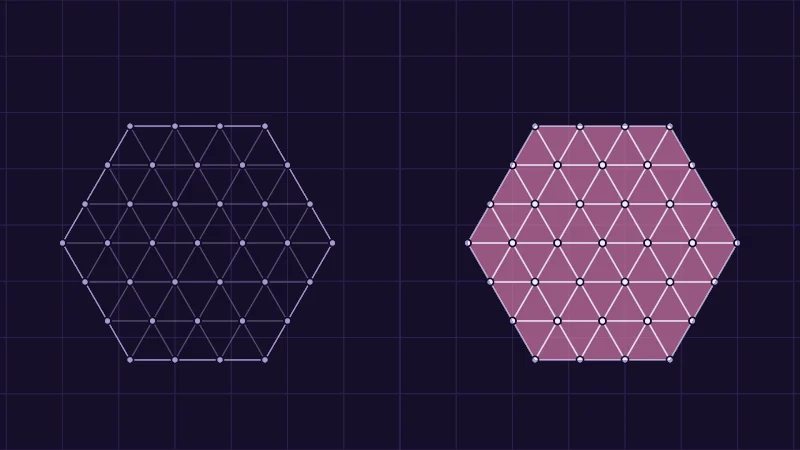
Step through Hide by. With Alpha 0 and Discard the left shows only a faint outline, but the right is still full of work. With NaN position both sides go empty. Then pick NaN on one corner and click a corner to move the pink cross there. Every triangle touching it disappears. Poof.
#define VRC_NAN asfloat(0x7fc00000u)
// ...
#define VRC_CULL_IF(clipPos, cond) { if (cond) (clipPos) = VRC_NAN; }
VRC_CULL_IF swaps the screen position for NaN when the condition holds. There’s one catch, though. A headset’s own view has been reported to read a wrong camera mode while streaming, so I only ask for it outside the stereo version (next section):
#if defined(USING_STEREO_MATRICES)
    bool photo = false; // a headset eye is never the camera
#else
    bool photo = _VRChatCameraMode != 0;
#endif
bool mirror = vrcInMirror();
bool hide = (_Mode == 1 &&  mirror)   // hide in mirror
         || (_Mode == 2 && !mirror)   // only in mirror
         || (_Mode == 3 &&  photo);   // hide from photos
VRC_CULL_IF(o.pos, hide);
VR or Desktop, and which eye
Unity builds a separate stereo version of every shader for headset eyes, and only that version defines USING_STEREO_MATRICES. This one trips people up, so take it slow. It tells you the person looking wears a headset, not whether the avatar’s wearer does. Mirrors and the handheld camera use the plain version, even for a headset viewer. There, mirror mode 1 or camera mode 1 says it (a VR viewer, from the table above).
In the stereo version, unity_StereoEyeIndex says which eye it is, 0 for left and 1 for right. In a VR mirror, _VRChatMirrorCameraPos is the point between the viewer’s eyes. Picture yourself as the right eye, and that middle point sits on your left. So the eye that sees it on its left is the right eye. Few shaders need the eye. One that shows each eye its own picture does, like a 3D photo stored as a left half and a right half.
UNITY_SETUP_STEREO_EYE_INDEX_POST_VERTEX(i);
#if defined(USING_STEREO_MATRICES)
    float eye = unity_StereoEyeIndex; // 0 left, 1 right
#else
    float3 c = mul(unity_WorldToCamera, float4(_VRChatMirrorCameraPos, 1)).xyz;
    float eye = (_VRChatMirrorMode == 1 && c.x < 0) ? 1 : 0; // right eye in a VR mirror
#endif
The same size at any avatar scale
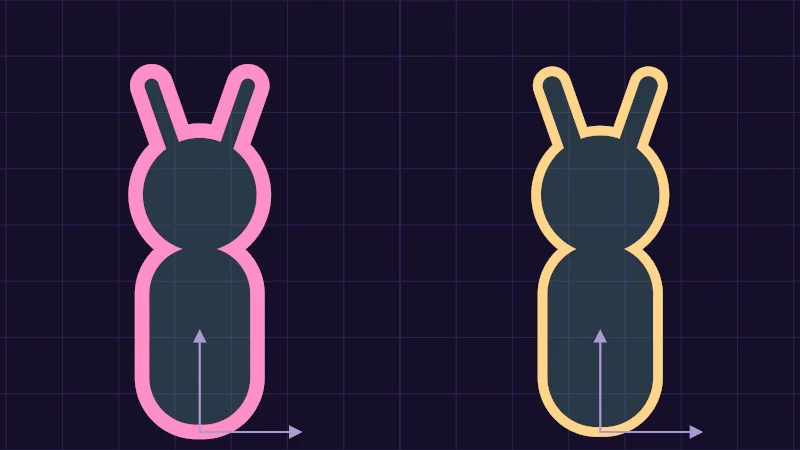
A width set in the mesh’s own units grows and shrinks with the avatar. The fix lives in the model matrix, unity_ObjectToWorld, which places the mesh in the world. Each of its first three columns is one of the mesh’s axes, and that column’s length is the scale along that axis.
The bars mean “length of”. is the average of , and . Divide a width by and it keeps one size at any avatar scale. Tiny avatar or giant avatar, same outline.
Turn on JavaScript to run this demo.
Rendered in Unity 2022.3.22f1 from the Copy for Unity shader, with the settings this demo starts with.
// The same outline on a scaled avatar: left in the mesh's own units, right divided by the scale read from the model matrix.
#include "sdf2d"
#include "diagram"

uniform float _Scale; // @range 0.4 1.6 0.01 = 1.5 | Avatar scale | The scale of the avatar, as the model matrix holds it.
uniform float _Width; // @range 0.01 0.06 0.005 = 0.045 | Outline width | The outline width the material asks for.

// A toy avatar seen from the front, in its own units: feet at the origin, about 1 tall.
float sdToy(float2 p)
{
    float2 q = float2(abs(p.x), p.y);
    float body = sdRoundedBox(p - float2(0.0, 0.3), float2(0.18, 0.3), 0.17);
    float head = length(p - float2(0.0, 0.74)) - 0.2;
    float ear = sdSegment(q, float2(0.08, 0.88), float2(0.15, 1.08)) - 0.045;
    return min(min(body, head), ear);
}

float3 panel(float3 col, float2 p, float2 foot, float outlineObj, float s, float3 ink)
{
    float2 local = (p - foot) / s;
    float d = sdToy(local) * s;                 // distance on screen, after scaling
    col = fillShape(col, d, series1(), 0.18);
    col = fillShape(col, abs(d) - 0.5 * outlineObj * s, ink, 1.0);
    // The model matrix columns: x and y axes of the avatar, as long as its scale.
    col = drawArrow(col, p, foot, foot + float2(0.32 * s, 0.0), 2.0, themeMuted());
    col = drawArrow(col, p, foot, foot + float2(0.0, 0.32 * s), 2.0, themeMuted());
    return col;
}

float4 shade(float2 uv)
{
    float2 p = centered(uv);
    float3 col = drawGrid(themeSurface(), p, 0.25);
    float s = _Scale * 0.95;
    float split = 0.0;
    col = lerp(col, themeGrid(), saturate(1.5 - abs(p.x - split) / pixelSize()));
    // Left: the width is in the mesh's own units, so it grows with the avatar.
    if (p.x < split) col = panel(col, p, float2(-0.89, -0.92), _Width, s, series2());
    // Right: the width is divided by the scale first, so it stays the same on screen.
    else col = panel(col, p, float2(0.89, -0.92), _Width / _Scale, s, series3());
    return float4(col, 1.0);
}
// The same outline on a scaled avatar: left in the mesh's own units, right divided by the scale read from the model matrix.
#include "sdf2d"
#include "diagram"
uniform float _Scale; // @range 0.4 1.6 0.01 = 1.5 | Avatar scale | The scale of the avatar, as the model matrix holds it.
uniform float _Width; // @range 0.01 0.06 0.005 = 0.045 | Outline width | The outline width the material asks for.
// A toy avatar seen from the front, in its own units: feet at the origin, about 1 tall.
float sdToy(vec2 p)
{
vec2 q = vec2(abs(p.x), p.y);
float body = sdRoundedBox(p - vec2(0.0, 0.3), vec2(0.18, 0.3), 0.17);
float head = length(p - vec2(0.0, 0.74)) - 0.2;
float ear = sdSegment(q, vec2(0.08, 0.88), vec2(0.15, 1.08)) - 0.045;
return min(min(body, head), ear);
}
vec3 panel(vec3 col, vec2 p, vec2 foot, float outlineObj, float s, vec3 ink)
{
vec2 local = (p - foot) / s;
float d = sdToy(local) * s; // distance on screen, after scaling
col = fillShape(col, d, series1(), 0.18);
col = fillShape(col, abs(d) - 0.5 * outlineObj * s, ink, 1.0);
// The model matrix columns: x and y axes of the avatar, as long as its scale.
col = drawArrow(col, p, foot, foot + vec2(0.32 * s, 0.0), 2.0, themeMuted());
col = drawArrow(col, p, foot, foot + vec2(0.0, 0.32 * s), 2.0, themeMuted());
return col;
}
vec4 shade(vec2 uv)
{
vec2 p = centered(uv);
vec3 col = drawGrid(themeSurface(), p, 0.25);
float s = _Scale * 0.95;
float split = 0.0;
col = mix(col, themeGrid(), saturate(1.5 - abs(p.x - split) / pixelSize()));
// Left: the width is in the mesh's own units, so it grows with the avatar.
if (p.x < split) col = panel(col, p, vec2(-0.89, -0.92), _Width, s, series2());
// Right: the width is divided by the scale first, so it stays the same on screen.
else col = panel(col, p, vec2(0.89, -0.92), _Width / _Scale, s, series3());
return vec4(col, 1.0);
}Names in this code (38)
_Scale- Slider "Avatar scale". The scale of the avatar, as the model matrix holds it. From 0.4 to 1.6, starts at 1.5.
_Width- Slider "Outline width". The outline width the material asks for. From 0.01 to 0.06, starts at 0.045.
body- Declared on line 12: float body = sdRoundedBox(p - float2(0.0, 0.3), float2(0.18, 0.3), 0.17);
centered- float2 centered(float2 uv). Square coordinates with the origin in the middle: the short side of the picture spans -1..1. (common library)
col- A parameter of panel(), line 18: float3 col.
d- Declared on line 21: float d = sdToy(local) * s; // distance on screen, after scaling
drawArrow- float3 drawArrow(float3 col, float2 p, float2 a, float2 b, float widthPx, float3 ink) (diagram library)
drawGrid- float3 drawGrid(float3 col, float2 p, float spacing) (diagram library)
ear- Declared on line 14: float ear = sdSegment(q, float2(0.08, 0.88), float2(0.15, 1.08)) - 0.045;
fillShape- float3 fillShape(float3 col, float d, float3 ink, float alpha). Fill or outline any signed distance d (in centered() units). alpha tints evenly for the eye; the edge itself blends in linear light like any coverage. (diagram library)
foot- A parameter of panel(), line 18: float2 foot.
head- Declared on line 13: float head = length(p - float2(0.0, 0.74)) - 0.2;
include- Pulls another file into this one, for example UnityCG.cginc.
ink- A parameter of panel(), line 18: float3 ink.
lerp- HLSL's blend from a (t = 0) to b (t = 1). GLSL calls it mix.
local- Declared on line 20: float2 local = (p - foot) / s;
outlineObj- A parameter of panel(), line 18: float outlineObj.
p- A parameter of sdToy(), line 9: float2 p.
panel- float3 panel(float3 col, float2 p, float2 foot, float outlineObj, float s, float3 ink)
pixelSize- float pixelSize() (common library)
q- Declared on line 11: float2 q = float2(abs(p.x), p.y);
s- A parameter of panel(), line 18: float s.
saturate- An HLSL function that clamps a value between 0 and 1.
sdRoundedBox- float sdRoundedBox(float2 p, float2 halfSize, float r) (sdf2d library)
sdSegment- float sdSegment(float2 p, float2 a, float2 b) (sdf2d library)
sdToy- float sdToy(float2 p). A toy avatar seen from the front, in its own units: feet at the origin, about 1 tall.
series1- float3 series1() (common library)
series2- float3 series2() (common library)
series3- float3 series3() (common library)
shade- float4 shade(float2 uv)
split- Declared on line 35: float split = 0.0;
themeGrid- float3 themeGrid() (common library)
themeMuted- float3 themeMuted() (common library)
themeSurface- float3 themeSurface(). The dusk stage colors, in linear light. Series colors are used in this order: mint, pink, butter. (common library)
uv- A parameter of shade(), line 30: float2 uv.
abs- abs(x) is x without its minus sign. abs(-0.3) = 0.3.
length- length(v) says how long the vector v is, sqrt(x² + y²).
min- min(a, b) picks the smaller of the two.
Move Avatar scale. On the left, an outline of Outline width in mesh units grows with the avatar. On the right it’s divided by the scale and stays put. The lilac arrows are the matrix columns, and their length is the scale.
float3 s3 = float3(length(unity_ObjectToWorld._m00_m10_m20),
                   length(unity_ObjectToWorld._m01_m11_m21),
                   length(unity_ObjectToWorld._m02_m12_m22));
float s = (s3.x + s3.y + s3.z) / 3.0;
float width = _OutlineWidth / s;
A few more little ones
_VRChatFaceMirrorModeis 1 while VRChat’s face mirror draws.- Some cameras draw without perspective, so far things don’t shrink.
unity_OrthoParams.wis 1 then, so an effect that needs perspective can switch itself off. - VRChat hands shaders the clock in
_VRChatTimeEncoded1, in the viewer’s own time zone, never the wearer’s. The SDK’sVRCTime.cgincdecodes it withVRC_GetLocalTime. - A number can be split over two colour channels to keep its precision. The CRT lesson shows how.
- Never start your own property names with
_VRChat. VRChat may add globals with those names at any time.
In practice
- Declare the globals you read inside the shader code, for example
float _VRChatMirrorMode; float _VRChatCameraMode;, never in Properties. A material property with the same name hides VRChat’s value. - All of this works only on PC. Players who block custom shaders see the material’s fallback instead, and it draws in every view. So give a mirror-only secret
Tags { "VRCFallback"="Hidden" }, or it isn’t much of a secret. - Put the hide condition in every pass, shadow and outline too, or that part still shows. A lonely shadow gives the game away.
- The model matrix also holds any import scale, so check at the avatar’s normal size. On a skinned mesh such as the body, Unity may scale the corners itself. Check that really changes before you divide by it.
- In Unity every global is 0, so test the mirror and camera branches in VRChat itself.
Credits
- VRChat documents the shader globals and the fallback tag, and ships the clock helpers in its SDK.
- The row 2 mirror check is credited to Lyuma and Merlin in cnlohr’s shadertrixx, and the VR mirror eye test there to advice from d4rkpl4y3r and techanon. pema99’s shader-knowledge collects both.
- The tilted near plane is Eric Lengyel’s oblique near-plane clipping (2005).
- The ray against a capsule in the demos follows Inigo Quilez’s intersectors, the heart his 2D distance functions (MIT License).
- VRChat’s mirror and camera globals, together with row 2 of the projection matrix, tell a shader which view it’s drawn for.
- A NaN corner drops a triangle before any pixel work, which makes it the cheapest way to hide a mesh in some views.
USING_STEREO_MATRICESmeans the person looking wears a headset. In mirrors, mirror mode 1 tells you instead.