Foundations, part 1
Drawing shapes with distance
Give every pixel one number, its distance to the nearest edge, and you can fill, outline, combine and morph crisp shapes at any size.
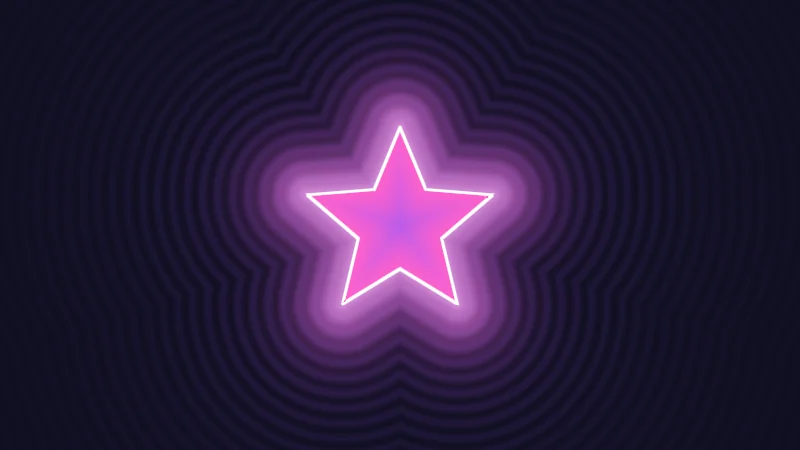
A lot of shapes in shaders aren’t pictures at all: the highlight in an anime eye, a glowing emblem, a magic circle. Each one is a tiny formula that tells every pixel how far it is from the shape’s edge. That number is its signed distance. Let’s draw shapes with it, then outline, combine and morph them. It’s the first Foundations article, so I’ll go slow.
Turn on JavaScript to run this demo.
Rendered in Unity 2022.3.22f1 from the Copy for Unity shader, with the settings this demo starts with.
// A shape that melts from a circle into a star, a heart and a moon, drawn only from distances.
#include "sdf2d"

float shape(int i, float2 p)
{
    if (i == 0) return sdCircle(p, 0.42);
    if (i == 1) return sdStar5(p, 0.52, 0.45);
    if (i == 2) return sdHeart((p + float2(0.0, 0.47)) / 0.95) * 0.95;
    return sdMoon(p - float2(-0.06, 0.0), 0.3, 0.45, 0.38);
}

float4 shade(float2 uv)
{
    float2 p = centered(uv) * 1.2;
    float t = _Time.y * 0.5;
    int i = int(floor(t)) % 4;
    float k = smoothstep(0.55, 1.0, frac(t));
    float d = lerp(shape(i, p), shape((i + 1) % 4, p), k);

    float3 col = float3(0.012, 0.012, 0.025);
    col += float3(0.30, 0.12, 0.55) * 0.10 * (0.5 + 0.5 * cos(TAU * d / 0.08)) * exp(-1.5 * max(d, 0.0));
    col += float3(0.95, 0.30, 1.0) * 0.55 * exp(-9.0 * max(d, 0.0));
    col = tonemapACES(col);
    float3 inside = lerp(float3(1.0, 0.12, 0.6), float3(0.25, 0.1, 0.9), saturate(-d * 3.0));
    col = lerp(col, inside, fillAA(d));
    float px = abs(d) / max(fwidth(d), 1e-5);
    col = lerp(col, float3(1.0, 1.0, 1.0), saturate(1.75 - px));
    return float4(col, 1.0);
}
// A shape that melts from a circle into a star, a heart and a moon, drawn only from distances.
#include "sdf2d"
float shape(int i, vec2 p)
{
if (i == 0) return sdCircle(p, 0.42);
if (i == 1) return sdStar5(p, 0.52, 0.45);
if (i == 2) return sdHeart((p + vec2(0.0, 0.47)) / 0.95) * 0.95;
return sdMoon(p - vec2(-0.06, 0.0), 0.3, 0.45, 0.38);
}
vec4 shade(vec2 uv)
{
vec2 p = centered(uv) * 1.2;
float t = _Time.y * 0.5;
int i = int(floor(t)) % 4;
float k = smoothstep(0.55, 1.0, fract(t));
float d = mix(shape(i, p), shape((i + 1) % 4, p), k);
vec3 col = vec3(0.012, 0.012, 0.025);
col += vec3(0.30, 0.12, 0.55) * 0.10 * (0.5 + 0.5 * cos(TAU * d / 0.08)) * exp(-1.5 * max(d, 0.0));
col += vec3(0.95, 0.30, 1.0) * 0.55 * exp(-9.0 * max(d, 0.0));
col = tonemapACES(col);
vec3 inside = mix(vec3(1.0, 0.12, 0.6), vec3(0.25, 0.1, 0.9), saturate(-d * 3.0));
col = mix(col, inside, fillAA(d));
float px = abs(d) / max(fwidth(d), 1e-5);
col = mix(col, vec3(1.0, 1.0, 1.0), saturate(1.75 - px));
return vec4(col, 1.0);
}Names in this code (30)
_Time- Time since the level loaded, from Unity. _Time.y is seconds.
centered- float2 centered(float2 uv). Square coordinates with the origin in the middle: the short side of the picture spans -1..1. (common library)
col- Declared on line 20: float3 col = float3(0.012, 0.012, 0.025);
d- Declared on line 18: float d = lerp(shape(i, p), shape((i + 1) % 4, p), k);
fillAA- float fillAA(float d). Anti-aliased coverage of a signed distance: 1 inside, 0 outside, a one pixel ramp at the edge. (common library)
frac- The part after the decimal point, in HLSL. GLSL calls it fract.
i- A parameter of shape(), line 4: int i.
include- Pulls another file into this one, for example UnityCG.cginc.
inside- Declared on line 24: float3 inside = lerp(float3(1.0, 0.12, 0.6), float3(0.25, 0.1, 0.9), saturate(-d * 3.0));
k- Declared on line 17: float k = smoothstep(0.55, 1.0, frac(t));
lerp- HLSL's blend from a (t = 0) to b (t = 1). GLSL calls it mix.
p- A parameter of shape(), line 4: float2 p.
px- Declared on line 26: float px = abs(d) / max(fwidth(d), 1e-5);
saturate- An HLSL function that clamps a value between 0 and 1.
sdCircle- float sdCircle(float2 p, float r) (sdf2d library)
sdHeart- float sdHeart(float2 p). Heart of height about 1, its tip at the origin. (sdf2d library)
sdMoon- float sdMoon(float2 p, float d, float ra, float rb). Circle of radius ra with a circle of radius rb, d to the right, cut out of it. (sdf2d library)
sdStar5- float sdStar5(float2 p, float r, float rf) (sdf2d library)
shade- float4 shade(float2 uv)
shape- float shape(int i, float2 p)
t- Declared on line 15: float t = _Time.y * 0.5;
tonemapACES- float3 tonemapACES(float3 x). Rolls HDR values above 1 off softly instead of clipping them. (common library)
uv- A parameter of shade(), line 12: float2 uv.
abs- abs(x) is x without its minus sign. abs(-0.3) = 0.3.
cos- cos(a) is the cosine of the angle a, in radians.
exp- exp(x) is e to the power x. exp(0) = 1, and it falls towards 0 as x goes negative.
floor- floor(x) rounds down to the largest whole number not above x. floor(2.7) = 2, floor(-0.5) = -1.
fwidth- fwidth(v) says how much v changes from this pixel to its neighbours, |dFdx(v)| + |dFdy(v)|. Edges one pixel wide are made with it.
max- max(a, b) picks the larger of the two.
smoothstep- smoothstep(e0, e1, x) is 0 below e0, 1 above e1, and an S curve t² (3 - 2t) in between, where t = (x - e0) / (e1 - e0). GLSL leaves e0 >= e1 undefined.
One shape melting into the next. There’s no texture hiding in here. Every frame is computed from distances.
Every pixel gets one number
A shader runs once for every pixel, and each time it knows where that pixel is. Its position says how far across and how far up it is. In these demos the picture is 2 units tall, and its middle is the origin, . Let’s start with the friendliest shape there is. For a circle of radius centred on the origin, the distance from to the edge is:
The bars in mean the length of , which is how far the pixel is from the centre. Take away the radius, and the sign tells you which side you’re on.
- means the pixel is inside.
- means it sits exactly on the edge.
- means it is outside, units away.
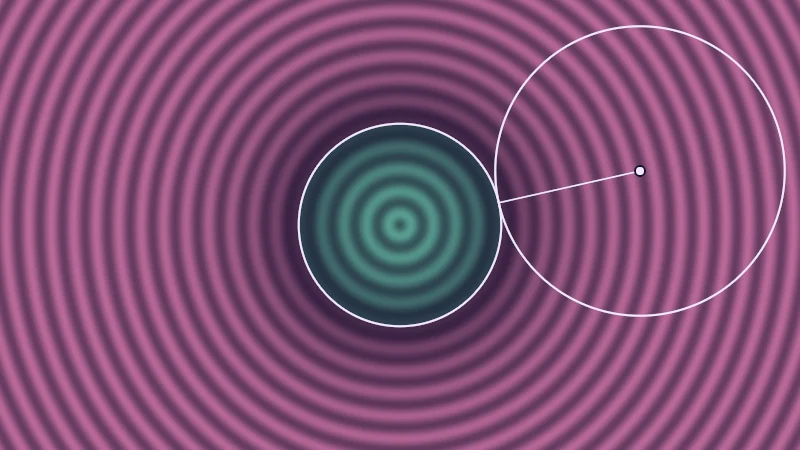
There’s one small trap here. Around a single number, the same bars drop the minus sign, so is how far the pixel is from the edge, on either side. And that’s where the name signed distance field, or SDF, comes from. Signed because of that minus, field because every point of the picture has one.
Turn on JavaScript to run this demo.
Rendered in Unity 2022.3.22f1 from the Copy for Unity shader, with the settings this demo starts with.
// The distance field of a circle, and a probe that shows what the distance means.
#include "sdf2d"
#include "diagram"

uniform float _Radius; // @range 0.1 0.8 0.01 = 0.45 | Radius r | Size of the circle.

float4 shade(float2 uv)
{
    float2 p = centered(uv);
    float d = sdCircle(p, _Radius);
    float3 col = drawDistanceField(d, 0.1);

    // The distance at the dragged point is the radius of the largest circle around it that stays on one side.
    float2 q = pointerCentered();
    float dq = sdCircle(q, _Radius);
    float2 nearest = length(q) > 1e-4 ? normalize(q) * _Radius : float2(_Radius, 0.0);
    col = drawCircle(col, p, q, abs(dq), 2.0, themeInk());
    col = drawLine(col, p, q, nearest, 1.5, themeInk());
    col = drawDot(col, p, q, 4.0, themeInk());
    return float4(col, 1.0);
}
// The distance field of a circle, and a probe that shows what the distance means.
#include "sdf2d"
#include "diagram"
uniform float _Radius; // @range 0.1 0.8 0.01 = 0.45 | Radius r | Size of the circle.
vec4 shade(vec2 uv)
{
vec2 p = centered(uv);
float d = sdCircle(p, _Radius);
vec3 col = drawDistanceField(d, 0.1);
// The distance at the dragged point is the radius of the largest circle around it that stays on one side.
vec2 q = pointerCentered();
float dq = sdCircle(q, _Radius);
vec2 nearest = length(q) > 1e-4 ? normalize(q) * _Radius : vec2(_Radius, 0.0);
col = drawCircle(col, p, q, abs(dq), 2.0, themeInk());
col = drawLine(col, p, q, nearest, 1.5, themeInk());
col = drawDot(col, p, q, 4.0, themeInk());
return vec4(col, 1.0);
}Names in this code (21)
_Radius- Slider "Radius r". Size of the circle. From 0.1 to 0.8, starts at 0.45.
centered- float2 centered(float2 uv). Square coordinates with the origin in the middle: the short side of the picture spans -1..1. (common library)
col- Declared on line 11: float3 col = drawDistanceField(d, 0.1);
d- Declared on line 10: float d = sdCircle(p, _Radius);
dq- Declared on line 15: float dq = sdCircle(q, _Radius);
drawCircle- float3 drawCircle(float3 col, float2 p, float2 c, float r, float widthPx, float3 ink) (diagram library)
drawDistanceField- float3 drawDistanceField(float d, float spacing). Distance field view: pink outside, mint inside, a band every `spacing` units, the zero line in ink. (diagram library)
drawDot- float3 drawDot(float3 col, float2 p, float2 c, float radiusPx, float3 ink). A dot with a ring in the surface color around it. (diagram library)
drawLine- float3 drawLine(float3 col, float2 p, float2 a, float2 b, float widthPx, float3 ink) (diagram library)
include- Pulls another file into this one, for example UnityCG.cginc.
nearest- Declared on line 16: float2 nearest = length(q) > 1e-4 ? normalize(q) * _Radius : float2(_Radius, 0.0);
p- Declared on line 9: float2 p = centered(uv);
pointerCentered- float2 pointerCentered(). The pointer (or the _Pointer material setting in Unity) in the same coordinates as centered(). (common library)
q- Declared on line 14: float2 q = pointerCentered();
sdCircle- float sdCircle(float2 p, float r) (sdf2d library)
shade- float4 shade(float2 uv)
themeInk- float3 themeInk() (common library)
uv- A parameter of shade(), line 7: float2 uv.
abs- abs(x) is x without its minus sign. abs(-0.3) = 0.3.
length- length(v) says how long the vector v is, sqrt(x² + y²).
normalize- normalize(v) keeps the direction of v and makes its length 1.
Drag the dot and play with Radius r. The circle around the dot has radius , so it reaches the edge but never crosses it. Mint is inside, pink is outside, and each stripe is 0.1 units further from the edge. The line shows the shortest way from the dot to the edge.
Three looks, one number
Once a pixel knows , how it looks is up to you.
| Look | Rule | Reads as |
|---|---|---|
| Fill | inside the shape | |
| Outline | within of the edge | |
| Glow | bright at the edge, fading outside |
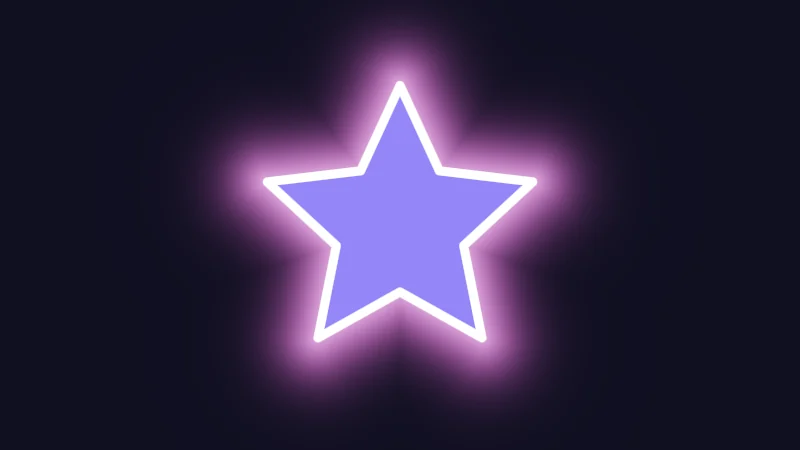
The outline works because is small on both sides of the edge. The glow needs two little helpers. The first, (exp in shader code), is a fade that is 1 when is 0 and sinks toward 0 as grows. The second, , picks the larger of and 0. It stays 0 inside the shape and equals outside. Put them together and the glow is 1 inside and falls off outside. A larger makes it tighter.
Turn on JavaScript to run this demo.
Rendered in Unity 2022.3.22f1 from the Copy for Unity shader, with the settings this demo starts with.
// Three looks from one distance: fill, outline and glow.
#include "sdf2d"

uniform float _Mode;    // @select = 3 | Show | Fill=0, Outline=1, Glow=2, All three=3
uniform float _Width;   // @range 0.005 0.08 0.005 = 0.02 | Outline w | Half the outline's width, in the same units as d.
uniform float _Falloff; // @range 4 40 1 = 12 | Glow s | How fast the glow fades with distance.

float4 shade(float2 uv)
{
    float2 p = centered(uv);
    float d = sdStar5(p, 0.62, 0.48);
    int mode = int(_Mode + 0.5);

    float3 col = float3(0.012, 0.012, 0.025);
    if (mode == 2 || mode == 3) col += float3(0.95, 0.35, 0.9) * 0.8 * exp(-_Falloff * max(d, 0.0));
    col = tonemapACES(col);
    if (mode == 0 || mode == 3) col = lerp(col, float3(0.30, 0.24, 0.95), fillAA(d));
    if (mode == 1 || mode == 3) col = lerp(col, float3(1.0, 1.0, 1.0), fillAA(abs(d) - _Width));
    return float4(col, 1.0);
}
// Three looks from one distance: fill, outline and glow.
#include "sdf2d"
uniform float _Mode; // @select = 3 | Show | Fill=0, Outline=1, Glow=2, All three=3
uniform float _Width; // @range 0.005 0.08 0.005 = 0.02 | Outline w | Half the outline's width, in the same units as d.
uniform float _Falloff; // @range 4 40 1 = 12 | Glow s | How fast the glow fades with distance.
vec4 shade(vec2 uv)
{
vec2 p = centered(uv);
float d = sdStar5(p, 0.62, 0.48);
int mode = int(_Mode + 0.5);
vec3 col = vec3(0.012, 0.012, 0.025);
if (mode == 2 || mode == 3) col += vec3(0.95, 0.35, 0.9) * 0.8 * exp(-_Falloff * max(d, 0.0));
col = tonemapACES(col);
if (mode == 0 || mode == 3) col = mix(col, vec3(0.30, 0.24, 0.95), fillAA(d));
if (mode == 1 || mode == 3) col = mix(col, vec3(1.0, 1.0, 1.0), fillAA(abs(d) - _Width));
return vec4(col, 1.0);
}Names in this code (18)
_Falloff- Slider "Glow s". How fast the glow fades with distance. From 4 to 40, starts at 12.
_Mode- Choice "Show".
_Width- Slider "Outline w". Half the outline's width, in the same units as d. From 0.005 to 0.08, starts at 0.02.
centered- float2 centered(float2 uv). Square coordinates with the origin in the middle: the short side of the picture spans -1..1. (common library)
col- Declared on line 14: float3 col = float3(0.012, 0.012, 0.025);
d- Declared on line 11: float d = sdStar5(p, 0.62, 0.48);
fillAA- float fillAA(float d). Anti-aliased coverage of a signed distance: 1 inside, 0 outside, a one pixel ramp at the edge. (common library)
include- Pulls another file into this one, for example UnityCG.cginc.
lerp- HLSL's blend from a (t = 0) to b (t = 1). GLSL calls it mix.
mode- Declared on line 12: int mode = int(_Mode + 0.5);
p- Declared on line 10: float2 p = centered(uv);
sdStar5- float sdStar5(float2 p, float r, float rf) (sdf2d library)
shade- float4 shade(float2 uv)
tonemapACES- float3 tonemapACES(float3 x). Rolls HDR values above 1 off softly instead of clipping them. (common library)
uv- A parameter of shade(), line 8: float2 uv.
abs- abs(x) is x without its minus sign. abs(-0.3) = 0.3.
exp- exp(x) is e to the power x. exp(0) = 1, and it falls towards 0 as x goes negative.
max- max(a, b) picks the larger of the two.
Set Show to one look at a time, then move Outline w and Glow s. All three read the very same .
A hard test like gives jagged edges. The demos here quietly soften every edge over about one pixel, and the next article shows how.
Mixing and matching shapes
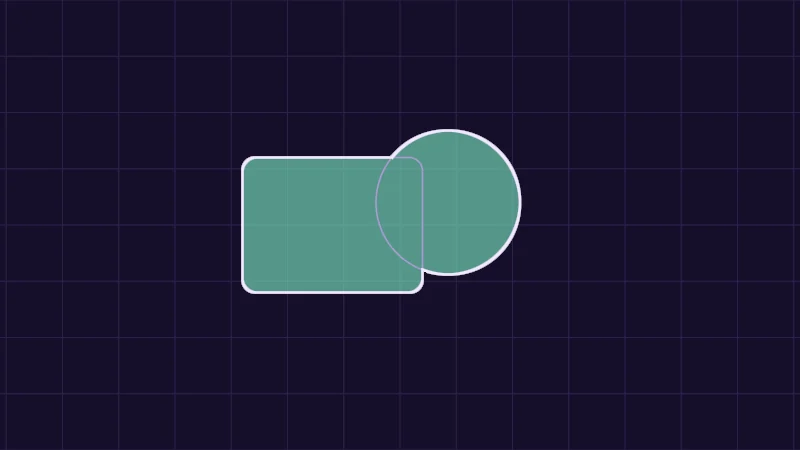
Now let’s put two shapes together. Call the distance to the box and the distance to the circle you drag . Min picks the smaller of two numbers, max the larger.
Remember that inside means a negative distance. A pixel is inside the union when it is inside either shape, so the smaller distance wins. It is inside the intersection only when it is inside both, so the larger one wins. Flipping the sign of swaps its inside and outside, which turns an intersection into cutting away. That last one bends brains a little, so give the demo a go.
Turn on JavaScript to run this demo.
Rendered in Unity 2022.3.22f1 from the Copy for Unity shader, with the settings this demo starts with.
// Lines on distances that are not exact (smooth unions, morphs): the width follows how fast d changes, so it stays even.
// fw is the pixel size of d; pass it in when d was folded by abs(), whose kink hides it.
float strokePx(float d, float widthPx, float fw) { return saturate(0.5 * widthPx + 0.5 - abs(d) / max(fw, 1e-5)); }
float strokePx(float d, float widthPx) { return strokePx(d, widthPx, fwidth(d)); }

// drawDistanceField with an even zero line.
float3 drawField(float d, float spacing, float fw)
{
    float3 hue = d > 0.0 ? series2() : series1();
    float strength = lerp(0.2, 0.7, 1.0 - exp(-5.0 * abs(d)));
    strength *= 0.75 + 0.25 * cos(TAU * d / spacing);
    float3 col = tint(themeSurface(), hue, strength);
    return lerp(col, themeInk(), strokePx(d, 2.0, fw));
}


// ----

// Combining two distances: a fixed rounded box (a) and a circle you can drag (b).
#include "sdf2d"
#include "diagram"

uniform float _Op; // @select = 3 | Operation | Union=0, Intersection=1, Subtraction=2, Smooth union=3
uniform float _K;  // @range 0.01 0.4 0.01 = 0.15 | Smoothness k | How close the shapes get before they melt together (Smooth union only).

float4 shade(float2 uv)
{
    float2 p = centered(uv);
    float a = sdRoundedBox(p - float2(-0.3, 0.0), float2(0.4, 0.3), 0.06);
    float b = sdCircle(p - pointerCentered(), 0.32);

    int op = int(_Op + 0.5);
    float d = op == 0 ? min(a, b)
            : op == 1 ? max(a, b)
            : op == 2 ? max(a, -b)
            : opSmoothUnion(a, b, _K);

    float3 col = drawGrid(themeSurface(), p, 0.25);
    col = fillShape(col, d, series1(), 0.6);
    col = strokeShape(col, a, 1.5, themeMuted());
    col = strokeShape(col, b, 1.5, themeMuted());
    col = lerp(col, themeInk(), strokePx(d, 2.5));
    return float4(col, 1.0);
}
// Lines on distances that are not exact (smooth unions, morphs): the width follows how fast d changes, so it stays even.
// fw is the pixel size of d; pass it in when d was folded by abs(), whose kink hides it.
float strokePx(float d, float widthPx, float fw) { return saturate(0.5 * widthPx + 0.5 - abs(d) / max(fw, 1e-5)); }
float strokePx(float d, float widthPx) { return strokePx(d, widthPx, fwidth(d)); }
// drawDistanceField with an even zero line.
vec3 drawField(float d, float spacing, float fw)
{
vec3 hue = d > 0.0 ? series2() : series1();
float strength = mix(0.2, 0.7, 1.0 - exp(-5.0 * abs(d)));
strength *= 0.75 + 0.25 * cos(TAU * d / spacing);
vec3 col = tint(themeSurface(), hue, strength);
return mix(col, themeInk(), strokePx(d, 2.0, fw));
}
// ----
// Combining two distances: a fixed rounded box (a) and a circle you can drag (b).
#include "sdf2d"
#include "diagram"
uniform float _Op; // @select = 3 | Operation | Union=0, Intersection=1, Subtraction=2, Smooth union=3
uniform float _K; // @range 0.01 0.4 0.01 = 0.15 | Smoothness k | How close the shapes get before they melt together (Smooth union only).
vec4 shade(vec2 uv)
{
vec2 p = centered(uv);
float a = sdRoundedBox(p - vec2(-0.3, 0.0), vec2(0.4, 0.3), 0.06);
float b = sdCircle(p - pointerCentered(), 0.32);
int op = int(_Op + 0.5);
float d = op == 0 ? min(a, b)
: op == 1 ? max(a, b)
: op == 2 ? max(a, -b)
: opSmoothUnion(a, b, _K);
vec3 col = drawGrid(themeSurface(), p, 0.25);
col = fillShape(col, d, series1(), 0.6);
col = strokeShape(col, a, 1.5, themeMuted());
col = strokeShape(col, b, 1.5, themeMuted());
col = mix(col, themeInk(), strokePx(d, 2.5));
return vec4(col, 1.0);
}Names in this code (35)
_K- Slider "Smoothness k". How close the shapes get before they melt together (Smooth union only). From 0.01 to 0.4, starts at 0.15.
_Op- Choice "Operation".
a- Declared on line 11: float a = sdRoundedBox(p - float2(-0.3, 0.0), float2(0.4, 0.3), 0.06);
b- Declared on line 12: float b = sdCircle(p - pointerCentered(), 0.32);
centered- float2 centered(float2 uv). Square coordinates with the origin in the middle: the short side of the picture spans -1..1. (common library)
col- Declared on line 20: float3 col = drawGrid(themeSurface(), p, 0.25);
d- Declared on line 15: float d = op == 0 ? min(a, b)
drawField- float3 drawField(float d, float spacing, float fw). drawDistanceField with an even zero line. (this article's helper code)
drawGrid- float3 drawGrid(float3 col, float2 p, float spacing) (diagram library)
fillShape- float3 fillShape(float3 col, float d, float3 ink, float alpha). Fill or outline any signed distance d (in centered() units). alpha tints evenly for the eye; the edge itself blends in linear light like any coverage. (diagram library)
include- Pulls another file into this one, for example UnityCG.cginc.
lerp- HLSL's blend from a (t = 0) to b (t = 1). GLSL calls it mix.
op- Declared on line 14: int op = int(_Op + 0.5);
opSmoothUnion- float opSmoothUnion(float a, float b, float k). Blends two shapes over a distance k instead of a sharp crease. (sdf2d library)
p- Declared on line 10: float2 p = centered(uv);
pointerCentered- float2 pointerCentered(). The pointer (or the _Pointer material setting in Unity) in the same coordinates as centered(). (common library)
saturate- An HLSL function that clamps a value between 0 and 1.
sdCircle- float sdCircle(float2 p, float r) (sdf2d library)
sdRoundedBox- float sdRoundedBox(float2 p, float2 halfSize, float r) (sdf2d library)
series1- float3 series1() (common library)
series2- float3 series2() (common library)
shade- float4 shade(float2 uv)
strokePx- float strokePx(float d, float widthPx, float fw). Lines on distances that are not exact (smooth unions, morphs): the width follows how fast d changes, so it stays even. fw is the pixel size of d; pass it in when d was folded by abs(), whose kink hides it. (this article's helper code)
strokeShape- float3 strokeShape(float3 col, float d, float widthPx, float3 ink) (diagram library)
themeInk- float3 themeInk() (common library)
themeMuted- float3 themeMuted() (common library)
themeSurface- float3 themeSurface(). The dusk stage colors, in linear light. Series colors are used in this order: mint, pink, butter. (common library)
tint- float3 tint(float3 a, float3 b, float t). Blends two colors in steps that look even to the eye (in sRGB), for value ramps such as distance bands. Edges and coverage still blend with lerp, in linear light, as light really adds up. (common library)
uv- A parameter of shade(), line 8: float2 uv.
abs- abs(x) is x without its minus sign. abs(-0.3) = 0.3.
cos- cos(a) is the cosine of the angle a, in radians.
exp- exp(x) is e to the power x. exp(0) = 1, and it falls towards 0 as x goes negative.
fwidth- fwidth(v) says how much v changes from this pixel to its neighbours, |dFdx(v)| + |dFdy(v)|. Edges one pixel wide are made with it.
max- max(a, b) picks the larger of the two.
min- min(a, b) picks the smaller of the two.
Drag the circle and switch Operation. The thin lilac lines are the box and the circle , and the mint fill is the result.
Melting two shapes together
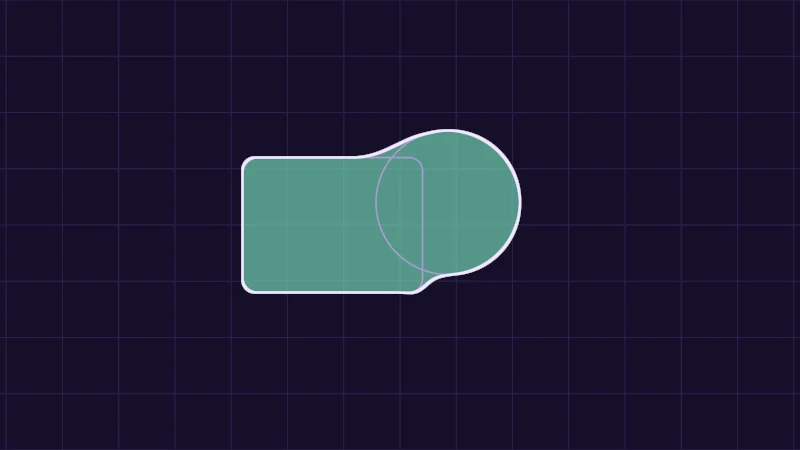
The plain union leaves a sharp crease where two shapes meet. The smooth union rounds it off. It looks scarier than it is, so let’s take it one piece at a time:
is Smoothness k, and it decides how close the shapes get before they melt. is a weight from 0 to 1. It is 1 where is nearer by at least , and 0 where is. It is in between only where the two distances differ by less than . Saturate keeps it between 0 and 1. slides from to as goes from 0 to 1 (GLSL, the language your browser runs, calls it mix).
Away from where the shapes meet, this is the plain union. Where they meet, is at its largest, and subtracting it moves the edge outwards to fill the corner. That little bulge is the whole melt.
Turn on JavaScript to run this demo.
Rendered in Unity 2022.3.22f1 from the Copy for Unity shader, with the settings this demo starts with.
Drag the circle near the box and raise Smoothness k to widen the melted neck. Far from the box, the circle keeps its own edge, as if nothing happened.
Rings and morphs for free
Because is a number like any other, two more tricks need only one small step each.
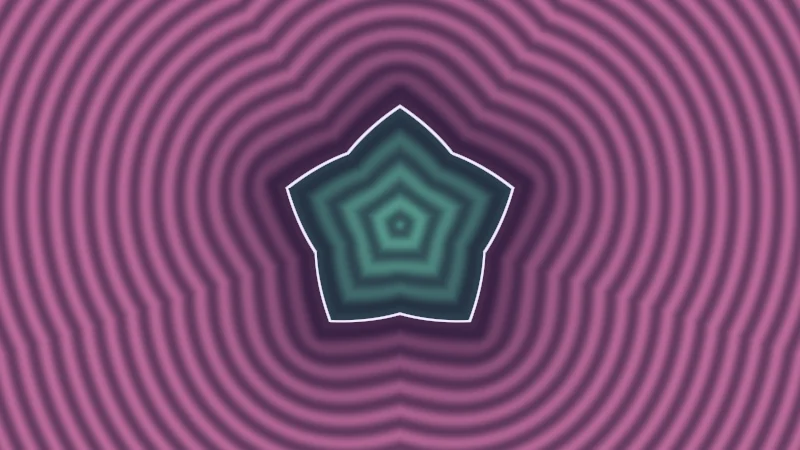
- Rings. Remember the outline rule, , with as half the outline’s width? That rule is itself a new distance, the distance to a band wide around the old edge. You can fill it, glow it or combine it again, and it works for any shape.
- Morphs. blends two distances, and the edge travels from shape A to shape B as goes from 0 to 1.
I have a small confession to make. A blend is no longer the true distance to anything. But where it crosses 0 is still a clean edge, and for drawing a shape, that edge is all that matters.
Turn on JavaScript to run this demo.
Rendered in Unity 2022.3.22f1 from the Copy for Unity shader, with the settings this demo starts with.
// Uses the helper code shown with an earlier figure on this page.

// ----

// Morphing two shapes by blending their distances, and turning the result into a ring.
#include "sdf2d"
#include "diagram"

uniform float _A;     // @select = 0 | Shape A | Circle=0, Box=1, Star=2, Heart=3, Moon=4
uniform float _B;     // @select = 2 | Shape B | Circle=0, Box=1, Star=2, Heart=3, Moon=4
uniform float _Morph; // @range 0 1 0.01 = 0.5 | Morph t | 0 shows shape A, 1 shows shape B.
uniform float _Ring;  // @range 0 0.12 0.005 = 0 | Ring w | Half the ring's thickness. Above 0, the edge becomes a band 2w wide.

float shape(float id, float2 p)
{
    int i = int(id + 0.5);
    if (i == 0) return sdCircle(p, 0.5);
    if (i == 1) return sdRoundedBox(p, float2(0.45, 0.45), 0.05);
    if (i == 2) return sdStar5(p, 0.6, 0.45);
    if (i == 3) return sdHeart((p + float2(0.0, 0.55)) * 0.95) / 0.95;
    return sdMoon(p, 0.3, 0.5, 0.42);
}

float4 shade(float2 uv)
{
    float2 p = centered(uv);
    float d = lerp(shape(_A, p), shape(_B, p), _Morph);
    float fw = fwidth(d);
    if (_Ring > 0.0) d = abs(d) - _Ring;
    return float4(drawField(d, 0.1, fw), 1.0);
}
// Uses the helper code shown with an earlier figure on this page.
// ----
// Morphing two shapes by blending their distances, and turning the result into a ring.
#include "sdf2d"
#include "diagram"
uniform float _A; // @select = 0 | Shape A | Circle=0, Box=1, Star=2, Heart=3, Moon=4
uniform float _B; // @select = 2 | Shape B | Circle=0, Box=1, Star=2, Heart=3, Moon=4
uniform float _Morph; // @range 0 1 0.01 = 0.5 | Morph t | 0 shows shape A, 1 shows shape B.
uniform float _Ring; // @range 0 0.12 0.005 = 0 | Ring w | Half the ring's thickness. Above 0, the edge becomes a band 2w wide.
float shape(float id, vec2 p)
{
int i = int(id + 0.5);
if (i == 0) return sdCircle(p, 0.5);
if (i == 1) return sdRoundedBox(p, vec2(0.45, 0.45), 0.05);
if (i == 2) return sdStar5(p, 0.6, 0.45);
if (i == 3) return sdHeart((p + vec2(0.0, 0.55)) * 0.95) / 0.95;
return sdMoon(p, 0.3, 0.5, 0.42);
}
vec4 shade(vec2 uv)
{
vec2 p = centered(uv);
float d = mix(shape(_A, p), shape(_B, p), _Morph);
float fw = fwidth(d);
if (_Ring > 0.0) d = abs(d) - _Ring;
return vec4(drawField(d, 0.1, fw), 1.0);
}Names in this code (23)
_A- Choice "Shape A".
_B- Choice "Shape B".
_Morph- Slider "Morph t". 0 shows shape A, 1 shows shape B. From 0 to 1, starts at 0.5.
_Ring- Slider "Ring w". Half the ring's thickness. Above 0, the edge becomes a band 2w wide. From 0 to 0.12, starts at 0.
centered- float2 centered(float2 uv). Square coordinates with the origin in the middle: the short side of the picture spans -1..1. (common library)
d- Declared on line 23: float d = lerp(shape(_A, p), shape(_B, p), _Morph);
drawField- float3 drawField(float d, float spacing, float fw). drawDistanceField with an even zero line. (this article's helper code)
fw- Declared on line 24: float fw = fwidth(d);
i- Declared on line 12: int i = int(id + 0.5);
id- A parameter of shape(), line 10: float id.
include- Pulls another file into this one, for example UnityCG.cginc.
lerp- HLSL's blend from a (t = 0) to b (t = 1). GLSL calls it mix.
p- A parameter of shape(), line 10: float2 p.
sdCircle- float sdCircle(float2 p, float r) (sdf2d library)
sdHeart- float sdHeart(float2 p). Heart of height about 1, its tip at the origin. (sdf2d library)
sdMoon- float sdMoon(float2 p, float d, float ra, float rb). Circle of radius ra with a circle of radius rb, d to the right, cut out of it. (sdf2d library)
sdRoundedBox- float sdRoundedBox(float2 p, float2 halfSize, float r) (sdf2d library)
sdStar5- float sdStar5(float2 p, float r, float rf) (sdf2d library)
shade- float4 shade(float2 uv)
shape- float shape(float id, float2 p)
uv- A parameter of shade(), line 20: float2 uv.
abs- abs(x) is x without its minus sign. abs(-0.3) = 0.3.
fwidth- fwidth(v) says how much v changes from this pixel to its neighbours, |dFdx(v)| + |dFdy(v)|. Edges one pixel wide are made with it.
Pick Shape A and Shape B and slide Morph t. Raise Ring w to turn the result into a ring. The stripes bend and bunch up away from the shape, but the edge itself stays clean.
In practice
Shaders draw shapes this way wherever they must stay sharp up close, like eye highlights, pupils, glowing marks on clothing and spell circles. In a Unity shader, usually comes from the mesh UVs (the flat map that places a texture on the mesh). A material slider can drive the morph, so an animation in a VRChat menu can switch the shape. Here’s a small example of my own:
float2 p = (i.uv - 0.5) * 2.0; // -1 to 1
float dA = length(p) - 0.5;
float dB = sdStar5(p, 0.6, 0.45);
float d = lerp(dA, dB, _Morph);
float fill = saturate(0.5 - d / max(fwidth(d), 1e-5));
The first line centres the UVs, so the middle is (0, 0), like in the demos. sdStar5 is a star from Inigo Quilez’s list of 2D shapes (see Credits), and _Morph is a material slider. The last line is the one-pixel soft edge from the next article, and fwidth(d) in it is how much changes from one pixel to the next.
Four little traps to watch for:
- Stretched UVs. If the UVs stretch the surface, for example a wide panel mapped onto a square of UV space, your circle turns into an oval. Scale one axis of to match and it’s round again.
- Resizing. To draw a shape times bigger, divide by and multiply the result by . Then is still measured in the same units, so outline widths and glows keep their size.
- Thin lines far away. A thin outline covers many pixels up close and less than one from across a room, where it flickers. Keep it at least one pixel wide:
w = max(w, 0.5 * fwidth(d)). - Edges inside a choice. Shader code can take one of two paths with
if. When neighbouring pixels take different paths,fwidthgets a wrong answer and the edge breaks up. Work outfwidth(d)before any such choice.
Credits
The 2D shape functions in my shaders and on this site follow Inigo Quilez’s 2D distance functions. The smooth union is his polynomial smooth minimum. His example code is MIT licensed. Thank you, Inigo!
- A signed distance is negative inside, zero on the edge and positive outside.
- Fill, outline and glow are three ways of reading that same number.
- Min, max and a sign flip combine shapes, makes rings, and lerp morphs.