Foundations, part 3
Growing noise from one random number
Smoke, ripples and sparkles without a single texture. Let's grow them all from one random number per grid cell.
The swirling smoke on my witch hat needs no texture. Neither do the ripples and glitter in my glass, or the fine fibres a procedural iris can have. They all grow from one tiny tool, a function that turns a position into a random looking number. Let’s build noise from that tool together, in five small steps. By the end, every piece of the orb below will make sense.
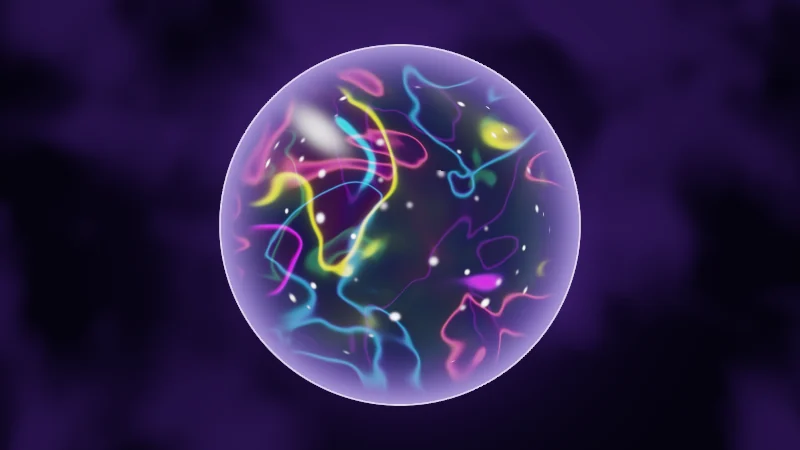
Turn on JavaScript to run this demo.
Rendered in Unity 2022.3.22f1 from the Copy for Unity shader, with the settings this demo starts with.
// Value noise and fbm, after Inigo Quilez (MIT License). hash12 is Dave Hoskins' Hash without Sine (MIT License).

// Fade curve between grid corners. 0: straight, 1: smoothstep, 2: quintic.
float2 nzFade(float2 f, int mode)
{
    if (mode == 0) return f;
    if (mode == 1) return f * f * (3.0 - 2.0 * f);
    return f * f * f * (f * (f * 6.0 - 15.0) + 10.0);
}

// Value noise: one random height per grid corner, blended. Range 0..1.
float nzValue(float2 p, int fade)
{
    float2 i = floor(p), u = nzFade(p - i, fade);
    float a = hash12(i), b = hash12(i + float2(1.0, 0.0));
    float c = hash12(i + float2(0.0, 1.0)), d = hash12(i + float2(1.0, 1.0));
    return lerp(lerp(a, b, u.x), lerp(c, d, u.x), u.y);
}

// fbm: octaves of value noise, divided by the summed strengths so it stays in 0..1.
// Each layer is turned and shifted, so the layers' grids do not line up.
float nzFbm(float2 p, int octaves, float lacunarity, float gain)
{
    const float2x2 turn = float2x2(0.8, 0.6, -0.6, 0.8);
    float sum = 0.0, amp = 0.5, norm = 0.0;
    for (int o = 0; o < 6; o++)
    {
        if (o >= octaves) break;
        sum += amp * nzValue(p, 2);
        norm += amp;
        p = mul(turn, p) * lacunarity + float2(17.1, 9.3);
        amp *= gain;
    }
    return sum / norm;
}

float nzFbm4(float2 p) { return nzFbm(p, 4, 2.03, 0.5); }


// ----

// A glass orb full of rainbow smoke and twinkling stars, made only from hashes, value noise, fbm and cells.
// The orb is a real sphere: drag it to turn it, and the smoke and stars inside turn in 3D.
#include "noise"
#include "ray"

uniform float _Warp;  // @range 0 3 0.01 = 1.5 | Warp | How far a second noise pushes the smoke noise around.
uniform float _Stars; // @range 0 1 0.01 = 0.45 | Stars | Share of the cells that hold a star.

// Inigo Quilez's cosine palette, set up as a smooth rainbow that repeats every 1.
float3 rainbow(float t) { return 0.5 + 0.5 * cos(TAU * (t + float3(0.0, 0.33, 0.67))); }

// fbm in 3D: octaves of 3D value noise, each shifted so their grids do not line up. Range 0..1.
float fbm3(float3 p, int octaves)
{
    float sum = 0.0, amp = 0.5, norm = 0.0;
    for (int o = 0; o < 3; o++)
    {
        if (o >= octaves) break;
        sum += amp * valueNoise3(p);
        norm += amp;
        p = p * 2.03 + float3(17.1, 9.3, 4.7);
        amp *= 0.5;
    }
    return sum / norm;
}

float4 shade(float2 uv)
{
    float2 p = centered(uv);
    float t = _Time.y;
    const float R = 0.8;
    float dOrb = length(p) - R;
    float r = saturate(length(p) / R);

    // Background: dim smoke that drifts upwards. It stays still when the orb turns.
    float2 bq = p * 1.6 + float2(0.0, -0.04 * t);
    float2 bpush = float2(nzFbm(bq * 0.5, 2, 2.03, 0.5), nzFbm(bq * 0.5 + 3.1, 2, 2.03, 0.5));
    float smoke = nzFbm(bq + 0.6 * bpush, 3, 2.03, 0.5);
    float3 col = float3(0.004, 0.003, 0.010) + float3(0.025, 0.010, 0.055) * smoothstep(0.4, 0.8, smoke);
    col += float3(0.20, 0.08, 0.45) * 0.08 * exp(-4.0 * max(dOrb, 0.0));

    // Inside: three slices through the orb, front to back, each cutting the same 3D domain-warped fbm.
    // Each slice point is turned into the orb's own space, so dragging turns the smoke with the glass.
    float3 inside = float3(0.02, 0.01, 0.05) * (0.4 + 0.6 * sqrt(max(1.0 - r * r, 0.0)));
    float3 drift = float3(0.0, -0.08 * t, 0.0);
    for (int k = 1; k <= 3; k++)
    {
        float fk = float(k);
        float3 view = float3(p, (fk - 2.0) * 0.35);
        float within = smoothstep(R, R - 0.12, length(view));
        float3 s = orbitTurn(view, _Pointer.xy) / R * (1.2 + 0.4 * fk) + drift + float3(3.7, 1.9, 0.0) * fk;
        float2 push = float2(fbm3(s, 2), fbm3(s + 5.2, 2));
        float w = fbm3(s + _Warp * float3(push, 0.0), 3);
        float3 hue = rainbow(w * 2.5 + 0.03 * t + 0.2 * fk);
        float fade = (4.0 - fk) / 3.0 * within;
        // Thin bright lines where w crosses evenly spaced levels.
        float band = abs(frac(w * 4.0) - 0.5) / 0.03;
        inside += hue * (exp(-band * band * 0.3) * 0.8 + exp(-band * 0.35) * 0.1) * fade * fade;
        inside += hue * 0.025 * fade * smoothstep(0.3, 0.7, w);
    }

    // Stars: one per 3D cell, but only in some cells, each with its own twinkle. Each star is pushed onto a
    // shell inside the glass, so they slide round with the orb and set behind it at the edge.
    const float SHELL = 0.85 * R;
    float z2 = SHELL * SHELL - dot(p, p);
    if (z2 > 0.0)
    {
        float3 sq = orbitTurn(float3(p, -sqrt(z2)), _Pointer.xy) / R * 5.0;
        float shell = length(sq);
        float3 si = floor(sq), cell = si;
        float f1 = 8.0;
        for (int z = -1; z <= 1; z++)
        for (int y = -1; y <= 1; y++)
        for (int x = -1; x <= 1; x++)
        {
            float3 g = float3(float(x), float(y), float(z));
            float3 c = si + g;
            float3 jitter = float3(hash13(c), hash13(c + 17.1), hash13(c + 31.7)) - 0.5;
            float3 at = c + 0.5 + jitter * 0.8;
            // Only cells the shell passes through hold a star, so stars do not pile up from deeper cells.
            if (abs(length(at) - shell) > 0.5) continue;
            float d = length(normalize(at) * shell - sq);
            if (d < f1) { f1 = d; cell = c; }
        }
        float h = hash13(cell + 7.3);
        float twinkle = 0.55 + 0.45 * sin(1.3 * t + TAU * hash13(cell + 2.1));
        float size = 0.04 + 0.05 * hash13(cell + 4.4);
        float star = exp(-f1 * f1 / (size * size)) * step(1.0 - _Stars, h) * twinkle;
        inside += float3(1.0, 0.92, 1.0) * star * (1.0 + 3.0 * hash13(cell + 9.9)) * smoothstep(0.0, 0.08, z2);
    }

    // The glass: a bright rim where the surface turns away, and one soft highlight. Lights do not turn with the orb.
    float rim = pow(r, 8.0);
    inside = inside * (1.0 - 0.6 * rim) + float3(0.45, 0.35, 1.0) * rim * 0.6;
    float2 hp = mul(rot2(0.7), p - float2(-0.36, 0.42));
    float spot = exp(-(hp.x * hp.x / 0.012 + hp.y * hp.y / 0.0025));
    inside += float3(1.0, 1.0, 1.0) * spot * 0.7;

    col = lerp(col, inside, fillAA(dOrb));
    col += float3(0.75, 0.6, 1.0) * strokeAA(dOrb, 0.006) * 0.8;
    return float4(tonemapACES(col), 1.0);
}
// Value noise and fbm, after Inigo Quilez (MIT License). hash12 is Dave Hoskins' Hash without Sine (MIT License).
// Fade curve between grid corners. 0: straight, 1: smoothstep, 2: quintic.
vec2 nzFade(vec2 f, int mode)
{
if (mode == 0) return f;
if (mode == 1) return f * f * (3.0 - 2.0 * f);
return f * f * f * (f * (f * 6.0 - 15.0) + 10.0);
}
// Value noise: one random height per grid corner, blended. Range 0..1.
float nzValue(vec2 p, int fade)
{
vec2 i = floor(p), u = nzFade(p - i, fade);
float a = hash12(i), b = hash12(i + vec2(1.0, 0.0));
float c = hash12(i + vec2(0.0, 1.0)), d = hash12(i + vec2(1.0, 1.0));
return mix(mix(a, b, u.x), mix(c, d, u.x), u.y);
}
// fbm: octaves of value noise, divided by the summed strengths so it stays in 0..1.
// Each layer is turned and shifted, so the layers' grids do not line up.
float nzFbm(vec2 p, int octaves, float lacunarity, float gain)
{
const mat2 turn = mat2(0.8, 0.6, -0.6, 0.8);
float sum = 0.0, amp = 0.5, norm = 0.0;
for (int o = 0; o < 6; o++)
{
if (o >= octaves) break;
sum += amp * nzValue(p, 2);
norm += amp;
p = (p * turn) * lacunarity + vec2(17.1, 9.3);
amp *= gain;
}
return sum / norm;
}
float nzFbm4(vec2 p) { return nzFbm(p, 4, 2.03, 0.5); }
// ----
// A glass orb full of rainbow smoke and twinkling stars, made only from hashes, value noise, fbm and cells.
// The orb is a real sphere: drag it to turn it, and the smoke and stars inside turn in 3D.
#include "noise"
#include "ray"
uniform float _Warp; // @range 0 3 0.01 = 1.5 | Warp | How far a second noise pushes the smoke noise around.
uniform float _Stars; // @range 0 1 0.01 = 0.45 | Stars | Share of the cells that hold a star.
// Inigo Quilez's cosine palette, set up as a smooth rainbow that repeats every 1.
vec3 rainbow(float t) { return 0.5 + 0.5 * cos(TAU * (t + vec3(0.0, 0.33, 0.67))); }
// fbm in 3D: octaves of 3D value noise, each shifted so their grids do not line up. Range 0..1.
float fbm3(vec3 p, int octaves)
{
float sum = 0.0, amp = 0.5, norm = 0.0;
for (int o = 0; o < 3; o++)
{
if (o >= octaves) break;
sum += amp * valueNoise3(p);
norm += amp;
p = p * 2.03 + vec3(17.1, 9.3, 4.7);
amp *= 0.5;
}
return sum / norm;
}
vec4 shade(vec2 uv)
{
vec2 p = centered(uv);
float t = _Time.y;
const float R = 0.8;
float dOrb = length(p) - R;
float r = saturate(length(p) / R);
// Background: dim smoke that drifts upwards. It stays still when the orb turns.
vec2 bq = p * 1.6 + vec2(0.0, -0.04 * t);
vec2 bpush = vec2(nzFbm(bq * 0.5, 2, 2.03, 0.5), nzFbm(bq * 0.5 + 3.1, 2, 2.03, 0.5));
float smoke = nzFbm(bq + 0.6 * bpush, 3, 2.03, 0.5);
vec3 col = vec3(0.004, 0.003, 0.010) + vec3(0.025, 0.010, 0.055) * smoothstep(0.4, 0.8, smoke);
col += vec3(0.20, 0.08, 0.45) * 0.08 * exp(-4.0 * max(dOrb, 0.0));
// Inside: three slices through the orb, front to back, each cutting the same 3D domain-warped fbm.
// Each slice point is turned into the orb's own space, so dragging turns the smoke with the glass.
vec3 inside = vec3(0.02, 0.01, 0.05) * (0.4 + 0.6 * sqrt(max(1.0 - r * r, 0.0)));
vec3 drift = vec3(0.0, -0.08 * t, 0.0);
for (int k = 1; k <= 3; k++)
{
float fk = float(k);
vec3 view = vec3(p, (fk - 2.0) * 0.35);
float within = hlslSmoothstep(R, R - 0.12, length(view));
vec3 s = orbitTurn(view, _Pointer.xy) / R * (1.2 + 0.4 * fk) + drift + vec3(3.7, 1.9, 0.0) * fk;
vec2 push = vec2(fbm3(s, 2), fbm3(s + 5.2, 2));
float w = fbm3(s + _Warp * vec3(push, 0.0), 3);
vec3 hue = rainbow(w * 2.5 + 0.03 * t + 0.2 * fk);
float fade = (4.0 - fk) / 3.0 * within;
// Thin bright lines where w crosses evenly spaced levels.
float band = abs(fract(w * 4.0) - 0.5) / 0.03;
inside += hue * (exp(-band * band * 0.3) * 0.8 + exp(-band * 0.35) * 0.1) * fade * fade;
inside += hue * 0.025 * fade * smoothstep(0.3, 0.7, w);
}
// Stars: one per 3D cell, but only in some cells, each with its own twinkle. Each star is pushed onto a
// shell inside the glass, so they slide round with the orb and set behind it at the edge.
const float SHELL = 0.85 * R;
float z2 = SHELL * SHELL - dot(p, p);
if (z2 > 0.0)
{
vec3 sq = orbitTurn(vec3(p, -sqrt(z2)), _Pointer.xy) / R * 5.0;
float shell = length(sq);
vec3 si = floor(sq), cell = si;
float f1 = 8.0;
for (int z = -1; z <= 1; z++)
for (int y = -1; y <= 1; y++)
for (int x = -1; x <= 1; x++)
{
vec3 g = vec3(float(x), float(y), float(z));
vec3 c = si + g;
vec3 jitter = vec3(hash13(c), hash13(c + 17.1), hash13(c + 31.7)) - 0.5;
vec3 at = c + 0.5 + jitter * 0.8;
// Only cells the shell passes through hold a star, so stars do not pile up from deeper cells.
if (abs(length(at) - shell) > 0.5) continue;
float d = length(normalize(at) * shell - sq);
if (d < f1) { f1 = d; cell = c; }
}
float h = hash13(cell + 7.3);
float twinkle = 0.55 + 0.45 * sin(1.3 * t + TAU * hash13(cell + 2.1));
float size = 0.04 + 0.05 * hash13(cell + 4.4);
float star = exp(-f1 * f1 / (size * size)) * step(1.0 - _Stars, h) * twinkle;
inside += vec3(1.0, 0.92, 1.0) * star * (1.0 + 3.0 * hash13(cell + 9.9)) * smoothstep(0.0, 0.08, z2);
}
// The glass: a bright rim where the surface turns away, and one soft highlight. Lights do not turn with the orb.
float rim = pow(r, 8.0);
inside = inside * (1.0 - 0.6 * rim) + vec3(0.45, 0.35, 1.0) * rim * 0.6;
vec2 hp = ((p - vec2(-0.36, 0.42)) * rot2(0.7));
float spot = exp(-(hp.x * hp.x / 0.012 + hp.y * hp.y / 0.0025));
inside += vec3(1.0, 1.0, 1.0) * spot * 0.7;
col = mix(col, inside, fillAA(dOrb));
col += vec3(0.75, 0.6, 1.0) * strokeAA(dOrb, 0.006) * 0.8;
return vec4(tonemapACES(col), 1.0);
}Names in this code (80)
_Pointer- Where the reader dragged, from (0, 0) at the bottom left to (1, 1) at the top right. xy is the first handle and zw a second one; in Unity it is the Pointer material setting.
_Stars- Slider "Stars". Share of the cells that hold a star. From 0 to 1, starts at 0.45.
_Time- Time since the level loaded, from Unity. _Time.y is seconds.
_Warp- Slider "Warp". How far a second noise pushes the smoke noise around. From 0 to 3, starts at 1.5.
at- Declared on line 79: float3 at = c + 0.5 + jitter * 0.8;
band- Declared on line 57: float band = abs(frac(w * 4.0) - 0.5) / 0.03;
bpush- Declared on line 37: float2 bpush = float2(nzFbm(bq * 0.5, 2, 2.03, 0.5), nzFbm(bq * 0.5 + 3.1, 2, 2.03, 0.5));
bq- Declared on line 36: float2 bq = p * 1.6 + float2(0.0, -0.04 * t);
c- Declared on line 77: float3 c = si + g;
centered- float2 centered(float2 uv). Square coordinates with the origin in the middle: the short side of the picture spans -1..1. (common library)
col- Declared on line 39: float3 col = float3(0.004, 0.003, 0.010) + float3(0.025, 0.010, 0.055) * smoothstep(0.4, 0.8, smoke);
d- Declared on line 82: float d = length(normalize(at) * shell - sq);
dOrb- Declared on line 32: float dOrb = length(p) - R;
drift- Declared on line 45: float3 drift = float3(0.0, -0.08 * t, 0.0);
f1- Declared on line 71: float f1 = 8.0;
fade- Declared on line 55: float fade = (4.0 - fk) / 3.0 * within;
fbm3- float fbm3(float3 p, int octaves). fbm in 3D: octaves of 3D value noise, each shifted so their grids do not line up. Range 0..1.
fillAA- float fillAA(float d). Anti-aliased coverage of a signed distance: 1 inside, 0 outside, a one pixel ramp at the edge. (common library)
fk- Declared on line 48: float fk = float(k);
float2x2- A 2 by 2 matrix in HLSL, four numbers in two rows of two. GLSL calls it mat2.
frac- The part after the decimal point, in HLSL. GLSL calls it fract.
g- Declared on line 76: float3 g = float3(float(x), float(y), float(z));
h- Declared on line 85: float h = hash13(cell + 7.3);
hash12- float hash12(float2 p) (common library)
hash13- float hash13(float3 p3). 3D value noise, for smoke and other things that change over time. (noise library)
hp- Declared on line 95: float2 hp = mul(rot2(0.7), p - float2(-0.36, 0.42));
hue- Declared on line 54: float3 hue = rainbow(w * 2.5 + 0.03 * t + 0.2 * fk);
include- Pulls another file into this one, for example UnityCG.cginc.
inside- Declared on line 44: float3 inside = float3(0.02, 0.01, 0.05) * (0.4 + 0.6 * sqrt(max(1.0 - r * r, 0.0)));
jitter- Declared on line 78: float3 jitter = float3(hash13(c), hash13(c + 17.1), hash13(c + 31.7)) - 0.5;
lerp- HLSL's blend from a (t = 0) to b (t = 1). GLSL calls it mix.
mul- Matrix times vector or matrix times matrix in HLSL. mul(M, v) applies M to v.
nzFade- float2 nzFade(float2 f, int mode). Fade curve between grid corners. 0: straight, 1: smoothstep, 2: quintic. (this article's helper code)
nzFbm- float nzFbm(float2 p, int octaves, float lacunarity, float gain). fbm: octaves of value noise, divided by the summed strengths so it stays in 0..1. Each layer is turned and shifted, so the layers' grids do not line up. (this article's helper code)
nzFbm4- float nzFbm4(float2 p) (this article's helper code)
nzValue- float nzValue(float2 p, int fade). Value noise: one random height per grid corner, blended. Range 0..1. (this article's helper code)
octaves- A parameter of fbm3(), line 13: int octaves.
orbitTurn- float3 orbitTurn(float3 p, float2 pointer01). The object's own coordinates of a point p seen in view space, after the reader turned the object. The front of the object follows the drag: right moves it right, up tilts it up. (ray library)
p- A parameter of fbm3(), line 13: float3 p.
push- Declared on line 52: float2 push = float2(fbm3(s, 2), fbm3(s + 5.2, 2));
r- Declared on line 33: float r = saturate(length(p) / R);
R- Declared on line 31: const float R = 0.8;
rainbow- float3 rainbow(float t). Inigo Quilez's cosine palette, set up as a smooth rainbow that repeats every 1.
rim- Declared on line 93: float rim = pow(r, 8.0);
rot2- float2x2 rot2(float a). Turns a point by a radians, counterclockwise: mul(rot2(a), p). (common library)
s- Declared on line 51: float3 s = orbitTurn(view, _Pointer.xy) / R * (1.2 + 0.4 * fk) + drift + float3(3.7, 1.9, 0.0) * fk;
saturate- An HLSL function that clamps a value between 0 and 1.
shade- float4 shade(float2 uv)
shell- Declared on line 69: float shell = length(sq);
SHELL- Declared on line 64: const float SHELL = 0.85 * R;
si- Declared on line 70: float3 si = floor(sq), cell = si;
size- Declared on line 87: float size = 0.04 + 0.05 * hash13(cell + 4.4);
smoke- Declared on line 38: float smoke = nzFbm(bq + 0.6 * bpush, 3, 2.03, 0.5);
spot- Declared on line 96: float spot = exp(-(hp.x * hp.x / 0.012 + hp.y * hp.y / 0.0025));
sq- Declared on line 68: float3 sq = orbitTurn(float3(p, -sqrt(z2)), _Pointer.xy) / R * 5.0;
star- Declared on line 88: float star = exp(-f1 * f1 / (size * size)) * step(1.0 - _Stars, h) * twinkle;
strokeAA- float strokeAA(float d, float width). Anti-aliased line of a given width (same units as d) around the zero line of d. (common library)
sum- Declared on line 15: float sum = 0.0, amp = 0.5, norm = 0.0;
t- A parameter of rainbow(), line 10: float t.
tonemapACES- float3 tonemapACES(float3 x). Rolls HDR values above 1 off softly instead of clipping them. (common library)
twinkle- Declared on line 86: float twinkle = 0.55 + 0.45 * sin(1.3 * t + TAU * hash13(cell + 2.1));
uv- A parameter of shade(), line 27: float2 uv.
valueNoise3- float valueNoise3(float3 p) (noise library)
view- Declared on line 49: float3 view = float3(p, (fk - 2.0) * 0.35);
w- Declared on line 53: float w = fbm3(s + _Warp * float3(push, 0.0), 3);
within- Declared on line 50: float within = smoothstep(R, R - 0.12, length(view));
z2- Declared on line 65: float z2 = SHELL * SHELL - dot(p, p);
abs- abs(x) is x without its minus sign. abs(-0.3) = 0.3.
cos- cos(a) is the cosine of the angle a, in radians.
dot- dot(a, b) multiplies matching parts and adds them up. For unit vectors it is the cosine of the angle between them.
exp- exp(x) is e to the power x. exp(0) = 1, and it falls towards 0 as x goes negative.
floor- floor(x) rounds down to the largest whole number not above x. floor(2.7) = 2, floor(-0.5) = -1.
length- length(v) says how long the vector v is, sqrt(x² + y²).
max- max(a, b) picks the larger of the two.
normalize- normalize(v) keeps the direction of v and makes its length 1.
pow- pow(x, y) is x to the power y, and undefined for x < 0.
sin- sin(a) is the sine of the angle a, in radians.
smoothstep- smoothstep(e0, e1, x) is 0 below e0, 1 above e1, and an S curve t² (3 - 2t) in between, where t = (x - e0) / (e1 - e0). GLSL leaves e0 >= e1 undefined.
sqrt- sqrt(x) is the square root of x, undefined for x < 0.
step- A hard switch. step(edge, x) is 0 when x < edge, otherwise 1.
Here’s where this is going. The smoke is layered noise, the streaks are noise pushed by noise, and the stars sit in cells. Drag the orb to turn it. The noise inside is 3D, so the streaks and stars turn with the glass. Slide Warp to 0 and watch the streaks relax into smooth loops.
One random number per cell
The first puzzle is that a shader has no dice, and every pixel is worked out on its own. Instead, it uses a hash, a few multiplications and additions that keep only the digits after the decimal point. That scrambles the input into a random looking number. The same input always gives the same output, so the pattern holds still.
Feed a hash every pixel position and you get TV static. To calm it down, let’s cut the picture into a grid of square cells and hash the number of each cell instead:
is the position, measured so the short side of the picture is 1. is how many cells fit across it (Cells N). The brackets round down, so every pixel in one cell gets the same input.
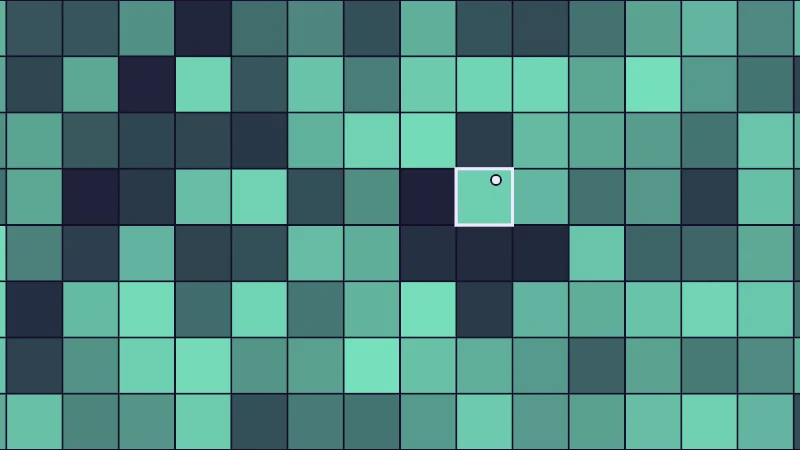
Turn on JavaScript to run this demo.
Rendered in Unity 2022.3.22f1 from the Copy for Unity shader, with the settings this demo starts with.
// A hash turns a position into a random looking number. Fed every pixel it gives static; fed the cell number, one value per cell.
#include "diagram"

uniform float _Input; // @select = 1 | Hash of | Every pixel=0, Cell number=1 | What the hash is given as its input.
uniform float _Cells; // @range 2 24 1 = 8 | Cells N | How many grid cells fit across the short side.

float4 shade(float2 uv)
{
    float2 p = centered(uv);
    float2 g = p * 0.5 * _Cells;
    float2 cell = floor(g);
    float h = _Input < 0.5 ? hash12(floor(uv * _ScreenParams.xy)) : hash12(cell);

    float3 col = tint(themeSurface(), series1(), 0.08 + 0.85 * h);
    if (_Input > 0.5)
    {
        // Cell borders, and the cell under the pointer outlined.
        float2 e = abs(g - round(g)) / (0.5 * _Cells * pixelSize());
        col = lerp(col, themeSurface(), saturate(1.5 - min(e.x, e.y)));
        float2 q = pointerCentered() * 0.5 * _Cells;
        float2 pc = floor(q);
        float2 local = abs(g - (pc + 0.5)) - 0.5;
        float box = max(local.x, local.y) * 2.0 / _Cells;
        col = strokeShape(col, box, 3.0, themeInk());
        float cellPx = 2.0 / (_Cells * pixelSize());
        col = drawDot(col, p, pointerCentered(), min(4.0, 0.15 * cellPx), themeInk());
    }
    return float4(col, 1.0);
}
// A hash turns a position into a random looking number. Fed every pixel it gives static; fed the cell number, one value per cell.
#include "diagram"
uniform float _Input; // @select = 1 | Hash of | Every pixel=0, Cell number=1 | What the hash is given as its input.
uniform float _Cells; // @range 2 24 1 = 8 | Cells N | How many grid cells fit across the short side.
vec4 shade(vec2 uv)
{
vec2 p = centered(uv);
vec2 g = p * 0.5 * _Cells;
vec2 cell = floor(g);
float h = _Input < 0.5 ? hash12(floor(uv * _ScreenParams.xy)) : hash12(cell);
vec3 col = tint(themeSurface(), series1(), 0.08 + 0.85 * h);
if (_Input > 0.5)
{
// Cell borders, and the cell under the pointer outlined.
vec2 e = abs(g - round(g)) / (0.5 * _Cells * pixelSize());
col = mix(col, themeSurface(), saturate(1.5 - min(e.x, e.y)));
vec2 q = pointerCentered() * 0.5 * _Cells;
vec2 pc = floor(q);
vec2 local = abs(g - (pc + 0.5)) - 0.5;
float box = max(local.x, local.y) * 2.0 / _Cells;
col = strokeShape(col, box, 3.0, themeInk());
float cellPx = 2.0 / (_Cells * pixelSize());
col = drawDot(col, p, pointerCentered(), min(4.0, 0.15 * cellPx), themeInk());
}
return vec4(col, 1.0);
}Names in this code (34)
_Cells- Slider "Cells N". How many grid cells fit across the short side. From 2 to 24, starts at 8.
_Input- Choice "Hash of". What the hash is given as its input.
_ScreenParams- The size of the render target from Unity, with x the width and y the height in pixels.
box- Declared on line 23: float box = max(local.x, local.y) * 2.0 / _Cells;
cell- Declared on line 11: float2 cell = floor(g);
cellPx- Declared on line 25: float cellPx = 2.0 / (_Cells * pixelSize());
centered- float2 centered(float2 uv). Square coordinates with the origin in the middle: the short side of the picture spans -1..1. (common library)
col- Declared on line 14: float3 col = tint(themeSurface(), series1(), 0.08 + 0.85 * h);
drawDot- float3 drawDot(float3 col, float2 p, float2 c, float radiusPx, float3 ink). A dot with a ring in the surface color around it. (diagram library)
e- Declared on line 18: float2 e = abs(g - round(g)) / (0.5 * _Cells * pixelSize());
g- Declared on line 10: float2 g = p * 0.5 * _Cells;
h- Declared on line 12: float h = _Input < 0.5 ? hash12(floor(uv * _ScreenParams.xy)) : hash12(cell);
hash12- float hash12(float2 p) (common library)
include- Pulls another file into this one, for example UnityCG.cginc.
lerp- HLSL's blend from a (t = 0) to b (t = 1). GLSL calls it mix.
local- Declared on line 22: float2 local = abs(g - (pc + 0.5)) - 0.5;
p- Declared on line 9: float2 p = centered(uv);
pc- Declared on line 21: float2 pc = floor(q);
pixelSize- float pixelSize() (common library)
pointerCentered- float2 pointerCentered(). The pointer (or the _Pointer material setting in Unity) in the same coordinates as centered(). (common library)
q- Declared on line 20: float2 q = pointerCentered() * 0.5 * _Cells;
saturate- An HLSL function that clamps a value between 0 and 1.
series1- float3 series1() (common library)
shade- float4 shade(float2 uv)
strokeShape- float3 strokeShape(float3 col, float d, float widthPx, float3 ink) (diagram library)
themeInk- float3 themeInk() (common library)
themeSurface- float3 themeSurface(). The dusk stage colors, in linear light. Series colors are used in this order: mint, pink, butter. (common library)
tint- float3 tint(float3 a, float3 b, float t). Blends two colors in steps that look even to the eye (in sRGB), for value ramps such as distance bands. Edges and coverage still blend with lerp, in linear light, as light really adds up. (common library)
uv- A parameter of shade(), line 7: float2 uv.
abs- abs(x) is x without its minus sign. abs(-0.3) = 0.3.
floor- floor(x) rounds down to the largest whole number not above x. floor(2.7) = 2, floor(-0.5) = -1.
max- max(a, b) picks the larger of the two.
min- min(a, b) picks the smaller of the two.
round- round(x) is the nearest whole number to x.
Drag the point around. Wherever it goes, the whole cell under it shares one number. Then switch Hash of to Every pixel and the static comes back.
Need more than one random number in a cell? Add a different fixed number to the cell’s number before each hash, say one for a star’s size and another for its twinkle. Each one is a fresh roll.
Rolling hills between random heights
Static is too harsh for smoke. Value noise smooths things out by putting a random height on every grid corner and blending between them. Along one line:
and are the hashed heights of the corners to the left and right. is how far the pixel is between them, from 0 to 1. Lerp (linear interpolation; lerp in Unity and in the demos) slides from to as goes from 0 to 1. And is the fade, the smoothstep curve you may know from the smooth edges lesson. In 2D, the same blend mixes four corners.
Smoothstep arrives flat at each corner, so the noise has no kinks. Now a subtle bit, so take it slow. Light also shows how fast the slope bends, and smoothstep still bends sharply at the corners. The quintic fade, from Ken Perlin’s improved noise, bends smoothly there too. That’s why my glass uses it for its ripples.
Turn on JavaScript to run this demo.
- f1(x):
lerp(h(floor(x)), h(floor(x) + 1.0), frac(x)) - f2(x):
lerp(h(floor(x)), h(floor(x) + 1.0), smoothstep(0.0, 1.0, frac(x))) - f3(x):
lerp(h(floor(x)), h(floor(x) + 1.0), quintic(frac(x)))
#define PLOT_X_RANGE float2(0.7, 3.5)
#define PLOT_Y_RANGE float2(-0.05, 1.05)
#define PLOT_TICK float2(0.5, 0.2)
#include "plot"
float h(float i) { return hash12(float2(i, 3.7)); } float quintic(float f) { return f * f * f * (f * (f * 6.0 - 15.0) + 10.0); }
float curve0(float x) { return lerp(h(floor(x)), h(floor(x) + 1.0), frac(x)); }
float curve1(float x) { return lerp(h(floor(x)), h(floor(x) + 1.0), smoothstep(0.0, 1.0, frac(x))); }
float curve2(float x) { return lerp(h(floor(x)), h(floor(x) + 1.0), quintic(frac(x))); }
float4 shade(float2 uv)
{
    float2 p = plotCoord(uv);
    float3 col = plotBackground(p);
    float h = plotPixel().x;
    col = plotGuideX(col, p, 1.0, themeMuted());
    col = plotGuideX(col, p, 2.0, themeMuted());
    col = plotGuideX(col, p, 3.0, themeMuted());
    col = plotCurveStyled(col, p, curve0(p.x), plotSlope(curve0(p.x - h), curve0(p.x), curve0(p.x + h), h), series1(), 0);
    col = plotCurveStyled(col, p, curve1(p.x), plotSlope(curve1(p.x - h), curve1(p.x), curve1(p.x + h), h), series2(), 1);
    col = plotCurveStyled(col, p, curve2(p.x), plotSlope(curve2(p.x - h), curve2(p.x), curve2(p.x + h), h), series3(), 2);
    return float4(col, 1.0);
}#define PLOT_X_RANGE vec2(0.7, 3.5)
#define PLOT_Y_RANGE vec2(-0.05, 1.05)
#define PLOT_TICK vec2(0.5, 0.2)
#include "plot"
float h(float i) { return hash12(vec2(i, 3.7)); } float quintic(float f) { return f * f * f * (f * (f * 6.0 - 15.0) + 10.0); }
float curve0(float x) { return mix(h(floor(x)), h(floor(x) + 1.0), fract(x)); }
float curve1(float x) { return mix(h(floor(x)), h(floor(x) + 1.0), smoothstep(0.0, 1.0, fract(x))); }
float curve2(float x) { return mix(h(floor(x)), h(floor(x) + 1.0), quintic(fract(x))); }
vec4 shade(vec2 uv)
{
vec2 p = plotCoord(uv);
vec3 col = plotBackground(p);
float h = plotPixel().x;
col = plotGuideX(col, p, 1.0, themeMuted());
col = plotGuideX(col, p, 2.0, themeMuted());
col = plotGuideX(col, p, 3.0, themeMuted());
col = plotCurveStyled(col, p, curve0(p.x), plotSlope(curve0(p.x - h), curve0(p.x), curve0(p.x + h), h), series1(), 0);
col = plotCurveStyled(col, p, curve1(p.x), plotSlope(curve1(p.x - h), curve1(p.x), curve1(p.x + h), h), series2(), 1);
col = plotCurveStyled(col, p, curve2(p.x), plotSlope(curve2(p.x - h), curve2(p.x), curve2(p.x + h), h), series3(), 2);
return vec4(col, 1.0);
}Names in this code (27)
col- Declared on line 12: float3 col = plotBackground(p);
curve0- float curve0(float x)
curve1- float curve1(float x)
curve2- float curve2(float x)
frac- The part after the decimal point, in HLSL. GLSL calls it fract.
h- float h(float i)
hash12- float hash12(float2 p) (common library)
i- A parameter of h(), line 5: float i.
include- Pulls another file into this one, for example UnityCG.cginc.
lerp- HLSL's blend from a (t = 0) to b (t = 1). GLSL calls it mix.
p- Declared on line 11: float2 p = plotCoord(uv);
plotBackground- float3 plotBackground(float2 p) (plot library)
plotCoord- float2 plotCoord(float2 uv) (plot library)
plotCurveStyled- float3 plotCurveStyled(float3 col, float2 p, float y, float slope, float3 ink, int style). The same line, solid (style 0), dashed (1) or dotted (2), so curves differ by more than color. (plot library)
plotGuideX- float3 plotGuideX(float3 col, float2 p, float x, float3 ink). Dashed vertical guide at x. (plot library)
plotPixel- float2 plotPixel(). Size of one pixel in data units. (plot library)
plotSlope- float plotSlope(float before, float here, float after, float h). f'(x) from f one pixel before, at and after x. Where f jumps (a step, a saw tooth), one side changes by many pixels and the other hardly at all: then the gentler side wins, so the line ends on each side of the jump instead of smearing up and down through it. (plot library)
series1- float3 series1() (common library)
series2- float3 series2() (common library)
series3- float3 series3() (common library)
shade- float4 shade(float2 uv)
themeMuted- float3 themeMuted() (common library)
uv- A parameter of shade(), line 9: float2 uv.
x- A parameter of curve0(), line 6: float x.
define- With #define NAME value, every NAME in the code is replaced by value before compiling.
floor- floor(x) rounds down to the largest whole number not above x. floor(2.7) = 2, floor(-0.5) = -1.
smoothstep- smoothstep(e0, e1, x) is 0 below e0, 1 above e1, and an S curve t² (3 - 2t) in between, where t = (x - e0) / (e1 - e0). GLSL leaves e0 >= e1 undefined.
All three curves meet the corner heights at the whole numbers, marked with thin lines. The straight blend turns sharply there, while the other two glide in flat.
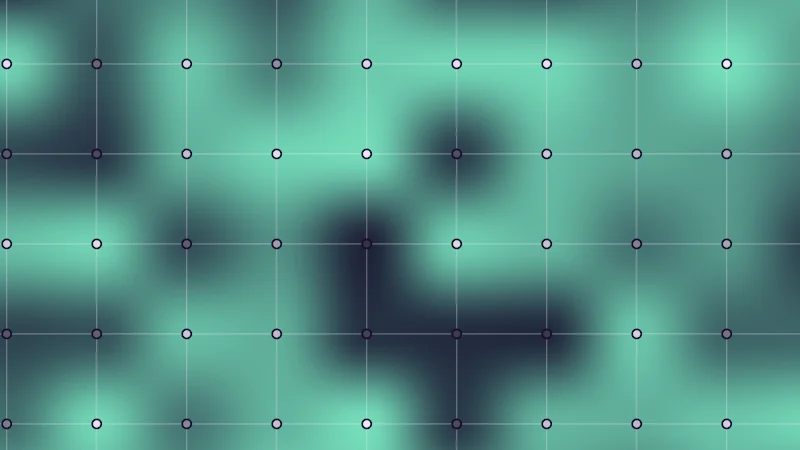
Turn on JavaScript to run this demo.
Rendered in Unity 2022.3.22f1 from the Copy for Unity shader, with the settings this demo starts with.
// Uses the helper code shown with an earlier figure on this page.

// ----

// Value noise with the grid it comes from, optionally lit as a bumpy surface.
#include "diagram"

uniform float _Fade;  // @select = 1 | Fade | Straight=0, Smoothstep=1, Quintic=2 | The curve that blends between the corners.
uniform float _Light; // @toggle = 0 | Light it | Shade the noise as if it were a bumpy surface lit from the top left.
uniform float _Grid;  // @toggle = 1 | Grid | Show the grid cells and the random height on each corner.

static const float SCALE = 2.5;
static const float2 SHIFT = float2(0.37, 0.21);

float noiseAt(float2 g) { return nzValue(g, int(_Fade + 0.5)); }

float4 shade(float2 uv)
{
    float2 p = centered(uv);
    float2 g = p * SCALE + SHIFT;
    float n = noiseAt(g);

    float3 col;
    if (_Light > 0.5)
    {
        // Slope from two extra samples, turned into a surface direction and lit with soft wrap light.
        float e = 0.002;
        float nx = noiseAt(g + float2(e, 0.0)), ny = noiseAt(g + float2(0.0, e));
        float3 normal = normalize(float3(-(nx - n) / e, -(ny - n) / e, 1.2));
        float lit = 0.5 + 0.5 * dot(normal, normalize(float3(-0.6, 0.6, 0.55)));
        float3 shadow = tint(float3(0.0, 0.0, 0.0), series1(), 0.3);
        float3 light = tint(series1(), float3(1.0, 1.0, 1.0), 0.4);
        col = tint(shadow, light, lit);
    }
    else
    {
        col = tint(themeSurface(), series1(), 0.08 + 0.85 * saturate(n));
    }

    if (_Grid > 0.5)
    {
        float ps = pixelSize() * SCALE;
        float2 e = abs(g - round(g)) / ps;
        col = lerp(col, tint(col, themeInk(), 0.35), saturate(1.0 - min(e.x, e.y)));
        float2 c = round(g);
        float2 a = (c - SHIFT) / SCALE;
        col = drawDot(col, p, a, 3.5, tint(themeSurface(), themeInk(), 0.15 + 0.85 * hash12(c)));
    }
    return float4(col, 1.0);
}
// Uses the helper code shown with an earlier figure on this page.
// ----
// Value noise with the grid it comes from, optionally lit as a bumpy surface.
#include "diagram"
uniform float _Fade; // @select = 1 | Fade | Straight=0, Smoothstep=1, Quintic=2 | The curve that blends between the corners.
uniform float _Light; // @toggle = 0 | Light it | Shade the noise as if it were a bumpy surface lit from the top left.
uniform float _Grid; // @toggle = 1 | Grid | Show the grid cells and the random height on each corner.
const float SCALE = 2.5;
const vec2 SHIFT = vec2(0.37, 0.21);
float noiseAt(vec2 g) { return nzValue(g, int(_Fade + 0.5)); }
vec4 shade(vec2 uv)
{
vec2 p = centered(uv);
vec2 g = p * SCALE + SHIFT;
float n = noiseAt(g);
vec3 col;
if (_Light > 0.5)
{
// Slope from two extra samples, turned into a surface direction and lit with soft wrap light.
float e = 0.002;
float nx = noiseAt(g + vec2(e, 0.0)), ny = noiseAt(g + vec2(0.0, e));
vec3 normal = normalize(vec3(-(nx - n) / e, -(ny - n) / e, 1.2));
float lit = 0.5 + 0.5 * dot(normal, normalize(vec3(-0.6, 0.6, 0.55)));
vec3 shadow = tint(vec3(0.0, 0.0, 0.0), series1(), 0.3);
vec3 light = tint(series1(), vec3(1.0, 1.0, 1.0), 0.4);
col = tint(shadow, light, lit);
}
else
{
col = tint(themeSurface(), series1(), 0.08 + 0.85 * saturate(n));
}
if (_Grid > 0.5)
{
float ps = pixelSize() * SCALE;
vec2 e = abs(g - round(g)) / ps;
col = mix(col, tint(col, themeInk(), 0.35), saturate(1.0 - min(e.x, e.y)));
vec2 c = round(g);
vec2 a = (c - SHIFT) / SCALE;
col = drawDot(col, p, a, 3.5, tint(themeSurface(), themeInk(), 0.15 + 0.85 * hash12(c)));
}
return vec4(col, 1.0);
}Names in this code (38)
_Fade- Choice "Fade". The curve that blends between the corners.
_Grid- Switch "Grid". Show the grid cells and the random height on each corner.
_Light- Switch "Light it". Shade the noise as if it were a bumpy surface lit from the top left.
a- Declared on line 42: float2 a = (c - SHIFT) / SCALE;
c- Declared on line 41: float2 c = round(g);
centered- float2 centered(float2 uv). Square coordinates with the origin in the middle: the short side of the picture spans -1..1. (common library)
col- Declared on line 19: float3 col;
drawDot- float3 drawDot(float3 col, float2 p, float2 c, float radiusPx, float3 ink). A dot with a ring in the surface color around it. (diagram library)
e- Declared on line 23: float e = 0.002;
g- A parameter of noiseAt(), line 11: float2 g.
hash12- float hash12(float2 p) (common library)
include- Pulls another file into this one, for example UnityCG.cginc.
lerp- HLSL's blend from a (t = 0) to b (t = 1). GLSL calls it mix.
light- Declared on line 28: float3 light = tint(series1(), float3(1.0, 1.0, 1.0), 0.4);
lit- Declared on line 26: float lit = 0.5 + 0.5 * dot(normal, normalize(float3(-0.6, 0.6, 0.55)));
n- Declared on line 17: float n = noiseAt(g);
noiseAt- float noiseAt(float2 g)
normal- Declared on line 25: float3 normal = normalize(float3(-(nx - n) / e, -(ny - n) / e, 1.2));
nx- Declared on line 24: float nx = noiseAt(g + float2(e, 0.0)), ny = noiseAt(g + float2(0.0, e));
nzValue- float nzValue(float2 p, int fade). Value noise: one random height per grid corner, blended. Range 0..1. (this article's helper code)
p- Declared on line 15: float2 p = centered(uv);
pixelSize- float pixelSize() (common library)
ps- Declared on line 38: float ps = pixelSize() * SCALE;
saturate- An HLSL function that clamps a value between 0 and 1.
SCALE- Declared on line 8: static const float SCALE = 2.5;
series1- float3 series1() (common library)
shade- float4 shade(float2 uv)
shadow- Declared on line 27: float3 shadow = tint(float3(0.0, 0.0, 0.0), series1(), 0.3);
SHIFT- Declared on line 9: static const float2 SHIFT = float2(0.37, 0.21);
themeInk- float3 themeInk() (common library)
themeSurface- float3 themeSurface(). The dusk stage colors, in linear light. Series colors are used in this order: mint, pink, butter. (common library)
tint- float3 tint(float3 a, float3 b, float t). Blends two colors in steps that look even to the eye (in sRGB), for value ramps such as distance bands. Edges and coverage still blend with lerp, in linear light, as light really adds up. (common library)
uv- A parameter of shade(), line 13: float2 uv.
abs- abs(x) is x without its minus sign. abs(-0.3) = 0.3.
dot- dot(a, b) multiplies matching parts and adds them up. For unit vectors it is the cosine of the angle between them.
min- min(a, b) picks the smaller of the two.
normalize- normalize(v) keeps the direction of v and makes its length 1.
round- round(x) is the nearest whole number to x.
Each dot’s shade is its corner’s random height. Now turn off Grid, turn on Light it and try each Fade. Straight shows creases, Smoothstep faint lines, and Quintic none. Light is picky like that.
Stacking up detail with fbm
Real smoke has big shapes with smaller wisps on top, so let’s stack noise the same way. fbm (fractional Brownian motion, a big name for layered noise) adds several layers of noise, called octaves:
is the value noise from the last section. Each term is one octave, and Octaves sets how many. is the lacunarity. Multiplying the position by fits times as many blobs in the same space, so each layer is times finer. is the gain, and it makes each layer times as strong as the one before. Dividing by the sum of the strengths keeps the result between 0 and 1.
There’s one last detail. Each layer is also shifted and turned by about 37 degrees, as Inigo Quilez does, so the layers’ grids never line up.
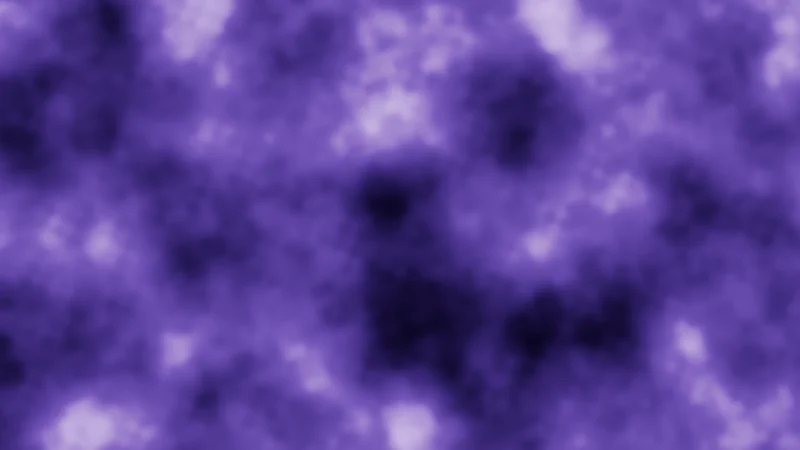
Turn on JavaScript to run this demo.
Rendered in Unity 2022.3.22f1 from the Copy for Unity shader, with the settings this demo starts with.
// Uses the helper code shown with an earlier figure on this page.

// ----

// fbm: layers of value noise, each finer and weaker than the last, added up.

uniform float _Octaves; // @range 1 6 1 = 4 | Octaves | How many layers of noise are added.
uniform float _Lac;     // @range 1.5 2.5 0.01 = 2.03 | Lacunarity L | How much finer each layer is than the one before.
uniform float _Gain;    // @range 0.3 0.7 0.01 = 0.5 | Gain g | How much weaker each layer is than the one before.

static const float SCALE = 2.2;

// nzFbm, but a layer finer than a pixel fades to the middle value instead of turning into grain.
float fbmNoGrain(float2 p, int octaves, float lacunarity, float gain)
{
    const float2x2 turn = float2x2(0.8, 0.6, -0.6, 0.8);
    float sum = 0.0, amp = 0.5, norm = 0.0, cellsPerPixel = SCALE * pixelSize();
    for (int o = 0; o < 6; o++)
    {
        if (o >= octaves) break;
        float keep = 1.0 - smoothstep(0.25, 0.5, cellsPerPixel);
        sum += amp * lerp(0.5, nzValue(p, 2), keep);
        norm += amp;
        p = mul(turn, p) * lacunarity + float2(17.1, 9.3);
        amp *= gain;
        cellsPerPixel *= lacunarity;
    }
    return sum / norm;
}

float4 shade(float2 uv)
{
    float2 p = centered(uv);
    float n = fbmNoGrain(p * SCALE, int(_Octaves + 0.5), _Lac, _Gain);

    float3 col = float3(0.006, 0.004, 0.020) + float3(0.30, 0.19, 0.80) * n * n * 0.9;
    col += float3(0.30, 0.25, 0.30) * smoothstep(0.65, 1.0, n);
    return float4(tonemapACES(col), 1.0);
}
// Uses the helper code shown with an earlier figure on this page.
// ----
// fbm: layers of value noise, each finer and weaker than the last, added up.
uniform float _Octaves; // @range 1 6 1 = 4 | Octaves | How many layers of noise are added.
uniform float _Lac; // @range 1.5 2.5 0.01 = 2.03 | Lacunarity L | How much finer each layer is than the one before.
uniform float _Gain; // @range 0.3 0.7 0.01 = 0.5 | Gain g | How much weaker each layer is than the one before.
const float SCALE = 2.2;
// nzFbm, but a layer finer than a pixel fades to the middle value instead of turning into grain.
float fbmNoGrain(vec2 p, int octaves, float lacunarity, float gain)
{
const mat2 turn = mat2(0.8, 0.6, -0.6, 0.8);
float sum = 0.0, amp = 0.5, norm = 0.0, cellsPerPixel = SCALE * pixelSize();
for (int o = 0; o < 6; o++)
{
if (o >= octaves) break;
float keep = 1.0 - smoothstep(0.25, 0.5, cellsPerPixel);
sum += amp * mix(0.5, nzValue(p, 2), keep);
norm += amp;
p = (p * turn) * lacunarity + vec2(17.1, 9.3);
amp *= gain;
cellsPerPixel *= lacunarity;
}
return sum / norm;
}
vec4 shade(vec2 uv)
{
vec2 p = centered(uv);
float n = fbmNoGrain(p * SCALE, int(_Octaves + 0.5), _Lac, _Gain);
vec3 col = vec3(0.006, 0.004, 0.020) + vec3(0.30, 0.19, 0.80) * n * n * 0.9;
col += vec3(0.30, 0.25, 0.30) * smoothstep(0.65, 1.0, n);
return vec4(tonemapACES(col), 1.0);
}Names in this code (24)
_Gain- Slider "Gain g". How much weaker each layer is than the one before. From 0.3 to 0.7, starts at 0.5.
_Lac- Slider "Lacunarity L". How much finer each layer is than the one before. From 1.5 to 2.5, starts at 2.03.
_Octaves- Slider "Octaves". How many layers of noise are added. From 1 to 6, starts at 4.
centered- float2 centered(float2 uv). Square coordinates with the origin in the middle: the short side of the picture spans -1..1. (common library)
col- Declared on line 32: float3 col = float3(0.006, 0.004, 0.020) + float3(0.30, 0.19, 0.80) * n * n * 0.9;
fbmNoGrain- float fbmNoGrain(float2 p, int octaves, float lacunarity, float gain). nzFbm, but a layer finer than a pixel fades to the middle value instead of turning into grain.
float2x2- A 2 by 2 matrix in HLSL, four numbers in two rows of two. GLSL calls it mat2.
gain- A parameter of fbmNoGrain(), line 10: float gain.
keep- Declared on line 17: float keep = 1.0 - smoothstep(0.25, 0.5, cellsPerPixel);
lacunarity- A parameter of fbmNoGrain(), line 10: float lacunarity.
lerp- HLSL's blend from a (t = 0) to b (t = 1). GLSL calls it mix.
mul- Matrix times vector or matrix times matrix in HLSL. mul(M, v) applies M to v.
n- Declared on line 30: float n = fbmNoGrain(p * SCALE, int(_Octaves + 0.5), _Lac, _Gain);
nzValue- float nzValue(float2 p, int fade). Value noise: one random height per grid corner, blended. Range 0..1. (this article's helper code)
octaves- A parameter of fbmNoGrain(), line 10: int octaves.
p- A parameter of fbmNoGrain(), line 10: float2 p.
pixelSize- float pixelSize() (common library)
SCALE- Declared on line 7: static const float SCALE = 2.2;
shade- float4 shade(float2 uv)
sum- Declared on line 13: float sum = 0.0, amp = 0.5, norm = 0.0, cellsPerPixel = SCALE * pixelSize();
tonemapACES- float3 tonemapACES(float3 x). Rolls HDR values above 1 off softly instead of clipping them. (common library)
turn- Declared on line 12: const float2x2 turn = float2x2(0.8, 0.6, -0.6, 0.8);
uv- A parameter of shade(), line 27: float2 uv.
smoothstep- smoothstep(e0, e1, x) is 0 below e0, 1 above e1, and an S curve t² (3 - 2t) in between, where t = (x - e0) / (e1 - e0). GLSL leaves e0 >= e1 undefined.
Set Octaves to 1 and the square grid peeks through. Add layers and it hides under the detail. Raise Lacunarity L and each layer jumps further from big to fine. A higher Gain g makes the noise rougher.
Which dot is nearest?
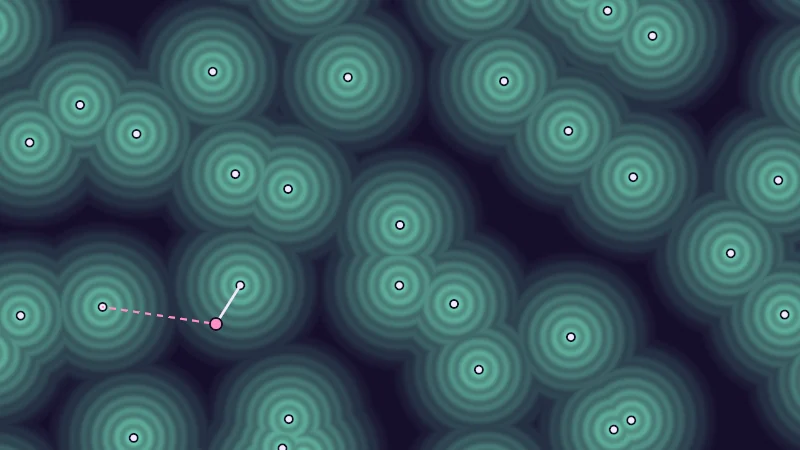
Time for a different shape. Let’s place one random point in each grid cell, using the hash (the number scrambler from the start) for its position. Then every pixel looks for the nearest point. These are Voronoi cells, and they hand you three useful numbers:
- F1, the distance to the nearest point. It makes round spots, like sparkles.
- F2, the distance to the second nearest point. F2 minus F1 is zero exactly on the border between two cells, so it draws facet lines.
- Cell number, which cell the nearest point belongs to. Hash it and each cell gets its own color.
A point never leaves its cell, so the nearest one is almost always in the pixel’s own cell or a neighbour. That’s 9 cells to check in a flat picture, 27 in 3D. The demo also hunts for the second nearest dot, which can sit further out, so it checks 5 by 5 cells.
Turn on JavaScript to run this demo.
Rendered in Unity 2022.3.22f1 from the Copy for Unity shader, with the settings this demo starts with.
// Voronoi cells. x: distance to the nearest point (F1), y: to the second nearest (F2),
// z: distance to the border between those two cells. cell: the nearest point's cell.
// jitter 0 puts every point in the middle of its cell.
float3 nzCells(float2 p, float jitter, out float2 cell)
{
    float2 i = floor(p), f = p - i;
    float d1 = 8.0, d2 = 8.0;
    float2 a = float2(0.0, 0.0), b = float2(0.0, 0.0);
    cell = i;
    // Two cells around, so the second nearest point is never missed.
    for (int y = -2; y <= 2; y++)
    for (int x = -2; x <= 2; x++)
    {
        float2 g = float2(float(x), float(y));
        float2 s = g + 0.5 + (hash22(i + g) - 0.5) * jitter;
        float d = length(s - f);
        if (d < d1) { d2 = d1; b = a; d1 = d; a = s; cell = i + g; }
        else if (d < d2) { d2 = d; b = s; }
    }
    // Inigo Quilez's border distance: how far the pixel is from the line halfway between the two points.
    float border = (d2 * d2 - d1 * d1) / (2.0 * max(length(b - a), 1e-4));
    return float3(d1, d2, border);
}


// ----

// Voronoi cells: one random point per grid cell, and every pixel asks which point is nearest.
#include "diagram"

uniform float _View;   // @select = 0 | Show | Nearest distance F1=0, Border F2 minus F1=1, Cell number=2 | Which number from the cell search is drawn.
uniform float _Jitter; // @range 0 1 0.01 = 1 | Jitter | How far each point may wander from the middle of its grid cell.
uniform float _Grid;   // @toggle = 0 | Grid | Show the grid the points come from.

static const float SCALE = 2.0;

float4 shade(float2 uv)
{
    float2 p = centered(uv);
    float2 g = p * SCALE;
    float2 cell;
    float3 f = nzCells(g, _Jitter, cell);
    int view = int(_View + 0.5);

    float3 col;
    if (view == 0)
    {
        col = tint(themeSurface(), series1(), saturate(0.85 - f.x * 1.1));
        col = tint(col, themeSurface(), 0.25 * (0.5 + 0.5 * cos(TAU * f.x / 0.1)));
    }
    else if (view == 1)
    {
        float edge = f.y - f.x;
        col = tint(themeSurface(), series1(), 0.15 + 0.6 * saturate(edge * 1.6));
        col = strokeShape(col, f.z / SCALE, 2.0, themeInk());
    }
    else
    {
        float h = hash12(cell + 3.3);
        float3 hue = h < 0.33 ? series1() : h < 0.66 ? series2() : series3();
        col = tint(themeSurface(), hue, 0.4 + 0.35 * hash12(cell + 8.1));
    }

    if (_Grid > 0.5)
    {
        float2 e = abs(g - round(g)) / (SCALE * pixelSize());
        col = lerp(col, tint(col, themeMuted(), 0.6), saturate(1.0 - min(e.x, e.y)));
    }

    // The random points themselves.
    float2 i = floor(g);
    for (int y = -1; y <= 1; y++)
    for (int x = -1; x <= 1; x++)
    {
        float2 c = i + float2(float(x), float(y));
        float2 s = (c + 0.5 + (hash22(c) - 0.5) * _Jitter) / SCALE;
        col = drawDot(col, p, s, 3.0, themeInk());
    }

    // From the dragged point: a line to the nearest point (F1) and a dashed line to the second nearest (F2).
    float2 q = pointerCentered() * SCALE;
    float2 qi = floor(q);
    float2 s1 = float2(0.0, 0.0), s2 = float2(0.0, 0.0);
    float d1 = 8.0, d2 = 8.0;
    for (int y2 = -2; y2 <= 2; y2++)
    for (int x2 = -2; x2 <= 2; x2++)
    {
        float2 c = qi + float2(float(x2), float(y2));
        float2 s = c + 0.5 + (hash22(c) - 0.5) * _Jitter;
        float d = length(s - q);
        if (d < d1) { d2 = d1; s2 = s1; d1 = d; s1 = s; }
        else if (d < d2) { d2 = d; s2 = s; }
    }
    float2 pq = q / SCALE;
    col = drawDashed(col, p, pq, s2 / SCALE, 2.0, series2());
    col = drawLine(col, p, pq, s1 / SCALE, 2.5, themeInk());
    col = drawDot(col, p, pq, 5.0, series2());
    return float4(col, 1.0);
}
// Voronoi cells. x: distance to the nearest point (F1), y: to the second nearest (F2),
// z: distance to the border between those two cells. cell: the nearest point's cell.
// jitter 0 puts every point in the middle of its cell.
vec3 nzCells(vec2 p, float jitter, out vec2 cell)
{
vec2 i = floor(p), f = p - i;
float d1 = 8.0, d2 = 8.0;
vec2 a = vec2(0.0, 0.0), b = vec2(0.0, 0.0);
cell = i;
// Two cells around, so the second nearest point is never missed.
for (int y = -2; y <= 2; y++)
for (int x = -2; x <= 2; x++)
{
vec2 g = vec2(float(x), float(y));
vec2 s = g + 0.5 + (hash22(i + g) - 0.5) * jitter;
float d = length(s - f);
if (d < d1) { d2 = d1; b = a; d1 = d; a = s; cell = i + g; }
else if (d < d2) { d2 = d; b = s; }
}
// Inigo Quilez's border distance: how far the pixel is from the line halfway between the two points.
float border = (d2 * d2 - d1 * d1) / (2.0 * max(length(b - a), 1e-4));
return vec3(d1, d2, border);
}
// ----
// Voronoi cells: one random point per grid cell, and every pixel asks which point is nearest.
#include "diagram"
uniform float _View; // @select = 0 | Show | Nearest distance F1=0, Border F2 minus F1=1, Cell number=2 | Which number from the cell search is drawn.
uniform float _Jitter; // @range 0 1 0.01 = 1 | Jitter | How far each point may wander from the middle of its grid cell.
uniform float _Grid; // @toggle = 0 | Grid | Show the grid the points come from.
const float SCALE = 2.0;
vec4 shade(vec2 uv)
{
vec2 p = centered(uv);
vec2 g = p * SCALE;
vec2 cell;
vec3 f = nzCells(g, _Jitter, cell);
int view = int(_View + 0.5);
vec3 col;
if (view == 0)
{
col = tint(themeSurface(), series1(), saturate(0.85 - f.x * 1.1));
col = tint(col, themeSurface(), 0.25 * (0.5 + 0.5 * cos(TAU * f.x / 0.1)));
}
else if (view == 1)
{
float edge = f.y - f.x;
col = tint(themeSurface(), series1(), 0.15 + 0.6 * saturate(edge * 1.6));
col = strokeShape(col, f.z / SCALE, 2.0, themeInk());
}
else
{
float h = hash12(cell + 3.3);
vec3 hue = h < 0.33 ? series1() : h < 0.66 ? series2() : series3();
col = tint(themeSurface(), hue, 0.4 + 0.35 * hash12(cell + 8.1));
}
if (_Grid > 0.5)
{
vec2 e = abs(g - round(g)) / (SCALE * pixelSize());
col = mix(col, tint(col, themeMuted(), 0.6), saturate(1.0 - min(e.x, e.y)));
}
// The random points themselves.
vec2 i = floor(g);
for (int y = -1; y <= 1; y++)
for (int x = -1; x <= 1; x++)
{
vec2 c = i + vec2(float(x), float(y));
vec2 s = (c + 0.5 + (hash22(c) - 0.5) * _Jitter) / SCALE;
col = drawDot(col, p, s, 3.0, themeInk());
}
// From the dragged point: a line to the nearest point (F1) and a dashed line to the second nearest (F2).
vec2 q = pointerCentered() * SCALE;
vec2 qi = floor(q);
vec2 s1 = vec2(0.0, 0.0), s2 = vec2(0.0, 0.0);
float d1 = 8.0, d2 = 8.0;
for (int y2 = -2; y2 <= 2; y2++)
for (int x2 = -2; x2 <= 2; x2++)
{
vec2 c = qi + vec2(float(x2), float(y2));
vec2 s = c + 0.5 + (hash22(c) - 0.5) * _Jitter;
float d = length(s - q);
if (d < d1) { d2 = d1; s2 = s1; d1 = d; s1 = s; }
else if (d < d2) { d2 = d; s2 = s; }
}
vec2 pq = q / SCALE;
col = drawDashed(col, p, pq, s2 / SCALE, 2.0, series2());
col = drawLine(col, p, pq, s1 / SCALE, 2.5, themeInk());
col = drawDot(col, p, pq, 5.0, series2());
return vec4(col, 1.0);
}Names in this code (52)
_Grid- Switch "Grid". Show the grid the points come from.
_Jitter- Slider "Jitter". How far each point may wander from the middle of its grid cell. From 0 to 1, starts at 1.
_View- Choice "Show". Which number from the cell search is drawn.
c- Declared on line 48: float2 c = i + float2(float(x), float(y));
cell- Declared on line 14: float2 cell;
centered- float2 centered(float2 uv). Square coordinates with the origin in the middle: the short side of the picture spans -1..1. (common library)
col- Declared on line 18: float3 col;
d- Declared on line 63: float d = length(s - q);
d1- Declared on line 57: float d1 = 8.0, d2 = 8.0;
drawDashed- float3 drawDashed(float3 col, float2 p, float2 a, float2 b, float widthPx, float3 ink) (diagram library)
drawDot- float3 drawDot(float3 col, float2 p, float2 c, float radiusPx, float3 ink). A dot with a ring in the surface color around it. (diagram library)
drawLine- float3 drawLine(float3 col, float2 p, float2 a, float2 b, float widthPx, float3 ink) (diagram library)
e- Declared on line 39: float2 e = abs(g - round(g)) / (SCALE * pixelSize());
edge- Declared on line 26: float edge = f.y - f.x;
f- Declared on line 15: float3 f = nzCells(g, _Jitter, cell);
g- Declared on line 13: float2 g = p * SCALE;
h- Declared on line 32: float h = hash12(cell + 3.3);
hash12- float hash12(float2 p) (common library)
hash22- float2 hash22(float2 p) (common library)
hue- Declared on line 33: float3 hue = h < 0.33 ? series1() : h < 0.66 ? series2() : series3();
i- Declared on line 44: float2 i = floor(g);
include- Pulls another file into this one, for example UnityCG.cginc.
lerp- HLSL's blend from a (t = 0) to b (t = 1). GLSL calls it mix.
nzCells- float3 nzCells(float2 p, float jitter, out float2 cell). Voronoi cells. x: distance to the nearest point (F1), y: to the second nearest (F2), z: distance to the border between those two cells. cell: the nearest point's cell. jitter 0 puts every point in the middle of its cell. (this article's helper code)
p- Declared on line 12: float2 p = centered(uv);
pixelSize- float pixelSize() (common library)
pointerCentered- float2 pointerCentered(). The pointer (or the _Pointer material setting in Unity) in the same coordinates as centered(). (common library)
pq- Declared on line 67: float2 pq = q / SCALE;
q- Declared on line 54: float2 q = pointerCentered() * SCALE;
qi- Declared on line 55: float2 qi = floor(q);
s- Declared on line 49: float2 s = (c + 0.5 + (hash22(c) - 0.5) * _Jitter) / SCALE;
s1- Declared on line 56: float2 s1 = float2(0.0, 0.0), s2 = float2(0.0, 0.0);
saturate- An HLSL function that clamps a value between 0 and 1.
SCALE- Declared on line 8: static const float SCALE = 2.0;
series1- float3 series1() (common library)
series2- float3 series2() (common library)
series3- float3 series3() (common library)
shade- float4 shade(float2 uv)
strokeShape- float3 strokeShape(float3 col, float d, float widthPx, float3 ink) (diagram library)
themeInk- float3 themeInk() (common library)
themeMuted- float3 themeMuted() (common library)
themeSurface- float3 themeSurface(). The dusk stage colors, in linear light. Series colors are used in this order: mint, pink, butter. (common library)
tint- float3 tint(float3 a, float3 b, float t). Blends two colors in steps that look even to the eye (in sRGB), for value ramps such as distance bands. Edges and coverage still blend with lerp, in linear light, as light really adds up. (common library)
uv- A parameter of shade(), line 10: float2 uv.
view- Declared on line 16: int view = int(_View + 0.5);
abs- abs(x) is x without its minus sign. abs(-0.3) = 0.3.
cos- cos(a) is the cosine of the angle a, in radians.
floor- floor(x) rounds down to the largest whole number not above x. floor(2.7) = 2, floor(-0.5) = -1.
length- length(v) says how long the vector v is, sqrt(x² + y²).
max- max(a, b) picks the larger of the two.
min- min(a, b) picks the smaller of the two.
round- round(x) is the nearest whole number to x.
Drag the pink point. The solid line is F1, the dashed one F2. Switch Show to Border F2 minus F1 for the facet lines, or to Cell number for one color per cell.
My glass uses cells in several places. Each facet cell gets its own random tilt, so it bends light its own way. Another grid of cells holds one glitter sparkle each, and the Crystals shape grows glass in whole cells.
Noise, pushed around by noise
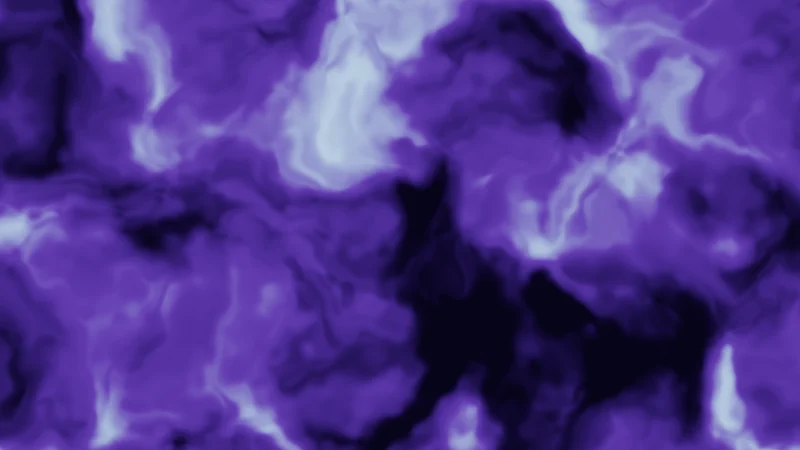
The last trick is a fun one. It makes noise look like liquid! Before reading fbm (the layered noise from before) at a point, let’s push the point by two more fbm values:
This one bends brains a little, so let’s go slowly. is the position. is the push, two numbers that say how far to move sideways and how far up or down. The second is read 5.2 further along, so the two aren’t the same. Since fbm lies between 0 and 1, subtracting 0.5 lets the push go either way. is the strength, Warp W.
The positions the noise is read at are called its domain, so this trick is domain warping. The push changes slowly from place to place, so blobs bend and stretch into folds and swirls without breaking apart. And that’s the whole trick.
Turn on JavaScript to run this demo.
Rendered in Unity 2022.3.22f1 from the Copy for Unity shader, with the settings this demo starts with.
// Uses the helper code shown with an earlier figure on this page.

// ----

// Domain warping: before reading fbm, push the point by two more fbm values.
#include "diagram"

uniform float _Warp;    // @range 0 4 0.01 = 1.5 | Warp W | How far the second noise pushes the point before the first noise is read.
uniform float _Arrows;  // @toggle = 0 | Arrows | Show which way, and how far, each point is pushed.

static const float SCALE = 1.8;

float2 pushAt(float2 q)
{
    float2 s = q + float2(0.0, 0.05 * _Time.y);
    return float2(nzFbm4(s), nzFbm4(s + 5.2)) - 0.5;
}

float4 shade(float2 uv)
{
    float2 p = centered(uv);
    float2 q = p * SCALE;
    float2 u = pushAt(q);
    float w = nzFbm4(q + _Warp * u);

    float v = smoothstep(0.25, 0.75, w);
    float3 col = lerp(float3(0.006, 0.004, 0.020), float3(0.12, 0.06, 0.36), v);
    col = lerp(col, float3(0.45, 0.70, 1.0), smoothstep(0.6, 0.9, w) * 0.7);

    if (_Arrows > 0.5)
    {
        // One arrow per square of a coarse grid, starting at the square's centre. The arrow length shows
        // the push, kept between a short minimum and half a square so each arrow stays inside its own square.
        float spacing = max(0.4, 90.0 * pixelSize());
        float2 a = (floor(p / spacing) + 0.5) * spacing;
        float2 d = _Warp * pushAt(a * SCALE) / SCALE;
        float len = length(d);
        float head = 13.0 * pixelSize();
        float shown = clamp(head + 6.0 * pixelSize() + len * 0.3, head + 6.0 * pixelSize(), 0.45 * spacing);
        float3 ink = float3(1.0, 0.75, 0.35);
        if (len > 1e-3) col = drawArrow(col, p, a, a + d / len * shown, 2.0, ink);
        col = lerp(col, ink, saturate(3.0 - length(p - a) / pixelSize()));
    }
    return float4(tonemapACES(col), 1.0);
}
// Uses the helper code shown with an earlier figure on this page.
// ----
// Domain warping: before reading fbm, push the point by two more fbm values.
#include "diagram"
uniform float _Warp; // @range 0 4 0.01 = 1.5 | Warp W | How far the second noise pushes the point before the first noise is read.
uniform float _Arrows; // @toggle = 0 | Arrows | Show which way, and how far, each point is pushed.
const float SCALE = 1.8;
vec2 pushAt(vec2 q)
{
vec2 s = q + vec2(0.0, 0.05 * _Time.y);
return vec2(nzFbm4(s), nzFbm4(s + 5.2)) - 0.5;
}
vec4 shade(vec2 uv)
{
vec2 p = centered(uv);
vec2 q = p * SCALE;
vec2 u = pushAt(q);
float w = nzFbm4(q + _Warp * u);
float v = smoothstep(0.25, 0.75, w);
vec3 col = mix(vec3(0.006, 0.004, 0.020), vec3(0.12, 0.06, 0.36), v);
col = mix(col, vec3(0.45, 0.70, 1.0), smoothstep(0.6, 0.9, w) * 0.7);
if (_Arrows > 0.5)
{
// One arrow per square of a coarse grid, starting at the square's centre. The arrow length shows
// the push, kept between a short minimum and half a square so each arrow stays inside its own square.
float spacing = max(0.4, 90.0 * pixelSize());
vec2 a = (floor(p / spacing) + 0.5) * spacing;
vec2 d = _Warp * pushAt(a * SCALE) / SCALE;
float len = length(d);
float head = 13.0 * pixelSize();
float shown = clamp(head + 6.0 * pixelSize() + len * 0.3, head + 6.0 * pixelSize(), 0.45 * spacing);
vec3 ink = vec3(1.0, 0.75, 0.35);
if (len > 1e-3) col = drawArrow(col, p, a, a + d / len * shown, 2.0, ink);
col = mix(col, ink, saturate(3.0 - length(p - a) / pixelSize()));
}
return vec4(tonemapACES(col), 1.0);
}Names in this code (34)
_Arrows- Switch "Arrows". Show which way, and how far, each point is pushed.
_Time- Time since the level loaded, from Unity. _Time.y is seconds.
_Warp- Slider "Warp W". How far the second noise pushes the point before the first noise is read. From 0 to 4, starts at 1.5.
a- Declared on line 31: float2 a = (floor(p / spacing) + 0.5) * spacing;
centered- float2 centered(float2 uv). Square coordinates with the origin in the middle: the short side of the picture spans -1..1. (common library)
col- Declared on line 23: float3 col = lerp(float3(0.006, 0.004, 0.020), float3(0.12, 0.06, 0.36), v);
d- Declared on line 32: float2 d = _Warp * pushAt(a * SCALE) / SCALE;
drawArrow- float3 drawArrow(float3 col, float2 p, float2 a, float2 b, float widthPx, float3 ink) (diagram library)
head- Declared on line 34: float head = 13.0 * pixelSize();
include- Pulls another file into this one, for example UnityCG.cginc.
ink- Declared on line 36: float3 ink = float3(1.0, 0.75, 0.35);
len- Declared on line 33: float len = length(d);
lerp- HLSL's blend from a (t = 0) to b (t = 1). GLSL calls it mix.
nzFbm4- float nzFbm4(float2 p) (this article's helper code)
p- Declared on line 17: float2 p = centered(uv);
pixelSize- float pixelSize() (common library)
pushAt- float2 pushAt(float2 q)
q- A parameter of pushAt(), line 9: float2 q.
s- Declared on line 11: float2 s = q + float2(0.0, 0.05 * _Time.y);
saturate- An HLSL function that clamps a value between 0 and 1.
SCALE- Declared on line 7: static const float SCALE = 1.8;
shade- float4 shade(float2 uv)
shown- Declared on line 35: float shown = clamp(head + 6.0 * pixelSize() + len * 0.3, head + 6.0 * pixelSize(), 0.45 * spacing);
spacing- Declared on line 30: float spacing = max(0.4, 90.0 * pixelSize());
tonemapACES- float3 tonemapACES(float3 x). Rolls HDR values above 1 off softly instead of clipping them. (common library)
u- Declared on line 19: float2 u = pushAt(q);
uv- A parameter of shade(), line 15: float2 uv.
v- Declared on line 22: float v = smoothstep(0.25, 0.75, w);
w- Declared on line 20: float w = nzFbm4(q + _Warp * u);
clamp- clamp(x, lo, hi) holds x between lo and hi.
floor- floor(x) rounds down to the largest whole number not above x. floor(2.7) = 2, floor(-0.5) = -1.
length- length(v) says how long the vector v is, sqrt(x² + y²).
max- max(a, b) picks the larger of the two.
smoothstep- smoothstep(e0, e1, x) is 0 below e0, 1 above e1, and an S curve t² (3 - 2t) in between, where t = (x - e0) / (e1 - e0). GLSL leaves e0 >= e1 undefined.
Slide Warp W from 0 to 4 and watch soft clouds turn into marble. Turn on Arrows to see which way each point gets pushed.
In practice
Shaders use noise for smoke, dissolves, ripples and sparkles. My glass uses a 3D fbm built the same way, with layers that are shifted but not turned. With Pattern Space set to Object, and always for its inner swirl, it reads noise at a point’s place inside the object, so the pattern runs through the mesh. In the code, 0.5 is the gain (how much weaker each layer gets), 2.03 the lacunarity (how much finer), and the added numbers shift each layer:
float gnFbm(float3 p)
{
    float sum = 0.0;
    float amplitude = 0.5;
    float norm = 0.0;
    [unroll]
    for (int octave = 0; octave < 4; octave++)
    {
        sum += amplitude * gnValueNoise(p);
        norm += amplitude;
        p = p * 2.03 + float3(17.1, 9.3, 3.7);
        amplitude *= 0.5;
    }
    return sum / norm;
}
Read noise at the object position, the point’s place on the mesh itself, so the pattern moves with the avatar. Noise read at the world position stays put while the avatar walks through it. On parts that bend with bones the object position moves too, and the pattern slides. Read the noise at the UVs there instead.
The vertex shader (the part that runs once per mesh corner) passes the object position on. The pixel part reads fbm there, at the position times _Scale, so a larger _Scale gives smaller blobs. This next bit feels backwards at first. Moving where the noise is read moves the picture the opposite way, so to make the smoke drift upward the code subtracts time times _Speed:
v2f vert(appdata v)
{
    v2f o;
    UNITY_SETUP_INSTANCE_ID(v);
    UNITY_INITIALIZE_VERTEX_OUTPUT_STEREO(o);
    o.pos = UnityObjectToClipPos(v.vertex);
    o.objectPos = v.vertex.xyz;    // moves with the avatar
    return o;
}

float4 frag(v2f i) : SV_Target
{
    UNITY_SETUP_STEREO_EYE_INDEX_POST_VERTEX(i);
    float n = gnFbm(i.objectPos * _Scale - float3(0.0, _Time.y * _Speed, 0.0));
    return float4(n.xxx, 1.0);
}
Two more things to keep an eye on:
- Fine detail flickers far away. Cells and fine octaves smaller than a pixel sparkle at random. Fade them out by the pixel size, with
fwidthfrom the smooth edges lesson. My glass does this with its glitter. - Every octave costs. In 3D, value noise hashes the 8 corners of a cube, and a cell search checks a 3 by 3 by 3 block of 27 cells. Four octaves of fbm is 32 hashes, and domain warping reads fbm three times: two for the push, one for the picture. It adds up fast, so use few octaves on anything that can fill the screen.
Credits
- The hash on this site and in my glass shader is Dave Hoskins’ Hash without Sine (MIT License). The hash in my smoke is based on it.
- Value noise, fbm, Voronoi cells and their border distance, domain warping and the cosine palette used for the rainbow follow Inigo Quilez’s articles.
- The quintic fade comes from Ken Perlin’s Improving Noise (2002). Cell noise from the nearest points was introduced by Steven Worley in A Cellular Texture Basis Function (1996).
- A hash is a shader’s dice. It turns a cell number into a random number that never changes.
- Value noise blends random corner heights with a fade curve, and fbm stacks finer, weaker layers on top.
- Voronoi cells give you spots, borders and a random number per cell, and pushing noise by noise makes it swirl.