Basics, part 10
HLSL and GLSL say the same thing in different words
Unity shaders are written in HLSL, but browsers run GLSL. Let's look at the names that differ, the few rules that bite, and how this site turns one into the other.
Unity shaders are written in HLSL, the High Level Shading Language from Microsoft. Your browser can’t run that, because WebGL speaks GLSL, the OpenGL Shading Language. They’re close cousins, with a few words spelled differently and a few rules that quietly differ. I write every demo here in HLSL and your browser runs it as GLSL, so let’s peek at both sides.
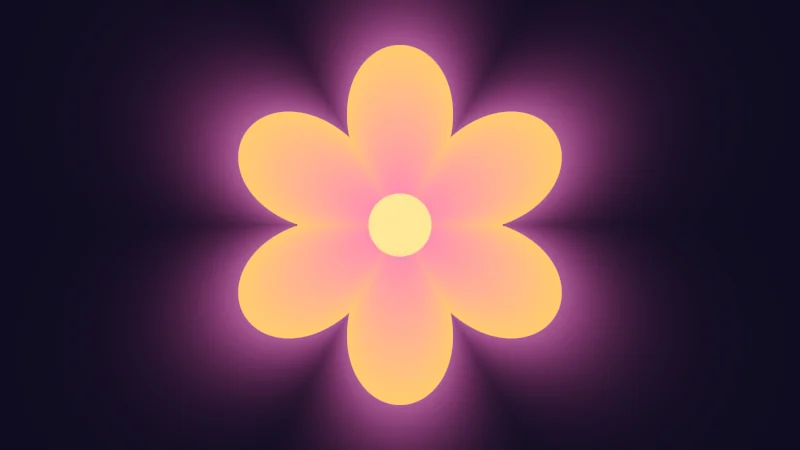
Turn on JavaScript to run this demo.
Rendered in Unity 2022.3.22f1 from the Copy for Unity shader, with the settings this demo starts with.
// A flower drawn with the words HLSL and GLSL spell differently. Open the code and switch tabs to compare.

uniform float _Petals; // @range 3 9 1 = 6 | Petals | How many petals the flower has.
uniform float _Turn;   // @range 0 360 1 = 0 | Turn | How far the flower is turned, in degrees.

float4 shade(float2 uv)
{
    float2 p = mul(rot2(radians(_Turn)), centered(uv));
    float angle = atan2(p.y, p.x) / TAU + 0.5;
    float petal = abs(frac(angle * _Petals) - 0.5) * 2.0;
    float r = lerp(0.8, 0.45, petal * petal);
    float d = length(p) - r;

    float3 col = float3(0.012, 0.010, 0.025);
    col += float3(0.9, 0.25, 0.6) * 0.3 * exp(-6.0 * max(d, 0.0));
    col = tonemapACES(col);
    float3 bloom = lerp(float3(1.0, 0.2, 0.5), float3(1.0, 0.6, 0.15), saturate(length(p) / r));
    col = lerp(col, bloom, fillAA(d));
    col = lerp(col, float3(1.0, 0.8, 0.3), fillAA(length(p) - 0.14));
    return float4(col, 1.0);
}
// A flower drawn with the words HLSL and GLSL spell differently. Open the code and switch tabs to compare.
uniform float _Petals; // @range 3 9 1 = 6 | Petals | How many petals the flower has.
uniform float _Turn; // @range 0 360 1 = 0 | Turn | How far the flower is turned, in degrees.
vec4 shade(vec2 uv)
{
vec2 p = (centered(uv) * rot2(radians(_Turn)));
float angle = atan(p.y, p.x) / TAU + 0.5;
float petal = abs(fract(angle * _Petals) - 0.5) * 2.0;
float r = mix(0.8, 0.45, petal * petal);
float d = length(p) - r;
vec3 col = vec3(0.012, 0.010, 0.025);
col += vec3(0.9, 0.25, 0.6) * 0.3 * exp(-6.0 * max(d, 0.0));
col = tonemapACES(col);
vec3 bloom = mix(vec3(1.0, 0.2, 0.5), vec3(1.0, 0.6, 0.15), saturate(length(p) / r));
col = mix(col, bloom, fillAA(d));
col = mix(col, vec3(1.0, 0.8, 0.3), fillAA(length(p) - 0.14));
return vec4(col, 1.0);
}Names in this code (25)
_Petals- Slider "Petals". How many petals the flower has. From 3 to 9, starts at 6.
_Turn- Slider "Turn". How far the flower is turned, in degrees. From 0 to 360, starts at 0.
angle- Declared on line 9: float angle = atan2(p.y, p.x) / TAU + 0.5;
atan2- The angle of the point (x, y), written atan2(y, x) in HLSL. GLSL calls it atan(y, x).
bloom- Declared on line 17: float3 bloom = lerp(float3(1.0, 0.2, 0.5), float3(1.0, 0.6, 0.15), saturate(length(p) / r));
centered- float2 centered(float2 uv). Square coordinates with the origin in the middle: the short side of the picture spans -1..1. (common library)
col- Declared on line 14: float3 col = float3(0.012, 0.010, 0.025);
d- Declared on line 12: float d = length(p) - r;
fillAA- float fillAA(float d). Anti-aliased coverage of a signed distance: 1 inside, 0 outside, a one pixel ramp at the edge. (common library)
frac- The part after the decimal point, in HLSL. GLSL calls it fract.
lerp- HLSL's blend from a (t = 0) to b (t = 1). GLSL calls it mix.
mul- Matrix times vector or matrix times matrix in HLSL. mul(M, v) applies M to v.
p- Declared on line 8: float2 p = mul(rot2(radians(_Turn)), centered(uv));
petal- Declared on line 10: float petal = abs(frac(angle * _Petals) - 0.5) * 2.0;
r- Declared on line 11: float r = lerp(0.8, 0.45, petal * petal);
rot2- float2x2 rot2(float a). Turns a point by a radians, counterclockwise: mul(rot2(a), p). (common library)
saturate- An HLSL function that clamps a value between 0 and 1.
shade- float4 shade(float2 uv)
tonemapACES- float3 tonemapACES(float3 x). Rolls HDR values above 1 off softly instead of clipping them. (common library)
uv- A parameter of shade(), line 6: float2 uv.
abs- abs(x) is x without its minus sign. abs(-0.3) = 0.3.
exp- exp(x) is e to the power x. exp(0) = 1, and it falls towards 0 as x goes negative.
length- length(v) says how long the vector v is, sqrt(x² + y²).
max- max(a, b) picks the larger of the two.
radians- radians(deg) converts degrees to radians.
Open the code under the picture and flip between the HLSL and GLSL tabs: lerp becomes mix, frac becomes fract, and mul a plain * with its sides swapped. Then play with Petals and Turn.
Same ideas, different words
Most differences are only names. Here are the ones you’ll meet most:
| HLSL (Unity) | GLSL (WebGL) | What it does |
|---|---|---|
float2, float3, float4 | vec2, vec3, vec4 | 2, 3 or 4 numbers together |
lerp(a, b, t) | mix(a, b, t) | Blends from a to b |
frac(x) | fract(x) | The part after the decimal point |
saturate(x) | clamp(x, 0.0, 1.0) | Keeps x between 0 and 1 |
atan2(y, x) | atan(y, x) | The angle of a point |
mul(M, v) | v * M | Turns or stretches v with M |
tex2D(t, uv) | texture(t, uv) | Reads a texture |
ddx(v) | dFdx(v) | How much v changes one pixel across |
Everything else you’ve met so far, like sin, dot and smoothstep, is spelled the same. But a few rules differ behind that same look, and those bite.
Matrices fill the other way
The rot2 helper from Sine and cosine builds the matrix below to turn a vector, and each language fills it from a list of numbers in its own order. HLSL goes row by row, so the first two numbers are the top row, while GLSL goes column by column, so they’re the left column.
float2x2 M = float2x2(c, -s,   // top row
                      s,  c);  // bottom row
float2 q = mul(M, v);
mat2 M = mat2(c, -s, // left column
s, c); // right column
vec2 q = v * M;This one bends brains, so take it slow. From the same list, GLSL puts -s and s in each other’s corners, and a turning matrix with those two traded turns the other way. Multiplying from the other side, v * M, trades them back. That’s why mul(M, v) becomes v * M.
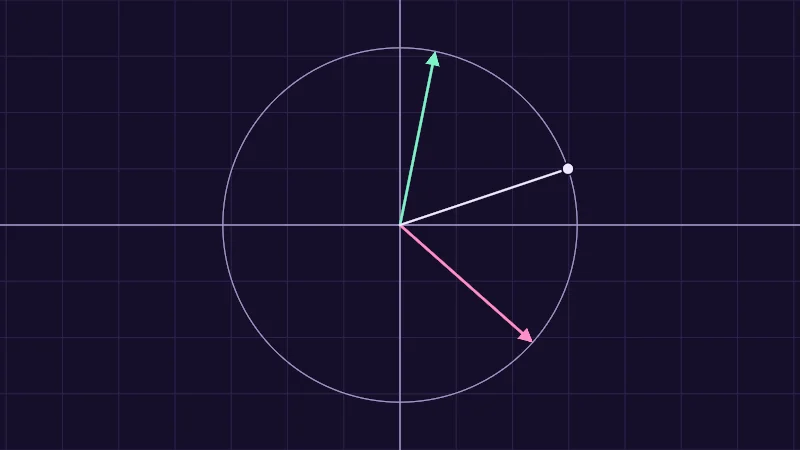
Turn on JavaScript to run this demo.
Rendered in Unity 2022.3.22f1 from the Copy for Unity shader, with the settings this demo starts with.
// One turning matrix, its four numbers read as rows (mint) and as columns (pink), applied to the point you drag.
#include "diagram"

uniform float _Angle; // @range 0 180 1 = 60 | Angle | How far the matrix should turn the point, in degrees.

float4 shade(float2 uv)
{
    float2 p = centered(uv);
    float2 v = pointerCentered();
    float2x2 M = rot2(radians(_Angle));

    float2 rows = mul(M, v); // read by rows: turns anticlockwise, as asked
    float2 cols = mul(v, M); // the same numbers read by columns: turns the other way

    float3 col = drawGrid(themeSurface(), p, 0.25);
    col = drawAxes(col, p);
    col = drawCircle(col, p, float2(0.0, 0.0), length(v), 1.0, themeMuted());
    col = drawArrow(col, p, float2(0.0, 0.0), cols, 2.5, series2());
    col = drawArrow(col, p, float2(0.0, 0.0), rows, 2.5, series1());
    col = drawLine(col, p, float2(0.0, 0.0), v, 2.0, themeInk());
    col = drawDot(col, p, v, 5.0, themeInk());
    return float4(col, 1.0);
}
// One turning matrix, its four numbers read as rows (mint) and as columns (pink), applied to the point you drag.
#include "diagram"
uniform float _Angle; // @range 0 180 1 = 60 | Angle | How far the matrix should turn the point, in degrees.
vec4 shade(vec2 uv)
{
vec2 p = centered(uv);
vec2 v = pointerCentered();
mat2 M = rot2(radians(_Angle));
vec2 rows = (v * M); // read by rows: turns anticlockwise, as asked
vec2 cols = (M * v); // the same numbers read by columns: turns the other way
vec3 col = drawGrid(themeSurface(), p, 0.25);
col = drawAxes(col, p);
col = drawCircle(col, p, vec2(0.0, 0.0), length(v), 1.0, themeMuted());
col = drawArrow(col, p, vec2(0.0, 0.0), cols, 2.5, series2());
col = drawArrow(col, p, vec2(0.0, 0.0), rows, 2.5, series1());
col = drawLine(col, p, vec2(0.0, 0.0), v, 2.0, themeInk());
col = drawDot(col, p, v, 5.0, themeInk());
return vec4(col, 1.0);
}Names in this code (28)
_Angle- Slider "Angle". How far the matrix should turn the point, in degrees. From 0 to 180, starts at 60.
centered- float2 centered(float2 uv). Square coordinates with the origin in the middle: the short side of the picture spans -1..1. (common library)
col- Declared on line 15: float3 col = drawGrid(themeSurface(), p, 0.25);
cols- Declared on line 13: float2 cols = mul(v, M); // the same numbers read by columns: turns the other way
drawArrow- float3 drawArrow(float3 col, float2 p, float2 a, float2 b, float widthPx, float3 ink) (diagram library)
drawAxes- float3 drawAxes(float3 col, float2 p) (diagram library)
drawCircle- float3 drawCircle(float3 col, float2 p, float2 c, float r, float widthPx, float3 ink) (diagram library)
drawDot- float3 drawDot(float3 col, float2 p, float2 c, float radiusPx, float3 ink). A dot with a ring in the surface color around it. (diagram library)
drawGrid- float3 drawGrid(float3 col, float2 p, float spacing) (diagram library)
drawLine- float3 drawLine(float3 col, float2 p, float2 a, float2 b, float widthPx, float3 ink) (diagram library)
float2x2- A 2 by 2 matrix in HLSL, four numbers in two rows of two. GLSL calls it mat2.
include- Pulls another file into this one, for example UnityCG.cginc.
M- Declared on line 10: float2x2 M = rot2(radians(_Angle));
mul- Matrix times vector or matrix times matrix in HLSL. mul(M, v) applies M to v.
p- Declared on line 8: float2 p = centered(uv);
pointerCentered- float2 pointerCentered(). The pointer (or the _Pointer material setting in Unity) in the same coordinates as centered(). (common library)
rot2- float2x2 rot2(float a). Turns a point by a radians, counterclockwise: mul(rot2(a), p). (common library)
rows- Declared on line 12: float2 rows = mul(M, v); // read by rows: turns anticlockwise, as asked
series1- float3 series1() (common library)
series2- float3 series2() (common library)
shade- float4 shade(float2 uv)
themeInk- float3 themeInk() (common library)
themeMuted- float3 themeMuted() (common library)
themeSurface- float3 themeSurface(). The dusk stage colors, in linear light. Series colors are used in this order: mint, pink, butter. (common library)
uv- A parameter of shade(), line 6: float2 uv.
v- Declared on line 9: float2 v = pointerCentered();
length- length(v) says how long the vector v is, sqrt(x² + y²).
radians- radians(deg) converts degrees to radians.
Drag the dot and slide Angle. Mint is mul(M, v) and turns anticlockwise, as asked. Pink reads the same four numbers by columns and turns the other way. In the GLSL tab, mint’s line has become v * M and pink’s M * v.
Remainders with a sign
HLSL’s fmod and GLSL’s mod both give the remainder of a division (what is left of after taking away whole copies of ). While is positive they agree. Below zero they part ways:
cuts the fraction off toward zero, while always rounds down. So fmod keeps the sign of , and mod takes the sign of . A pattern that repeats across zero wants the GLSL way, so in HLSL write x - y * floor(x / y).
Turn on JavaScript to run this demo.
- f1(x):
fmod(x, _Y) - f2(x):
x - _Y * floor(x / _Y)
#define PLOT_X_RANGE float2(-3.0, 3.0)
#define PLOT_Y_RANGE float2(-2.2, 2.2)
#define PLOT_TICK float2(1.0, 0.5)
#include "plot"
uniform float _Y; // @range 0.5 2 0.05 = 1 | Divisor y | The y in fmod(x, y), which sets how big each repeat is.
float curve0(float x) { return fmod(x, _Y); }
float curve1(float x) { return x - _Y * floor(x / _Y); }
float4 shade(float2 uv)
{
    float2 p = plotCoord(uv);
    float3 col = plotBackground(p);
    float h = plotPixel().x;
    col = plotCurveStyled(col, p, curve0(p.x), plotSlope(curve0(p.x - h), curve0(p.x), curve0(p.x + h), h), series1(), 0);
    col = plotCurveStyled(col, p, curve1(p.x), plotSlope(curve1(p.x - h), curve1(p.x), curve1(p.x + h), h), series2(), 1);
    return float4(col, 1.0);
}#define PLOT_X_RANGE vec2(-3.0, 3.0)
#define PLOT_Y_RANGE vec2(-2.2, 2.2)
#define PLOT_TICK vec2(1.0, 0.5)
#include "plot"
uniform float _Y; // @range 0.5 2 0.05 = 1 | Divisor y | The y in fmod(x, y), which sets how big each repeat is.
float curve0(float x) { return fmod(x, _Y); }
float curve1(float x) { return x - _Y * floor(x / _Y); }
vec4 shade(vec2 uv)
{
vec2 p = plotCoord(uv);
vec3 col = plotBackground(p);
float h = plotPixel().x;
col = plotCurveStyled(col, p, curve0(p.x), plotSlope(curve0(p.x - h), curve0(p.x), curve0(p.x + h), h), series1(), 0);
col = plotCurveStyled(col, p, curve1(p.x), plotSlope(curve1(p.x - h), curve1(p.x), curve1(p.x + h), h), series2(), 1);
return vec4(col, 1.0);
}Names in this code (20)
_Y- Slider "Divisor y". The y in fmod(x, y), which sets how big each repeat is. From 0.5 to 2, starts at 1.
col- Declared on line 11: float3 col = plotBackground(p);
curve0- float curve0(float x)
curve1- float curve1(float x)
fmod- The remainder of x / y in HLSL, with the sign of x (GLSL mod takes the sign of y).
h- Declared on line 12: float h = plotPixel().x;
include- Pulls another file into this one, for example UnityCG.cginc.
p- Declared on line 10: float2 p = plotCoord(uv);
plotBackground- float3 plotBackground(float2 p) (plot library)
plotCoord- float2 plotCoord(float2 uv) (plot library)
plotCurveStyled- float3 plotCurveStyled(float3 col, float2 p, float y, float slope, float3 ink, int style). The same line, solid (style 0), dashed (1) or dotted (2), so curves differ by more than color. (plot library)
plotPixel- float2 plotPixel(). Size of one pixel in data units. (plot library)
plotSlope- float plotSlope(float before, float here, float after, float h). f'(x) from f one pixel before, at and after x. Where f jumps (a step, a saw tooth), one side changes by many pixels and the other hardly at all: then the gentler side wins, so the line ends on each side of the jump instead of smearing up and down through it. (plot library)
series1- float3 series1() (common library)
series2- float3 series2() (common library)
shade- float4 shade(float2 uv)
uv- A parameter of shade(), line 8: float2 uv.
x- A parameter of curve0(), line 6: float x.
define- With #define NAME value, every NAME in the code is replaced by value before compiling.
floor- floor(x) rounds down to the largest whole number not above x. floor(2.7) = 2, floor(-0.5) = -1.
Right of zero the lines lie on top of each other. Left of zero, mint fmod follows below zero, while dashed pink mod keeps its teeth between 0 and . Divisor y stretches them.
Three small traps
- A falling smoothstep.
smoothstep(1.0, 0.0, x)falls from 1 to 0. Unity is fine with that, since Microsoft defines smoothstep by a formula that doesn’t mind the order. GLSL calls the answer undefined unless the first edge is below the second, so a browser may draw anything. - One number for three. GLSL happily fills
vec3(0.5)with three halves. Unity refusesfloat3(0.5), so writefloat3(0.5, 0.5, 0.5). - Values at the top of the file. In GLSL,
float k = 2.0;outside any function is a plain value. Unity takes it for an input the material hands in, like a slider from the Properties block. Nothing hands it in, so it starts at 0. Writestatic const float k = 2.0;instead.
Precision on phones
Both languages can keep numbers with fewer digits, which saves work on small chips. In GLSL the pixel code must say how precise its floats are. highp is a full 32 bit float, while mediump only has to keep about three digits and is often 16 bits on phones. This site picks highp.
Unity’s version is the half type. A PC runs it as a full float anyway, so you never notice. On phones, and a Quest is a phone chip at heart, it can really be 16 bits. That’s plenty for a color, but time, UVs and world positions run out of digits.
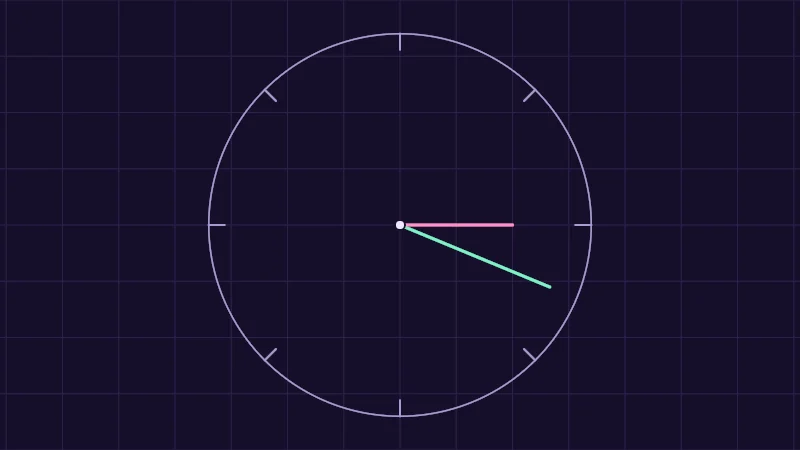
Turn on JavaScript to run this demo.
Rendered in Unity 2022.3.22f1 from the Copy for Unity shader, with the settings this demo starts with.
// A clock hand driven by time kept as a float (mint), and one driven by the same time rounded like a 16 bit half (pink).
#include "diagram"

uniform float _Minutes; // @range 0 120 1 = 30 | Minutes running | How long the shader has been running before the demo starts.

// The nearest number a 16 bit half can hold. It keeps 11 binary digits, so the gap between neighbours grows with the number.
float roundToHalf(float x)
{
    float gap = exp2(floor(log2(max(abs(x), 0.001))) - 10.0);
    return round(x / gap) * gap;
}

// Where a clock hand points after this many seconds: one turn every 8 seconds, clockwise from the top.
float2 hand(float seconds)
{
    float a = seconds * TAU / 8.0;
    return float2(sin(a), cos(a));
}

float4 shade(float2 uv)
{
    float2 p = centered(uv);
    float t = _Minutes * 60.0 + _Time.y;

    float3 col = drawGrid(themeSurface(), p, 0.25);
    col = drawCircle(col, p, float2(0.0, 0.0), 0.85, 1.5, themeMuted());
    for (int i = 0; i < 8; i++)
    {
        float2 tick = hand(float(i));
        col = drawLine(col, p, tick * 0.78, tick * 0.85, 2.0, themeMuted());
    }
    col = drawLine(col, p, float2(0.0, 0.0), hand(t) * 0.72, 3.0, series1());
    col = drawLine(col, p, float2(0.0, 0.0), hand(roundToHalf(t)) * 0.5, 3.0, series2());
    col = drawDot(col, p, float2(0.0, 0.0), 4.0, themeInk());
    return float4(col, 1.0);
}
// A clock hand driven by time kept as a float (mint), and one driven by the same time rounded like a 16 bit half (pink).
#include "diagram"
uniform float _Minutes; // @range 0 120 1 = 30 | Minutes running | How long the shader has been running before the demo starts.
// The nearest number a 16 bit half can hold. It keeps 11 binary digits, so the gap between neighbours grows with the number.
float roundToHalf(float x)
{
float gap = exp2(floor(log2(max(abs(x), 0.001))) - 10.0);
return round(x / gap) * gap;
}
// Where a clock hand points after this many seconds: one turn every 8 seconds, clockwise from the top.
vec2 hand(float seconds)
{
float a = seconds * TAU / 8.0;
return vec2(sin(a), cos(a));
}
vec4 shade(vec2 uv)
{
vec2 p = centered(uv);
float t = _Minutes * 60.0 + _Time.y;
vec3 col = drawGrid(themeSurface(), p, 0.25);
col = drawCircle(col, p, vec2(0.0, 0.0), 0.85, 1.5, themeMuted());
for (int i = 0; i < 8; i++)
{
vec2 tick = hand(float(i));
col = drawLine(col, p, tick * 0.78, tick * 0.85, 2.0, themeMuted());
}
col = drawLine(col, p, vec2(0.0, 0.0), hand(t) * 0.72, 3.0, series1());
col = drawLine(col, p, vec2(0.0, 0.0), hand(roundToHalf(t)) * 0.5, 3.0, series2());
col = drawDot(col, p, vec2(0.0, 0.0), 4.0, themeInk());
return vec4(col, 1.0);
}Names in this code (33)
_Minutes- Slider "Minutes running". How long the shader has been running before the demo starts. From 0 to 120, starts at 30.
_Time- Time since the level loaded, from Unity. _Time.y is seconds.
a- Declared on line 16: float a = seconds * TAU / 8.0;
centered- float2 centered(float2 uv). Square coordinates with the origin in the middle: the short side of the picture spans -1..1. (common library)
col- Declared on line 25: float3 col = drawGrid(themeSurface(), p, 0.25);
drawCircle- float3 drawCircle(float3 col, float2 p, float2 c, float r, float widthPx, float3 ink) (diagram library)
drawDot- float3 drawDot(float3 col, float2 p, float2 c, float radiusPx, float3 ink). A dot with a ring in the surface color around it. (diagram library)
drawGrid- float3 drawGrid(float3 col, float2 p, float spacing) (diagram library)
drawLine- float3 drawLine(float3 col, float2 p, float2 a, float2 b, float widthPx, float3 ink) (diagram library)
gap- Declared on line 9: float gap = exp2(floor(log2(max(abs(x), 0.001))) - 10.0);
hand- float2 hand(float seconds). Where a clock hand points after this many seconds: one turn every 8 seconds, clockwise from the top.
include- Pulls another file into this one, for example UnityCG.cginc.
p- Declared on line 22: float2 p = centered(uv);
roundToHalf- float roundToHalf(float x). The nearest number a 16 bit half can hold. It keeps 11 binary digits, so the gap between neighbours grows with the number.
seconds- A parameter of hand(), line 14: float seconds.
series1- float3 series1() (common library)
series2- float3 series2() (common library)
shade- float4 shade(float2 uv)
t- Declared on line 23: float t = _Minutes * 60.0 + _Time.y;
themeInk- float3 themeInk() (common library)
themeMuted- float3 themeMuted() (common library)
themeSurface- float3 themeSurface(). The dusk stage colors, in linear light. Series colors are used in this order: mint, pink, butter. (common library)
tick- Declared on line 29: float2 tick = hand(float(i));
uv- A parameter of shade(), line 20: float2 uv.
x- A parameter of roundToHalf(), line 7: float x.
abs- abs(x) is x without its minus sign. abs(-0.3) = 0.3.
cos- cos(a) is the cosine of the angle a, in radians.
exp2- exp2(x) is 2 to the power x.
floor- floor(x) rounds down to the largest whole number not above x. floor(2.7) = 2, floor(-0.5) = -1.
log2- log2(x) is the base 2 logarithm, undefined for x <= 0.
max- max(a, b) picks the larger of the two.
round- round(x) is the nearest whole number to x.
sin- sin(a) is the sine of the angle a, in radians.
Mint keeps time as a float. Pink rounds it like a 16 bit half, so at 30 minutes it can only jump once a second, past 35 minutes every 2 seconds and past 69 every 4. Slide Minutes running to 0 and the hands agree.
How this site does it
You always see and edit HLSL here, and the site turns it into GLSL line for line each time you edit. It swaps the names from the table, flips every mul, and adds what GLSL lacks: saturate, plus fmod and smoothstep with HLSL’s rules. My favourite part is that every line keeps its number, so an error points at your own line. Write something only one side accepts, like float3(0.5), and the site stops you with the line and the fix.
The GLSL tab shows your code exactly as your browser runs it. Copy for Unity goes the other way and wraps the same HLSL in a complete Unity shader file, with a Properties block made from the sliders.
- Most differences are names:
float2andvec2,lerpandmix,fracandfract. - HLSL fills matrices by rows and GLSL by columns, so
mul(M, v)becomesv * M. - Watch for
fmodbelow zero, falling smoothsteps,float3(0.5), missingstatic const, andhalfon phones.