Basics, part 3
Vectors are little arrows made of numbers
A vector is a few numbers that travel together, like a position, a direction or a color. Add them, measure them, then let the dot product light a sphere.
In the coordinates lesson every pixel got a position, two numbers for how far across and how far up. Shaders keep numbers together like that all the time, and a group of them is a vector. Let’s add vectors, measure them, and then use one little trick, the dot product, to light a sphere.
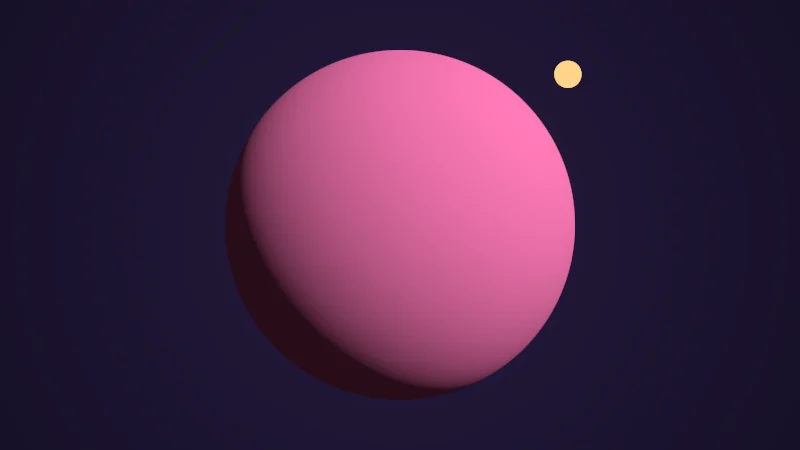
Turn on JavaScript to run this demo.
Rendered in Unity 2022.3.22f1 from the Copy for Unity shader, with the settings this demo starts with.
Drag anywhere to swing the light around the sphere. By the end you’ll know the one line that shades it.
A few numbers that travel together
In a Unity shader, the type tells you how many numbers a vector holds. A float2 has two, a float3 three and a float4 four. They can stand for a position like (0.5, -0.2), the direction up (0, 1, 0) or the color orange (1, 0.5, 0.2). I like to picture a vector as an arrow that starts at (0, 0), so (2, 0.5) goes two units across and half a unit up.
Adding and scaling arrows
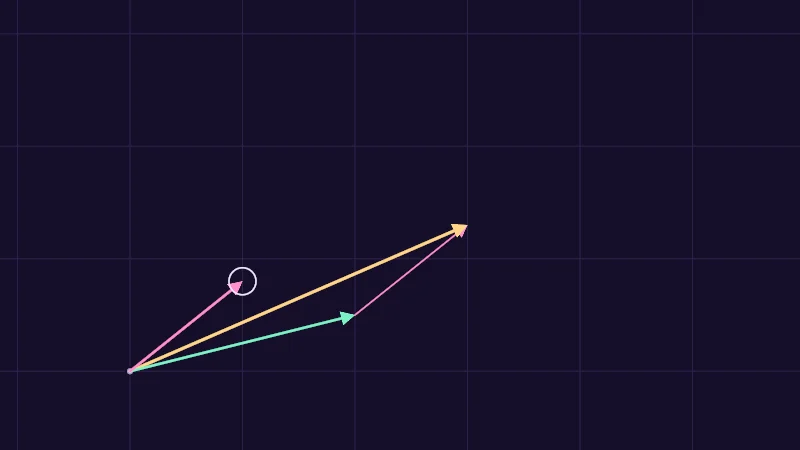
To add two vectors, add the matching numbers: . As arrows, the second one goes on the end of the first, and the sum runs from the start to where it ends.
3: The sum runs from the start to where it ends.
To scale a vector, multiply each number by the same : , twice as long and the same direction. A negative turns it around, which is all subtracting is: is . And turning or stretching every vector at once is the job of a matrix.
Turn on JavaScript to run this demo.
Rendered in Unity 2022.3.22f1 from the Copy for Unity shader, with the settings this demo starts with.
// Adding arrows: a copy of b rides on the end of a, and the sum runs from the start to where the copy ends.
#include "diagram"

uniform float _K; // @range -1 2 0.01 = 1 | Scale k | Multiplies b before it is added, so 2 doubles it and -1 turns it around.

static const float S = 0.5;                  // one unit of the vectors, in centered() units: one grid square
static const float2 O = float2(-1.2, -0.65); // where the arrows start

float4 shade(float2 uv)
{
    float2 p = centered(uv);
    float2 a = float2(2.0, 0.5);
    float2 b = (pointerCentered() - O) / S; // the tip you drag, as a vector
    float2 kb = _K * b;
    float2 sum = a + kb;

    float3 col = drawGrid(themeSurface(), p - O, S);
    col = drawDot(col, p, O, 3.0, themeMuted());
    if (length(kb) > 0.05) col = drawArrow(col, p, O + a * S, O + sum * S, 1.5, series2());
    if (length(sum) > 0.05) col = drawArrow(col, p, O, O + sum * S, 3.0, series3());
    col = drawArrow(col, p, O, O + a * S, 2.5, series1());
    if (length(b) > 0.05) col = drawArrow(col, p, O, O + b * S, 2.5, series2());
    col = drawCircle(col, p, O + b * S, 0.06, 1.5, themeInk());
    return float4(col, 1.0);
}
// Adding arrows: a copy of b rides on the end of a, and the sum runs from the start to where the copy ends.
#include "diagram"
uniform float _K; // @range -1 2 0.01 = 1 | Scale k | Multiplies b before it is added, so 2 doubles it and -1 turns it around.
const float S = 0.5; // one unit of the vectors, in centered() units: one grid square
const vec2 O = vec2(-1.2, -0.65); // where the arrows start
vec4 shade(vec2 uv)
{
vec2 p = centered(uv);
vec2 a = vec2(2.0, 0.5);
vec2 b = (pointerCentered() - O) / S; // the tip you drag, as a vector
vec2 kb = _K * b;
vec2 sum = a + kb;
vec3 col = drawGrid(themeSurface(), p - O, S);
col = drawDot(col, p, O, 3.0, themeMuted());
if (length(kb) > 0.05) col = drawArrow(col, p, O + a * S, O + sum * S, 1.5, series2());
if (length(sum) > 0.05) col = drawArrow(col, p, O, O + sum * S, 3.0, series3());
col = drawArrow(col, p, O, O + a * S, 2.5, series1());
if (length(b) > 0.05) col = drawArrow(col, p, O, O + b * S, 2.5, series2());
col = drawCircle(col, p, O + b * S, 0.06, 1.5, themeInk());
return vec4(col, 1.0);
}Names in this code (25)
_K- Slider "Scale k". Multiplies b before it is added, so 2 doubles it and -1 turns it around. From -1 to 2, starts at 1.
a- Declared on line 12: float2 a = float2(2.0, 0.5);
b- Declared on line 13: float2 b = (pointerCentered() - O) / S; // the tip you drag, as a vector
centered- float2 centered(float2 uv). Square coordinates with the origin in the middle: the short side of the picture spans -1..1. (common library)
col- Declared on line 17: float3 col = drawGrid(themeSurface(), p - O, S);
drawArrow- float3 drawArrow(float3 col, float2 p, float2 a, float2 b, float widthPx, float3 ink) (diagram library)
drawCircle- float3 drawCircle(float3 col, float2 p, float2 c, float r, float widthPx, float3 ink) (diagram library)
drawDot- float3 drawDot(float3 col, float2 p, float2 c, float radiusPx, float3 ink). A dot with a ring in the surface color around it. (diagram library)
drawGrid- float3 drawGrid(float3 col, float2 p, float spacing) (diagram library)
include- Pulls another file into this one, for example UnityCG.cginc.
kb- Declared on line 14: float2 kb = _K * b;
O- Declared on line 7: static const float2 O = float2(-1.2, -0.65); // where the arrows start
p- Declared on line 11: float2 p = centered(uv);
pointerCentered- float2 pointerCentered(). The pointer (or the _Pointer material setting in Unity) in the same coordinates as centered(). (common library)
S- Declared on line 6: static const float S = 0.5; // one unit of the vectors, in centered() units: one grid square
series1- float3 series1() (common library)
series2- float3 series2() (common library)
series3- float3 series3() (common library)
shade- float4 shade(float2 uv)
sum- Declared on line 15: float2 sum = a + kb;
themeInk- float3 themeInk() (common library)
themeMuted- float3 themeMuted() (common library)
themeSurface- float3 themeSurface(). The dusk stage colors, in linear light. Series colors are used in this order: mint, pink, butter. (common library)
uv- A parameter of shade(), line 9: float2 uv.
length- length(v) says how long the vector v is, sqrt(x² + y²).
Drag the tip of b and watch its copy ride on the end of a, with the butter sum following along. Set Scale k to 2 and the copy doubles. At -1 it turns around, and the sum becomes .
How long is an arrow?
The length comes from Pythagoras. Think of the two numbers as the short sides of a triangle with a square corner, and the arrow is its long side.
and are the numbers of , and is its length. A float3 adds under the root. In code it’s length(v).
Often only the direction matters. Divide a vector by its length and you get a unit vector, with length 1 and the same direction. That’s normalize(v):
There’s one trap, though. The vector (0, 0) has no direction, and normalizing it divides by zero. What you get back is garbage.
Do two arrows agree?
The dot product multiplies the matching numbers and adds them up:
is the across part of , the up part of . The answer is one number that says how much the arrows point the same way. It also comes from their lengths and the angle between them, with the cosine from the sine and cosine lesson:
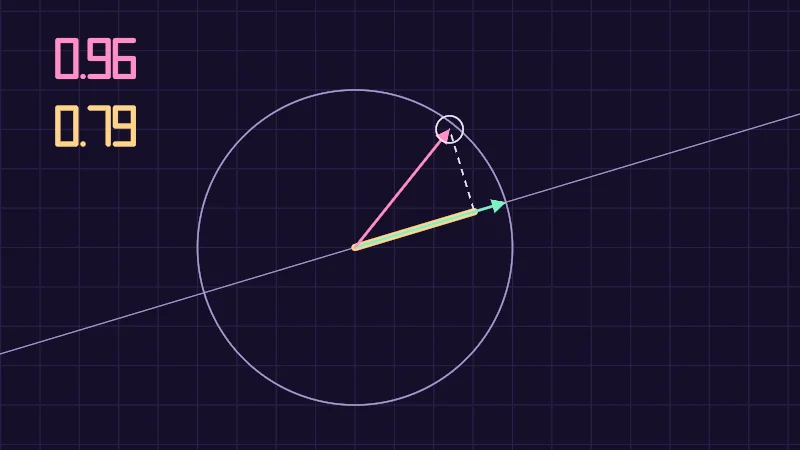
Take this one slowly. For two unit vectors both lengths are 1, which leaves the cosine alone. It’s 1 when they point the same way, 0 at a right angle and -1 when they point opposite ways. Now picture a light shining onto ‘s line at a right angle. Then casts a shadow on the line, its projection. When has length 1, is that shadow’s length.
Turn on JavaScript to run this demo.
Rendered in Unity 2022.3.22f1 from the Copy for Unity shader, with the settings this demo starts with.
// Numbers for the readouts, drawn with seven segments like a pocket calculator. Not part of the lesson.
#include "sdf2d"

// Which segments a digit lights, one bit each: 1 top, 2 top right, 4 bottom right, 8 bottom,
// 16 bottom left, 32 top left, 64 middle.
int segments(int n)
{
    if (n == 0) return 63;
    if (n == 1) return 6;
    if (n == 2) return 91;
    if (n == 3) return 79;
    if (n == 4) return 102;
    if (n == 5) return 109;
    if (n == 6) return 125;
    if (n == 7) return 7;
    if (n == 8) return 127;
    return 111;
}

// Distance to one digit in a box 0.5 wide and 1 tall, its bottom left corner at the origin.
float sdDigit(float2 q, int n)
{
    if (n == 1) q.x += 0.25; // a one stands in the middle of its box
    int m = segments(n);
    float d = 1e5;
    if ((m & 1) != 0) d = min(d, sdSegment(q, float2(0.0, 1.0), float2(0.5, 1.0)));
    if ((m & 2) != 0) d = min(d, sdSegment(q, float2(0.5, 1.0), float2(0.5, 0.5)));
    if ((m & 4) != 0) d = min(d, sdSegment(q, float2(0.5, 0.5), float2(0.5, 0.0)));
    if ((m & 8) != 0) d = min(d, sdSegment(q, float2(0.0, 0.0), float2(0.5, 0.0)));
    if ((m & 16) != 0) d = min(d, sdSegment(q, float2(0.0, 0.0), float2(0.0, 0.5)));
    if ((m & 32) != 0) d = min(d, sdSegment(q, float2(0.0, 0.5), float2(0.0, 1.0)));
    if ((m & 64) != 0) d = min(d, sdSegment(q, float2(0.0, 0.5), float2(0.5, 0.5)));
    return d;
}

// Writes v like -1.25 (up to 9.99), with the digits h tall and the bottom left corner at `at`.
float3 drawNumber(float3 col, float2 p, float2 at, float h, float v, float3 ink)
{
    float2 q = (p - at) / h;
    int c = int(min(floor(abs(v) * 100.0 + 0.5), 999.0));
    float d = length(q - float2(1.32, 0.0));
    if (v < 0.0 && c > 0) d = min(d, sdSegment(q, float2(0.15, 0.5), float2(0.5, 0.5)));
    d = min(d, sdDigit(q - float2(0.62, 0.0), c / 100));
    d = min(d, sdDigit(q - float2(1.52, 0.0), (c / 10) % 10));
    d = min(d, sdDigit(q - float2(2.22, 0.0), c % 10));
    return lerp(col, ink, saturate(0.5 - (d * h - 0.07 * h) / pixelSize()));
}


// ----

// The dot product of a fixed arrow a and an arrow b you drag, with b's shadow on a's line.
#include "diagram"

uniform float _Unit; // @toggle = 0 | Normalize b | Keeps b's direction but sets its length to 1, so the dot product becomes the cosine of the angle.

static const float S = 0.7;                 // one unit of the vectors, in centered() units
static const float2 O = float2(-0.2, -0.1); // where both arrows start

float4 shade(float2 uv)
{
    float2 p = centered(uv);
    float2 a = normalize(float2(1.0, 0.3)); // length 1
    float2 b = (pointerCentered() - O) / S;
    if (_Unit > 0.5) b = length(b) > 1e-4 ? normalize(b) : a;

    float ab = dot(a, b);
    float2 shadow = ab * a; // the foot of the dashed line: b's projection on a's line

    float3 col = drawGrid(themeSurface(), p - O, 0.25 * S);
    col = drawCircle(col, p, O, S, 1.5, themeMuted());
    col = drawLine(col, p, O - 3.0 * a, O + 3.0 * a, 1.0, themeMuted());
    col = drawLine(col, p, O, O + shadow * S, 7.0, series3());
    if (length(b - shadow) > 0.01) col = drawDashed(col, p, O + b * S, O + shadow * S, 1.5, themeInk());
    col = drawArrow(col, p, O, O + a * S, 2.5, series1());
    if (length(b) > 0.05) col = drawArrow(col, p, O, O + b * S, 2.5, series2());
    col = drawCircle(col, p, pointerCentered(), 0.06, 1.5, themeInk());

    col = drawNumber(col, p, float2(-1.62, 0.66), 0.16, length(b), series2());
    col = drawNumber(col, p, float2(-1.62, 0.36), 0.16, ab, series3());
    return float4(col, 1.0);
}
// Numbers for the readouts, drawn with seven segments like a pocket calculator. Not part of the lesson.
#include "sdf2d"
// Which segments a digit lights, one bit each: 1 top, 2 top right, 4 bottom right, 8 bottom,
// 16 bottom left, 32 top left, 64 middle.
int segments(int n)
{
if (n == 0) return 63;
if (n == 1) return 6;
if (n == 2) return 91;
if (n == 3) return 79;
if (n == 4) return 102;
if (n == 5) return 109;
if (n == 6) return 125;
if (n == 7) return 7;
if (n == 8) return 127;
return 111;
}
// Distance to one digit in a box 0.5 wide and 1 tall, its bottom left corner at the origin.
float sdDigit(vec2 q, int n)
{
if (n == 1) q.x += 0.25; // a one stands in the middle of its box
int m = segments(n);
float d = 1e5;
if ((m & 1) != 0) d = min(d, sdSegment(q, vec2(0.0, 1.0), vec2(0.5, 1.0)));
if ((m & 2) != 0) d = min(d, sdSegment(q, vec2(0.5, 1.0), vec2(0.5, 0.5)));
if ((m & 4) != 0) d = min(d, sdSegment(q, vec2(0.5, 0.5), vec2(0.5, 0.0)));
if ((m & 8) != 0) d = min(d, sdSegment(q, vec2(0.0, 0.0), vec2(0.5, 0.0)));
if ((m & 16) != 0) d = min(d, sdSegment(q, vec2(0.0, 0.0), vec2(0.0, 0.5)));
if ((m & 32) != 0) d = min(d, sdSegment(q, vec2(0.0, 0.5), vec2(0.0, 1.0)));
if ((m & 64) != 0) d = min(d, sdSegment(q, vec2(0.0, 0.5), vec2(0.5, 0.5)));
return d;
}
// Writes v like -1.25 (up to 9.99), with the digits h tall and the bottom left corner at `at`.
vec3 drawNumber(vec3 col, vec2 p, vec2 at, float h, float v, vec3 ink)
{
vec2 q = (p - at) / h;
int c = int(min(floor(abs(v) * 100.0 + 0.5), 999.0));
float d = length(q - vec2(1.32, 0.0));
if (v < 0.0 && c > 0) d = min(d, sdSegment(q, vec2(0.15, 0.5), vec2(0.5, 0.5)));
d = min(d, sdDigit(q - vec2(0.62, 0.0), c / 100));
d = min(d, sdDigit(q - vec2(1.52, 0.0), (c / 10) % 10));
d = min(d, sdDigit(q - vec2(2.22, 0.0), c % 10));
return mix(col, ink, saturate(0.5 - (d * h - 0.07 * h) / pixelSize()));
}
// ----
// The dot product of a fixed arrow a and an arrow b you drag, with b's shadow on a's line.
#include "diagram"
uniform float _Unit; // @toggle = 0 | Normalize b | Keeps b's direction but sets its length to 1, so the dot product becomes the cosine of the angle.
const float S = 0.7; // one unit of the vectors, in centered() units
const vec2 O = vec2(-0.2, -0.1); // where both arrows start
vec4 shade(vec2 uv)
{
vec2 p = centered(uv);
vec2 a = normalize(vec2(1.0, 0.3)); // length 1
vec2 b = (pointerCentered() - O) / S;
if (_Unit > 0.5) b = length(b) > 1e-4 ? normalize(b) : a;
float ab = dot(a, b);
vec2 shadow = ab * a; // the foot of the dashed line: b's projection on a's line
vec3 col = drawGrid(themeSurface(), p - O, 0.25 * S);
col = drawCircle(col, p, O, S, 1.5, themeMuted());
col = drawLine(col, p, O - 3.0 * a, O + 3.0 * a, 1.0, themeMuted());
col = drawLine(col, p, O, O + shadow * S, 7.0, series3());
if (length(b - shadow) > 0.01) col = drawDashed(col, p, O + b * S, O + shadow * S, 1.5, themeInk());
col = drawArrow(col, p, O, O + a * S, 2.5, series1());
if (length(b) > 0.05) col = drawArrow(col, p, O, O + b * S, 2.5, series2());
col = drawCircle(col, p, pointerCentered(), 0.06, 1.5, themeInk());
col = drawNumber(col, p, vec2(-1.62, 0.66), 0.16, length(b), series2());
col = drawNumber(col, p, vec2(-1.62, 0.36), 0.16, ab, series3());
return vec4(col, 1.0);
}Names in this code (38)
_Unit- Switch "Normalize b". Keeps b's direction but sets its length to 1, so the dot product becomes the cosine of the angle.
a- Declared on line 12: float2 a = normalize(float2(1.0, 0.3)); // length 1
ab- Declared on line 16: float ab = dot(a, b);
b- Declared on line 13: float2 b = (pointerCentered() - O) / S;
centered- float2 centered(float2 uv). Square coordinates with the origin in the middle: the short side of the picture spans -1..1. (common library)
col- Declared on line 19: float3 col = drawGrid(themeSurface(), p - O, 0.25 * S);
drawArrow- float3 drawArrow(float3 col, float2 p, float2 a, float2 b, float widthPx, float3 ink) (diagram library)
drawCircle- float3 drawCircle(float3 col, float2 p, float2 c, float r, float widthPx, float3 ink) (diagram library)
drawDashed- float3 drawDashed(float3 col, float2 p, float2 a, float2 b, float widthPx, float3 ink) (diagram library)
drawGrid- float3 drawGrid(float3 col, float2 p, float spacing) (diagram library)
drawLine- float3 drawLine(float3 col, float2 p, float2 a, float2 b, float widthPx, float3 ink) (diagram library)
drawNumber- float3 drawNumber(float3 col, float2 p, float2 at, float h, float v, float3 ink). Writes v like -1.25 (up to 9.99), with the digits h tall and the bottom left corner at `at`. (this article's helper code)
include- Pulls another file into this one, for example UnityCG.cginc.
lerp- HLSL's blend from a (t = 0) to b (t = 1). GLSL calls it mix.
O- Declared on line 7: static const float2 O = float2(-0.2, -0.1); // where both arrows start
p- Declared on line 11: float2 p = centered(uv);
pixelSize- float pixelSize() (common library)
pointerCentered- float2 pointerCentered(). The pointer (or the _Pointer material setting in Unity) in the same coordinates as centered(). (common library)
S- Declared on line 6: static const float S = 0.7; // one unit of the vectors, in centered() units
saturate- An HLSL function that clamps a value between 0 and 1.
sdDigit- float sdDigit(float2 q, int n). Distance to one digit in a box 0.5 wide and 1 tall, its bottom left corner at the origin. (this article's helper code)
sdSegment- float sdSegment(float2 p, float2 a, float2 b) (sdf2d library)
segments- int segments(int n). Which segments a digit lights, one bit each: 1 top, 2 top right, 4 bottom right, 8 bottom, 16 bottom left, 32 top left, 64 middle. (this article's helper code)
series1- float3 series1() (common library)
series2- float3 series2() (common library)
series3- float3 series3() (common library)
shade- float4 shade(float2 uv)
shadow- Declared on line 17: float2 shadow = ab * a; // the foot of the dashed line: b's projection on a's line
themeInk- float3 themeInk() (common library)
themeMuted- float3 themeMuted() (common library)
themeSurface- float3 themeSurface(). The dusk stage colors, in linear light. Series colors are used in this order: mint, pink, butter. (common library)
uv- A parameter of shade(), line 9: float2 uv.
abs- abs(x) is x without its minus sign. abs(-0.3) = 0.3.
dot- dot(a, b) multiplies matching parts and adds them up. For unit vectors it is the cosine of the angle between them.
floor- floor(x) rounds down to the largest whole number not above x. floor(2.7) = 2, floor(-0.5) = -1.
length- length(v) says how long the vector v is, sqrt(x² + y²).
min- min(a, b) picks the smaller of the two.
normalize- normalize(v) keeps the direction of v and makes its length 1.
Drag the tip of b and watch the numbers. The butter one, , is the shadow’s length, negative when b points backwards. Turn on Normalize b to keep b on the circle, and becomes the cosine.
Lighting with one dot
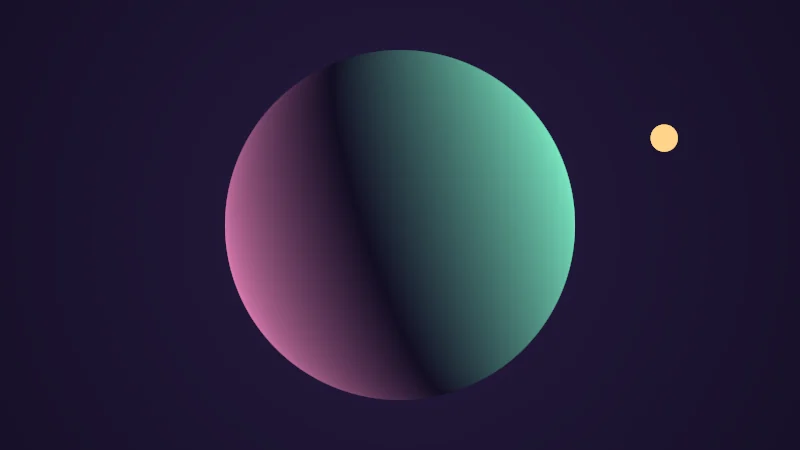
Here’s where the dot product earns its keep. Every point of a surface has a normal , a unit vector pointing straight out. On a sphere it’s the direction from the centre to the point. is a unit vector from the surface towards the light:
Where the surface faces the light head on, is 1 and you get full brightness. It fades as the surface turns away, reaches 0 at a right angle and goes negative on the far side, where max holds it at 0. This is Lambert lighting, and it sits under nearly every lit shader. A toon shader cuts the same number into hard steps.
Turn on JavaScript to run this demo.
Rendered in Unity 2022.3.22f1 from the Copy for Unity shader, with the settings this demo starts with.
// A sphere lit by one light. Its brightness is N dot L: how much the surface faces the light.
#include "ray"

uniform float _Show;   // @select = 0 | Show | Lit=0, Raw N dot L=1 | Lit stops the dot product at 0. Raw keeps its sign, mint where it is positive and pink where it is negative.
uniform float3 _Color; // @color = #ff7ab8 | Color | The color of the sphere.

float4 shade(float2 uv)
{
    float2 p = centered(uv);

    // L points from the surface towards the light. Dragging swings it around the sphere.
    float2 turn = orbitAngles(_Pointer.xy);
    float3 L = float3(sin(turn.x) * cos(turn.y), sin(turn.y), -cos(turn.x) * cos(turn.y));

    // A camera in front of a sphere of radius 1 at the origin.
    float3 eye = float3(0.0, 0.0, -3.0);
    float3 ray = cameraRay(p, eye, float3(0.0, 0.0, 0.0), 2.2);
    float t = raySphere(eye, ray, float3(0.0, 0.0, 0.0), 1.0);
    float3 closest = eye + ray * dot(-eye, ray); // where the ray passes nearest the centre
    float3 hit = t > 0.0 ? eye + ray * t : closest;

    // A sphere's normal points straight out from its centre.
    float3 N = normalize(hit);
    float ndl = dot(N, L);

    float3 dark = float3(0.006, 0.004, 0.016);
    float3 sphere = _Color * (0.02 + saturate(ndl));
    if (_Show > 0.5) sphere = ndl > 0.0 ? tint(dark, series1(), ndl) : tint(dark, series2(), -ndl);

    // The light itself: a small sun that hides behind the sphere when it goes round the back.
    float3 sunColor = float3(1.0, 0.66, 0.25);
    float sun = fillAA(length(p - 1.25 * L.xy) - 0.06);
    float3 col = dark + float3(0.012, 0.006, 0.03) * (1.0 - length(p) * 0.4);
    col = lerp(col, sunColor, sun);
    col = lerp(col, sphere, fillAA(length(closest) - 1.0));
    if (L.z < 0.0) col = lerp(col, sunColor, sun);
    return float4(col, 1.0);
}
// A sphere lit by one light. Its brightness is N dot L: how much the surface faces the light.
#include "ray"
uniform float _Show; // @select = 0 | Show | Lit=0, Raw N dot L=1 | Lit stops the dot product at 0. Raw keeps its sign, mint where it is positive and pink where it is negative.
uniform vec3 _Color; // @color = #ff7ab8 | Color | The color of the sphere.
vec4 shade(vec2 uv)
{
vec2 p = centered(uv);
// L points from the surface towards the light. Dragging swings it around the sphere.
vec2 turn = orbitAngles(_Pointer.xy);
vec3 L = vec3(sin(turn.x) * cos(turn.y), sin(turn.y), -cos(turn.x) * cos(turn.y));
// A camera in front of a sphere of radius 1 at the origin.
vec3 eye = vec3(0.0, 0.0, -3.0);
vec3 ray = cameraRay(p, eye, vec3(0.0, 0.0, 0.0), 2.2);
float t = raySphere(eye, ray, vec3(0.0, 0.0, 0.0), 1.0);
vec3 closest = eye + ray * dot(-eye, ray); // where the ray passes nearest the centre
vec3 hit = t > 0.0 ? eye + ray * t : closest;
// A sphere's normal points straight out from its centre.
vec3 N = normalize(hit);
float ndl = dot(N, L);
vec3 dark = vec3(0.006, 0.004, 0.016);
vec3 sphere = _Color * (0.02 + saturate(ndl));
if (_Show > 0.5) sphere = ndl > 0.0 ? tint(dark, series1(), ndl) : tint(dark, series2(), -ndl);
// The light itself: a small sun that hides behind the sphere when it goes round the back.
vec3 sunColor = vec3(1.0, 0.66, 0.25);
float sun = fillAA(length(p - 1.25 * L.xy) - 0.06);
vec3 col = dark + vec3(0.012, 0.006, 0.03) * (1.0 - length(p) * 0.4);
col = mix(col, sunColor, sun);
col = mix(col, sphere, fillAA(length(closest) - 1.0));
if (L.z < 0.0) col = mix(col, sunColor, sun);
return vec4(col, 1.0);
}Names in this code (36)
_Color- Color picker "Color". The color of the sphere.
_Pointer- Where the reader dragged, from (0, 0) at the bottom left to (1, 1) at the top right. xy is the first handle and zw a second one; in Unity it is the Pointer material setting.
_Show- Choice "Show". Lit stops the dot product at 0. Raw keeps its sign, mint where it is positive and pink where it is negative.
cameraRay- float3 cameraRay(float2 uv, float3 eye, float3 target, float zoom). Ray from a camera at `eye` looking at `target`. uv in centered() units; zoom about 1.5 is a normal lens. (ray library)
centered- float2 centered(float2 uv). Square coordinates with the origin in the middle: the short side of the picture spans -1..1. (common library)
closest- Declared on line 19: float3 closest = eye + ray * dot(-eye, ray); // where the ray passes nearest the centre
col- Declared on line 33: float3 col = dark + float3(0.012, 0.006, 0.03) * (1.0 - length(p) * 0.4);
dark- Declared on line 26: float3 dark = float3(0.006, 0.004, 0.016);
eye- Declared on line 16: float3 eye = float3(0.0, 0.0, -3.0);
fillAA- float fillAA(float d). Anti-aliased coverage of a signed distance: 1 inside, 0 outside, a one pixel ramp at the edge. (common library)
hit- Declared on line 20: float3 hit = t > 0.0 ? eye + ray * t : closest;
include- Pulls another file into this one, for example UnityCG.cginc.
L- Declared on line 13: float3 L = float3(sin(turn.x) * cos(turn.y), sin(turn.y), -cos(turn.x) * cos(turn.y));
lerp- HLSL's blend from a (t = 0) to b (t = 1). GLSL calls it mix.
N- Declared on line 23: float3 N = normalize(hit);
ndl- Declared on line 24: float ndl = dot(N, L);
orbitAngles- float2 orbitAngles(float2 pointer01). Dragging a 3D demo (pointer="orbit"): sideways spins the object without end, up and down tilts it up to 75 degrees. (ray library)
p- Declared on line 9: float2 p = centered(uv);
ray- Declared on line 17: float3 ray = cameraRay(p, eye, float3(0.0, 0.0, 0.0), 2.2);
raySphere- float raySphere(float3 ro, float3 rd, float3 center, float radius). Distance along the ray to a sphere, or -1 when it misses. (ray library)
saturate- An HLSL function that clamps a value between 0 and 1.
series1- float3 series1() (common library)
series2- float3 series2() (common library)
shade- float4 shade(float2 uv)
sphere- Declared on line 27: float3 sphere = _Color * (0.02 + saturate(ndl));
sun- Declared on line 32: float sun = fillAA(length(p - 1.25 * L.xy) - 0.06);
sunColor- Declared on line 31: float3 sunColor = float3(1.0, 0.66, 0.25);
t- Declared on line 18: float t = raySphere(eye, ray, float3(0.0, 0.0, 0.0), 1.0);
tint- float3 tint(float3 a, float3 b, float t). Blends two colors in steps that look even to the eye (in sRGB), for value ramps such as distance bands. Edges and coverage still blend with lerp, in linear light, as light really adds up. (common library)
turn- Declared on line 12: float2 turn = orbitAngles(_Pointer.xy);
uv- A parameter of shade(), line 7: float2 uv.
cos- cos(a) is the cosine of the angle a, in radians.
dot- dot(a, b) multiplies matching parts and adds them up. For unit vectors it is the cosine of the angle between them.
length- length(v) says how long the vector v is, sqrt(x² + y²).
normalize- normalize(v) keeps the direction of v and makes its length 1.
sin- sin(a) is the sine of the angle a, in radians.
Drag to move the light. Show starts on Raw, so you see before max. Mint means it’s positive and pink means it’s negative, with dark in between. Switch to Lit to see max at work.
The cross product
The dot product turns two vectors into a number. The cross product turns two 3D vectors, and only 3D ones, into a third at a right angle to both. Give it two edges of a triangle and it points straight out of the triangle.
4: normalize makes it length 1, and that's the triangle's normal.
Here it is in a shader:
float3 edge1 = p1 - p0;
float3 edge2 = p2 - p0;
float3 n = normalize(cross(edge1, edge2));p0, p1 and p2 are the corners, and normalize makes the result the triangle’s normal. Swap the two edges and it points the other way, which is why the order of a triangle’s corners decides which side is its front.
Picking parts with swizzles
You can read the parts of a vector by their letters: .x, .y, .z, .w, or .r, .g, .b, .a. Several letters make a new vector, in any order. That’s a swizzle:
float4 col = float4(1.0, 0.5, 0.2, 1.0); // orange, fully opaque
float3 rgb = col.rgb;          // (1.0, 0.5, 0.2): the color without alpha
float3 swapped = col.bgr;      // (0.2, 0.5, 1.0): now it's blue
float2 floorPos = worldPos.xz; // where a point is on the floor, seen from above
In practice
In a Unity shader, the lighting looks like this:
float3 N = normalize(i.worldNormal);
float3 L = normalize(_WorldSpaceLightPos0.xyz);
float light = saturate(dot(N, L));
_WorldSpaceLightPos0.xyz is the direction towards the main directional light, and saturate is the max from before that also stops at 1. Two traps:
- Normalize again. The normal is blended across each triangle, and a blend of two unit vectors comes out a little shorter than 1.
- No light at all. Many VRChat worlds have no realtime directional light, and then this direction can be all zeros. Hello again, normalize trap. Lit shaders check for that and fall back on a direction of their own.
- A vector is a few numbers kept together. Add and scale them number by number.
lengthmeasures an arrow,normalizekeeps only its direction and swizzles pick its parts.- The dot product says how much two directions agree, so lights a surface. The cross product finds a direction at right angles to two others.