Basics, part 4
Where a matrix sends the arrows
A matrix is a small grid of numbers that turns, stretches and slants every point at once. Read it by its columns, multiply by hand and undo it.
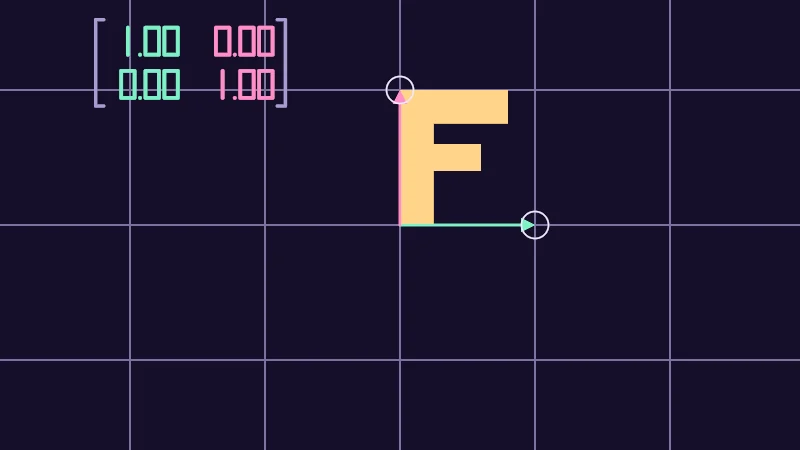
A matrix is a small grid of numbers that turns, stretches and slants every point at once. You’ve already used one, because rot2 from the sine and cosine lesson builds a matrix that turns. Let’s see where a matrix sends things, then multiply one by hand, stack two and undo one.
Turn on JavaScript to run this demo.
Rendered in Unity 2022.3.22f1 from the Copy for Unity shader, with the settings this demo starts with.
// Shared by the matrix demos. Matrix helpers, the letter F, a grid that follows a matrix, and the corner numbers.
#include "sdf2d"

static const float S = 0.6; // one grid square, in centered() units

float cross2(float2 a, float2 b) { return a.x * b.y - a.y * b.x; }

// The matrix whose first column is where x lands (i) and whose second is where y lands (j).
float2x2 fromColumns(float2 i, float2 j)
{
    return float2x2(i.x, j.x, i.y, j.y); // the columns go in row by row
}

// Undoes m. Check abs(determinant(m)) >= 0.01 first: a flattened matrix has no way back.
float2x2 inverse2(float2x2 m)
{
    return float2x2(m[1][1], -m[0][1], -m[1][0], m[0][0]) / determinant(m);
}

// Distance to the segment from a to b, also when a and b are the same point.
float sdEdge(float2 p, float2 a, float2 b)
{
    float2 pa = p - a, ba = b - a;
    float h = saturate(dot(pa, ba) / max(dot(ba, ba), 1e-8));
    return length(pa - ba * h);
}

// Signed distance to the parallelogram with one corner at `corner` and the edges e1 and e2 from it.
// A flat one (e1 and e2 on one line) has no inside.
float sdParallelogram(float2 p, float2 corner, float2 e1, float2 e2)
{
    float2 q = p - corner;
    float2 o = float2(0.0, 0.0);
    float d = min(min(sdEdge(q, o, e1), sdEdge(q, e2, e1 + e2)), min(sdEdge(q, o, e2), sdEdge(q, e1, e1 + e2)));
    float c = cross2(e1, e2);
    float a = cross2(q, e2) * sign(c), b = cross2(e1, q) * sign(c); // how far along e1 and e2, times abs(c)
    return (min(a, b) > 0.0 && max(a, b) < abs(c)) ? -d : d;
}

// The letter F after the matrix m, its bottom left corner on the origin. The bars reach into the stem, so no seam
// shows where they meet.
float sdF(float2 p, float2x2 m)
{
    float2 o = float2(0.0, 0.0);
    float d = sdParallelogram(p, o, mul(m, float2(0.25, 0.0)), mul(m, float2(0.0, 1.0)));
    d = min(d, sdParallelogram(p, mul(m, float2(0.0, 0.75)), mul(m, float2(0.8, 0.0)), mul(m, float2(0.0, 0.25))));
    return min(d, sdParallelogram(p, mul(m, float2(0.0, 0.4)), mul(m, float2(0.6, 0.0)), mul(m, float2(0.0, 0.2))));
}

// The grid after m: 1 px lines through whole steps of S along m's columns. A family of lines fades out as it
// crowds together (gone below 4 px apart, full from 8 px), and a flattened m draws none.
float3 drawMappedGrid(float3 col, float2 p, float2x2 m, float3 ink)
{
    float2 i = m._m00_m10, j = m._m01_m11;
    float det = determinant(m);
    float safe = abs(det) < 0.01 ? 0.01 : det;
    float2 steps = float2(cross2(p, j), cross2(i, p)) / (S * safe); // p in steps of i and of j
    float2 gap = S * abs(safe) / max(float2(length(j), length(i)), 1e-6) / pixelSize(); // px from line to line
    float2 a = saturate(1.0 - abs(steps - round(steps)) * gap) * saturate(gap / 4.0 - 1.0);
    return lerp(col, ink, max(a.x, a.y) * step(0.01, abs(det)));
}

// Which segments a digit lights, one bit each: 1 top, 2 top right, 4 bottom right, 8 bottom,
// 16 bottom left, 32 top left, 64 middle.
int segments(int n)
{
    if (n == 0) return 63;
    if (n == 1) return 6;
    if (n == 2) return 91;
    if (n == 3) return 79;
    if (n == 4) return 102;
    if (n == 5) return 109;
    if (n == 6) return 125;
    if (n == 7) return 7;
    if (n == 8) return 127;
    return 111;
}

// Distance to one digit in a box 0.5 wide and 1 tall, its bottom left corner at the origin.
float sdDigit(float2 q, int n)
{
    if (n == 1) q.x += 0.25; // a one stands in the middle of its box
    int m = segments(n);
    float d = 1e5;
    if ((m & 1) != 0) d = min(d, sdSegment(q, float2(0.0, 1.0), float2(0.5, 1.0)));
    if ((m & 2) != 0) d = min(d, sdSegment(q, float2(0.5, 1.0), float2(0.5, 0.5)));
    if ((m & 4) != 0) d = min(d, sdSegment(q, float2(0.5, 0.5), float2(0.5, 0.0)));
    if ((m & 8) != 0) d = min(d, sdSegment(q, float2(0.0, 0.0), float2(0.5, 0.0)));
    if ((m & 16) != 0) d = min(d, sdSegment(q, float2(0.0, 0.0), float2(0.0, 0.5)));
    if ((m & 32) != 0) d = min(d, sdSegment(q, float2(0.0, 0.5), float2(0.0, 1.0)));
    if ((m & 64) != 0) d = min(d, sdSegment(q, float2(0.0, 0.5), float2(0.5, 0.5)));
    return d;
}

// Signed distance to v written like -1.25, digits 1 tall, centred on the origin. v stays within -9.99 and 9.99.
float sdNumber(float2 p, float v)
{
    float2 q = p + float2(1.435, 0.5);
    int c = int(floor(min(abs(v), 9.99) * 100.0 + 0.5));
    float d = length(q - float2(1.32, 0.0)); // the decimal point
    if (v < 0.0 && c > 0) d = min(d, sdSegment(q, float2(0.15, 0.5), float2(0.5, 0.5)));
    d = min(d, sdDigit(q - float2(0.62, 0.0), c / 100));
    d = min(d, sdDigit(q - float2(1.52, 0.0), (c / 10) % 10));
    d = min(d, sdDigit(q - float2(2.22, 0.0), c % 10));
    return d - 0.07;
}

// The four numbers of m in two rows between brackets, the first column mint and the second pink, digits `size`
// tall, the top left corner at `at`.
float3 drawMatrix(float3 col, float2 p, float2 at, float2x2 m, float size)
{
    float2 q = (p - at) / size;
    float px = pixelSize() / size;
    float2 r = float2(abs(q.x - 3.575), q.y); // both brackets at once
    float brackets = sdSegment(r, float2(3.515, -0.06), float2(3.515, -3.26));
    brackets = min(brackets, sdSegment(r, float2(3.515, -0.06), float2(3.215, -0.06)));
    brackets = min(brackets, sdSegment(r, float2(3.515, -3.26), float2(3.215, -3.26))) - 0.06;
    float first = min(sdNumber(q - float2(1.82, -0.86), m._m00), sdNumber(q - float2(1.82, -2.46), m._m10));
    float second = min(sdNumber(q - float2(5.33, -0.86), m._m01), sdNumber(q - float2(5.33, -2.46), m._m11));
    col = lerp(col, themeMuted(), saturate(0.5 - brackets / px));
    col = lerp(col, series1(), saturate(0.5 - first / px));
    return lerp(col, series2(), saturate(0.5 - second / px));
}


// ----

// The two arrows you drag are the columns of a matrix, and the grid and the letter F follow them.
#include "diagram"

float4 shade(float2 uv)
{
    float2 p = centered(uv);
    float2 i = pointerCentered() / S;     // where x lands, in grid squares
    float2 j = centered(_Pointer.zw) / S; // where y lands
    float2x2 M = fromColumns(i, j);

    float3 col = drawGrid(themeSurface(), p, S);
    col = drawMappedGrid(col, p, M, themeMuted());
    col = fillShape(col, sdF(p, S * M), series3(), 1.0);
    if (length(i) > 0.02) col = drawArrow(col, p, float2(0.0, 0.0), i * S, 2.5, series1());
    if (length(j) > 0.02) col = drawArrow(col, p, float2(0.0, 0.0), j * S, 2.5, series2());
    col = drawCircle(col, p, i * S, 0.06, 1.5, themeInk());
    col = drawCircle(col, p, j * S, 0.06, 1.5, themeInk());
    col = drawMatrix(col, p, float2(-1.36, 0.92), M, 0.12);
    return float4(col, 1.0);
}
// Shared by the matrix demos. Matrix helpers, the letter F, a grid that follows a matrix, and the corner numbers.
#include "sdf2d"
const float S = 0.6; // one grid square, in centered() units
float cross2(vec2 a, vec2 b) { return a.x * b.y - a.y * b.x; }
// The matrix whose first column is where x lands (i) and whose second is where y lands (j).
mat2 fromColumns(vec2 i, vec2 j)
{
return mat2(i.x, j.x, i.y, j.y); // the columns go in row by row
}
// Undoes m. Check abs(determinant(m)) >= 0.01 first: a flattened matrix has no way back.
mat2 inverse2(mat2 m)
{
return mat2(m[1][1], -m[0][1], -m[1][0], m[0][0]) / determinant(m);
}
// Distance to the segment from a to b, also when a and b are the same point.
float sdEdge(vec2 p, vec2 a, vec2 b)
{
vec2 pa = p - a, ba = b - a;
float h = saturate(dot(pa, ba) / max(dot(ba, ba), 1e-8));
return length(pa - ba * h);
}
// Signed distance to the parallelogram with one corner at `corner` and the edges e1 and e2 from it.
// A flat one (e1 and e2 on one line) has no inside.
float sdParallelogram(vec2 p, vec2 corner, vec2 e1, vec2 e2)
{
vec2 q = p - corner;
vec2 o = vec2(0.0, 0.0);
float d = min(min(sdEdge(q, o, e1), sdEdge(q, e2, e1 + e2)), min(sdEdge(q, o, e2), sdEdge(q, e1, e1 + e2)));
float c = cross2(e1, e2);
float a = cross2(q, e2) * sign(c), b = cross2(e1, q) * sign(c); // how far along e1 and e2, times abs(c)
return (min(a, b) > 0.0 && max(a, b) < abs(c)) ? -d : d;
}
// The letter F after the matrix m, its bottom left corner on the origin. The bars reach into the stem, so no seam
// shows where they meet.
float sdF(vec2 p, mat2 m)
{
vec2 o = vec2(0.0, 0.0);
float d = sdParallelogram(p, o, (vec2(0.25, 0.0) * m), (vec2(0.0, 1.0) * m));
d = min(d, sdParallelogram(p, (vec2(0.0, 0.75) * m), (vec2(0.8, 0.0) * m), (vec2(0.0, 0.25) * m)));
return min(d, sdParallelogram(p, (vec2(0.0, 0.4) * m), (vec2(0.6, 0.0) * m), (vec2(0.0, 0.2) * m)));
}
// The grid after m: 1 px lines through whole steps of S along m's columns. A family of lines fades out as it
// crowds together (gone below 4 px apart, full from 8 px), and a flattened m draws none.
vec3 drawMappedGrid(vec3 col, vec2 p, mat2 m, vec3 ink)
{
vec2 i = vec2(m[0][0], m[1][0]), j = vec2(m[0][1], m[1][1]);
float det = determinant(m);
float safe = abs(det) < 0.01 ? 0.01 : det;
vec2 steps = vec2(cross2(p, j), cross2(i, p)) / (S * safe); // p in steps of i and of j
vec2 gap = S * abs(safe) / max(vec2(length(j), length(i)), 1e-6) / pixelSize(); // px from line to line
vec2 a = saturate(1.0 - abs(steps - round(steps)) * gap) * saturate(gap / 4.0 - 1.0);
return mix(col, ink, max(a.x, a.y) * step(0.01, abs(det)));
}
// Which segments a digit lights, one bit each: 1 top, 2 top right, 4 bottom right, 8 bottom,
// 16 bottom left, 32 top left, 64 middle.
int segments(int n)
{
if (n == 0) return 63;
if (n == 1) return 6;
if (n == 2) return 91;
if (n == 3) return 79;
if (n == 4) return 102;
if (n == 5) return 109;
if (n == 6) return 125;
if (n == 7) return 7;
if (n == 8) return 127;
return 111;
}
// Distance to one digit in a box 0.5 wide and 1 tall, its bottom left corner at the origin.
float sdDigit(vec2 q, int n)
{
if (n == 1) q.x += 0.25; // a one stands in the middle of its box
int m = segments(n);
float d = 1e5;
if ((m & 1) != 0) d = min(d, sdSegment(q, vec2(0.0, 1.0), vec2(0.5, 1.0)));
if ((m & 2) != 0) d = min(d, sdSegment(q, vec2(0.5, 1.0), vec2(0.5, 0.5)));
if ((m & 4) != 0) d = min(d, sdSegment(q, vec2(0.5, 0.5), vec2(0.5, 0.0)));
if ((m & 8) != 0) d = min(d, sdSegment(q, vec2(0.0, 0.0), vec2(0.5, 0.0)));
if ((m & 16) != 0) d = min(d, sdSegment(q, vec2(0.0, 0.0), vec2(0.0, 0.5)));
if ((m & 32) != 0) d = min(d, sdSegment(q, vec2(0.0, 0.5), vec2(0.0, 1.0)));
if ((m & 64) != 0) d = min(d, sdSegment(q, vec2(0.0, 0.5), vec2(0.5, 0.5)));
return d;
}
// Signed distance to v written like -1.25, digits 1 tall, centred on the origin. v stays within -9.99 and 9.99.
float sdNumber(vec2 p, float v)
{
vec2 q = p + vec2(1.435, 0.5);
int c = int(floor(min(abs(v), 9.99) * 100.0 + 0.5));
float d = length(q - vec2(1.32, 0.0)); // the decimal point
if (v < 0.0 && c > 0) d = min(d, sdSegment(q, vec2(0.15, 0.5), vec2(0.5, 0.5)));
d = min(d, sdDigit(q - vec2(0.62, 0.0), c / 100));
d = min(d, sdDigit(q - vec2(1.52, 0.0), (c / 10) % 10));
d = min(d, sdDigit(q - vec2(2.22, 0.0), c % 10));
return d - 0.07;
}
// The four numbers of m in two rows between brackets, the first column mint and the second pink, digits `size`
// tall, the top left corner at `at`.
vec3 drawMatrix(vec3 col, vec2 p, vec2 at, mat2 m, float size)
{
vec2 q = (p - at) / size;
float px = pixelSize() / size;
vec2 r = vec2(abs(q.x - 3.575), q.y); // both brackets at once
float brackets = sdSegment(r, vec2(3.515, -0.06), vec2(3.515, -3.26));
brackets = min(brackets, sdSegment(r, vec2(3.515, -0.06), vec2(3.215, -0.06)));
brackets = min(brackets, sdSegment(r, vec2(3.515, -3.26), vec2(3.215, -3.26))) - 0.06;
float first = min(sdNumber(q - vec2(1.82, -0.86), m[0][0]), sdNumber(q - vec2(1.82, -2.46), m[1][0]));
float second = min(sdNumber(q - vec2(5.33, -0.86), m[0][1]), sdNumber(q - vec2(5.33, -2.46), m[1][1]));
col = mix(col, themeMuted(), saturate(0.5 - brackets / px));
col = mix(col, series1(), saturate(0.5 - first / px));
return mix(col, series2(), saturate(0.5 - second / px));
}
// ----
// The two arrows you drag are the columns of a matrix, and the grid and the letter F follow them.
#include "diagram"
vec4 shade(vec2 uv)
{
vec2 p = centered(uv);
vec2 i = pointerCentered() / S; // where x lands, in grid squares
vec2 j = centered(_Pointer.zw) / S; // where y lands
mat2 M = fromColumns(i, j);
vec3 col = drawGrid(themeSurface(), p, S);
col = drawMappedGrid(col, p, M, themeMuted());
col = fillShape(col, sdF(p, S * M), series3(), 1.0);
if (length(i) > 0.02) col = drawArrow(col, p, vec2(0.0, 0.0), i * S, 2.5, series1());
if (length(j) > 0.02) col = drawArrow(col, p, vec2(0.0, 0.0), j * S, 2.5, series2());
col = drawCircle(col, p, i * S, 0.06, 1.5, themeInk());
col = drawCircle(col, p, j * S, 0.06, 1.5, themeInk());
col = drawMatrix(col, p, vec2(-1.36, 0.92), M, 0.12);
return vec4(col, 1.0);
}Names in this code (48)
_Pointer- Where the reader dragged, from (0, 0) at the bottom left to (1, 1) at the top right. xy is the first handle and zw a second one; in Unity it is the Pointer material setting.
centered- float2 centered(float2 uv). Square coordinates with the origin in the middle: the short side of the picture spans -1..1. (common library)
col- Declared on line 11: float3 col = drawGrid(themeSurface(), p, S);
cross2- float cross2(float2 a, float2 b) (this article's helper code)
determinant- determinant(M) in HLSL says how much M scales areas, or volumes in 3D, and is negative when M flips them over. At 0, M flattens everything and has no inverse.
drawArrow- float3 drawArrow(float3 col, float2 p, float2 a, float2 b, float widthPx, float3 ink) (diagram library)
drawCircle- float3 drawCircle(float3 col, float2 p, float2 c, float r, float widthPx, float3 ink) (diagram library)
drawGrid- float3 drawGrid(float3 col, float2 p, float spacing) (diagram library)
drawMappedGrid- float3 drawMappedGrid(float3 col, float2 p, float2x2 m, float3 ink). The grid after m: 1 px lines through whole steps of S along m's columns. A family of lines fades out as it crowds together (gone below 4 px apart, full from 8 px), and a flattened m draws none. (this article's helper code)
drawMatrix- float3 drawMatrix(float3 col, float2 p, float2 at, float2x2 m, float size). The four numbers of m in two rows between brackets, the first column mint and the second pink, digits `size` tall, the top left corner at `at`. (this article's helper code)
fillShape- float3 fillShape(float3 col, float d, float3 ink, float alpha). Fill or outline any signed distance d (in centered() units). alpha tints evenly for the eye; the edge itself blends in linear light like any coverage. (diagram library)
float2x2- A 2 by 2 matrix in HLSL, four numbers in two rows of two. GLSL calls it mat2.
fromColumns- float2x2 fromColumns(float2 i, float2 j). The matrix whose first column is where x lands (i) and whose second is where y lands (j). (this article's helper code)
i- Declared on line 7: float2 i = pointerCentered() / S; // where x lands, in grid squares
include- Pulls another file into this one, for example UnityCG.cginc.
inverse2- float2x2 inverse2(float2x2 m). Undoes m. Check abs(determinant(m)) >= 0.01 first: a flattened matrix has no way back. (this article's helper code)
j- Declared on line 8: float2 j = centered(_Pointer.zw) / S; // where y lands
lerp- HLSL's blend from a (t = 0) to b (t = 1). GLSL calls it mix.
M- Declared on line 9: float2x2 M = fromColumns(i, j);
mul- Matrix times vector or matrix times matrix in HLSL. mul(M, v) applies M to v.
p- Declared on line 6: float2 p = centered(uv);
pixelSize- float pixelSize() (common library)
pointerCentered- float2 pointerCentered(). The pointer (or the _Pointer material setting in Unity) in the same coordinates as centered(). (common library)
saturate- An HLSL function that clamps a value between 0 and 1.
sdDigit- float sdDigit(float2 q, int n). Distance to one digit in a box 0.5 wide and 1 tall, its bottom left corner at the origin. (this article's helper code)
sdEdge- float sdEdge(float2 p, float2 a, float2 b). Distance to the segment from a to b, also when a and b are the same point. (this article's helper code)
sdF- float sdF(float2 p, float2x2 m). The letter F after the matrix m, its bottom left corner on the origin. The bars reach into the stem, so no seam shows where they meet. (this article's helper code)
sdNumber- float sdNumber(float2 p, float v). Signed distance to v written like -1.25, digits 1 tall, centred on the origin. v stays within -9.99 and 9.99. (this article's helper code)
sdParallelogram- float sdParallelogram(float2 p, float2 corner, float2 e1, float2 e2). Signed distance to the parallelogram with one corner at `corner` and the edges e1 and e2 from it. A flat one (e1 and e2 on one line) has no inside. (this article's helper code)
sdSegment- float sdSegment(float2 p, float2 a, float2 b) (sdf2d library)
segments- int segments(int n). Which segments a digit lights, one bit each: 1 top, 2 top right, 4 bottom right, 8 bottom, 16 bottom left, 32 top left, 64 middle. (this article's helper code)
series1- float3 series1() (common library)
series2- float3 series2() (common library)
series3- float3 series3() (common library)
shade- float4 shade(float2 uv)
themeInk- float3 themeInk() (common library)
themeMuted- float3 themeMuted() (common library)
themeSurface- float3 themeSurface(). The dusk stage colors, in linear light. Series colors are used in this order: mint, pink, butter. (common library)
uv- A parameter of shade(), line 4: float2 uv.
abs- abs(x) is x without its minus sign. abs(-0.3) = 0.3.
dot- dot(a, b) multiplies matching parts and adds them up. For unit vectors it is the cosine of the angle between them.
floor- floor(x) rounds down to the largest whole number not above x. floor(2.7) = 2, floor(-0.5) = -1.
length- length(v) says how long the vector v is, sqrt(x² + y²).
max- max(a, b) picks the larger of the two.
min- min(a, b) picks the smaller of the two.
round- round(x) is the nearest whole number to x.
sign- sign(x) gives -1 for negative x, 0 for zero and 1 for positive x.
step- A hard switch. step(edge, x) is 0 when x < edge, otherwise 1.
Drag the tip of either arrow and watch the grid and the F follow along. The numbers in the corner follow too, mint ones for the mint arrow and pink ones for the pink arrow.
Columns are where the arrows land
Here’s the one idea that makes matrices click. Picture two arrows, (1, 0) one step across and (0, 1) one step up. A matrix’s first column is where (1, 0) lands, and its second column is where (0, 1) lands:
is the mint column and the pink one. A point is steps across plus steps up. The matrix keeps the steps and trades the two arrows for and , so the point lands on of plus of . Every point of the grid and the F does the same, which is why they all follow when you drag. The numbers in the corner of the demo above are itself.
Rows times columns
Let’s work out mul(M, v), a matrix times a point, by hand. Take float2x2(1, 1, 2, 0) as and . HLSL fills a matrix row by row, so its rows are (1, 1) and (2, 0), and its columns are (1, 2) and (1, 0). I picked it because it isn’t symmetric, so a mix-up shows.
By rows, each row is a dot product with the point. is how far across it lands, and how far up. Mix up rows and columns and you’d get (4, 2) instead.
By columns, take the first column 2 times, then put the second column once on the end of it. Both ways land on (3, 4), and the figure can play either one.
4: The point lands on (3, 4).
A small zoo
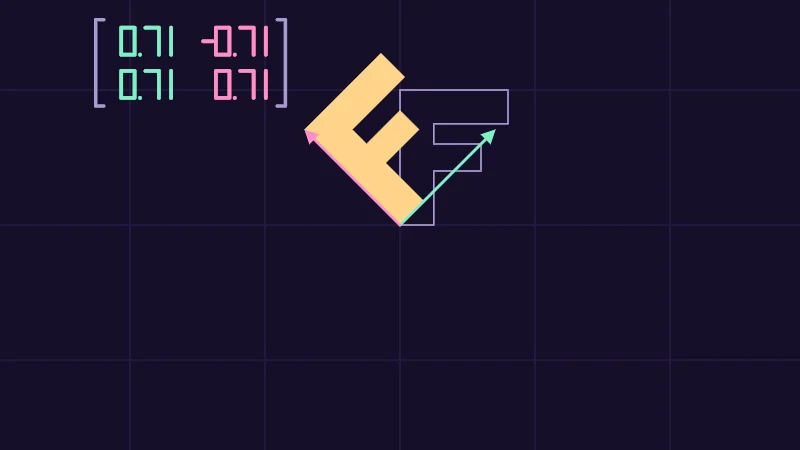
Let’s meet a few families you’ll see again and again. Each one is easiest to picture by where it sends the two arrows.
- The identity,
float2x2(1, 0, 0, 1), leaves both arrows where they are, so nothing moves. - A scale stretches or squashes each arrow along its own line.
- A rotation swings both arrows round together. That’s
rot2, which buildsfloat2x2(c, -s, s, c)from the cosine c and the sine s of the angle. Its first column is (c, s), the point on the circle. - A shear keeps the first arrow and tips the second one sideways, so the F leans over.
- A flip turns one arrow around, and the F faces the other way, as in a mirror.
Turn on JavaScript to run this demo.
Rendered in Unity 2022.3.22f1 from the Copy for Unity shader, with the settings this demo starts with.
// Uses the helper code shown with an earlier figure on this page.

// ----

// Five kinds of matrix moving the letter F, each the identity at Amount 0.
#include "diagram"

uniform float _Kind;   // @select = 2 | Matrix | Identity=0, Scale=1, Rotation=2, Shear=3, Flip=4 | Which matrix the F goes through.
uniform float _Amount; // @range 0 1 0.01 = 0.5 | Amount | How much of it. At 0 every one is the identity.

float4 shade(float2 uv)
{
    float2 p = centered(uv);
    float t = _Amount;
    int kind = int(_Kind + 0.5);
    float2x2 M = float2x2(1.0, 0.0, 0.0, 1.0);                       // identity
    if (kind == 1) M = float2x2(1.0 + t, 0.0, 0.0, 1.0 - 0.5 * t);   // scale
    if (kind == 2) M = rot2(t * PI / 2.0);                            // rotation
    if (kind == 3) M = float2x2(1.0, t, 0.0, 1.0);                    // shear
    if (kind == 4) M = float2x2(1.0 - 2.0 * t, 0.0, 0.0, 1.0);        // flip
    float2 i = M._m00_m10, j = M._m01_m11;

    float3 col = drawGrid(themeSurface(), p, S);
    col = strokeShape(col, sdF(p, float2x2(S, 0.0, 0.0, S)), 1.5, themeMuted());
    col = fillShape(col, sdF(p, S * M), series3(), 1.0);
    if (length(i) > 0.02) col = drawArrow(col, p, float2(0.0, 0.0), i * S, 2.5, series1());
    if (length(j) > 0.02) col = drawArrow(col, p, float2(0.0, 0.0), j * S, 2.5, series2());
    col = drawMatrix(col, p, float2(-1.36, 0.92), M, 0.12);
    return float4(col, 1.0);
}
// Uses the helper code shown with an earlier figure on this page.
// ----
// Five kinds of matrix moving the letter F, each the identity at Amount 0.
#include "diagram"
uniform float _Kind; // @select = 2 | Matrix | Identity=0, Scale=1, Rotation=2, Shear=3, Flip=4 | Which matrix the F goes through.
uniform float _Amount; // @range 0 1 0.01 = 0.5 | Amount | How much of it. At 0 every one is the identity.
vec4 shade(vec2 uv)
{
vec2 p = centered(uv);
float t = _Amount;
int kind = int(_Kind + 0.5);
mat2 M = mat2(1.0, 0.0, 0.0, 1.0); // identity
if (kind == 1) M = mat2(1.0 + t, 0.0, 0.0, 1.0 - 0.5 * t); // scale
if (kind == 2) M = rot2(t * PI / 2.0); // rotation
if (kind == 3) M = mat2(1.0, t, 0.0, 1.0); // shear
if (kind == 4) M = mat2(1.0 - 2.0 * t, 0.0, 0.0, 1.0); // flip
vec2 i = vec2(M[0][0], M[1][0]), j = vec2(M[0][1], M[1][1]);
vec3 col = drawGrid(themeSurface(), p, S);
col = strokeShape(col, sdF(p, mat2(S, 0.0, 0.0, S)), 1.5, themeMuted());
col = fillShape(col, sdF(p, S * M), series3(), 1.0);
if (length(i) > 0.02) col = drawArrow(col, p, vec2(0.0, 0.0), i * S, 2.5, series1());
if (length(j) > 0.02) col = drawArrow(col, p, vec2(0.0, 0.0), j * S, 2.5, series2());
col = drawMatrix(col, p, vec2(-1.36, 0.92), M, 0.12);
return vec4(col, 1.0);
}Names in this code (26)
_Amount- Slider "Amount". How much of it. At 0 every one is the identity. From 0 to 1, starts at 0.5.
_Kind- Choice "Matrix". Which matrix the F goes through.
centered- float2 centered(float2 uv). Square coordinates with the origin in the middle: the short side of the picture spans -1..1. (common library)
col- Declared on line 19: float3 col = drawGrid(themeSurface(), p, S);
drawArrow- float3 drawArrow(float3 col, float2 p, float2 a, float2 b, float widthPx, float3 ink) (diagram library)
drawGrid- float3 drawGrid(float3 col, float2 p, float spacing) (diagram library)
drawMatrix- float3 drawMatrix(float3 col, float2 p, float2 at, float2x2 m, float size). The four numbers of m in two rows between brackets, the first column mint and the second pink, digits `size` tall, the top left corner at `at`. (this article's helper code)
fillShape- float3 fillShape(float3 col, float d, float3 ink, float alpha). Fill or outline any signed distance d (in centered() units). alpha tints evenly for the eye; the edge itself blends in linear light like any coverage. (diagram library)
float2x2- A 2 by 2 matrix in HLSL, four numbers in two rows of two. GLSL calls it mat2.
i- Declared on line 17: float2 i = M._m00_m10, j = M._m01_m11;
include- Pulls another file into this one, for example UnityCG.cginc.
kind- Declared on line 11: int kind = int(_Kind + 0.5);
M- Declared on line 12: float2x2 M = float2x2(1.0, 0.0, 0.0, 1.0); // identity
p- Declared on line 9: float2 p = centered(uv);
rot2- float2x2 rot2(float a). Turns a point by a radians, counterclockwise: mul(rot2(a), p). (common library)
sdF- float sdF(float2 p, float2x2 m). The letter F after the matrix m, its bottom left corner on the origin. The bars reach into the stem, so no seam shows where they meet. (this article's helper code)
series1- float3 series1() (common library)
series2- float3 series2() (common library)
series3- float3 series3() (common library)
shade- float4 shade(float2 uv)
strokeShape- float3 strokeShape(float3 col, float d, float widthPx, float3 ink) (diagram library)
t- Declared on line 10: float t = _Amount;
themeMuted- float3 themeMuted() (common library)
themeSurface- float3 themeSurface(). The dusk stage colors, in linear light. Series colors are used in this order: mint, pink, butter. (common library)
uv- A parameter of shade(), line 7: float2 uv.
length- length(v) says how long the vector v is, sqrt(x² + y²).
Pick a Matrix, slide Amount from 0 to 1 and watch which of the four numbers change. Halfway through the flip, the mint arrow shrinks to nothing and the F is squashed flat onto the pink one.
Two make one
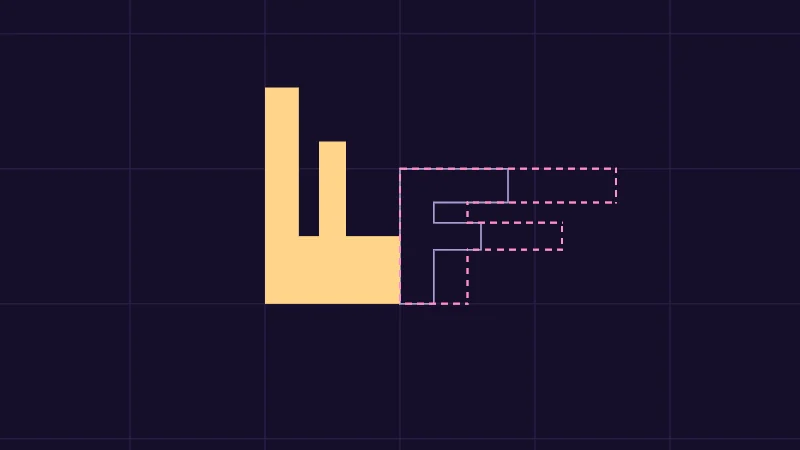
mul(A, B) is a matrix too. It does to a point what does first and does after, so you read it from right to left. That’s why the order matters. Stretching and then rotating usually isn’t the same as rotating and then stretching.
Columns help again when you multiply by hand. The first column of mul(A, B) is where (1, 0) ends up, so send it through and then through . Each column of the product is times one column of , the way Gilbert Strang’s book below explains it. Here is a quarter turn and stretches to twice the width. The turn takes the first column of , (2, 0), to (0, 2), and the second, (0, 1), to (-1, 0).
4: Together they make mul(A, B) = float2x2(0, -1, 2, 0).
Turn on JavaScript to run this demo.
Rendered in Unity 2022.3.22f1 from the Copy for Unity shader, with the settings this demo starts with.
// Uses the helper code shown with an earlier figure on this page.

// ----

// A stretch and a rotation in either order: the same two matrices, usually a different F.
#include "diagram"

uniform float _First;   // @select = 0 | First | Stretch=0, Rotation=1 | Which of the two happens first.
uniform float _Angle;   // @range 0 180 1 = 90 | Rotation | How far it rotates, in degrees, anticlockwise.
uniform float _Stretch; // @range 0.5 3 0.01 = 2 | Stretch | How many times as wide the stretch makes things.

static const float2 O = float2(0.0, -0.35); // the F's corner, a little below the middle

// The outline of the F after m, dashed, one edge at a time from corner to corner.
float3 drawDashedF(float3 col, float2 p, float2x2 m, float3 ink)
{
    float2 c[10];
    c[0] = float2(0.0, 0.0);
    c[1] = float2(0.25, 0.0);
    c[2] = float2(0.25, 0.4);
    c[3] = float2(0.6, 0.4);
    c[4] = float2(0.6, 0.6);
    c[5] = float2(0.25, 0.6);
    c[6] = float2(0.25, 0.75);
    c[7] = float2(0.8, 0.75);
    c[8] = float2(0.8, 1.0);
    c[9] = float2(0.0, 1.0);
    for (int k = 0; k < 10; k++) col = drawDashed(col, p, mul(m, c[k]), mul(m, c[(k + 1) % 10]), 2.0, ink);
    return col;
}

float4 shade(float2 uv)
{
    float2 p = centered(uv) - O;
    float2x2 R = rot2(radians(_Angle));
    float2x2 St = float2x2(_Stretch, 0.0, 0.0, 1.0);
    float2x2 first = St;
    float2x2 both = mul(R, St); // stretch first, then rotate
    if (_First > 0.5)
    {
        first = R;
        both = mul(St, R);      // rotate first, then stretch
    }

    float3 col = drawGrid(themeSurface(), p, S);
    col = strokeShape(col, sdF(p, float2x2(S, 0.0, 0.0, S)), 1.5, themeMuted());
    col = fillShape(col, sdF(p, S * both), series3(), 1.0);
    col = drawDashedF(col, p, S * first, series2());
    return float4(col, 1.0);
}
// Uses the helper code shown with an earlier figure on this page.
// ----
// A stretch and a rotation in either order: the same two matrices, usually a different F.
#include "diagram"
uniform float _First; // @select = 0 | First | Stretch=0, Rotation=1 | Which of the two happens first.
uniform float _Angle; // @range 0 180 1 = 90 | Rotation | How far it rotates, in degrees, anticlockwise.
uniform float _Stretch; // @range 0.5 3 0.01 = 2 | Stretch | How many times as wide the stretch makes things.
const vec2 O = vec2(0.0, -0.35); // the F's corner, a little below the middle
// The outline of the F after m, dashed, one edge at a time from corner to corner.
vec3 drawDashedF(vec3 col, vec2 p, mat2 m, vec3 ink)
{
vec2 c[10];
c[0] = vec2(0.0, 0.0);
c[1] = vec2(0.25, 0.0);
c[2] = vec2(0.25, 0.4);
c[3] = vec2(0.6, 0.4);
c[4] = vec2(0.6, 0.6);
c[5] = vec2(0.25, 0.6);
c[6] = vec2(0.25, 0.75);
c[7] = vec2(0.8, 0.75);
c[8] = vec2(0.8, 1.0);
c[9] = vec2(0.0, 1.0);
for (int k = 0; k < 10; k++) col = drawDashed(col, p, (c[k] * m), (c[(k + 1) % 10] * m), 2.0, ink);
return col;
}
vec4 shade(vec2 uv)
{
vec2 p = centered(uv) - O;
mat2 R = rot2(radians(_Angle));
mat2 St = mat2(_Stretch, 0.0, 0.0, 1.0);
mat2 first = St;
mat2 both = (St * R); // stretch first, then rotate
if (_First > 0.5)
{
first = R;
both = (R * St); // rotate first, then stretch
}
vec3 col = drawGrid(themeSurface(), p, S);
col = strokeShape(col, sdF(p, mat2(S, 0.0, 0.0, S)), 1.5, themeMuted());
col = fillShape(col, sdF(p, S * both), series3(), 1.0);
col = drawDashedF(col, p, S * first, series2());
return vec4(col, 1.0);
}Names in this code (30)
_Angle- Slider "Rotation". How far it rotates, in degrees, anticlockwise. From 0 to 180, starts at 90.
_First- Choice "First". Which of the two happens first.
_Stretch- Slider "Stretch". How many times as wide the stretch makes things. From 0.5 to 3, starts at 2.
both- Declared on line 34: float2x2 both = mul(R, St); // stretch first, then rotate
centered- float2 centered(float2 uv). Square coordinates with the origin in the middle: the short side of the picture spans -1..1. (common library)
col- A parameter of drawDashedF(), line 11: float3 col.
drawDashed- float3 drawDashed(float3 col, float2 p, float2 a, float2 b, float widthPx, float3 ink) (diagram library)
drawDashedF- float3 drawDashedF(float3 col, float2 p, float2x2 m, float3 ink). The outline of the F after m, dashed, one edge at a time from corner to corner.
drawGrid- float3 drawGrid(float3 col, float2 p, float spacing) (diagram library)
fillShape- float3 fillShape(float3 col, float d, float3 ink, float alpha). Fill or outline any signed distance d (in centered() units). alpha tints evenly for the eye; the edge itself blends in linear light like any coverage. (diagram library)
first- Declared on line 33: float2x2 first = St;
float2x2- A 2 by 2 matrix in HLSL, four numbers in two rows of two. GLSL calls it mat2.
include- Pulls another file into this one, for example UnityCG.cginc.
ink- A parameter of drawDashedF(), line 11: float3 ink.
m- A parameter of drawDashedF(), line 11: float2x2 m.
mul- Matrix times vector or matrix times matrix in HLSL. mul(M, v) applies M to v.
O- Declared on line 8: static const float2 O = float2(0.0, -0.35); // the F's corner, a little below the middle
p- A parameter of drawDashedF(), line 11: float2 p.
R- Declared on line 31: float2x2 R = rot2(radians(_Angle));
rot2- float2x2 rot2(float a). Turns a point by a radians, counterclockwise: mul(rot2(a), p). (common library)
sdF- float sdF(float2 p, float2x2 m). The letter F after the matrix m, its bottom left corner on the origin. The bars reach into the stem, so no seam shows where they meet. (this article's helper code)
series2- float3 series2() (common library)
series3- float3 series3() (common library)
shade- float4 shade(float2 uv)
St- Declared on line 32: float2x2 St = float2x2(_Stretch, 0.0, 0.0, 1.0);
strokeShape- float3 strokeShape(float3 col, float d, float widthPx, float3 ink) (diagram library)
themeMuted- float3 themeMuted() (common library)
themeSurface- float3 themeSurface(). The dusk stage colors, in linear light. Series colors are used in this order: mint, pink, butter. (common library)
uv- A parameter of shade(), line 28: float2 uv.
radians- radians(deg) converts degrees to radians.
Switch First between Stretch and Rotation and watch the butter F land somewhere else. Then set Rotation to 180, and both orders agree, because a half turn only points every arrow the other way.
Undo
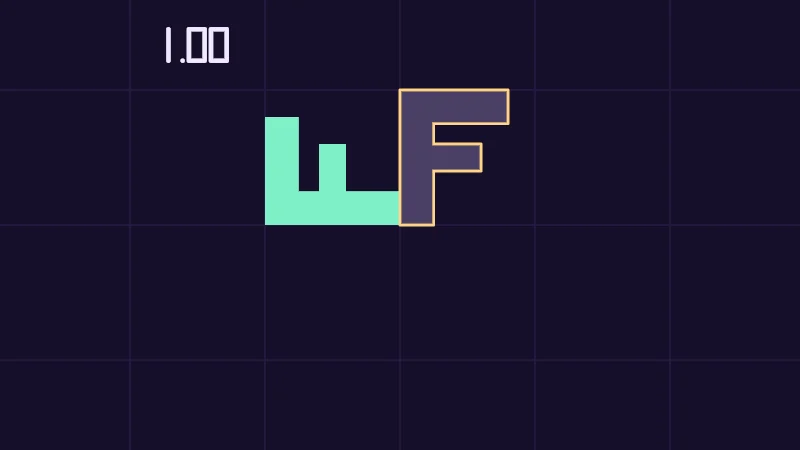
To go back you need the inverse, written . A point put through and then is back where it started. HLSL has transpose and determinant but no inverse, so my demos bring their own inverse2.
Not every matrix can be undone. The determinant says how much grows areas. At 2 they double, below 0 they also flip over, and at 0 everything is flattened onto a line, or even a point. Many points then share one spot, and nothing can tell them apart again. For a 2 by 2 matrix it’s .
The transpose swaps rows and columns. For a rotation it’s the inverse, because a rotation keeps both arrows 1 long and at a right angle. For a stretch or a shear it isn’t.
Turn on JavaScript to run this demo.
Rendered in Unity 2022.3.22f1 from the Copy for Unity shader, with the settings this demo starts with.
// Uses the helper code shown with an earlier figure on this page.

// ----

// A matrix moves the F, and a second matrix after it tries to put the F back where it started.
#include "diagram"

uniform float _Kind;   // @select = 0 | Matrix | Rotation=0, Stretch=1, Shear=2, Squash=3 | Which matrix the F goes through.
uniform float _Amount; // @range 0 1 0.01 = 0.5 | Amount | How much of it.
uniform float _Undo;   // @select = 2 | Undo with | Nothing=0, Inverse=1, Transpose=2 | What comes after the matrix to bring the F back.

float4 shade(float2 uv)
{
    float2 p = centered(uv);
    float t = _Amount;
    int kind = int(_Kind + 0.5);
    int undo = int(_Undo + 0.5);
    float2x2 M = rot2(t * PI);                                  // rotation
    if (kind == 1) M = float2x2(1.0 + 2.0 * t, 0.0, 0.0, 1.0);  // stretch
    if (kind == 2) M = float2x2(1.0, 2.0 * t, 0.0, 1.0);        // shear
    if (kind == 3) M = float2x2(1.0, 0.0, 0.0, 1.0 - t);        // squash

    float det = determinant(M);
    bool flattened = abs(det) < 0.01; // no inverse then
    float2x2 U = float2x2(1.0, 0.0, 0.0, 1.0);
    if (undo == 1 && !flattened) U = inverse2(M);
    if (undo == 2) U = transpose(M);

    float3 col = drawGrid(themeSurface(), p, S);
    col = fillShape(col, sdF(p, float2x2(S, 0.0, 0.0, S)), themeMuted(), 0.35);
    col = fillShape(col, sdF(p, S * M), series1(), 1.0);
    if (undo != 1 || !flattened) col = strokeShape(col, sdF(p, S * mul(U, M)), 2.5, series3());
    float digits = sdNumber((p - float2(-0.95, 0.8)) / 0.14, det) * 0.14; // the determinant, 0.14 tall
    col = lerp(col, themeInk(), saturate(0.5 - digits / pixelSize()));
    return float4(col, 1.0);
}
// Uses the helper code shown with an earlier figure on this page.
// ----
// A matrix moves the F, and a second matrix after it tries to put the F back where it started.
#include "diagram"
uniform float _Kind; // @select = 0 | Matrix | Rotation=0, Stretch=1, Shear=2, Squash=3 | Which matrix the F goes through.
uniform float _Amount; // @range 0 1 0.01 = 0.5 | Amount | How much of it.
uniform float _Undo; // @select = 2 | Undo with | Nothing=0, Inverse=1, Transpose=2 | What comes after the matrix to bring the F back.
vec4 shade(vec2 uv)
{
vec2 p = centered(uv);
float t = _Amount;
int kind = int(_Kind + 0.5);
int undo = int(_Undo + 0.5);
mat2 M = rot2(t * PI); // rotation
if (kind == 1) M = mat2(1.0 + 2.0 * t, 0.0, 0.0, 1.0); // stretch
if (kind == 2) M = mat2(1.0, 2.0 * t, 0.0, 1.0); // shear
if (kind == 3) M = mat2(1.0, 0.0, 0.0, 1.0 - t); // squash
float det = determinant(M);
bool flattened = abs(det) < 0.01; // no inverse then
mat2 U = mat2(1.0, 0.0, 0.0, 1.0);
if (undo == 1 && !flattened) U = inverse2(M);
if (undo == 2) U = transpose(M);
vec3 col = drawGrid(themeSurface(), p, S);
col = fillShape(col, sdF(p, mat2(S, 0.0, 0.0, S)), themeMuted(), 0.35);
col = fillShape(col, sdF(p, S * M), series1(), 1.0);
if (undo != 1 || !flattened) col = strokeShape(col, sdF(p, S * (M * U)), 2.5, series3());
float digits = sdNumber((p - vec2(-0.95, 0.8)) / 0.14, det) * 0.14; // the determinant, 0.14 tall
col = mix(col, themeInk(), saturate(0.5 - digits / pixelSize()));
return vec4(col, 1.0);
}Names in this code (37)
_Amount- Slider "Amount". How much of it. From 0 to 1, starts at 0.5.
_Kind- Choice "Matrix". Which matrix the F goes through.
_Undo- Choice "Undo with". What comes after the matrix to bring the F back.
centered- float2 centered(float2 uv). Square coordinates with the origin in the middle: the short side of the picture spans -1..1. (common library)
col- Declared on line 25: float3 col = drawGrid(themeSurface(), p, S);
det- Declared on line 19: float det = determinant(M);
determinant- determinant(M) in HLSL says how much M scales areas, or volumes in 3D, and is negative when M flips them over. At 0, M flattens everything and has no inverse.
digits- Declared on line 29: float digits = sdNumber((p - float2(-0.95, 0.8)) / 0.14, det) * 0.14; // the determinant, 0.14 tall
drawGrid- float3 drawGrid(float3 col, float2 p, float spacing) (diagram library)
fillShape- float3 fillShape(float3 col, float d, float3 ink, float alpha). Fill or outline any signed distance d (in centered() units). alpha tints evenly for the eye; the edge itself blends in linear light like any coverage. (diagram library)
flattened- Declared on line 20: bool flattened = abs(det) < 0.01; // no inverse then
float2x2- A 2 by 2 matrix in HLSL, four numbers in two rows of two. GLSL calls it mat2.
include- Pulls another file into this one, for example UnityCG.cginc.
inverse2- float2x2 inverse2(float2x2 m). Undoes m. Check abs(determinant(m)) >= 0.01 first: a flattened matrix has no way back. (this article's helper code)
kind- Declared on line 12: int kind = int(_Kind + 0.5);
lerp- HLSL's blend from a (t = 0) to b (t = 1). GLSL calls it mix.
M- Declared on line 14: float2x2 M = rot2(t * PI); // rotation
mul- Matrix times vector or matrix times matrix in HLSL. mul(M, v) applies M to v.
p- Declared on line 10: float2 p = centered(uv);
pixelSize- float pixelSize() (common library)
rot2- float2x2 rot2(float a). Turns a point by a radians, counterclockwise: mul(rot2(a), p). (common library)
saturate- An HLSL function that clamps a value between 0 and 1.
sdF- float sdF(float2 p, float2x2 m). The letter F after the matrix m, its bottom left corner on the origin. The bars reach into the stem, so no seam shows where they meet. (this article's helper code)
sdNumber- float sdNumber(float2 p, float v). Signed distance to v written like -1.25, digits 1 tall, centred on the origin. v stays within -9.99 and 9.99. (this article's helper code)
series1- float3 series1() (common library)
series3- float3 series3() (common library)
shade- float4 shade(float2 uv)
strokeShape- float3 strokeShape(float3 col, float d, float widthPx, float3 ink) (diagram library)
t- Declared on line 11: float t = _Amount;
themeInk- float3 themeInk() (common library)
themeMuted- float3 themeMuted() (common library)
themeSurface- float3 themeSurface(). The dusk stage colors, in linear light. Series colors are used in this order: mint, pink, butter. (common library)
transpose- transpose(M) in HLSL swaps the rows and the columns of M.
U- Declared on line 21: float2x2 U = float2x2(1.0, 0.0, 0.0, 1.0);
undo- Declared on line 13: int undo = int(_Undo + 0.5);
uv- A parameter of shade(), line 8: float2 uv.
abs- abs(x) is x without its minus sign. abs(-0.3) = 0.3.
Try Undo with on each Matrix and watch when the butter outline lands back on the pale F. Then push Squash to an Amount of 1. The determinant drops to 0, and with Inverse the butter outline is gone.
In practice
A rotation matrix turns around (0, 0), which is a corner of the UVs, because they usually run from 0 to 1. To rotate a texture, this line moves the middle to (0, 0), rotates, and moves it back:
float2 uv = mul(rot2(_Angle), i.uv - 0.5) + 0.5;Three traps catch everyone once. First, * between two matrices isn’t the product. Microsoft’s HLSL docs call the result “a per-component multiply of the two matrices”, so it multiplies cell by cell. The product is mul:
float2x2 both = mul(A, B); // B first, then A
float2x2 cells = A * B;    // cell by cell, not a matrix product
Second, a constructor like float2x2(...) fills row by row, and M[0] reads a row. The columns are M._m00_m10 and M._m01_m11, where _m10 means row 1, column 0, counting from 0:
float2x2 M = float2x2(1.0, 1.0,
                      2.0, 0.0);
float2 xLands = M._m00_m10; // (1, 2): the first column
float2 yLands = M._m01_m11; // (1, 0): the second column
float2 topRow = M[0];       // (1, 1): a row, not a column
Third, mul(v, M) treats as a row, which is the same as mul(transpose(M), v). With the and from before, both give (4, 2), the mix-up from the rows section:
float2 a = mul(v, M);            // v as a row
float2 b = mul(transpose(M), v); // the same two numbers
Unity’s UnityObjectToWorldNormal does this on purpose. It returns normalize(mul(norm, (float3x3)unity_WorldToObject)) for normals, the arrows that point straight out of a surface, and the reason is a story for a later lesson.
- A matrix’s columns are where (1, 0) and (0, 1) land, and every other point follows them.
mul(A, B)does first and after, and swapping them usually changes the answer.- The determinant says how a matrix grows areas, and at 0 there’s no way back. For a rotation, the transpose undoes it.
Read more
- Dunn and Parberry, 3D Math Primer for Graphics and Game Development, free to read online. Chapter 4, “Introduction to Matrices”, sections 4.1.6 to 4.1.8 for multiplying by hand and rows against columns. Section 4.2, “Geometric Interpretation of Matrix”, reads a matrix by where it sends the arrows. Chapter 5, “Matrices and Linear Transformations”, 5.1 to 5.6, for turns, scales, flips, shears and putting them together. Chapter 6, “More on Matrices”, 6.1 and 6.2, for the determinant and the inverse. It writes points as rows, so its matrices are Unity’s turned over.
- 3Blue1Brown, Essence of linear algebra, chapter 3, “Linear transformations and matrices” and chapter 4, “Matrix multiplication as composition”, for the columns idea and two matrices making one, animated.
- LearnOpenGL, “Transformations”, for matrices that scale, turn and move things in a 3D program.
- The Book of Shaders, “2D Matrices”, for turning and scaling shapes inside a shader.
- Microsoft, “Per-Component Math Operations”, the HLSL rules for
*,_m00and constructors. - Gilbert Strang, Introduction to Linear Algebra, 6th edition, 2023, a book. Section 1.4, “Matrix Multiplication AB and CR”, has each column of AB as A times one column of B.