Basics, part 2
Sine and cosine go round in circles
Two small functions turn an angle into a point on a circle and a circle into a wave. Shaders use them for waves, pulses, ripples and turning things.
Sine and cosine sound like school math, and I won’t pretend they aren’t. But they’re also behind almost everything in a shader that pulses, wobbles, ripples or turns. And here’s the nice part. One picture explains both of them, a point going round a circle. Let’s start there, then turn the circle into a wave and set it moving.
How far round, in radians
First, a way to say how far round. You probably know degrees, with 360 for a full turn. Shaders use radians instead. A full turn is , about 6.28. Half a turn is (3.14) and a quarter turn is (1.57).
Why such an odd number? A circle with radius 1 is exactly long all the way round. So an angle in radians is how far you walk along the edge of that circle. The demos on this site call a full turn TAU, a handy name for . Unity’s own helper file calls it UNITY_TWO_PI.
Watch out for one small trap. sin(90) is not the sine of 90 degrees but of 90 radians, more than 14 whole turns. For degrees, write sin(radians(90)). Or do what I do and think in turns, where a quarter turn is TAU * 0.25.
A point going round
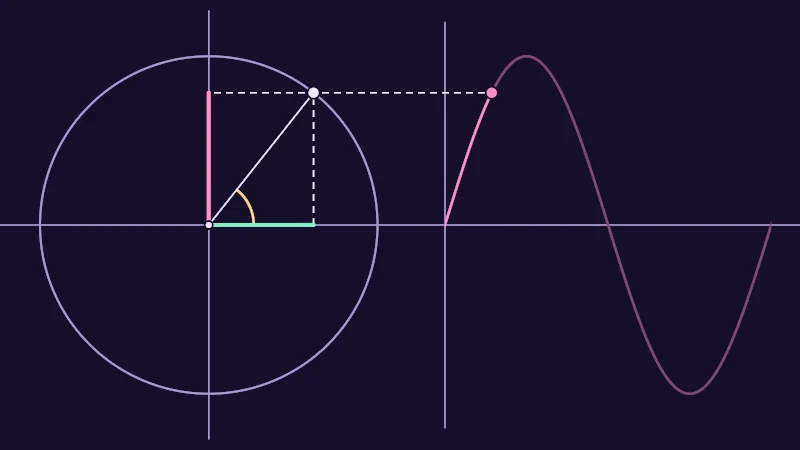
Take a circle with radius 1 around , the middle from the coordinates lesson. Math books call it the unit circle. Start on the right, turn anticlockwise by an angle , and you land on the point
And that’s all cosine and sine are. is how far across the point is, and is how far up. Both stay between and , because the point never leaves the circle. On the left half, the cosine is negative. Below the middle, the sine is.
Turn on JavaScript to run this demo.
Rendered in Unity 2022.3.22f1 from the Copy for Unity shader, with the settings this demo starts with.
// A point going round a circle of radius 1. Its cosine is how far across it is, its sine how far up.
// On the right, the sine of every angle from 0 to a full turn, laid out side by side: a sine wave.
#include "diagram"

static const float2 O = float2(-0.85, 0.0);   // the middle of the circle on screen
static const float R = 0.75;                  // the circle's radius on screen: this is 1
static const float WAVE_START = 0.2;          // where the wave starts: angle 0
static const float WAVE_END = 1.65;           // where it ends: a full turn

// A line from a to b that stays drawable when the two ends meet.
float3 drawBar(float3 col, float2 p, float2 a, float2 b, float widthPx, float3 ink)
{
    return drawLine(col, p, a, b + float2(1e-4, 1e-4), widthPx, ink);
}

float4 shade(float2 uv)
{
    float2 p = centered(uv);

    // The angle points from the middle towards the dragged point: 0 on the right, a full turn back there.
    float2 q = pointerCentered();
    float2 toQ = q - O;
    if (dot(toQ, toQ) < 1e-8) toQ = float2(1.0, 0.0);   // right on the middle there is no direction
    float a = atan2(toQ.y, toQ.x);
    if (a < 0.0) a += TAU;
    float c = cos(a);
    float s = sin(a);
    float2 P = O + R * float2(c, s);

    float3 col = themeSurface();
    col = drawLine(col, p, float2(-2.0, 0.0), float2(2.0, 0.0), 1.5, themeMuted());
    col = drawLine(col, p, O - float2(0.0, 0.95), O + float2(0.0, 0.95), 1.5, themeMuted());
    col = drawLine(col, p, float2(WAVE_START, -0.9), float2(WAVE_START, 0.9), 1.5, themeMuted());
    col = drawCircle(col, p, O, R, 2.0, themeMuted());

    // The wave: at each x, the sine of the matching angle. The part you have gone round so far is brighter.
    float len = WAVE_END - WAVE_START;
    float waveAngle = saturate((p.x - WAVE_START) / len) * TAU;
    float slope = R * cos(waveAngle) * TAU / len;
    float dWave = abs(p.y - R * sin(waveAngle)) / sqrt(1.0 + slope * slope) / pixelSize();
    float inside = saturate((p.x - WAVE_START) / pixelSize() + 0.5) * saturate((WAVE_END - p.x) / pixelSize() + 0.5);
    float done = saturate((a - waveAngle) * len / TAU / pixelSize() + 0.5);
    col = lerp(col, tint(themeSurface(), series2(), 0.45 + 0.55 * done), inside * saturate(1.75 - dWave));

    // The angle a as an arc, from the right round to the point.
    float pa = atan2(p.y - O.y, p.x - O.x);
    if (pa < 0.0) pa += TAU;
    float arcR = 0.2;
    float onArc = saturate((a - pa) * arcR / pixelSize() + 0.5);
    col = lerp(col, series3(), onArc * saturate(1.75 - abs(length(p - O) - arcR) / pixelSize()));

    // Dashed lines from the point down to the axis across, and across to the axis up and to the wave.
    float2 W = float2(WAVE_START + len * a / TAU, P.y);
    col = drawDashed(col, p, P, float2(P.x, O.y + 1e-4), 1.5, themeInk());
    col = drawDashed(col, p, float2(O.x + 1e-4, P.y), W, 1.5, themeInk());
    col = drawLine(col, p, O, P, 1.5, themeInk());

    // cos a across, sin a up.
    col = drawBar(col, p, O, O + float2(R * c, 0.0), 4.0, series1());
    col = drawBar(col, p, O, O + float2(0.0, R * s), 4.0, series2());

    // Where you hold it, when that is off the circle.
    if (length(q - P) > 8.0 * pixelSize())
    {
        col = drawDashed(col, p, P, q, 1.0, themeMuted());
        col = drawCircle(col, p, q, 5.0 * pixelSize(), 1.5, themeInk());
    }
    col = drawDot(col, p, O, 3.0, themeInk());
    col = drawDot(col, p, W, 5.0, series2());
    col = drawDot(col, p, P, 5.0, themeInk());
    return float4(col, 1.0);
}
// A point going round a circle of radius 1. Its cosine is how far across it is, its sine how far up.
// On the right, the sine of every angle from 0 to a full turn, laid out side by side: a sine wave.
#include "diagram"
const vec2 O = vec2(-0.85, 0.0); // the middle of the circle on screen
const float R = 0.75; // the circle's radius on screen: this is 1
const float WAVE_START = 0.2; // where the wave starts: angle 0
const float WAVE_END = 1.65; // where it ends: a full turn
// A line from a to b that stays drawable when the two ends meet.
vec3 drawBar(vec3 col, vec2 p, vec2 a, vec2 b, float widthPx, vec3 ink)
{
return drawLine(col, p, a, b + vec2(1e-4, 1e-4), widthPx, ink);
}
vec4 shade(vec2 uv)
{
vec2 p = centered(uv);
// The angle points from the middle towards the dragged point: 0 on the right, a full turn back there.
vec2 q = pointerCentered();
vec2 toQ = q - O;
if (dot(toQ, toQ) < 1e-8) toQ = vec2(1.0, 0.0); // right on the middle there is no direction
float a = atan(toQ.y, toQ.x);
if (a < 0.0) a += TAU;
float c = cos(a);
float s = sin(a);
vec2 P = O + R * vec2(c, s);
vec3 col = themeSurface();
col = drawLine(col, p, vec2(-2.0, 0.0), vec2(2.0, 0.0), 1.5, themeMuted());
col = drawLine(col, p, O - vec2(0.0, 0.95), O + vec2(0.0, 0.95), 1.5, themeMuted());
col = drawLine(col, p, vec2(WAVE_START, -0.9), vec2(WAVE_START, 0.9), 1.5, themeMuted());
col = drawCircle(col, p, O, R, 2.0, themeMuted());
// The wave: at each x, the sine of the matching angle. The part you have gone round so far is brighter.
float len = WAVE_END - WAVE_START;
float waveAngle = saturate((p.x - WAVE_START) / len) * TAU;
float slope = R * cos(waveAngle) * TAU / len;
float dWave = abs(p.y - R * sin(waveAngle)) / sqrt(1.0 + slope * slope) / pixelSize();
float inside = saturate((p.x - WAVE_START) / pixelSize() + 0.5) * saturate((WAVE_END - p.x) / pixelSize() + 0.5);
float done = saturate((a - waveAngle) * len / TAU / pixelSize() + 0.5);
col = mix(col, tint(themeSurface(), series2(), 0.45 + 0.55 * done), inside * saturate(1.75 - dWave));
// The angle a as an arc, from the right round to the point.
float pa = atan(p.y - O.y, p.x - O.x);
if (pa < 0.0) pa += TAU;
float arcR = 0.2;
float onArc = saturate((a - pa) * arcR / pixelSize() + 0.5);
col = mix(col, series3(), onArc * saturate(1.75 - abs(length(p - O) - arcR) / pixelSize()));
// Dashed lines from the point down to the axis across, and across to the axis up and to the wave.
vec2 W = vec2(WAVE_START + len * a / TAU, P.y);
col = drawDashed(col, p, P, vec2(P.x, O.y + 1e-4), 1.5, themeInk());
col = drawDashed(col, p, vec2(O.x + 1e-4, P.y), W, 1.5, themeInk());
col = drawLine(col, p, O, P, 1.5, themeInk());
// cos a across, sin a up.
col = drawBar(col, p, O, O + vec2(R * c, 0.0), 4.0, series1());
col = drawBar(col, p, O, O + vec2(0.0, R * s), 4.0, series2());
// Where you hold it, when that is off the circle.
if (length(q - P) > 8.0 * pixelSize())
{
col = drawDashed(col, p, P, q, 1.0, themeMuted());
col = drawCircle(col, p, q, 5.0 * pixelSize(), 1.5, themeInk());
}
col = drawDot(col, p, O, 3.0, themeInk());
col = drawDot(col, p, W, 5.0, series2());
col = drawDot(col, p, P, 5.0, themeInk());
return vec4(col, 1.0);
}Names in this code (52)
a- A parameter of drawBar(), line 11: float2 a.
arcR- Declared on line 48: float arcR = 0.2;
atan2- The angle of the point (x, y), written atan2(y, x) in HLSL. GLSL calls it atan(y, x).
b- A parameter of drawBar(), line 11: float2 b.
c- Declared on line 26: float c = cos(a);
centered- float2 centered(float2 uv). Square coordinates with the origin in the middle: the short side of the picture spans -1..1. (common library)
col- A parameter of drawBar(), line 11: float3 col.
done- Declared on line 42: float done = saturate((a - waveAngle) * len / TAU / pixelSize() + 0.5);
drawBar- float3 drawBar(float3 col, float2 p, float2 a, float2 b, float widthPx, float3 ink). A line from a to b that stays drawable when the two ends meet.
drawCircle- float3 drawCircle(float3 col, float2 p, float2 c, float r, float widthPx, float3 ink) (diagram library)
drawDashed- float3 drawDashed(float3 col, float2 p, float2 a, float2 b, float widthPx, float3 ink) (diagram library)
drawDot- float3 drawDot(float3 col, float2 p, float2 c, float radiusPx, float3 ink). A dot with a ring in the surface color around it. (diagram library)
drawLine- float3 drawLine(float3 col, float2 p, float2 a, float2 b, float widthPx, float3 ink) (diagram library)
dWave- Declared on line 40: float dWave = abs(p.y - R * sin(waveAngle)) / sqrt(1.0 + slope * slope) / pixelSize();
include- Pulls another file into this one, for example UnityCG.cginc.
ink- A parameter of drawBar(), line 11: float3 ink.
inside- Declared on line 41: float inside = saturate((p.x - WAVE_START) / pixelSize() + 0.5) * saturate((WAVE_END - p.x) / pixelSize() + 0.5);
len- Declared on line 37: float len = WAVE_END - WAVE_START;
lerp- HLSL's blend from a (t = 0) to b (t = 1). GLSL calls it mix.
O- Declared on line 5: static const float2 O = float2(-0.85, 0.0); // the middle of the circle on screen
onArc- Declared on line 49: float onArc = saturate((a - pa) * arcR / pixelSize() + 0.5);
p- A parameter of drawBar(), line 11: float2 p.
P- Declared on line 28: float2 P = O + R * float2(c, s);
pa- Declared on line 46: float pa = atan2(p.y - O.y, p.x - O.x);
pixelSize- float pixelSize() (common library)
pointerCentered- float2 pointerCentered(). The pointer (or the _Pointer material setting in Unity) in the same coordinates as centered(). (common library)
q- Declared on line 21: float2 q = pointerCentered();
R- Declared on line 6: static const float R = 0.75; // the circle's radius on screen: this is 1
s- Declared on line 27: float s = sin(a);
saturate- An HLSL function that clamps a value between 0 and 1.
series1- float3 series1() (common library)
series2- float3 series2() (common library)
series3- float3 series3() (common library)
shade- float4 shade(float2 uv)
slope- Declared on line 39: float slope = R * cos(waveAngle) * TAU / len;
themeInk- float3 themeInk() (common library)
themeMuted- float3 themeMuted() (common library)
themeSurface- float3 themeSurface(). The dusk stage colors, in linear light. Series colors are used in this order: mint, pink, butter. (common library)
tint- float3 tint(float3 a, float3 b, float t). Blends two colors in steps that look even to the eye (in sRGB), for value ramps such as distance bands. Edges and coverage still blend with lerp, in linear light, as light really adds up. (common library)
toQ- Declared on line 22: float2 toQ = q - O;
uv- A parameter of shade(), line 16: float2 uv.
W- Declared on line 53: float2 W = float2(WAVE_START + len * a / TAU, P.y);
WAVE_END- Declared on line 8: static const float WAVE_END = 1.65; // where it ends: a full turn
WAVE_START- Declared on line 7: static const float WAVE_START = 0.2; // where the wave starts: angle 0
waveAngle- Declared on line 38: float waveAngle = saturate((p.x - WAVE_START) / len) * TAU;
widthPx- A parameter of drawBar(), line 11: float widthPx.
abs- abs(x) is x without its minus sign. abs(-0.3) = 0.3.
cos- cos(a) is the cosine of the angle a, in radians.
dot- dot(a, b) multiplies matching parts and adds them up. For unit vectors it is the cosine of the angle between them.
length- length(v) says how long the vector v is, sqrt(x² + y²).
sin- sin(a) is the sine of the angle a, in radians.
sqrt- sqrt(x) is the square root of x, undefined for x < 0.
Drag the point round the circle. The mint line is , the pink line is and the butter arc is the angle . On the right, the pink dot sits at the same height as the point, and the brighter part of the wave is the way you’ve come.
Follow the pink height round. It climbs to 1 at the top, drops to at the bottom and comes home again. The curve on the right is that height for every angle, laid side by side. That’s a sine wave. Cosine makes the very same wave, a quarter turn earlier.
From a circle to a wave
That curve is the hardest working shape in shaders. A sine doesn’t care where its number comes from, so feed it a position across the picture instead of an angle. Three numbers tune the wave:
- is the amplitude, how tall the wave is. It swings from to .
- , the frequency, is how many waves fit in every of . Double it and the waves squeeze together.
- is the phase, and it slides the wave sideways. A phase of brings it right back where it started.
In code the order doesn’t matter, so sin(x * f + p) * A is the same wave.
Turn on JavaScript to run this demo.
- f1(x):
_A * sin(_F * x + _P) - f2(x):
sin(x)
#define PLOT_X_RANGE float2(0.0, 6.2832)
#define PLOT_Y_RANGE float2(-1.6, 1.6)
#define PLOT_TICK float2(1.0, 0.5)
#include "plot"
uniform float _A; // @range 0 1.5 0.01 = 1.0 | Amplitude A | How tall the wave is. It swings from -A to A.
uniform float _F; // @range 0.5 6 0.05 = 2.0 | Frequency f | How many waves fit across this plot.
uniform float _P; // @range 0 6.28 0.01 = 0.0 | Phase p | Slides the wave sideways. At 6.28 it is back where it started.
float curve0(float x) { return _A * sin(_F * x + _P); }
float curve1(float x) { return sin(x); }
float4 shade(float2 uv)
{
    float2 p = plotCoord(uv);
    float3 col = plotBackground(p);
    float h = plotPixel().x;
    col = plotCurveStyled(col, p, curve0(p.x), plotSlope(curve0(p.x - h), curve0(p.x), curve0(p.x + h), h), series1(), 0);
    col = plotCurveStyled(col, p, curve1(p.x), plotSlope(curve1(p.x - h), curve1(p.x), curve1(p.x + h), h), series2(), 1);
    return float4(col, 1.0);
}#define PLOT_X_RANGE vec2(0.0, 6.2832)
#define PLOT_Y_RANGE vec2(-1.6, 1.6)
#define PLOT_TICK vec2(1.0, 0.5)
#include "plot"
uniform float _A; // @range 0 1.5 0.01 = 1.0 | Amplitude A | How tall the wave is. It swings from -A to A.
uniform float _F; // @range 0.5 6 0.05 = 2.0 | Frequency f | How many waves fit across this plot.
uniform float _P; // @range 0 6.28 0.01 = 0.0 | Phase p | Slides the wave sideways. At 6.28 it is back where it started.
float curve0(float x) { return _A * sin(_F * x + _P); }
float curve1(float x) { return sin(x); }
vec4 shade(vec2 uv)
{
vec2 p = plotCoord(uv);
vec3 col = plotBackground(p);
float h = plotPixel().x;
col = plotCurveStyled(col, p, curve0(p.x), plotSlope(curve0(p.x - h), curve0(p.x), curve0(p.x + h), h), series1(), 0);
col = plotCurveStyled(col, p, curve1(p.x), plotSlope(curve1(p.x - h), curve1(p.x), curve1(p.x + h), h), series2(), 1);
return vec4(col, 1.0);
}Names in this code (21)
_A- Slider "Amplitude A". How tall the wave is. It swings from -A to A. From 0 to 1.5, starts at 1.
_F- Slider "Frequency f". How many waves fit across this plot. From 0.5 to 6, starts at 2.
_P- Slider "Phase p". Slides the wave sideways. At 6.28 it is back where it started. From 0 to 6.28, starts at 0.
col- Declared on line 13: float3 col = plotBackground(p);
curve0- float curve0(float x)
curve1- float curve1(float x)
h- Declared on line 14: float h = plotPixel().x;
include- Pulls another file into this one, for example UnityCG.cginc.
p- Declared on line 12: float2 p = plotCoord(uv);
plotBackground- float3 plotBackground(float2 p) (plot library)
plotCoord- float2 plotCoord(float2 uv) (plot library)
plotCurveStyled- float3 plotCurveStyled(float3 col, float2 p, float y, float slope, float3 ink, int style). The same line, solid (style 0), dashed (1) or dotted (2), so curves differ by more than color. (plot library)
plotPixel- float2 plotPixel(). Size of one pixel in data units. (plot library)
plotSlope- float plotSlope(float before, float here, float after, float h). f'(x) from f one pixel before, at and after x. Where f jumps (a step, a saw tooth), one side changes by many pixels and the other hardly at all: then the gentler side wins, so the line ends on each side of the jump instead of smearing up and down through it. (plot library)
series1- float3 series1() (common library)
series2- float3 series2() (common library)
shade- float4 shade(float2 uv)
uv- A parameter of shade(), line 10: float2 uv.
x- A parameter of curve0(), line 8: float x.
define- With #define NAME value, every NAME in the code is replaced by value before compiling.
sin- sin(a) is the sine of the angle a, in radians.
The plot runs from 0 to , so Frequency f is also how many waves you see. Lower Amplitude A to flatten the mint wave, then drag Phase p and watch it slide left. The dashed pink line is plain .
Making it move
Now the fun part. Unity hands every shader a clock, _Time.y, that counts the seconds since the scene loaded. Put it in the phase and the wave slides along on its own:
Here is the time in seconds. A plus slides the wave to the left, a minus to the right, and multiplying by a number changes the speed.
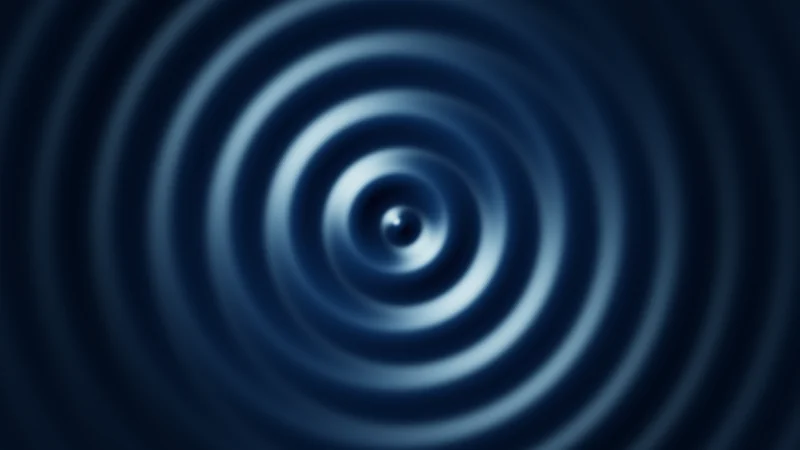
For a ripple, let’s swap for , the pixel’s distance from the middle:
is the height of the water and sets the speed. The minus pulls every crest outwards, so the rings travel away from the middle. The bright glints are where the water tilts towards a light at the top left.
Turn on JavaScript to run this demo.
Rendered in Unity 2022.3.22f1 from the Copy for Unity shader, with the settings this demo starts with.
// A ripple on a dark pond: one sine wave of the distance from the middle, pulled outwards by time.
uniform float _Amp;   // @range 0 1 0.01 = 0.8 | Amplitude A | How tall the ripples are. At 0 the pond is flat.
uniform float _Freq;  // @range 4 40 0.5 = 24 | Frequency f | How tightly the rings are packed.
uniform float _Speed; // @range 0 4 0.05 = 1.5 | Speed s | How fast the rings travel outwards. At 0 they stand still.

float4 shade(float2 uv)
{
    float2 p = centered(uv);
    float r = length(p);                        // how far this pixel is from the middle

    // The wave. Taking the time away moves every crest outwards as the seconds go by.
    float phase = _Freq * r - _Speed * _Time.y;
    float h = _Amp * sin(phase);                // the water's height, from -A to A
    float calm = exp(-1.2 * r);                 // the ripples die down further out

    // How steep the water is. The slope of a sine is its cosine, so tight rings are steeper.
    float slope = 0.04 * _Amp * _Freq * cos(phase) * calm * saturate(r * 30.0);
    float3 n = normalize(float3(-slope * p / max(r, 1e-4), 1.0));   // which way the water faces
    float3 toLight = normalize(float3(-1.0, 1.0, 0.9));             // a light at the top left
    float diffuse = saturate(dot(n, toLight));
    float glint = pow(saturate(dot(n, normalize(toLight + float3(0.0, 0.0, 1.0)))), 30.0);

    float3 col = float3(0.002, 0.006, 0.018);
    col += float3(0.012, 0.05, 0.11) * diffuse * (0.4 + saturate(0.5 + 0.5 * h * calm));   // crests a little lighter
    col += float3(0.5, 0.8, 1.0) * glint;       // water tilted towards the light catches a glint
    col *= 1.0 - 0.7 * saturate(r - 0.4);       // a darker rim around the pond
    return float4(tonemapACES(col), 1.0);
}
// A ripple on a dark pond: one sine wave of the distance from the middle, pulled outwards by time.
uniform float _Amp; // @range 0 1 0.01 = 0.8 | Amplitude A | How tall the ripples are. At 0 the pond is flat.
uniform float _Freq; // @range 4 40 0.5 = 24 | Frequency f | How tightly the rings are packed.
uniform float _Speed; // @range 0 4 0.05 = 1.5 | Speed s | How fast the rings travel outwards. At 0 they stand still.
vec4 shade(vec2 uv)
{
vec2 p = centered(uv);
float r = length(p); // how far this pixel is from the middle
// The wave. Taking the time away moves every crest outwards as the seconds go by.
float phase = _Freq * r - _Speed * _Time.y;
float h = _Amp * sin(phase); // the water's height, from -A to A
float calm = exp(-1.2 * r); // the ripples die down further out
// How steep the water is. The slope of a sine is its cosine, so tight rings are steeper.
float slope = 0.04 * _Amp * _Freq * cos(phase) * calm * saturate(r * 30.0);
vec3 n = normalize(vec3(-slope * p / max(r, 1e-4), 1.0)); // which way the water faces
vec3 toLight = normalize(vec3(-1.0, 1.0, 0.9)); // a light at the top left
float diffuse = saturate(dot(n, toLight));
float glint = pow(saturate(dot(n, normalize(toLight + vec3(0.0, 0.0, 1.0)))), 30.0);
vec3 col = vec3(0.002, 0.006, 0.018);
col += vec3(0.012, 0.05, 0.11) * diffuse * (0.4 + saturate(0.5 + 0.5 * h * calm)); // crests a little lighter
col += vec3(0.5, 0.8, 1.0) * glint; // water tilted towards the light catches a glint
col *= 1.0 - 0.7 * saturate(r - 0.4); // a darker rim around the pond
return vec4(tonemapACES(col), 1.0);
}Names in this code (28)
_Amp- Slider "Amplitude A". How tall the ripples are. At 0 the pond is flat. From 0 to 1, starts at 0.8.
_Freq- Slider "Frequency f". How tightly the rings are packed. From 4 to 40, starts at 24.
_Speed- Slider "Speed s". How fast the rings travel outwards. At 0 they stand still. From 0 to 4, starts at 1.5.
_Time- Time since the level loaded, from Unity. _Time.y is seconds.
calm- Declared on line 14: float calm = exp(-1.2 * r); // the ripples die down further out
centered- float2 centered(float2 uv). Square coordinates with the origin in the middle: the short side of the picture spans -1..1. (common library)
col- Declared on line 23: float3 col = float3(0.002, 0.006, 0.018);
diffuse- Declared on line 20: float diffuse = saturate(dot(n, toLight));
glint- Declared on line 21: float glint = pow(saturate(dot(n, normalize(toLight + float3(0.0, 0.0, 1.0)))), 30.0);
h- Declared on line 13: float h = _Amp * sin(phase); // the water's height, from -A to A
n- Declared on line 18: float3 n = normalize(float3(-slope * p / max(r, 1e-4), 1.0)); // which way the water faces
p- Declared on line 8: float2 p = centered(uv);
phase- Declared on line 12: float phase = _Freq * r - _Speed * _Time.y;
r- Declared on line 9: float r = length(p); // how far this pixel is from the middle
saturate- An HLSL function that clamps a value between 0 and 1.
shade- float4 shade(float2 uv)
slope- Declared on line 17: float slope = 0.04 * _Amp * _Freq * cos(phase) * calm * saturate(r * 30.0);
toLight- Declared on line 19: float3 toLight = normalize(float3(-1.0, 1.0, 0.9)); // a light at the top left
tonemapACES- float3 tonemapACES(float3 x). Rolls HDR values above 1 off softly instead of clipping them. (common library)
uv- A parameter of shade(), line 6: float2 uv.
cos- cos(a) is the cosine of the angle a, in radians.
dot- dot(a, b) multiplies matching parts and adds them up. For unit vectors it is the cosine of the angle between them.
exp- exp(x) is e to the power x. exp(0) = 1, and it falls towards 0 as x goes negative.
length- length(v) says how long the vector v is, sqrt(x² + y²).
max- max(a, b) picks the larger of the two.
normalize- normalize(v) keeps the direction of v and makes its length 1.
pow- pow(x, y) is x to the power y, and undefined for x < 0.
sin- sin(a) is the sine of the angle a, in radians.
Set Speed s to 0 and the rings stop. The clock still ticks, but nothing in the wave reads it any more. Then raise Frequency f for tight little ripples.
In practice
Once you know the shape, you’ll spot it all over shaders:
- Waves and wobbles come from the sine of a position plus time. Move a mesh’s points with it and a tail sways.
- Pulses use the sine of time alone, for a glow that breathes in and out.
- Rings take the sine of a distance, like the pond.
- Turning is cosine and sine working together to swing a point around the middle.
The sine dips below 0, and a glow can’t get darker than off. So for a pulse, I lift it into the range 0 to 1:
float pulse = 0.5 + 0.5 * sin(_Time.y * 3.0);The 3 makes it go round three times faster, so it breathes about every two seconds.
For turning, the demos use the little helper below. It writes a turn as a matrix, a small grid of four numbers. mul(rot2(a), p) turns p anticlockwise by the angle a. Feed it the point and out comes , the point from the circle demo.
float2x2 rot2(float a)
{
    float c = cos(a), s = sin(a);
    return float2x2(c, -s, s, c);
}
Polar coordinates does much more with angles and draws rings, rays and spirals. And the next lesson is about the points and arrows all this turning moves.
- Shaders measure angles in radians. A full turn is , which the demos call
TAU. - is a point on a circle of radius 1, with cosine how far across and sine how far up.
- shapes a wave, and
_Time.yin the phase sets it moving.