Basics, part 5
How lerp, inverse lerp and remap blend numbers
Slide from one value to another with lerp, find where a value sits with inverse lerp, and move numbers from one range into another with remap.
So much of what a shader does is blending. One color melts into another, a glow fades out, a slider becomes a size. Three tiny formulas do most of that work: lerp, inverse lerp and remap. Let’s meet all three, plus saturate, the little guard that keeps them in line.
Turn on JavaScript to run this demo.
Rendered in Unity 2022.3.22f1 from the Copy for Unity shader, with the settings this demo starts with.
// A tiny seven segment font, for the number under the marker.
#include "sdf2d"

// The segments the digit n lights, one bit each:
// 1 top, 2 top right, 4 bottom right, 8 bottom, 16 bottom left, 32 top left, 64 middle.
int digitSegments(int n)
{
    if (n == 0) return 63;
    if (n == 1) return 6;
    if (n == 2) return 91;
    if (n == 3) return 79;
    if (n == 4) return 102;
    if (n == 5) return 109;
    if (n == 6) return 125;
    if (n == 7) return 7;
    if (n == 8) return 127;
    return 111;
}

// Distance to the digit n, drawn 0.5 wide and 1 tall around the origin.
float sdDigit(float2 p, int n)
{
    float2 q = p + float2(0.25, 0.5);
    int m = digitSegments(n);
    float d = 1e5;
    if ((m & 1) != 0) d = min(d, sdSegment(q, float2(0.07, 1.0), float2(0.43, 1.0)));
    if ((m & 2) != 0) d = min(d, sdSegment(q, float2(0.5, 0.93), float2(0.5, 0.57)));
    if ((m & 4) != 0) d = min(d, sdSegment(q, float2(0.5, 0.43), float2(0.5, 0.07)));
    if ((m & 8) != 0) d = min(d, sdSegment(q, float2(0.07, 0.0), float2(0.43, 0.0)));
    if ((m & 16) != 0) d = min(d, sdSegment(q, float2(0.0, 0.07), float2(0.0, 0.43)));
    if ((m & 32) != 0) d = min(d, sdSegment(q, float2(0.0, 0.57), float2(0.0, 0.93)));
    if ((m & 64) != 0) d = min(d, sdSegment(q, float2(0.07, 0.5), float2(0.43, 0.5)));
    return d - 0.075;
}

// Distance to v, from 0 to 1, written as 0.00 with digits 1 tall, centred on the origin.
float sdReadout(float2 p, float v)
{
    int hundredths = int(floor(saturate(v) * 100.0 + 0.5));
    float d = sdDigit(p - float2(-0.98, 0.0), hundredths / 100);
    d = min(d, length(p - float2(-0.39, -0.44)) - 0.085);
    d = min(d, sdDigit(p - float2(0.2, 0.0), (hundredths / 10) % 10));
    return min(d, sdDigit(p - float2(0.98, 0.0), hundredths % 10));
}


// ----

// Blending two colors with lerp. The marker's place across the picture is t: 0 at the left edge, 1 at the right.
#include "sdf2d"
#include "diagram"

uniform float3 _ColorA; // @color = #7ef0c8 | Color a | The color at t = 0, on the left.
uniform float3 _ColorB; // @color = #ff8fc8 | Color b | The color at t = 1, on the right.

float4 shade(float2 uv)
{
    float2 p = centered(uv);
    float edge = centered(float2(1.0, 0.5)).x; // the right edge of the picture

    // The strip: each column shows lerp(a, b, t) for its own t, which is uv.x.
    float3 col = themeSurface();
    col = lerp(col, lerp(_ColorA, _ColorB, uv.x), fillAA(abs(p.y + 0.1) - 0.2));

    // The marker you drag: _Pointer.x also runs from 0 to 1 across the picture, so it is t.
    float t = _Pointer.x;
    float x = lerp(-edge, edge, t);
    float3 mixed = lerp(_ColorA, _ColorB, t);

    // A swatch of the blended color above the strip, kept inside the picture.
    float2 swatch = float2(clamp(x, 0.32 - edge, edge - 0.32), 0.56);
    float disc = sdCircle(p - swatch, 0.24);
    col = drawLine(col, p, float2(x, 0.1), swatch, 2.0, themeInk());
    col = lerp(col, mixed, fillAA(disc));
    col = strokeShape(col, disc, 2.0, themeInk());

    // The marker on the strip, and t written underneath it.
    col = drawLine(col, p, float2(x, -0.3), float2(x, 0.1), 2.0, themeInk());
    col = drawDot(col, p, float2(x, -0.1), 5.0, themeInk());
    float2 at = float2(clamp(x, 0.3 - edge, edge - 0.3), -0.55);
    col = lerp(col, themeInk(), fillAA(sdReadout((p - at) / 0.18, t) * 0.18));
    return float4(col, 1.0);
}
// A tiny seven segment font, for the number under the marker.
#include "sdf2d"
// The segments the digit n lights, one bit each:
// 1 top, 2 top right, 4 bottom right, 8 bottom, 16 bottom left, 32 top left, 64 middle.
int digitSegments(int n)
{
if (n == 0) return 63;
if (n == 1) return 6;
if (n == 2) return 91;
if (n == 3) return 79;
if (n == 4) return 102;
if (n == 5) return 109;
if (n == 6) return 125;
if (n == 7) return 7;
if (n == 8) return 127;
return 111;
}
// Distance to the digit n, drawn 0.5 wide and 1 tall around the origin.
float sdDigit(vec2 p, int n)
{
vec2 q = p + vec2(0.25, 0.5);
int m = digitSegments(n);
float d = 1e5;
if ((m & 1) != 0) d = min(d, sdSegment(q, vec2(0.07, 1.0), vec2(0.43, 1.0)));
if ((m & 2) != 0) d = min(d, sdSegment(q, vec2(0.5, 0.93), vec2(0.5, 0.57)));
if ((m & 4) != 0) d = min(d, sdSegment(q, vec2(0.5, 0.43), vec2(0.5, 0.07)));
if ((m & 8) != 0) d = min(d, sdSegment(q, vec2(0.07, 0.0), vec2(0.43, 0.0)));
if ((m & 16) != 0) d = min(d, sdSegment(q, vec2(0.0, 0.07), vec2(0.0, 0.43)));
if ((m & 32) != 0) d = min(d, sdSegment(q, vec2(0.0, 0.57), vec2(0.0, 0.93)));
if ((m & 64) != 0) d = min(d, sdSegment(q, vec2(0.07, 0.5), vec2(0.43, 0.5)));
return d - 0.075;
}
// Distance to v, from 0 to 1, written as 0.00 with digits 1 tall, centred on the origin.
float sdReadout(vec2 p, float v)
{
int hundredths = int(floor(saturate(v) * 100.0 + 0.5));
float d = sdDigit(p - vec2(-0.98, 0.0), hundredths / 100);
d = min(d, length(p - vec2(-0.39, -0.44)) - 0.085);
d = min(d, sdDigit(p - vec2(0.2, 0.0), (hundredths / 10) % 10));
return min(d, sdDigit(p - vec2(0.98, 0.0), hundredths % 10));
}
// ----
// Blending two colors with lerp. The marker's place across the picture is t: 0 at the left edge, 1 at the right.
#include "sdf2d"
#include "diagram"
uniform vec3 _ColorA; // @color = #7ef0c8 | Color a | The color at t = 0, on the left.
uniform vec3 _ColorB; // @color = #ff8fc8 | Color b | The color at t = 1, on the right.
vec4 shade(vec2 uv)
{
vec2 p = centered(uv);
float edge = centered(vec2(1.0, 0.5)).x; // the right edge of the picture
// The strip: each column shows lerp(a, b, t) for its own t, which is uv.x.
vec3 col = themeSurface();
col = mix(col, mix(_ColorA, _ColorB, uv.x), fillAA(abs(p.y + 0.1) - 0.2));
// The marker you drag: _Pointer.x also runs from 0 to 1 across the picture, so it is t.
float t = _Pointer.x;
float x = mix(-edge, edge, t);
vec3 mixed = mix(_ColorA, _ColorB, t);
// A swatch of the blended color above the strip, kept inside the picture.
vec2 swatch = vec2(clamp(x, 0.32 - edge, edge - 0.32), 0.56);
float disc = sdCircle(p - swatch, 0.24);
col = drawLine(col, p, vec2(x, 0.1), swatch, 2.0, themeInk());
col = mix(col, mixed, fillAA(disc));
col = strokeShape(col, disc, 2.0, themeInk());
// The marker on the strip, and t written underneath it.
col = drawLine(col, p, vec2(x, -0.3), vec2(x, 0.1), 2.0, themeInk());
col = drawDot(col, p, vec2(x, -0.1), 5.0, themeInk());
vec2 at = vec2(clamp(x, 0.3 - edge, edge - 0.3), -0.55);
col = mix(col, themeInk(), fillAA(sdReadout((p - at) / 0.18, t) * 0.18));
return vec4(col, 1.0);
}Names in this code (34)
_ColorA- Color picker "Color a". The color at t = 0, on the left.
_ColorB- Color picker "Color b". The color at t = 1, on the right.
_Pointer- Where the reader dragged, from (0, 0) at the bottom left to (1, 1) at the top right. xy is the first handle and zw a second one; in Unity it is the Pointer material setting.
at- Declared on line 32: float2 at = float2(clamp(x, 0.3 - edge, edge - 0.3), -0.55);
centered- float2 centered(float2 uv). Square coordinates with the origin in the middle: the short side of the picture spans -1..1. (common library)
col- Declared on line 14: float3 col = themeSurface();
digitSegments- int digitSegments(int n). The segments the digit n lights, one bit each: 1 top, 2 top right, 4 bottom right, 8 bottom, 16 bottom left, 32 top left, 64 middle. (this article's helper code)
disc- Declared on line 24: float disc = sdCircle(p - swatch, 0.24);
drawDot- float3 drawDot(float3 col, float2 p, float2 c, float radiusPx, float3 ink). A dot with a ring in the surface color around it. (diagram library)
drawLine- float3 drawLine(float3 col, float2 p, float2 a, float2 b, float widthPx, float3 ink) (diagram library)
edge- Declared on line 11: float edge = centered(float2(1.0, 0.5)).x; // the right edge of the picture
fillAA- float fillAA(float d). Anti-aliased coverage of a signed distance: 1 inside, 0 outside, a one pixel ramp at the edge. (common library)
include- Pulls another file into this one, for example UnityCG.cginc.
lerp- HLSL's blend from a (t = 0) to b (t = 1). GLSL calls it mix.
mixed- Declared on line 20: float3 mixed = lerp(_ColorA, _ColorB, t);
p- Declared on line 10: float2 p = centered(uv);
saturate- An HLSL function that clamps a value between 0 and 1.
sdCircle- float sdCircle(float2 p, float r) (sdf2d library)
sdDigit- float sdDigit(float2 p, int n). Distance to the digit n, drawn 0.5 wide and 1 tall around the origin. (this article's helper code)
sdReadout- float sdReadout(float2 p, float v). Distance to v, from 0 to 1, written as 0.00 with digits 1 tall, centred on the origin. (this article's helper code)
sdSegment- float sdSegment(float2 p, float2 a, float2 b) (sdf2d library)
shade- float4 shade(float2 uv)
strokeShape- float3 strokeShape(float3 col, float d, float widthPx, float3 ink) (diagram library)
swatch- Declared on line 23: float2 swatch = float2(clamp(x, 0.32 - edge, edge - 0.32), 0.56);
t- Declared on line 18: float t = _Pointer.x;
themeInk- float3 themeInk() (common library)
themeSurface- float3 themeSurface(). The dusk stage colors, in linear light. Series colors are used in this order: mint, pink, butter. (common library)
uv- A parameter of shade(), line 8: float2 uv.
x- Declared on line 19: float x = lerp(-edge, edge, t);
abs- abs(x) is x without its minus sign. abs(-0.3) = 0.3.
clamp- clamp(x, lo, hi) holds x between lo and hi.
floor- floor(x) rounds down to the largest whole number not above x. floor(2.7) = 2, floor(-0.5) = -1.
length- length(v) says how long the vector v is, sqrt(x² + y²).
min- min(a, b) picks the smaller of the two.
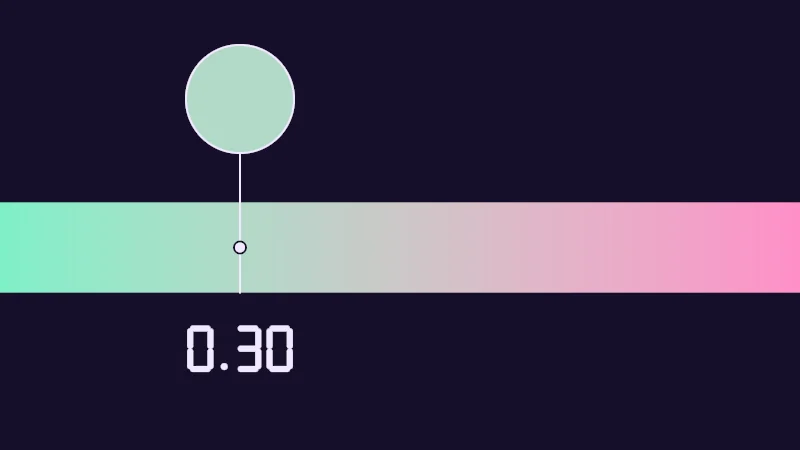
Drag the marker along the strip. The circle shows the color at the marker, and the number under it is how far along you are, from 0 to 1. Lerp calls that t. Then pick your own Color a and Color b.
From a to b with lerp
Lerp is short for linear interpolation, which is a long name for a short slide. You give it a start , an end and an amount :
is the whole way from to , and says how much of that way to go. At you stay at , at you arrive at , and lands halfway. WebGL’s shader language, GLSL, calls it mix (lesson 6 compares the two).
Colors work the same way. A color is three numbers, one each for red, green and blue, and lerp slides each one on its own. Each column of the strip above is a lerp from mint to pink with its own . Halfway, mint’s extra green and pink’s extra red even out into a soft grey.
Asking backwards with inverse lerp
Sometimes you know the value and want the amount. Where does sit on the way from to ? Turn the lerp around and solve for :
is how far has come from the start, and is the whole way, so is the share of the way behind you. Say a range runs from 2 to 6 and is 5: , three quarters of the way.
Unity’s shader language has no inverse lerp function, so shaders write the division out. There’s one trap. When equals , you divide by 0 and the result breaks. Keep the two ends apart.
Remap is inverse lerp, then lerp
Put the two in a row and a number can move from one range into another. Inverse lerp finds where sits between and , and lerp puts that same between and :
That’s remap. A value 40% of the way from to comes out 40% of the way from to . Make smaller than and the result runs backwards, a handy way to flip a fade.
Turn on JavaScript to run this demo.
- f1(x):
lerp(_A, _B, keep(x)) - f2(x):
keep((x - _A) / (_B - _A)) - f3(x):
lerp(_C, _D, keep((x - _A) / (_B - _A)))
#define PLOT_X_RANGE float2(-0.48, 1.48)
#define PLOT_Y_RANGE float2(-0.2, 1.2)
#define PLOT_TICK float2(0.25, 0.25)
#include "plot"
uniform float _A; // @range 0 1 0.01 = 0.2 | Start a | Where the old range starts.
uniform float _B; // @range 0 1 0.01 = 0.6 | End b | Where the old range ends.
uniform float _C; // @range 0 1 0.01 = 0.4 | Start c | Where the new range starts.
uniform float _D; // @range 0 1 0.01 = 0.9 | End d | Where the new range ends.
uniform float _Saturate; // @toggle = 0 | Saturate | Holds t between 0 and 1.
// t as it is, or held between 0 and 1 when Saturate is on.
float keep(float t) { return _Saturate > 0.5 ? saturate(t) : t; }
float curve0(float x) { return lerp(_A, _B, keep(x)); }
float curve1(float x) { return keep((x - _A) / (_B - _A)); }
float curve2(float x) { return lerp(_C, _D, keep((x - _A) / (_B - _A))); }
float4 shade(float2 uv)
{
    float2 p = plotCoord(uv);
    float3 col = plotBackground(p);
    float h = plotPixel().x;
    col = plotGuideX(col, p, _A, themeMuted());
    col = plotGuideX(col, p, _B, themeMuted());
    col = plotCurveStyled(col, p, curve0(p.x), plotSlope(curve0(p.x - h), curve0(p.x), curve0(p.x + h), h), series1(), 0);
    col = plotCurveStyled(col, p, curve1(p.x), plotSlope(curve1(p.x - h), curve1(p.x), curve1(p.x + h), h), series2(), 1);
    col = plotCurveStyled(col, p, curve2(p.x), plotSlope(curve2(p.x - h), curve2(p.x), curve2(p.x + h), h), series3(), 2);
    return float4(col, 1.0);
}#define PLOT_X_RANGE vec2(-0.48, 1.48)
#define PLOT_Y_RANGE vec2(-0.2, 1.2)
#define PLOT_TICK vec2(0.25, 0.25)
#include "plot"
uniform float _A; // @range 0 1 0.01 = 0.2 | Start a | Where the old range starts.
uniform float _B; // @range 0 1 0.01 = 0.6 | End b | Where the old range ends.
uniform float _C; // @range 0 1 0.01 = 0.4 | Start c | Where the new range starts.
uniform float _D; // @range 0 1 0.01 = 0.9 | End d | Where the new range ends.
uniform float _Saturate; // @toggle = 0 | Saturate | Holds t between 0 and 1.
// t as it is, or held between 0 and 1 when Saturate is on.
float keep(float t) { return _Saturate > 0.5 ? saturate(t) : t; }
float curve0(float x) { return mix(_A, _B, keep(x)); }
float curve1(float x) { return keep((x - _A) / (_B - _A)); }
float curve2(float x) { return mix(_C, _D, keep((x - _A) / (_B - _A))); }
vec4 shade(vec2 uv)
{
vec2 p = plotCoord(uv);
vec3 col = plotBackground(p);
float h = plotPixel().x;
col = plotGuideX(col, p, _A, themeMuted());
col = plotGuideX(col, p, _B, themeMuted());
col = plotCurveStyled(col, p, curve0(p.x), plotSlope(curve0(p.x - h), curve0(p.x), curve0(p.x + h), h), series1(), 0);
col = plotCurveStyled(col, p, curve1(p.x), plotSlope(curve1(p.x - h), curve1(p.x), curve1(p.x + h), h), series2(), 1);
col = plotCurveStyled(col, p, curve2(p.x), plotSlope(curve2(p.x - h), curve2(p.x), curve2(p.x + h), h), series3(), 2);
return vec4(col, 1.0);
}Names in this code (30)
_A- Slider "Start a". Where the old range starts. From 0 to 1, starts at 0.2.
_B- Slider "End b". Where the old range ends. From 0 to 1, starts at 0.6.
_C- Slider "Start c". Where the new range starts. From 0 to 1, starts at 0.4.
_D- Slider "End d". Where the new range ends. From 0 to 1, starts at 0.9.
_Saturate- Switch "Saturate". Holds t between 0 and 1.
col- Declared on line 18: float3 col = plotBackground(p);
curve0- float curve0(float x)
curve1- float curve1(float x)
curve2- float curve2(float x)
h- Declared on line 19: float h = plotPixel().x;
include- Pulls another file into this one, for example UnityCG.cginc.
keep- float keep(float t). t as it is, or held between 0 and 1 when Saturate is on.
lerp- HLSL's blend from a (t = 0) to b (t = 1). GLSL calls it mix.
p- Declared on line 17: float2 p = plotCoord(uv);
plotBackground- float3 plotBackground(float2 p) (plot library)
plotCoord- float2 plotCoord(float2 uv) (plot library)
plotCurveStyled- float3 plotCurveStyled(float3 col, float2 p, float y, float slope, float3 ink, int style). The same line, solid (style 0), dashed (1) or dotted (2), so curves differ by more than color. (plot library)
plotGuideX- float3 plotGuideX(float3 col, float2 p, float x, float3 ink). Dashed vertical guide at x. (plot library)
plotPixel- float2 plotPixel(). Size of one pixel in data units. (plot library)
plotSlope- float plotSlope(float before, float here, float after, float h). f'(x) from f one pixel before, at and after x. Where f jumps (a step, a saw tooth), one side changes by many pixels and the other hardly at all: then the gentler side wins, so the line ends on each side of the jump instead of smearing up and down through it. (plot library)
saturate- An HLSL function that clamps a value between 0 and 1.
series1- float3 series1() (common library)
series2- float3 series2() (common library)
series3- float3 series3() (common library)
shade- float4 shade(float2 uv)
t- A parameter of keep(), line 11: float t.
themeMuted- float3 themeMuted() (common library)
uv- A parameter of shade(), line 15: float2 uv.
x- A parameter of curve0(), line 12: float x.
define- With #define NAME value, every NAME in the code is replaced by value before compiling.
Mint is lerp, pink is inverse lerp and butter is remap. Pink crosses 0 at Start a and 1 at End b, and butter climbs from Start c to End d between the same guides. Mint and pink are mirror images across the diagonal from (0, 0) to (1, 1), because one undoes the other.
Keeping t between 0 and 1
Here’s the catch. Inverse lerp doesn’t stop at the ends. Past , climbs above 1, and before it drops below 0. Lerp then keeps going too, and you get a color beyond the end color, a size below zero or a brightness over the top. Saturate, which you met in the first lesson, holds a number between 0 and 1:
Max lifts anything below 0 up to 0, and min pulls anything above 1 down to 1. Most remaps want it between their two steps, so stays between and . Turn on Saturate in the plot above and watch the pink and butter lines go flat past the guides, while mint does the same past 0 and 1. Leave it off when a value should keep going, like a ramp that keeps rising.
Fading with distance
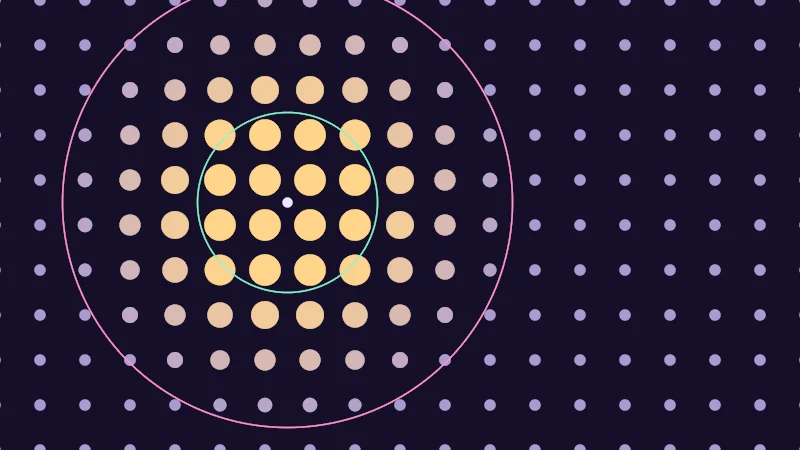
Now for a classic, things that fade as they get further away. In the demo below, is each dot’s distance from the viewer, measured as the length of the arrow between them (see the vectors lesson). Near is and Far is . Inverse lerp and saturate give a that is 0 up close and 1 far away. Then that one drives two lerps, one for the dot’s size and one for its color. That makes two remaps from one .
There’s a softer cousin. Smoothstep is saturate and inverse lerp with the corners rounded off, so a fade eases in and out. The smooth edges lesson takes it apart.
Turn on JavaScript to run this demo.
Rendered in Unity 2022.3.22f1 from the Copy for Unity shader, with the settings this demo starts with.
// Dots that fade with their distance from the viewer you drag: an inverse lerp from Near to Far, kept between 0 and 1.
#include "diagram"

uniform float _Near;  // @range 0 1.5 0.01 = 0.4 | Near | Closer than this, a dot is as big and bright as it gets.
uniform float _Far;   // @range 0 2 0.01 = 1.0 | Far | Further than this, a dot is as small and dim as it gets.
uniform float _Blend; // @select = 0 | Blend | Saturate=0, No saturate=1, Smoothstep=2 | How the distance turns into t.

float4 shade(float2 uv)
{
    float2 p = centered(uv);
    float2 viewer = pointerCentered();

    // The middle of the nearest dot: the dots sit on a grid 0.2 apart.
    float2 center = round(p / 0.2) * 0.2;
    float dist = length(center - viewer);

    // Inverse lerp: 0 at Near, 1 at Far.
    float t = (dist - _Near) / (_Far - _Near);
    int blend = int(_Blend + 0.5);
    if (blend == 0) t = saturate(t);
    if (blend == 2) t = smoothstep(_Near, _Far, dist);

    // One t drives two lerps, so two remaps: distance to size and distance to color.
    // min keeps a swollen dot inside its own square of the grid when t drops below 0.
    float radius = min(lerp(0.07, 0.025, t), 0.095);
    float3 ink = lerp(series3(), themeMuted(), t);

    float3 col = fillShape(themeSurface(), length(p - center) - radius, ink, 1.0);
    col = drawCircle(col, p, viewer, _Near, 1.5, series1());
    col = drawCircle(col, p, viewer, _Far, 1.5, series2());
    col = drawDot(col, p, viewer, 5.0, themeInk());
    return float4(col, 1.0);
}
// Dots that fade with their distance from the viewer you drag: an inverse lerp from Near to Far, kept between 0 and 1.
#include "diagram"
uniform float _Near; // @range 0 1.5 0.01 = 0.4 | Near | Closer than this, a dot is as big and bright as it gets.
uniform float _Far; // @range 0 2 0.01 = 1.0 | Far | Further than this, a dot is as small and dim as it gets.
uniform float _Blend; // @select = 0 | Blend | Saturate=0, No saturate=1, Smoothstep=2 | How the distance turns into t.
vec4 shade(vec2 uv)
{
vec2 p = centered(uv);
vec2 viewer = pointerCentered();
// The middle of the nearest dot: the dots sit on a grid 0.2 apart.
vec2 center = round(p / 0.2) * 0.2;
float dist = length(center - viewer);
// Inverse lerp: 0 at Near, 1 at Far.
float t = (dist - _Near) / (_Far - _Near);
int blend = int(_Blend + 0.5);
if (blend == 0) t = saturate(t);
if (blend == 2) t = hlslSmoothstep(_Near, _Far, dist);
// One t drives two lerps, so two remaps: distance to size and distance to color.
// min keeps a swollen dot inside its own square of the grid when t drops below 0.
float radius = min(mix(0.07, 0.025, t), 0.095);
vec3 ink = mix(series3(), themeMuted(), t);
vec3 col = fillShape(themeSurface(), length(p - center) - radius, ink, 1.0);
col = drawCircle(col, p, viewer, _Near, 1.5, series1());
col = drawCircle(col, p, viewer, _Far, 1.5, series2());
col = drawDot(col, p, viewer, 5.0, themeInk());
return vec4(col, 1.0);
}Names in this code (32)
_Blend- Choice "Blend". How the distance turns into t.
_Far- Slider "Far". Further than this, a dot is as small and dim as it gets. From 0 to 2, starts at 1.
_Near- Slider "Near". Closer than this, a dot is as big and bright as it gets. From 0 to 1.5, starts at 0.4.
blend- Declared on line 19: int blend = int(_Blend + 0.5);
center- Declared on line 14: float2 center = round(p / 0.2) * 0.2;
centered- float2 centered(float2 uv). Square coordinates with the origin in the middle: the short side of the picture spans -1..1. (common library)
col- Declared on line 28: float3 col = fillShape(themeSurface(), length(p - center) - radius, ink, 1.0);
dist- Declared on line 15: float dist = length(center - viewer);
drawCircle- float3 drawCircle(float3 col, float2 p, float2 c, float r, float widthPx, float3 ink) (diagram library)
drawDot- float3 drawDot(float3 col, float2 p, float2 c, float radiusPx, float3 ink). A dot with a ring in the surface color around it. (diagram library)
fillShape- float3 fillShape(float3 col, float d, float3 ink, float alpha). Fill or outline any signed distance d (in centered() units). alpha tints evenly for the eye; the edge itself blends in linear light like any coverage. (diagram library)
include- Pulls another file into this one, for example UnityCG.cginc.
ink- Declared on line 26: float3 ink = lerp(series3(), themeMuted(), t);
lerp- HLSL's blend from a (t = 0) to b (t = 1). GLSL calls it mix.
p- Declared on line 10: float2 p = centered(uv);
pointerCentered- float2 pointerCentered(). The pointer (or the _Pointer material setting in Unity) in the same coordinates as centered(). (common library)
radius- Declared on line 25: float radius = min(lerp(0.07, 0.025, t), 0.095);
saturate- An HLSL function that clamps a value between 0 and 1.
series1- float3 series1() (common library)
series2- float3 series2() (common library)
series3- float3 series3() (common library)
shade- float4 shade(float2 uv)
t- Declared on line 18: float t = (dist - _Near) / (_Far - _Near);
themeInk- float3 themeInk() (common library)
themeMuted- float3 themeMuted() (common library)
themeSurface- float3 themeSurface(). The dusk stage colors, in linear light. Series colors are used in this order: mint, pink, butter. (common library)
uv- A parameter of shade(), line 8: float2 uv.
viewer- Declared on line 11: float2 viewer = pointerCentered();
length- length(v) says how long the vector v is, sqrt(x² + y²).
min- min(a, b) picks the smaller of the two.
round- round(x) is the nearest whole number to x.
smoothstep- smoothstep(e0, e1, x) is 0 below e0, 1 above e1, and an S curve t² (3 - 2t) in between, where t = (x - e0) / (e1 - e0). GLSL leaves e0 >= e1 undefined.
Drag the viewer. Inside the mint ring the dots are big and butter, past the pink ring small and lilac. With Blend set to No saturate, near dots swell and turn a hotter yellow, and far ones shrink to nothing. Then try Smoothstep, which eases the fade in and out at the rings.
In practice
You’ll meet these in almost every shader:
- Blending colors, for a tint, a shadow color or day turning into night.
- Fading things with distance, like details that only show up close or a glow that softens far away.
- Stretching a 0 to 1 slider, which is friendly to set and to animate, into whatever range the math needs.
Here’s a small example of my own:
// A 0 to 1 slider becomes a glow strength from 0.5 to 8.
float glow = lerp(0.5, 8.0, _Glow);
float3 col = _Color.rgb * glow;

// 0 closer than 2 metres from the camera, 1 beyond 5 metres.
float dist = distance(_WorldSpaceCameraPos, i.worldPos);
float fade = saturate((dist - 2.0) / (5.0 - 2.0));
col = lerp(col, _FogColor, fade);_Color, _Glow and _FogColor are material settings, one Unity unit is one metre, and the fade is a saturated inverse lerp.
One mix-up catches everyone once: lerp(a, b, t) takes an amount, but smoothstep(a, b, x) takes a value and works out the amount itself.
- Lerp slides from to as goes from 0 to 1, on numbers and colors alike.
- Inverse lerp finds the of a value, and remap is inverse lerp followed by lerp.
- Saturate keeps between 0 and 1, so a remap stays in its new range. Smoothstep is a saturated inverse lerp with soft ends.