Basics, part 1
Where is this pixel?
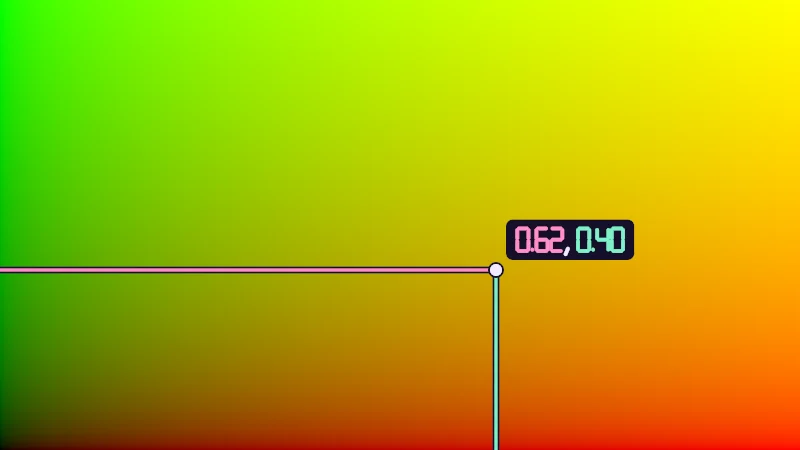
A shader colors one pixel at a time, and its first clue is where that pixel sits. Let's read UV, move the middle to (0, 0) and draw a graph.
Here’s a strange thing about shaders. They never see the whole picture! The graphics card runs the same small program once for every pixel your mesh covers, thousands or millions of times, side by side. Each run picks one color, and the one clue it starts from is where its pixel sits. Everything I draw in a shader grows out of that clue, so that’s where the Basics begin.
Turn on JavaScript to run this demo.
Rendered in Unity 2022.3.22f1 from the Copy for Unity shader, with the settings this demo starts with.
// Numbers drawn with seven segments, for the probe readout in this lesson.
#include "sdf2d"

// Which segments the digit n lights, one bit each:
// 1 top, 2 top right, 4 bottom right, 8 bottom, 16 bottom left, 32 top left, 64 middle.
int digitSegments(int n)
{
    if (n == 0) return 63;
    if (n == 1) return 6;
    if (n == 2) return 91;
    if (n == 3) return 79;
    if (n == 4) return 102;
    if (n == 5) return 109;
    if (n == 6) return 125;
    if (n == 7) return 7;
    if (n == 8) return 127;
    return 111;
}

// Distance to the digit n in a box 0.5 wide and 1 tall, centred on the origin. A one moves to the middle of its box.
float sdDigit(float2 p, int n)
{
    int m = digitSegments(n);
    float2 q = p + float2(n == 1 ? 0.5 : 0.25, 0.5);
    float g = 0.07;
    float d = 1e5;
    if ((m & 1) != 0) d = min(d, sdSegment(q, float2(g, 1.0), float2(0.5 - g, 1.0)));
    if ((m & 2) != 0) d = min(d, sdSegment(q, float2(0.5, 1.0 - g), float2(0.5, 0.5 + g)));
    if ((m & 4) != 0) d = min(d, sdSegment(q, float2(0.5, 0.5 - g), float2(0.5, g)));
    if ((m & 8) != 0) d = min(d, sdSegment(q, float2(g, 0.0), float2(0.5 - g, 0.0)));
    if ((m & 16) != 0) d = min(d, sdSegment(q, float2(0.0, g), float2(0.0, 0.5 - g)));
    if ((m & 32) != 0) d = min(d, sdSegment(q, float2(0.0, 0.5 + g), float2(0.0, 1.0 - g)));
    if ((m & 64) != 0) d = min(d, sdSegment(q, float2(g, 0.5), float2(0.5 - g, 0.5)));
    return d - 0.085;
}

// Distance to a number from 0 to 9.99 with two decimals, like 0.62, in characters 1 unit tall.
// It starts at the origin and is 2 units long.
float sdNumber(float2 p, float v)
{
    int r = int(floor(clamp(v, 0.0, 9.99) * 100.0 + 0.5));
    float d = sdDigit(p - float2(0.25, 0.0), r / 100);
    d = min(d, length(p - float2(0.67, -0.44)) - 0.085);
    d = min(d, sdDigit(p - float2(1.1, 0.0), (r / 10) % 10));
    return min(d, sdDigit(p - float2(1.75, 0.0), r % 10));
}

// Distance to a comma that hangs below the baseline of a character centred on the origin.
float sdComma(float2 p) { return sdSegment(p, float2(0.0, -0.4), float2(-0.1, -0.64)) - 0.085; }


// ----

// UV as color: red grows to the right, green grows up. The probe reads the two numbers of the pixel under it.
#include "diagram"

float4 shade(float2 uv)
{
    float3 col = float3(uv.x, uv.y, 0.0);

    float2 p = centered(uv);
    float2 probe = pointerCentered();
    float2 corner = centered(float2(0.0, 0.0));

    // u is the way in from the left edge (pink), v the way up from the bottom edge (mint).
    float2 left = float2(corner.x, probe.y);
    float2 bottom = float2(probe.x, corner.y);
    col = drawLine(col, p, left, probe, 7.0, themeSurface());
    col = drawLine(col, p, bottom, probe, 7.0, themeSurface());
    col = drawLine(col, p, left, probe, 3.0, series2());
    col = drawLine(col, p, bottom, probe, 3.0, series1());
    col = drawDot(col, p, probe, 6.0, themeInk());

    // The readout "u, v" on a dark plate beside the probe, on whichever side has room.
    // The text is 4.7 character heights long: u from 0 to 2, the comma at 2.25, v from 2.7 to 4.7.
    float px = pixelSize();
    float textPx = clamp(0.1 / px, 12.0, 28.0);
    float h = textPx * px;
    float2 halfSize = float2(2.85, 0.9) * h;
    float2 side = float2(_Pointer.x < 0.7 ? 1.0 : -1.0, _Pointer.y < 0.75 ? 1.0 : -1.0);
    float2 center = probe + side * (halfSize + 10.0 * px);
    float plate = sdRoundedBox(p - center, halfSize, 0.3 * h);
    if (plate < 2.0 * px)
    {
        col = lerp(col, themeSurface(), saturate(0.5 - plate / px));
        float2 q = (p - center) / h + float2(2.35, 0.0);
        col = lerp(col, series2(), saturate(0.5 - sdNumber(q, _Pointer.x) * textPx));
        col = lerp(col, themeInk(), saturate(0.5 - sdComma(q - float2(2.25, 0.0)) * textPx));
        col = lerp(col, series1(), saturate(0.5 - sdNumber(q - float2(2.7, 0.0), _Pointer.y) * textPx));
    }
    return float4(col, 1.0);
}
// Numbers drawn with seven segments, for the probe readout in this lesson.
#include "sdf2d"
// Which segments the digit n lights, one bit each:
// 1 top, 2 top right, 4 bottom right, 8 bottom, 16 bottom left, 32 top left, 64 middle.
int digitSegments(int n)
{
if (n == 0) return 63;
if (n == 1) return 6;
if (n == 2) return 91;
if (n == 3) return 79;
if (n == 4) return 102;
if (n == 5) return 109;
if (n == 6) return 125;
if (n == 7) return 7;
if (n == 8) return 127;
return 111;
}
// Distance to the digit n in a box 0.5 wide and 1 tall, centred on the origin. A one moves to the middle of its box.
float sdDigit(vec2 p, int n)
{
int m = digitSegments(n);
vec2 q = p + vec2(n == 1 ? 0.5 : 0.25, 0.5);
float g = 0.07;
float d = 1e5;
if ((m & 1) != 0) d = min(d, sdSegment(q, vec2(g, 1.0), vec2(0.5 - g, 1.0)));
if ((m & 2) != 0) d = min(d, sdSegment(q, vec2(0.5, 1.0 - g), vec2(0.5, 0.5 + g)));
if ((m & 4) != 0) d = min(d, sdSegment(q, vec2(0.5, 0.5 - g), vec2(0.5, g)));
if ((m & 8) != 0) d = min(d, sdSegment(q, vec2(g, 0.0), vec2(0.5 - g, 0.0)));
if ((m & 16) != 0) d = min(d, sdSegment(q, vec2(0.0, g), vec2(0.0, 0.5 - g)));
if ((m & 32) != 0) d = min(d, sdSegment(q, vec2(0.0, 0.5 + g), vec2(0.0, 1.0 - g)));
if ((m & 64) != 0) d = min(d, sdSegment(q, vec2(g, 0.5), vec2(0.5 - g, 0.5)));
return d - 0.085;
}
// Distance to a number from 0 to 9.99 with two decimals, like 0.62, in characters 1 unit tall.
// It starts at the origin and is 2 units long.
float sdNumber(vec2 p, float v)
{
int r = int(floor(clamp(v, 0.0, 9.99) * 100.0 + 0.5));
float d = sdDigit(p - vec2(0.25, 0.0), r / 100);
d = min(d, length(p - vec2(0.67, -0.44)) - 0.085);
d = min(d, sdDigit(p - vec2(1.1, 0.0), (r / 10) % 10));
return min(d, sdDigit(p - vec2(1.75, 0.0), r % 10));
}
// Distance to a comma that hangs below the baseline of a character centred on the origin.
float sdComma(vec2 p) { return sdSegment(p, vec2(0.0, -0.4), vec2(-0.1, -0.64)) - 0.085; }
// ----
// UV as color: red grows to the right, green grows up. The probe reads the two numbers of the pixel under it.
#include "diagram"
vec4 shade(vec2 uv)
{
vec3 col = vec3(uv.x, uv.y, 0.0);
vec2 p = centered(uv);
vec2 probe = pointerCentered();
vec2 corner = centered(vec2(0.0, 0.0));
// u is the way in from the left edge (pink), v the way up from the bottom edge (mint).
vec2 left = vec2(corner.x, probe.y);
vec2 bottom = vec2(probe.x, corner.y);
col = drawLine(col, p, left, probe, 7.0, themeSurface());
col = drawLine(col, p, bottom, probe, 7.0, themeSurface());
col = drawLine(col, p, left, probe, 3.0, series2());
col = drawLine(col, p, bottom, probe, 3.0, series1());
col = drawDot(col, p, probe, 6.0, themeInk());
// The readout "u, v" on a dark plate beside the probe, on whichever side has room.
// The text is 4.7 character heights long: u from 0 to 2, the comma at 2.25, v from 2.7 to 4.7.
float px = pixelSize();
float textPx = clamp(0.1 / px, 12.0, 28.0);
float h = textPx * px;
vec2 halfSize = vec2(2.85, 0.9) * h;
vec2 side = vec2(_Pointer.x < 0.7 ? 1.0 : -1.0, _Pointer.y < 0.75 ? 1.0 : -1.0);
vec2 center = probe + side * (halfSize + 10.0 * px);
float plate = sdRoundedBox(p - center, halfSize, 0.3 * h);
if (plate < 2.0 * px)
{
col = mix(col, themeSurface(), saturate(0.5 - plate / px));
vec2 q = (p - center) / h + vec2(2.35, 0.0);
col = mix(col, series2(), saturate(0.5 - sdNumber(q, _Pointer.x) * textPx));
col = mix(col, themeInk(), saturate(0.5 - sdComma(q - vec2(2.25, 0.0)) * textPx));
col = mix(col, series1(), saturate(0.5 - sdNumber(q - vec2(2.7, 0.0), _Pointer.y) * textPx));
}
return vec4(col, 1.0);
}Names in this code (39)
_Pointer- Where the reader dragged, from (0, 0) at the bottom left to (1, 1) at the top right. xy is the first handle and zw a second one; in Unity it is the Pointer material setting.
bottom- Declared on line 14: float2 bottom = float2(probe.x, corner.y);
center- Declared on line 28: float2 center = probe + side * (halfSize + 10.0 * px);
centered- float2 centered(float2 uv). Square coordinates with the origin in the middle: the short side of the picture spans -1..1. (common library)
col- Declared on line 6: float3 col = float3(uv.x, uv.y, 0.0);
corner- Declared on line 10: float2 corner = centered(float2(0.0, 0.0));
digitSegments- int digitSegments(int n). Which segments the digit n lights, one bit each: 1 top, 2 top right, 4 bottom right, 8 bottom, 16 bottom left, 32 top left, 64 middle. (this article's helper code)
drawDot- float3 drawDot(float3 col, float2 p, float2 c, float radiusPx, float3 ink). A dot with a ring in the surface color around it. (diagram library)
drawLine- float3 drawLine(float3 col, float2 p, float2 a, float2 b, float widthPx, float3 ink) (diagram library)
h- Declared on line 25: float h = textPx * px;
halfSize- Declared on line 26: float2 halfSize = float2(2.85, 0.9) * h;
include- Pulls another file into this one, for example UnityCG.cginc.
left- Declared on line 13: float2 left = float2(corner.x, probe.y);
lerp- HLSL's blend from a (t = 0) to b (t = 1). GLSL calls it mix.
p- Declared on line 8: float2 p = centered(uv);
pixelSize- float pixelSize() (common library)
plate- Declared on line 29: float plate = sdRoundedBox(p - center, halfSize, 0.3 * h);
pointerCentered- float2 pointerCentered(). The pointer (or the _Pointer material setting in Unity) in the same coordinates as centered(). (common library)
probe- Declared on line 9: float2 probe = pointerCentered();
px- Declared on line 23: float px = pixelSize();
q- Declared on line 33: float2 q = (p - center) / h + float2(2.35, 0.0);
saturate- An HLSL function that clamps a value between 0 and 1.
sdComma- float sdComma(float2 p). Distance to a comma that hangs below the baseline of a character centred on the origin. (this article's helper code)
sdDigit- float sdDigit(float2 p, int n). Distance to the digit n in a box 0.5 wide and 1 tall, centred on the origin. A one moves to the middle of its box. (this article's helper code)
sdNumber- float sdNumber(float2 p, float v). Distance to a number from 0 to 9.99 with two decimals, like 0.62, in characters 1 unit tall. It starts at the origin and is 2 units long. (this article's helper code)
sdRoundedBox- float sdRoundedBox(float2 p, float2 halfSize, float r) (sdf2d library)
sdSegment- float sdSegment(float2 p, float2 a, float2 b) (sdf2d library)
series1- float3 series1() (common library)
series2- float3 series2() (common library)
shade- float4 shade(float2 uv)
side- Declared on line 27: float2 side = float2(_Pointer.x < 0.7 ? 1.0 : -1.0, _Pointer.y < 0.75 ? 1.0 : -1.0);
textPx- Declared on line 24: float textPx = clamp(0.1 / px, 12.0, 28.0);
themeInk- float3 themeInk() (common library)
themeSurface- float3 themeSurface(). The dusk stage colors, in linear light. Series colors are used in this order: mint, pink, butter. (common library)
uv- A parameter of shade(), line 4: float2 uv.
clamp- clamp(x, lo, hi) holds x between lo and hi.
floor- floor(x) rounds down to the largest whole number not above x. floor(2.7) = 2, floor(-0.5) = -1.
length- length(v) says how long the vector v is, sqrt(x² + y²).
min- min(a, b) picks the smaller of the two.
Drag the white dot, the probe. Each pixel’s color comes from its position alone. The pink line is the way in from the left edge, the mint line the way up from the bottom, and the numbers show both.
Two numbers called UV
The position comes as two numbers called UV. says how far across the pixel is, how far up. Both run from 0 to 1, with in the bottom left corner, in the top right and in the middle. They aren’t pixels or centimetres. Halfway across is 0.5 on a tiny picture and on a huge one.
The demo shows them as color, red for and green for , while blue stays 0. So the bottom left is black, the bottom right red and the top left green. In the top right, full red and full green light make yellow.
UV comes from the mesh, not the screen. Each demo here is drawn like Unity’s quad, a flat square made of two triangles, whose UVs are laid out exactly like this.
Moving the middle
Zero in a corner suits textures, but shapes like to grow from the middle. So nearly every demo on this site starts with centered(uv). On a wide picture like this one, it does two things:
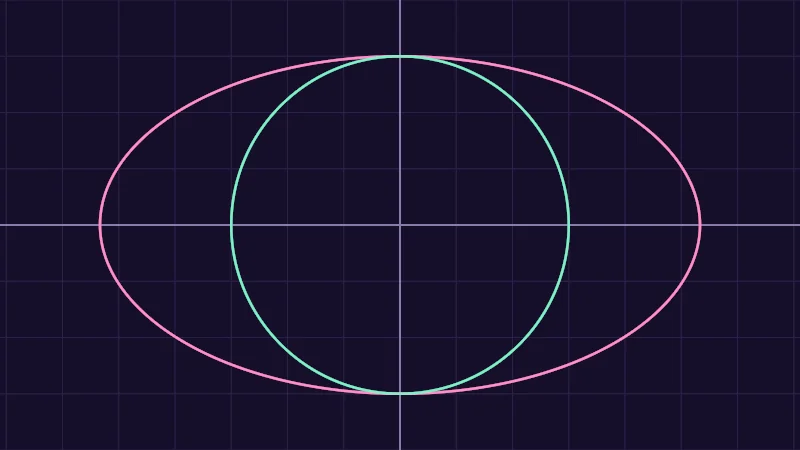
First, stretches 0 to 1 into -1 to 1, so the middle lands on 0. Then is multiplied by the aspect , the picture’s width divided by its height. This picture is 16 wide and 9 tall, which makes about 1.78. Now runs from -1 to 1 and from -1.78 to 1.78. On a tall picture, gets the extra room instead.
Why bother with the aspect? Without it, -1 to 1 fits the short side and the long side alike, so one step across is longer on screen than one step up, and every circle comes out as an oval.
Turn on JavaScript to run this demo.
Rendered in Unity 2022.3.22f1 from the Copy for Unity shader, with the settings this demo starts with.
// centered(uv): the middle is (0, 0) and the short side runs from -1 to 1, so a circle stays round.
#include "diagram"

uniform float _Radius; // @range 0.1 1 0.01 = 0.75 | Radius | How big both circles are, each in its own units.

float4 shade(float2 uv)
{
    float2 p = centered(uv);
    float3 col = drawGrid(themeSurface(), p, 0.25);
    col = drawAxes(col, p);

    // The same circle without the aspect: uv * 2 - 1 runs from -1 to 1 both ways, so it stretches with the picture.
    float2 q = uv * 2.0 - 1.0;
    float d = length(q) - _Radius;
    float dPx = abs(d) / max(length(float2(ddx(d), ddy(d))), 1e-5);
    col = lerp(col, series2(), saturate(1.75 - dPx));

    col = drawCircle(col, p, float2(0.0, 0.0), _Radius, 2.5, series1());
    return float4(col, 1.0);
}
// centered(uv): the middle is (0, 0) and the short side runs from -1 to 1, so a circle stays round.
#include "diagram"
uniform float _Radius; // @range 0.1 1 0.01 = 0.75 | Radius | How big both circles are, each in its own units.
vec4 shade(vec2 uv)
{
vec2 p = centered(uv);
vec3 col = drawGrid(themeSurface(), p, 0.25);
col = drawAxes(col, p);
// The same circle without the aspect: uv * 2 - 1 runs from -1 to 1 both ways, so it stretches with the picture.
vec2 q = uv * 2.0 - 1.0;
float d = length(q) - _Radius;
float dPx = abs(d) / max(length(vec2(dFdx(d), dFdy(d))), 1e-5);
col = mix(col, series2(), saturate(1.75 - dPx));
col = drawCircle(col, p, vec2(0.0, 0.0), _Radius, 2.5, series1());
return vec4(col, 1.0);
}Names in this code (23)
_Radius- Slider "Radius". How big both circles are, each in its own units. From 0.1 to 1, starts at 0.75.
centered- float2 centered(float2 uv). Square coordinates with the origin in the middle: the short side of the picture spans -1..1. (common library)
col- Declared on line 9: float3 col = drawGrid(themeSurface(), p, 0.25);
d- Declared on line 14: float d = length(q) - _Radius;
ddx- HLSL's measure of how much a value changes to the next pixel on the right. GLSL calls it dFdx.
ddy- HLSL's measure of how much a value changes to the next pixel down. GLSL calls it dFdy.
dPx- Declared on line 15: float dPx = abs(d) / max(length(float2(ddx(d), ddy(d))), 1e-5);
drawAxes- float3 drawAxes(float3 col, float2 p) (diagram library)
drawCircle- float3 drawCircle(float3 col, float2 p, float2 c, float r, float widthPx, float3 ink) (diagram library)
drawGrid- float3 drawGrid(float3 col, float2 p, float spacing) (diagram library)
include- Pulls another file into this one, for example UnityCG.cginc.
lerp- HLSL's blend from a (t = 0) to b (t = 1). GLSL calls it mix.
p- Declared on line 8: float2 p = centered(uv);
q- Declared on line 13: float2 q = uv * 2.0 - 1.0;
saturate- An HLSL function that clamps a value between 0 and 1.
series1- float3 series1() (common library)
series2- float3 series2() (common library)
shade- float4 shade(float2 uv)
themeSurface- float3 themeSurface(). The dusk stage colors, in linear light. Series colors are used in this order: mint, pink, butter. (common library)
uv- A parameter of shade(), line 6: float2 uv.
abs- abs(x) is x without its minus sign. abs(-0.3) = 0.3.
length- length(v) says how long the vector v is, sqrt(x² + y²).
max- max(a, b) picks the larger of the two.
Slide Radius and both shapes follow, because they share it. The mint circle uses centered(uv) and stays round. The pink one uses and and skips the aspect, so it stretches with the picture. The two brighter lines are the axes, crossing at . Grid squares are 0.25 units.
I’ll often call the pair , the pixel’s position. Vectors shows how one letter can hold two numbers.
Reading a graph
Shader math is full of small rules that turn one number into another: halve it, square it, keep it between 0 and 1. A graph is a picture of such a rule. Call the rule , and means you put in and get out . To read it, find on the horizontal axis, go straight up or down to the curve, and see how high you are.
Turn on JavaScript to run this demo.
- f1(x):
0.5 * x - f2(x):
x * x - f3(x):
saturate(x)
#define PLOT_X_RANGE float2(-1.5, 1.5)
#define PLOT_Y_RANGE float2(-1.0, 2.4)
#define PLOT_TICK float2(0.5, 0.5)
#include "plot"
uniform float _X; // @range -1.5 1.5 0.01 = 1.2 | Pick x | Where to read the three curves.
float curve0(float x) { return 0.5 * x; }
float curve1(float x) { return x * x; }
float curve2(float x) { return saturate(x); }
float4 shade(float2 uv)
{
    float2 p = plotCoord(uv);
    float3 col = plotBackground(p);
    float h = plotPixel().x;
    col = plotGuideX(col, p, _X, themeMuted());
    col = plotCurveStyled(col, p, curve0(p.x), plotSlope(curve0(p.x - h), curve0(p.x), curve0(p.x + h), h), series1(), 0);
    col = plotCurveStyled(col, p, curve1(p.x), plotSlope(curve1(p.x - h), curve1(p.x), curve1(p.x + h), h), series2(), 1);
    col = plotCurveStyled(col, p, curve2(p.x), plotSlope(curve2(p.x - h), curve2(p.x), curve2(p.x + h), h), series3(), 2);
    col = plotPoint(col, p, float2(_X, 0.5 * _X), series1());
    col = plotPoint(col, p, float2(_X, _X * _X), series2());
    col = plotPoint(col, p, float2(_X, saturate(_X)), series3());
    return float4(col, 1.0);
}#define PLOT_X_RANGE vec2(-1.5, 1.5)
#define PLOT_Y_RANGE vec2(-1.0, 2.4)
#define PLOT_TICK vec2(0.5, 0.5)
#include "plot"
uniform float _X; // @range -1.5 1.5 0.01 = 1.2 | Pick x | Where to read the three curves.
float curve0(float x) { return 0.5 * x; }
float curve1(float x) { return x * x; }
float curve2(float x) { return saturate(x); }
vec4 shade(vec2 uv)
{
vec2 p = plotCoord(uv);
vec3 col = plotBackground(p);
float h = plotPixel().x;
col = plotGuideX(col, p, _X, themeMuted());
col = plotCurveStyled(col, p, curve0(p.x), plotSlope(curve0(p.x - h), curve0(p.x), curve0(p.x + h), h), series1(), 0);
col = plotCurveStyled(col, p, curve1(p.x), plotSlope(curve1(p.x - h), curve1(p.x), curve1(p.x + h), h), series2(), 1);
col = plotCurveStyled(col, p, curve2(p.x), plotSlope(curve2(p.x - h), curve2(p.x), curve2(p.x + h), h), series3(), 2);
col = plotPoint(col, p, vec2(_X, 0.5 * _X), series1());
col = plotPoint(col, p, vec2(_X, _X * _X), series2());
col = plotPoint(col, p, vec2(_X, saturate(_X)), series3());
return vec4(col, 1.0);
}Names in this code (24)
_X- Slider "Pick x". Where to read the three curves. From -1.5 to 1.5, starts at 1.2.
col- Declared on line 12: float3 col = plotBackground(p);
curve0- float curve0(float x)
curve1- float curve1(float x)
curve2- float curve2(float x)
h- Declared on line 13: float h = plotPixel().x;
include- Pulls another file into this one, for example UnityCG.cginc.
p- Declared on line 11: float2 p = plotCoord(uv);
plotBackground- float3 plotBackground(float2 p) (plot library)
plotCoord- float2 plotCoord(float2 uv) (plot library)
plotCurveStyled- float3 plotCurveStyled(float3 col, float2 p, float y, float slope, float3 ink, int style). The same line, solid (style 0), dashed (1) or dotted (2), so curves differ by more than color. (plot library)
plotGuideX- float3 plotGuideX(float3 col, float2 p, float x, float3 ink). Dashed vertical guide at x. (plot library)
plotPixel- float2 plotPixel(). Size of one pixel in data units. (plot library)
plotPoint- float3 plotPoint(float3 col, float2 p, float2 at, float3 ink). A 5 px dot with a 2 px ring in the surface color, so it stays readable on top of a line. (plot library)
plotSlope- float plotSlope(float before, float here, float after, float h). f'(x) from f one pixel before, at and after x. Where f jumps (a step, a saw tooth), one side changes by many pixels and the other hardly at all: then the gentler side wins, so the line ends on each side of the jump instead of smearing up and down through it. (plot library)
saturate- An HLSL function that clamps a value between 0 and 1.
series1- float3 series1() (common library)
series2- float3 series2() (common library)
series3- float3 series3() (common library)
shade- float4 shade(float2 uv)
themeMuted- float3 themeMuted() (common library)
uv- A parameter of shade(), line 9: float2 uv.
x- A parameter of curve0(), line 6: float x.
define- With #define NAME value, every NAME in the code is replaced by value before compiling.
Move Pick x and watch the three dots ride along, each at the height of its curve. Mint halves , pink multiplies by itself, and butter is saturate, which keeps any number between 0 and 1.
The next lesson, Sine and cosine, reads two famous wave graphs this way.
Drawing a curve, pixel by pixel
That graph is a shader too, and a shader can’t move a pen along a line. Each pixel only knows its own , so it asks a different question. How far am I above the curve?
is positive above the curve, negative below and 0 right on it. The bars in drop the minus sign and leave the gap either way. Where is under about a pixel, the pixel belongs to the line. A hard yes or no would give jagged stairs, so the color fades out over a pixel instead. That soft edge is anti-aliasing. Here is in a Unity shader, on a square quad:
float2 p = i.uv * 2.0 - 1.0;      // -1 to 1, the middle is (0, 0)
float d = p.y - p.x * p.x;        // above the curve y = x * x it is positive
float px = max(fwidth(d), 1e-5);  // how much d changes per pixel, never 0
float ink = saturate(1.5 - abs(d) / px);
col = lerp(col, float3(1.0, 1.0, 1.0), ink);
fwidth(d) is how much changes from one pixel to the next, so dividing by it turns the gap into pixels. On the steep parts changes faster, so the line reaches further up and down and doesn’t get thin there. The smooth edges lesson takes the soft edge apart, and Drawing shapes with distance grows this idea into whole shapes.
In practice
- UV in Unity. The mesh’s UV reaches each pixel, usually as
i.uv. You’ll find where it comes from in the Unity shader file lesson. - UVs on a model. On a character or a piece of clothing, the UVs are a flat map of the surface, cut into pieces like a sewing pattern. A pattern drawn from UV follows the fabric and jumps at the seams, where the pieces meet.
- The aspect in Unity. Copy for Unity, the Unity button on a demo’s code window, reads the aspect from the quad’s scale, so a quad scaled to 2 by 1 still draws round circles. In your own shader, multiply by the width over the height.
- A shader colors one pixel at a time, and its first clue is where that pixel sits.
- UV runs from 0 to 1 with at the bottom left.
centered(uv)moves to the middle and keeps circles round. - To draw , each pixel measures its gap to the curve and takes the line’s color where that gap is under a pixel.