Foundations, part 4
Rings, rays and spirals with polar coordinates
Give every pixel an angle and a distance from a centre, and suddenly rings, rays, spirals, rings of copies and even a heart take a line or two of math.
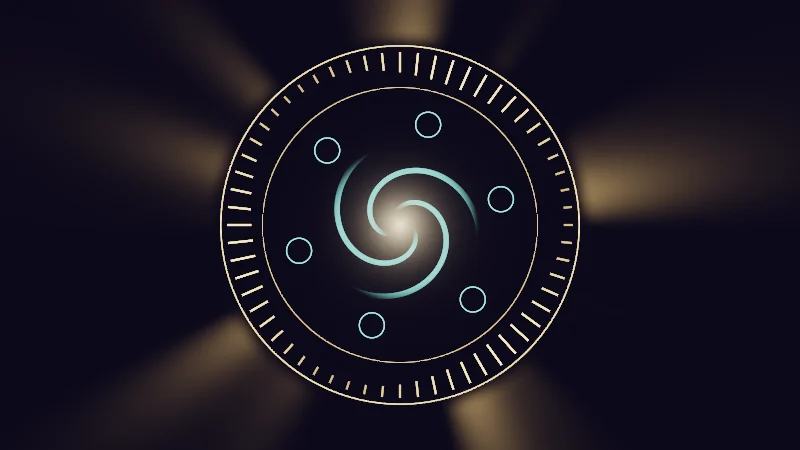
I keep running into round things in shaders: halos, dials, rings of tick marks, spirals. Each one is a struggle with x and y, and surprisingly short with two other numbers, the pixel’s angle around a centre and its distance from it. Those two are called polar coordinates. Let’s use them to draw rings, rays, spirals, a ring of copies and, why not, a heart.
Turn on JavaScript to run this demo.
Rendered in Unity 2022.3.22f1 from the Copy for Unity shader, with the settings this demo starts with.
// Polar helpers shared by this article's demos.

// x: the angle in radians (-PI..PI, 0 points right), y: the radius.
float2 toPolar(float2 p) { return float2(atan2(p.y, p.x), length(p)); }

// The shorter way round from angle b to angle a, in -PI..PI. No jump where atan2 wraps.
float angleDiff(float a, float b) { return (frac((a - b) / TAU + 0.5) - 0.5) * TAU; }

// Coverage of a distance over exactly one pixel. For fields that jump between sectors,
// where fwidth() would see the jump and smear it.
float fillPx(float d) { return saturate(0.5 - d / pixelSize()); }

// Inigo Quilez's polar heart (Shadertoy XsfGRn): the edge radius for h = angle from the top / PI.
float heartRadius(float h) { return (13.0 * h - 22.0 * h * h + 10.0 * h * h * h) / (6.0 - 5.0 * h); }


// ----

// A magic circle built only from angle and radius: a sunburst, a ring of ticks, a ring of small circles and a spiral in the middle.
#include "sdf2d"

float4 shade(float2 uv)
{
    float2 p = centered(uv) * 1.08;
    float t = _Time.y;
    float a = atan2(p.y, p.x);
    float r = length(p);
    float3 gold = float3(1.0, 0.72, 0.32);
    float3 aqua = float3(0.35, 0.95, 0.85);

    float3 col = float3(0.010, 0.008, 0.020);

    // Sunburst outside the circle: waves of the angle with whole counts, so there is no seam.
    float wave = 0.5 * sin(5.0 * a + t * 0.2) + 0.3 * sin(9.0 * a - t * 0.3) + 0.2 * sin(14.0 * a + t * 0.1);
    float beam = pow(saturate(wave + 0.1), 2.0);
    col += gold * beam * 0.25 * smoothstep(0.84, 0.95, r) * exp(-3.0 * max(r - 0.9, 0.0));

    // Two rings that frame the ticks.
    col += gold * 1.2 * strokeAA(r - 0.86, 0.006);
    col += gold * 0.8 * strokeAA(r - 0.66, 0.004);

    // 60 ticks: turn the pixel back into the first slice and draw one box there.
    float n = 60.0;
    float slice = TAU / n;
    float k = floor(a / slice + 0.5);
    float2 q = mul(rot2(-k * slice), p);
    float level = 0.5 + 0.5 * sin(k * TAU * 3.0 / n - t * 0.8);
    float len = 0.04 + 0.08 * level;
    float dTick = sdBox(q - float2(0.83 - 0.5 * len, 0.0), float2(0.5 * len, 0.005));
    col += gold * (0.5 + 1.0 * level) * fillPx(dTick / 1.08);

    // Six small circles on a turning ring, drawn the same way.
    float2 pc = mul(rot2(-t * 0.1), p);
    float s6 = TAU / 6.0;
    float k6 = floor(atan2(pc.y, pc.x) / s6 + 0.5);
    float2 q6 = mul(rot2(-k6 * s6), pc);
    float dSmall = abs(sdCircle(q6 - float2(0.50, 0.0), 0.06)) - 0.003;
    col += aqua * 0.9 * fillPx(dSmall / 1.08);

    // Spiral on a light hub: angle plus radius, three arms turning slowly.
    float ph = frac(3.0 * a / TAU + 6.0 * r - t * 0.3);
    float dLine = (abs(ph - 0.5) - 0.08) / length(float2(6.0, 3.0 / (TAU * max(r, 1e-3))));
    float arms = fillPx(dLine / 1.08) * smoothstep(0.06, 0.14, r) * smoothstep(0.38, 0.28, r);
    col += aqua * 0.6 * arms;
    col += float3(1.0, 0.85, 0.6) * 0.9 * exp(-r * 14.0);

    return float4(tonemapACES(col), 1.0);
}
// Polar helpers shared by this article's demos.
// x: the angle in radians (-PI..PI, 0 points right), y: the radius.
vec2 toPolar(vec2 p) { return vec2(atan(p.y, p.x), length(p)); }
// The shorter way round from angle b to angle a, in -PI..PI. No jump where atan2 wraps.
float angleDiff(float a, float b) { return (fract((a - b) / TAU + 0.5) - 0.5) * TAU; }
// Coverage of a distance over exactly one pixel. For fields that jump between sectors,
// where fwidth() would see the jump and smear it.
float fillPx(float d) { return saturate(0.5 - d / pixelSize()); }
// Inigo Quilez's polar heart (Shadertoy XsfGRn): the edge radius for h = angle from the top / PI.
float heartRadius(float h) { return (13.0 * h - 22.0 * h * h + 10.0 * h * h * h) / (6.0 - 5.0 * h); }
// ----
// A magic circle built only from angle and radius: a sunburst, a ring of ticks, a ring of small circles and a spiral in the middle.
#include "sdf2d"
vec4 shade(vec2 uv)
{
vec2 p = centered(uv) * 1.08;
float t = _Time.y;
float a = atan(p.y, p.x);
float r = length(p);
vec3 gold = vec3(1.0, 0.72, 0.32);
vec3 aqua = vec3(0.35, 0.95, 0.85);
vec3 col = vec3(0.010, 0.008, 0.020);
// Sunburst outside the circle: waves of the angle with whole counts, so there is no seam.
float wave = 0.5 * sin(5.0 * a + t * 0.2) + 0.3 * sin(9.0 * a - t * 0.3) + 0.2 * sin(14.0 * a + t * 0.1);
float beam = pow(saturate(wave + 0.1), 2.0);
col += gold * beam * 0.25 * smoothstep(0.84, 0.95, r) * exp(-3.0 * max(r - 0.9, 0.0));
// Two rings that frame the ticks.
col += gold * 1.2 * strokeAA(r - 0.86, 0.006);
col += gold * 0.8 * strokeAA(r - 0.66, 0.004);
// 60 ticks: turn the pixel back into the first slice and draw one box there.
float n = 60.0;
float slice = TAU / n;
float k = floor(a / slice + 0.5);
vec2 q = (p * rot2(-k * slice));
float level = 0.5 + 0.5 * sin(k * TAU * 3.0 / n - t * 0.8);
float len = 0.04 + 0.08 * level;
float dTick = sdBox(q - vec2(0.83 - 0.5 * len, 0.0), vec2(0.5 * len, 0.005));
col += gold * (0.5 + 1.0 * level) * fillPx(dTick / 1.08);
// Six small circles on a turning ring, drawn the same way.
vec2 pc = (p * rot2(-t * 0.1));
float s6 = TAU / 6.0;
float k6 = floor(atan(pc.y, pc.x) / s6 + 0.5);
vec2 q6 = (pc * rot2(-k6 * s6));
float dSmall = abs(sdCircle(q6 - vec2(0.50, 0.0), 0.06)) - 0.003;
col += aqua * 0.9 * fillPx(dSmall / 1.08);
// Spiral on a light hub: angle plus radius, three arms turning slowly.
float ph = fract(3.0 * a / TAU + 6.0 * r - t * 0.3);
float dLine = (abs(ph - 0.5) - 0.08) / length(vec2(6.0, 3.0 / (TAU * max(r, 1e-3))));
float arms = fillPx(dLine / 1.08) * smoothstep(0.06, 0.14, r) * hlslSmoothstep(0.38, 0.28, r);
col += aqua * 0.6 * arms;
col += vec3(1.0, 0.85, 0.6) * 0.9 * exp(-r * 14.0);
return vec4(tonemapACES(col), 1.0);
}Names in this code (51)
_Time- Time since the level loaded, from Unity. _Time.y is seconds.
a- Declared on line 8: float a = atan2(p.y, p.x);
angleDiff- float angleDiff(float a, float b). The shorter way round from angle b to angle a, in -PI..PI. No jump where atan2 wraps. (this article's helper code)
aqua- Declared on line 11: float3 aqua = float3(0.35, 0.95, 0.85);
arms- Declared on line 45: float arms = fillPx(dLine / 1.08) * smoothstep(0.06, 0.14, r) * smoothstep(0.38, 0.28, r);
atan2- The angle of the point (x, y), written atan2(y, x) in HLSL. GLSL calls it atan(y, x).
beam- Declared on line 17: float beam = pow(saturate(wave + 0.1), 2.0);
centered- float2 centered(float2 uv). Square coordinates with the origin in the middle: the short side of the picture spans -1..1. (common library)
col- Declared on line 13: float3 col = float3(0.010, 0.008, 0.020);
dLine- Declared on line 44: float dLine = (abs(ph - 0.5) - 0.08) / length(float2(6.0, 3.0 / (TAU * max(r, 1e-3))));
dSmall- Declared on line 39: float dSmall = abs(sdCircle(q6 - float2(0.50, 0.0), 0.06)) - 0.003;
dTick- Declared on line 31: float dTick = sdBox(q - float2(0.83 - 0.5 * len, 0.0), float2(0.5 * len, 0.005));
fillPx- float fillPx(float d). Coverage of a distance over exactly one pixel. For fields that jump between sectors, where fwidth() would see the jump and smear it. (this article's helper code)
frac- The part after the decimal point, in HLSL. GLSL calls it fract.
gold- Declared on line 10: float3 gold = float3(1.0, 0.72, 0.32);
heartRadius- float heartRadius(float h). Inigo Quilez's polar heart (Shadertoy XsfGRn): the edge radius for h = angle from the top / PI. (this article's helper code)
include- Pulls another file into this one, for example UnityCG.cginc.
k- Declared on line 27: float k = floor(a / slice + 0.5);
k6- Declared on line 37: float k6 = floor(atan2(pc.y, pc.x) / s6 + 0.5);
len- Declared on line 30: float len = 0.04 + 0.08 * level;
level- Declared on line 29: float level = 0.5 + 0.5 * sin(k * TAU * 3.0 / n - t * 0.8);
mul- Matrix times vector or matrix times matrix in HLSL. mul(M, v) applies M to v.
n- Declared on line 25: float n = 60.0;
p- Declared on line 6: float2 p = centered(uv) * 1.08;
pc- Declared on line 35: float2 pc = mul(rot2(-t * 0.1), p);
ph- Declared on line 43: float ph = frac(3.0 * a / TAU + 6.0 * r - t * 0.3);
pixelSize- float pixelSize() (common library)
q- Declared on line 28: float2 q = mul(rot2(-k * slice), p);
q6- Declared on line 38: float2 q6 = mul(rot2(-k6 * s6), pc);
r- Declared on line 9: float r = length(p);
rot2- float2x2 rot2(float a). Turns a point by a radians, counterclockwise: mul(rot2(a), p). (common library)
s6- Declared on line 36: float s6 = TAU / 6.0;
saturate- An HLSL function that clamps a value between 0 and 1.
sdBox- float sdBox(float2 p, float2 halfSize) (sdf2d library)
sdCircle- float sdCircle(float2 p, float r) (sdf2d library)
shade- float4 shade(float2 uv)
slice- Declared on line 26: float slice = TAU / n;
strokeAA- float strokeAA(float d, float width). Anti-aliased line of a given width (same units as d) around the zero line of d. (common library)
t- Declared on line 7: float t = _Time.y;
tonemapACES- float3 tonemapACES(float3 x). Rolls HDR values above 1 off softly instead of clipping them. (common library)
toPolar- float2 toPolar(float2 p). x: the angle in radians (-PI..PI, 0 points right), y: the radius. (this article's helper code)
uv- A parameter of shade(), line 4: float2 uv.
wave- Declared on line 16: float wave = 0.5 * sin(5.0 * a + t * 0.2) + 0.3 * sin(9.0 * a - t * 0.3) + 0.2 * sin(14.0 * a + t * 0.1);
abs- abs(x) is x without its minus sign. abs(-0.3) = 0.3.
exp- exp(x) is e to the power x. exp(0) = 1, and it falls towards 0 as x goes negative.
floor- floor(x) rounds down to the largest whole number not above x. floor(2.7) = 2, floor(-0.5) = -1.
length- length(v) says how long the vector v is, sqrt(x² + y²).
max- max(a, b) picks the larger of the two.
pow- pow(x, y) is x to the power y, and undefined for x < 0.
sin- sin(a) is the sine of the angle a, in radians.
smoothstep- smoothstep(e0, e1, x) is 0 below e0, 1 above e1, and an S curve t² (3 - 2t) in between, where t = (x - e0) / (e1 - e0). GLSL leaves e0 >= e1 undefined.
The rays outside, the 60 ticks, the six small circles and the spiral in the middle all come from angle and radius. By the end, you’ll know how to make each piece.
Two numbers instead of x and y
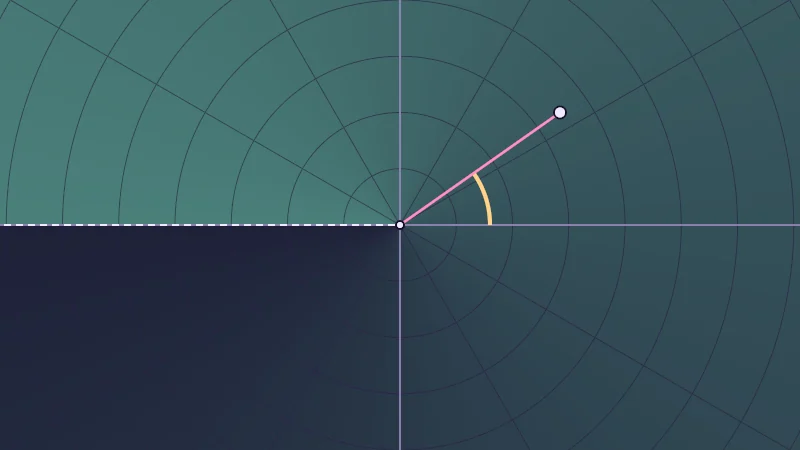
Normally a pixel sits at a position . You can describe the very same spot by its radius and its angle :
is the distance from the centre, the same one you met in the circle distance. is the direction, in radians. Radians are the angle unit shaders use. A full turn is (about 6.28) where degrees would say 360. 0 points right and , a quarter turn, points up. atan(y, x) turns a direction into its angle; Unity calls it atan2.
Go on, drag the point. The pink line is and the butter arc is .
Turn on JavaScript to run this demo.
Rendered in Unity 2022.3.22f1 from the Copy for Unity shader, with the settings this demo starts with.
// Uses the helper code shown with an earlier figure on this page.

// ----

// Angle and radius of a point you can drag, with the plane shaded by angle or by radius.
#include "diagram"

uniform float _Shade; // @select = 0 | Shade by | Angle a=0, Radius r=1 | What the background brightness follows.

float4 shade(float2 uv)
{
    float2 p = centered(uv);
    float2 pp = toPolar(p);

    // Background: brightness follows the angle (with its jump on the left) or the radius.
    float amount = _Shade < 0.5 ? pp.x / TAU + 0.5 : saturate(pp.y / 1.8);
    float3 col = tint(themeSurface(), series1(), 0.08 + 0.42 * amount);

    // Faint polar grid: circles every 0.25, spokes every 30 degrees.
    float ring = abs(pp.y - 0.25 * round(pp.y / 0.25)) / pixelSize();
    float spoke = abs(angleDiff(pp.x, PI / 6.0 * round(pp.x / (PI / 6.0)))) * pp.y / pixelSize();
    col = lerp(col, themeGrid(), 0.8 * saturate(1.0 - min(ring, spoke)));
    col = drawAxes(col, p);

    // The seam: atan2 jumps from +PI to -PI on the negative x axis.
    col = drawDashed(col, p, float2(0.0, 0.0), float2(-2.0, 0.0), 2.0, themeInk());

    float2 q = pointerCentered();
    float2 qp = toPolar(q);

    // Angle arc from the +x axis round to the point, with soft ends.
    float arcR = min(0.4, 0.7 * qp.y);
    float past = max(min(0.0, qp.x) - pp.x, pp.x - max(0.0, qp.x));   // how far outside the arc's angles, in radians
    float onArc = saturate(0.5 - past * arcR / pixelSize());
    col = lerp(col, series3(), onArc * saturate(2.5 - abs(pp.y - arcR) / pixelSize()));

    col = drawLine(col, p, float2(0.0, 0.0), q, 2.5, series2());
    col = drawDot(col, p, float2(0.0, 0.0), 3.0, themeInk());
    col = drawDot(col, p, q, 5.0, themeInk());
    return float4(col, 1.0);
}
// Uses the helper code shown with an earlier figure on this page.
// ----
// Angle and radius of a point you can drag, with the plane shaded by angle or by radius.
#include "diagram"
uniform float _Shade; // @select = 0 | Shade by | Angle a=0, Radius r=1 | What the background brightness follows.
vec4 shade(vec2 uv)
{
vec2 p = centered(uv);
vec2 pp = toPolar(p);
// Background: brightness follows the angle (with its jump on the left) or the radius.
float amount = _Shade < 0.5 ? pp.x / TAU + 0.5 : saturate(pp.y / 1.8);
vec3 col = tint(themeSurface(), series1(), 0.08 + 0.42 * amount);
// Faint polar grid: circles every 0.25, spokes every 30 degrees.
float ring = abs(pp.y - 0.25 * round(pp.y / 0.25)) / pixelSize();
float spoke = abs(angleDiff(pp.x, PI / 6.0 * round(pp.x / (PI / 6.0)))) * pp.y / pixelSize();
col = mix(col, themeGrid(), 0.8 * saturate(1.0 - min(ring, spoke)));
col = drawAxes(col, p);
// The seam: atan2 jumps from +PI to -PI on the negative x axis.
col = drawDashed(col, p, vec2(0.0, 0.0), vec2(-2.0, 0.0), 2.0, themeInk());
vec2 q = pointerCentered();
vec2 qp = toPolar(q);
// Angle arc from the +x axis round to the point, with soft ends.
float arcR = min(0.4, 0.7 * qp.y);
float past = max(min(0.0, qp.x) - pp.x, pp.x - max(0.0, qp.x)); // how far outside the arc's angles, in radians
float onArc = saturate(0.5 - past * arcR / pixelSize());
col = mix(col, series3(), onArc * saturate(2.5 - abs(pp.y - arcR) / pixelSize()));
col = drawLine(col, p, vec2(0.0, 0.0), q, 2.5, series2());
col = drawDot(col, p, vec2(0.0, 0.0), 3.0, themeInk());
col = drawDot(col, p, q, 5.0, themeInk());
return vec4(col, 1.0);
}Names in this code (37)
_Shade- Choice "Shade by". What the background brightness follows.
amount- Declared on line 12: float amount = _Shade < 0.5 ? pp.x / TAU + 0.5 : saturate(pp.y / 1.8);
angleDiff- float angleDiff(float a, float b). The shorter way round from angle b to angle a, in -PI..PI. No jump where atan2 wraps. (this article's helper code)
arcR- Declared on line 28: float arcR = min(0.4, 0.7 * qp.y);
centered- float2 centered(float2 uv). Square coordinates with the origin in the middle: the short side of the picture spans -1..1. (common library)
col- Declared on line 13: float3 col = tint(themeSurface(), series1(), 0.08 + 0.42 * amount);
drawAxes- float3 drawAxes(float3 col, float2 p) (diagram library)
drawDashed- float3 drawDashed(float3 col, float2 p, float2 a, float2 b, float widthPx, float3 ink) (diagram library)
drawDot- float3 drawDot(float3 col, float2 p, float2 c, float radiusPx, float3 ink). A dot with a ring in the surface color around it. (diagram library)
drawLine- float3 drawLine(float3 col, float2 p, float2 a, float2 b, float widthPx, float3 ink) (diagram library)
include- Pulls another file into this one, for example UnityCG.cginc.
lerp- HLSL's blend from a (t = 0) to b (t = 1). GLSL calls it mix.
onArc- Declared on line 30: float onArc = saturate(0.5 - past * arcR / pixelSize());
p- Declared on line 8: float2 p = centered(uv);
past- Declared on line 29: float past = max(min(0.0, qp.x) - pp.x, pp.x - max(0.0, qp.x)); // how far outside the arc's angles, in radians
pixelSize- float pixelSize() (common library)
pointerCentered- float2 pointerCentered(). The pointer (or the _Pointer material setting in Unity) in the same coordinates as centered(). (common library)
pp- Declared on line 9: float2 pp = toPolar(p);
q- Declared on line 24: float2 q = pointerCentered();
qp- Declared on line 25: float2 qp = toPolar(q);
ring- Declared on line 16: float ring = abs(pp.y - 0.25 * round(pp.y / 0.25)) / pixelSize();
saturate- An HLSL function that clamps a value between 0 and 1.
series1- float3 series1() (common library)
series2- float3 series2() (common library)
series3- float3 series3() (common library)
shade- float4 shade(float2 uv)
spoke- Declared on line 17: float spoke = abs(angleDiff(pp.x, PI / 6.0 * round(pp.x / (PI / 6.0)))) * pp.y / pixelSize();
themeGrid- float3 themeGrid() (common library)
themeInk- float3 themeInk() (common library)
themeSurface- float3 themeSurface(). The dusk stage colors, in linear light. Series colors are used in this order: mint, pink, butter. (common library)
tint- float3 tint(float3 a, float3 b, float t). Blends two colors in steps that look even to the eye (in sRGB), for value ramps such as distance bands. Edges and coverage still blend with lerp, in linear light, as light really adds up. (common library)
toPolar- float2 toPolar(float2 p). x: the angle in radians (-PI..PI, 0 points right), y: the radius. (this article's helper code)
uv- A parameter of shade(), line 6: float2 uv.
abs- abs(x) is x without its minus sign. abs(-0.3) = 0.3.
max- max(a, b) picks the larger of the two.
min- min(a, b) picks the smaller of the two.
round- round(x) is the nearest whole number to x.
With Shade by on Angle a, follow the mint round. It gets stronger all the way round, then jumps back on the dashed line.
The angle runs from to , so somewhere it has to jump. atan jumps on the left, along the dashed line. I call that line the seam. Keep it in mind, because it comes back.
Rings, rays and spirals
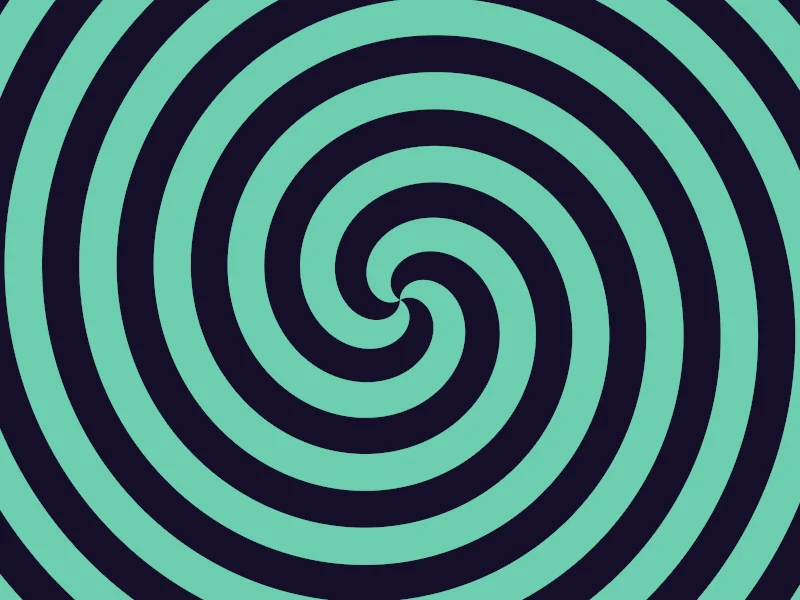
Time to meet fract(x), the star of this section. It keeps only how far is past the whole number below it, so as grows, it counts 0 to 1 over and over. That works below zero too, though it looks odd at first. The whole number below −0.3 is −1, so fract(-0.3) is 0.7. Feed it the radius and you get rings. Feed it the angle and you get rays.
counts rings per unit of radius, rays per turn, and is the angle counted in turns. fract gives a ramp from 0 to 1 in every repeat, and the demo colors its middle half, so stripes and gaps come out equally wide. Now the fun one. Add the two together and the rings slide as the angle grows. After of a turn each ring has reached the place of the next, so they join into spiral arms.
Turn on JavaScript to run this demo.
Rendered in Unity 2022.3.22f1 from the Copy for Unity shader, with the settings this demo starts with.
// Uses the helper code shown with an earlier figure on this page.

// ----

// Stripes in polar space: frac of the radius gives rings, frac of the angle gives rays, both together a spiral.
#include "diagram"

uniform float _Pattern; // @select = 2 | Pattern | Rings=0, Rays=1, Spiral=2, Checker=3
uniform float _N;       // @range 1 10 1 = 4 | Rings n | How many stripes per unit of radius.
uniform float _M;       // @range 1 16 0.5 = 3 | Rays m | How many stripes once around. Try a value that is not a whole number.

// A stripe on the middle half of each repeat: negative inside, in units of the repeat.
float stripe(float x) { return abs(frac(x) - 0.5) - 0.25; }

float4 shade(float2 uv)
{
    float2 p = centered(uv);
    float2 pp = toPolar(p);
    float turn = pp.x / TAU;                       // -0.5..0.5 once around

    // Each stripe distance is scaled back to plane units, so the edge stays one pixel wide.
    float dRing = stripe(pp.y * _N) / _N;
    float dRay = stripe(turn * _M) * (TAU / _M) * pp.y;
    float dSpiral = stripe(turn * _M + pp.y * _N) / length(float2(_N, _M / (TAU * max(pp.y, 1e-3))));

    int mode = int(_Pattern + 0.5);
    float d = mode == 0 ? dRing
            : mode == 1 ? dRay
            : mode == 2 ? dSpiral
            : max(min(dRing, dRay), -max(dRing, dRay));

    float3 col = themeSurface();
    col = lerp(col, tint(col, series1(), 0.85), fillPx(d));
    return float4(col, 1.0);
}
// Uses the helper code shown with an earlier figure on this page.
// ----
// Stripes in polar space: frac of the radius gives rings, frac of the angle gives rays, both together a spiral.
#include "diagram"
uniform float _Pattern; // @select = 2 | Pattern | Rings=0, Rays=1, Spiral=2, Checker=3
uniform float _N; // @range 1 10 1 = 4 | Rings n | How many stripes per unit of radius.
uniform float _M; // @range 1 16 0.5 = 3 | Rays m | How many stripes once around. Try a value that is not a whole number.
// A stripe on the middle half of each repeat: negative inside, in units of the repeat.
float stripe(float x) { return abs(fract(x) - 0.5) - 0.25; }
vec4 shade(vec2 uv)
{
vec2 p = centered(uv);
vec2 pp = toPolar(p);
float turn = pp.x / TAU; // -0.5..0.5 once around
// Each stripe distance is scaled back to plane units, so the edge stays one pixel wide.
float dRing = stripe(pp.y * _N) / _N;
float dRay = stripe(turn * _M) * (TAU / _M) * pp.y;
float dSpiral = stripe(turn * _M + pp.y * _N) / length(vec2(_N, _M / (TAU * max(pp.y, 1e-3))));
int mode = int(_Pattern + 0.5);
float d = mode == 0 ? dRing
: mode == 1 ? dRay
: mode == 2 ? dSpiral
: max(min(dRing, dRay), -max(dRing, dRay));
vec3 col = themeSurface();
col = mix(col, tint(col, series1(), 0.85), fillPx(d));
return vec4(col, 1.0);
}Names in this code (29)
_M- Slider "Rays m". How many stripes once around. Try a value that is not a whole number. From 1 to 16, starts at 3.
_N- Slider "Rings n". How many stripes per unit of radius. From 1 to 10, starts at 4.
_Pattern- Choice "Pattern".
centered- float2 centered(float2 uv). Square coordinates with the origin in the middle: the short side of the picture spans -1..1. (common library)
col- Declared on line 28: float3 col = themeSurface();
d- Declared on line 23: float d = mode == 0 ? dRing
dRay- Declared on line 19: float dRay = stripe(turn * _M) * (TAU / _M) * pp.y;
dRing- Declared on line 18: float dRing = stripe(pp.y * _N) / _N;
dSpiral- Declared on line 20: float dSpiral = stripe(turn * _M + pp.y * _N) / length(float2(_N, _M / (TAU * max(pp.y, 1e-3))));
fillPx- float fillPx(float d). Coverage of a distance over exactly one pixel. For fields that jump between sectors, where fwidth() would see the jump and smear it. (this article's helper code)
frac- The part after the decimal point, in HLSL. GLSL calls it fract.
include- Pulls another file into this one, for example UnityCG.cginc.
lerp- HLSL's blend from a (t = 0) to b (t = 1). GLSL calls it mix.
mode- Declared on line 22: int mode = int(_Pattern + 0.5);
p- Declared on line 13: float2 p = centered(uv);
pp- Declared on line 14: float2 pp = toPolar(p);
series1- float3 series1() (common library)
shade- float4 shade(float2 uv)
stripe- float stripe(float x). A stripe on the middle half of each repeat: negative inside, in units of the repeat.
themeSurface- float3 themeSurface(). The dusk stage colors, in linear light. Series colors are used in this order: mint, pink, butter. (common library)
tint- float3 tint(float3 a, float3 b, float t). Blends two colors in steps that look even to the eye (in sRGB), for value ramps such as distance bands. Edges and coverage still blend with lerp, in linear light, as light really adds up. (common library)
toPolar- float2 toPolar(float2 p). x: the angle in radians (-PI..PI, 0 points right), y: the radius. (this article's helper code)
turn- Declared on line 15: float turn = pp.x / TAU; // -0.5..0.5 once around
uv- A parameter of shade(), line 11: float2 uv.
x- A parameter of stripe(), line 9: float x.
abs- abs(x) is x without its minus sign. abs(-0.3) = 0.3.
length- length(v) says how long the vector v is, sqrt(x² + y²).
max- max(a, b) picks the larger of the two.
min- min(a, b) picks the smaller of the two.
Try each Pattern (Checker crosses rings with rays). Then go back to Spiral and set Rays m to 7.5. On the left, the stripes no longer meet. Hello again, seam.
The seam, and two ways round it
Remember the seam? It’s the dashed line on the left, where the angle jumps by .
The first way: use whole counts. When is a whole number, the jump of in adds exactly to the number inside fract. fract throws whole numbers away, so the stripes don’t change at all. That’s why counts around a circle are whole numbers. The radius has no seam, so can be anything.
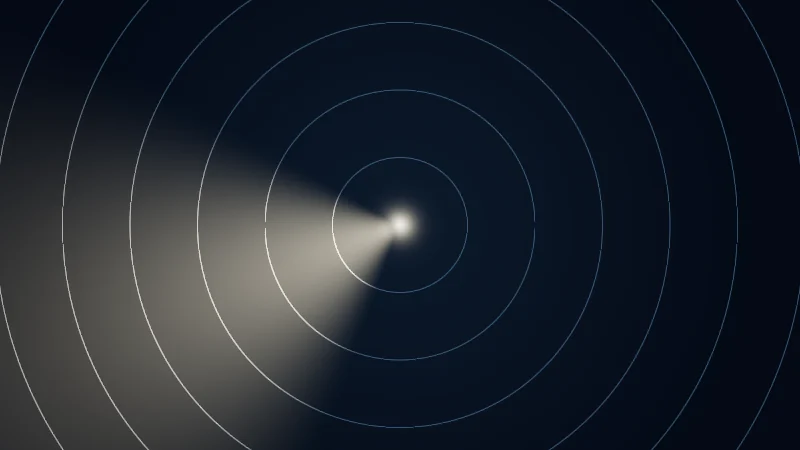
The second way: wrap the difference. Say you want a soft wedge of light around an angle . For that you need the distance between two angles, and near the seam the plain gets it wrong, because and are 2 degrees apart, not 358. So let’s wrap it first:
This one looks scarier than it is, so let’s take it slowly. Dividing by counts the difference in turns. drops whole turns and leaves a number between and . Multiplying by makes it an angle again. What comes out, , is the shorter way round, between 0 and . The wedge is brightest at and fades out as reaches the width .
Turn on JavaScript to run this demo.
Rendered in Unity 2022.3.22f1 from the Copy for Unity shader, with the settings this demo starts with.
// Uses the helper code shown with an earlier figure on this page.

// ----

// A lighthouse beam: a soft wedge around one angle, measured with or without wrapping.

uniform float _Angle; // @range -3.14 3.14 0.01 = 2.0 | Angle g | Where the beam points at the start, in radians. 0 is right and 3.14 is left.
uniform float _Spin;  // @range 0 1 0.01 = 0.6 | Spin | How fast the beam turns, in radians per second.
uniform float _Width; // @range 0.1 1.5 0.01 = 0.9 | Width w | How far from its centre angle the beam fades out, in radians.
uniform float _Wrap;  // @toggle = 1 | Wrap | Measure the shorter way round the circle, so the beam survives the seam.

float4 shade(float2 uv)
{
    float2 p = centered(uv);
    float2 pp = toPolar(p);

    float g = angleDiff(_Angle + _Time.y * _Spin, 0.0);   // kept in -PI..PI like atan2
    float gap = _Wrap > 0.5 ? abs(angleDiff(pp.x, g)) : abs(pp.x - g);
    float beam = smoothstep(_Width, 0.0, gap);

    // Night water with faint range rings every 0.3.
    float3 col = lerp(float3(0.010, 0.020, 0.035), float3(0.004, 0.008, 0.016), saturate(pp.y / 1.6));
    float rings = strokeAA(pp.y - 0.3 * max(round(pp.y / 0.3), 1.0), 0.004);
    col += float3(0.08, 0.14, 0.20) * 0.5 * rings;

    // The beam fades with distance and lights the rings it crosses.
    float reach = exp(-1.2 * pp.y) * smoothstep(0.02, 0.08, pp.y);
    col += float3(1.0, 0.9, 0.7) * beam * reach * (0.4 + 2.0 * rings);
    col += float3(1.0, 0.92, 0.75) * 1.5 * exp(-pp.y * 40.0);   // the lamp
    return float4(tonemapACES(col), 1.0);
}
// Uses the helper code shown with an earlier figure on this page.
// ----
// A lighthouse beam: a soft wedge around one angle, measured with or without wrapping.
uniform float _Angle; // @range -3.14 3.14 0.01 = 2.0 | Angle g | Where the beam points at the start, in radians. 0 is right and 3.14 is left.
uniform float _Spin; // @range 0 1 0.01 = 0.6 | Spin | How fast the beam turns, in radians per second.
uniform float _Width; // @range 0.1 1.5 0.01 = 0.9 | Width w | How far from its centre angle the beam fades out, in radians.
uniform float _Wrap; // @toggle = 1 | Wrap | Measure the shorter way round the circle, so the beam survives the seam.
vec4 shade(vec2 uv)
{
vec2 p = centered(uv);
vec2 pp = toPolar(p);
float g = angleDiff(_Angle + _Time.y * _Spin, 0.0); // kept in -PI..PI like atan2
float gap = _Wrap > 0.5 ? abs(angleDiff(pp.x, g)) : abs(pp.x - g);
float beam = hlslSmoothstep(_Width, 0.0, gap);
// Night water with faint range rings every 0.3.
vec3 col = mix(vec3(0.010, 0.020, 0.035), vec3(0.004, 0.008, 0.016), saturate(pp.y / 1.6));
float rings = strokeAA(pp.y - 0.3 * max(round(pp.y / 0.3), 1.0), 0.004);
col += vec3(0.08, 0.14, 0.20) * 0.5 * rings;
// The beam fades with distance and lights the rings it crosses.
float reach = exp(-1.2 * pp.y) * smoothstep(0.02, 0.08, pp.y);
col += vec3(1.0, 0.9, 0.7) * beam * reach * (0.4 + 2.0 * rings);
col += vec3(1.0, 0.92, 0.75) * 1.5 * exp(-pp.y * 40.0); // the lamp
return vec4(tonemapACES(col), 1.0);
}Names in this code (27)
_Angle- Slider "Angle g". Where the beam points at the start, in radians. 0 is right and 3.14 is left. From -3.14 to 3.14, starts at 2.
_Spin- Slider "Spin". How fast the beam turns, in radians per second. From 0 to 1, starts at 0.6.
_Time- Time since the level loaded, from Unity. _Time.y is seconds.
_Width- Slider "Width w". How far from its centre angle the beam fades out, in radians. From 0.1 to 1.5, starts at 0.9.
_Wrap- Switch "Wrap". Measure the shorter way round the circle, so the beam survives the seam.
angleDiff- float angleDiff(float a, float b). The shorter way round from angle b to angle a, in -PI..PI. No jump where atan2 wraps. (this article's helper code)
beam- Declared on line 15: float beam = smoothstep(_Width, 0.0, gap);
centered- float2 centered(float2 uv). Square coordinates with the origin in the middle: the short side of the picture spans -1..1. (common library)
col- Declared on line 18: float3 col = lerp(float3(0.010, 0.020, 0.035), float3(0.004, 0.008, 0.016), saturate(pp.y / 1.6));
g- Declared on line 13: float g = angleDiff(_Angle + _Time.y * _Spin, 0.0); // kept in -PI..PI like atan2
gap- Declared on line 14: float gap = _Wrap > 0.5 ? abs(angleDiff(pp.x, g)) : abs(pp.x - g);
lerp- HLSL's blend from a (t = 0) to b (t = 1). GLSL calls it mix.
p- Declared on line 10: float2 p = centered(uv);
pp- Declared on line 11: float2 pp = toPolar(p);
reach- Declared on line 23: float reach = exp(-1.2 * pp.y) * smoothstep(0.02, 0.08, pp.y);
rings- Declared on line 19: float rings = strokeAA(pp.y - 0.3 * max(round(pp.y / 0.3), 1.0), 0.004);
saturate- An HLSL function that clamps a value between 0 and 1.
shade- float4 shade(float2 uv)
strokeAA- float strokeAA(float d, float width). Anti-aliased line of a given width (same units as d) around the zero line of d. (common library)
tonemapACES- float3 tonemapACES(float3 x). Rolls HDR values above 1 off softly instead of clipping them. (common library)
toPolar- float2 toPolar(float2 p). x: the angle in radians (-PI..PI, 0 points right), y: the radius. (this article's helper code)
uv- A parameter of shade(), line 8: float2 uv.
abs- abs(x) is x without its minus sign. abs(-0.3) = 0.3.
exp- exp(x) is e to the power x. exp(0) = 1, and it falls towards 0 as x goes negative.
max- max(a, b) picks the larger of the two.
round- round(x) is the nearest whole number to x.
smoothstep- smoothstep(e0, e1, x) is 0 below e0, 1 above e1, and an S curve t² (3 - 2t) in between, where t = (x - e0) / (e1 - e0). GLSL leaves e0 >= e1 undefined.
Set Spin to 0 and turn Wrap off, then move Angle g close to 3.14. See how half of the wedge is cut off at the seam? Turn Wrap back on and it is whole again.
Turn on JavaScript to run this demo.
- f1(x):
abs(x - _G) - f2(x):
abs(frac((x - _G) / 6.2831853 + 0.5) - 0.5) * 6.2831853
#define PLOT_X_RANGE float2(-3.1416, 3.1416)
#define PLOT_Y_RANGE float2(0.0, 6.4)
#define PLOT_TICK float2(1.0, 1.0)
#include "plot"
uniform float _G; // @range -3.14 3.14 0.01 = -2.0 | Angle g | The angle the wedge points at, in radians.
float curve0(float x) { return abs(x - _G); }
float curve1(float x) { return abs(frac((x - _G) / 6.2831853 + 0.5) - 0.5) * 6.2831853; }
float4 shade(float2 uv)
{
    float2 p = plotCoord(uv);
    float3 col = plotBackground(p);
    float h = plotPixel().x;
    col = plotGuideX(col, p, _G, themeMuted());
    col = plotCurveStyled(col, p, curve0(p.x), plotSlope(curve0(p.x - h), curve0(p.x), curve0(p.x + h), h), series1(), 0);
    col = plotCurveStyled(col, p, curve1(p.x), plotSlope(curve1(p.x - h), curve1(p.x), curve1(p.x + h), h), series2(), 1);
    return float4(col, 1.0);
}#define PLOT_X_RANGE vec2(-3.1416, 3.1416)
#define PLOT_Y_RANGE vec2(0.0, 6.4)
#define PLOT_TICK vec2(1.0, 1.0)
#include "plot"
uniform float _G; // @range -3.14 3.14 0.01 = -2.0 | Angle g | The angle the wedge points at, in radians.
float curve0(float x) { return abs(x - _G); }
float curve1(float x) { return abs(fract((x - _G) / 6.2831853 + 0.5) - 0.5) * 6.2831853; }
vec4 shade(vec2 uv)
{
vec2 p = plotCoord(uv);
vec3 col = plotBackground(p);
float h = plotPixel().x;
col = plotGuideX(col, p, _G, themeMuted());
col = plotCurveStyled(col, p, curve0(p.x), plotSlope(curve0(p.x - h), curve0(p.x), curve0(p.x + h), h), series1(), 0);
col = plotCurveStyled(col, p, curve1(p.x), plotSlope(curve1(p.x - h), curve1(p.x), curve1(p.x + h), h), series2(), 1);
return vec4(col, 1.0);
}Names in this code (22)
_G- Slider "Angle g". The angle the wedge points at, in radians. From -3.14 to 3.14, starts at -2.
col- Declared on line 11: float3 col = plotBackground(p);
curve0- float curve0(float x)
curve1- float curve1(float x)
frac- The part after the decimal point, in HLSL. GLSL calls it fract.
h- Declared on line 12: float h = plotPixel().x;
include- Pulls another file into this one, for example UnityCG.cginc.
p- Declared on line 10: float2 p = plotCoord(uv);
plotBackground- float3 plotBackground(float2 p) (plot library)
plotCoord- float2 plotCoord(float2 uv) (plot library)
plotCurveStyled- float3 plotCurveStyled(float3 col, float2 p, float y, float slope, float3 ink, int style). The same line, solid (style 0), dashed (1) or dotted (2), so curves differ by more than color. (plot library)
plotGuideX- float3 plotGuideX(float3 col, float2 p, float x, float3 ink). Dashed vertical guide at x. (plot library)
plotPixel- float2 plotPixel(). Size of one pixel in data units. (plot library)
plotSlope- float plotSlope(float before, float here, float after, float h). f'(x) from f one pixel before, at and after x. Where f jumps (a step, a saw tooth), one side changes by many pixels and the other hardly at all: then the gentler side wins, so the line ends on each side of the jump instead of smearing up and down through it. (plot library)
series1- float3 series1() (common library)
series2- float3 series2() (common library)
shade- float4 shade(float2 uv)
themeMuted- float3 themeMuted() (common library)
uv- A parameter of shade(), line 8: float2 uv.
x- A parameter of curve0(), line 6: float x.
abs- abs(x) is x without its minus sign. abs(-0.3) = 0.3.
define- With #define NAME value, every NAME in the code is replaced by value before compiling.
Move Angle g and watch the far end, where the plain difference keeps climbing towards and the wrapped one turns back down.
Draw once, copy all the way round
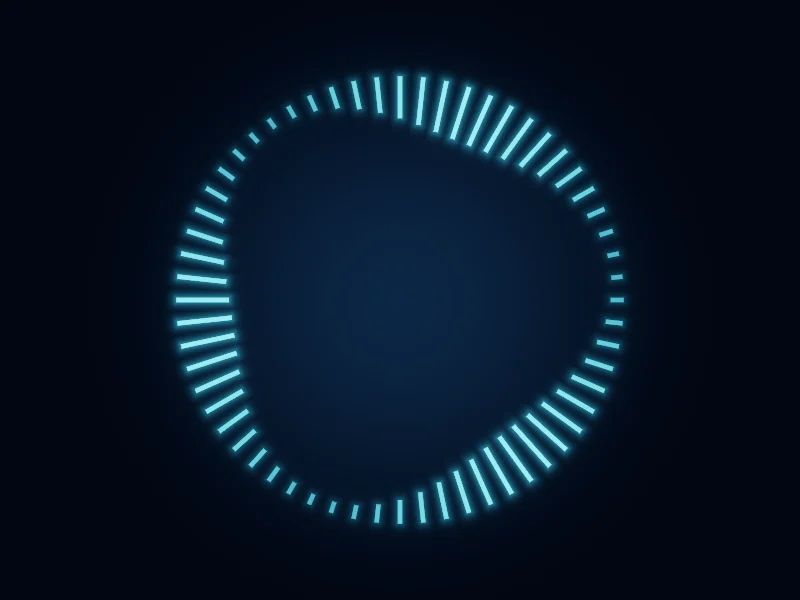
Here comes a lovely trick. A ring of 60 ticks is not drawn one tick after another. Instead, each pixel works out which slice of the circle it is in, then turns itself back into the first slice. With slices (the same as before, now counting copies) of size :
is the number of the slice, and is the same pixel turned back by slices. Now draw the one shape with in place of , and it shows up in every slice. As a bonus, gives every copy its own number, so each tick can have its own length or brightness.
Turn on JavaScript to run this demo.
Rendered in Unity 2022.3.22f1 from the Copy for Unity shader, with the settings this demo starts with.
// Uses the helper code shown with an earlier figure on this page.

// ----

// One shape drawn once, repeated around a circle: each pixel turns itself into the first slice.
#include "sdf2d"

uniform float _Count;  // @range 3 96 1 = 60 | Copies m | How many slices the circle is cut into.
uniform float _Shape;  // @select = 0 | Shape | Tick=0, Dot=1, Heart=2 | The one shape every slice draws.
uniform float _Slices; // @toggle = 0 | Show slices | Shade every other slice and draw the borders between them.

float4 shade(float2 uv)
{
    float2 p = centered(uv) * 1.1;
    float a = atan2(p.y, p.x);
    float r = length(p);

    float slice = TAU / _Count;
    float k = floor(a / slice + 0.5);              // which slice this pixel is in
    float2 q = mul(rot2(-k * slice), p);           // the same pixel, turned back into slice 0: x points outwards
    float idx = k - _Count * floor(k / _Count);    // 0..m-1, counted from the right

    // One wave running round the ring, so every copy gets its own length and brightness.
    float level = 0.5 + 0.5 * sin(idx * TAU * 3.0 / _Count - _Time.y * 0.8);
    float R = 0.82;
    float len = 0.04 + 0.16 * level;

    float d;
    int shape = int(_Shape + 0.5);
    if (shape == 0)
    {
        d = sdBox(q - float2(R - 0.5 * len, 0.0), float2(0.5 * len, 0.008));
    }
    else if (shape == 1)
    {
        d = sdCircle(q - float2(R - 0.04, 0.0), 0.012 + 0.03 * level);
    }
    else
    {
        float s = min(0.07 + 0.06 * level, 0.9 * slice * R);
        d = sdHeart(float2(q.y, q.x - (R - s)) / s) * s;   // tip towards the centre
    }

    float px = pixelSize() * 1.1;
    float fill = saturate(0.5 - d / px);   // a fixed pixel width: d jumps at the slice borders

    float3 col = lerp(float3(0.010, 0.030, 0.060), float3(0.002, 0.006, 0.014), smoothstep(0.0, 1.2, r));
    if (_Slices > 0.5)
    {
        col += float3(0.010, 0.025, 0.045) * fmod(idx, 2.0);
        float border = (0.5 * slice - abs(atan2(q.y, q.x))) * r;
        col = lerp(col, float3(0.08, 0.16, 0.26), saturate(1.0 - border / px) * smoothstep(0.25, 0.6, r));
    }
    float amount = 0.3 + 0.7 * level;
    float3 tickCol = float3(0.15, 0.75, 1.0);
    col += tickCol * 0.2 * exp(-max(d, 0.0) * 80.0) * amount;   // soft glow around each copy
    col = lerp(col, tickCol * (0.4 + 1.2 * amount), fill * (0.35 + 0.65 * amount));
    return float4(tonemapACES(col), 1.0);
}
// Uses the helper code shown with an earlier figure on this page.
// ----
// One shape drawn once, repeated around a circle: each pixel turns itself into the first slice.
#include "sdf2d"
uniform float _Count; // @range 3 96 1 = 60 | Copies m | How many slices the circle is cut into.
uniform float _Shape; // @select = 0 | Shape | Tick=0, Dot=1, Heart=2 | The one shape every slice draws.
uniform float _Slices; // @toggle = 0 | Show slices | Shade every other slice and draw the borders between them.
vec4 shade(vec2 uv)
{
vec2 p = centered(uv) * 1.1;
float a = atan(p.y, p.x);
float r = length(p);
float slice = TAU / _Count;
float k = floor(a / slice + 0.5); // which slice this pixel is in
vec2 q = (p * rot2(-k * slice)); // the same pixel, turned back into slice 0: x points outwards
float idx = k - _Count * floor(k / _Count); // 0..m-1, counted from the right
// One wave running round the ring, so every copy gets its own length and brightness.
float level = 0.5 + 0.5 * sin(idx * TAU * 3.0 / _Count - _Time.y * 0.8);
float R = 0.82;
float len = 0.04 + 0.16 * level;
float d;
int shape = int(_Shape + 0.5);
if (shape == 0)
{
d = sdBox(q - vec2(R - 0.5 * len, 0.0), vec2(0.5 * len, 0.008));
}
else if (shape == 1)
{
d = sdCircle(q - vec2(R - 0.04, 0.0), 0.012 + 0.03 * level);
}
else
{
float s = min(0.07 + 0.06 * level, 0.9 * slice * R);
d = sdHeart(vec2(q.y, q.x - (R - s)) / s) * s; // tip towards the centre
}
float px = pixelSize() * 1.1;
float fill = saturate(0.5 - d / px); // a fixed pixel width: d jumps at the slice borders
vec3 col = mix(vec3(0.010, 0.030, 0.060), vec3(0.002, 0.006, 0.014), smoothstep(0.0, 1.2, r));
if (_Slices > 0.5)
{
col += vec3(0.010, 0.025, 0.045) * fmod(idx, 2.0);
float border = (0.5 * slice - abs(atan(q.y, q.x))) * r;
col = mix(col, vec3(0.08, 0.16, 0.26), saturate(1.0 - border / px) * smoothstep(0.25, 0.6, r));
}
float amount = 0.3 + 0.7 * level;
vec3 tickCol = vec3(0.15, 0.75, 1.0);
col += tickCol * 0.2 * exp(-max(d, 0.0) * 80.0) * amount; // soft glow around each copy
col = mix(col, tickCol * (0.4 + 1.2 * amount), fill * (0.35 + 0.65 * amount));
return vec4(tonemapACES(col), 1.0);
}Names in this code (46)
_Count- Slider "Copies m". How many slices the circle is cut into. From 3 to 96, starts at 60.
_Shape- Choice "Shape". The one shape every slice draws.
_Slices- Switch "Show slices". Shade every other slice and draw the borders between them.
_Time- Time since the level loaded, from Unity. _Time.y is seconds.
a- Declared on line 11: float a = atan2(p.y, p.x);
amount- Declared on line 50: float amount = 0.3 + 0.7 * level;
atan2- The angle of the point (x, y), written atan2(y, x) in HLSL. GLSL calls it atan(y, x).
border- Declared on line 47: float border = (0.5 * slice - abs(atan2(q.y, q.x))) * r;
centered- float2 centered(float2 uv). Square coordinates with the origin in the middle: the short side of the picture spans -1..1. (common library)
col- Declared on line 43: float3 col = lerp(float3(0.010, 0.030, 0.060), float3(0.002, 0.006, 0.014), smoothstep(0.0, 1.2, r));
d- Declared on line 24: float d;
fill- Declared on line 41: float fill = saturate(0.5 - d / px); // a fixed pixel width: d jumps at the slice borders
fmod- The remainder of x / y in HLSL, with the sign of x (GLSL mod takes the sign of y).
idx- Declared on line 17: float idx = k - _Count * floor(k / _Count); // 0..m-1, counted from the right
include- Pulls another file into this one, for example UnityCG.cginc.
k- Declared on line 15: float k = floor(a / slice + 0.5); // which slice this pixel is in
len- Declared on line 22: float len = 0.04 + 0.16 * level;
lerp- HLSL's blend from a (t = 0) to b (t = 1). GLSL calls it mix.
level- Declared on line 20: float level = 0.5 + 0.5 * sin(idx * TAU * 3.0 / _Count - _Time.y * 0.8);
mul- Matrix times vector or matrix times matrix in HLSL. mul(M, v) applies M to v.
p- Declared on line 10: float2 p = centered(uv) * 1.1;
pixelSize- float pixelSize() (common library)
px- Declared on line 40: float px = pixelSize() * 1.1;
q- Declared on line 16: float2 q = mul(rot2(-k * slice), p); // the same pixel, turned back into slice 0: x points outwards
r- Declared on line 12: float r = length(p);
R- Declared on line 21: float R = 0.82;
rot2- float2x2 rot2(float a). Turns a point by a radians, counterclockwise: mul(rot2(a), p). (common library)
s- Declared on line 36: float s = min(0.07 + 0.06 * level, 0.9 * slice * R);
saturate- An HLSL function that clamps a value between 0 and 1.
sdBox- float sdBox(float2 p, float2 halfSize) (sdf2d library)
sdCircle- float sdCircle(float2 p, float r) (sdf2d library)
sdHeart- float sdHeart(float2 p). Heart of height about 1, its tip at the origin. (sdf2d library)
shade- float4 shade(float2 uv)
shape- Declared on line 25: int shape = int(_Shape + 0.5);
slice- Declared on line 14: float slice = TAU / _Count;
tickCol- Declared on line 51: float3 tickCol = float3(0.15, 0.75, 1.0);
tonemapACES- float3 tonemapACES(float3 x). Rolls HDR values above 1 off softly instead of clipping them. (common library)
uv- A parameter of shade(), line 8: float2 uv.
abs- abs(x) is x without its minus sign. abs(-0.3) = 0.3.
exp- exp(x) is e to the power x. exp(0) = 1, and it falls towards 0 as x goes negative.
floor- floor(x) rounds down to the largest whole number not above x. floor(2.7) = 2, floor(-0.5) = -1.
length- length(v) says how long the vector v is, sqrt(x² + y²).
max- max(a, b) picks the larger of the two.
min- min(a, b) picks the smaller of the two.
sin- sin(a) is the sine of the angle a, in radians.
smoothstep- smoothstep(e0, e1, x) is 0 below e0, 1 above e1, and an S curve t² (3 - 2t) in between, where t = (x - e0) / (e1 - e0). GLSL leaves e0 >= e1 undefined.
Play with Copies m and Shape (yes, there is a heart), and turn on Show slices to see where each copy lives.
There’s one catch. A pixel only sees the copy in its own slice, so keep each copy inside its slice or it gets cut off. You may know this way of repeating a shape as pModPolar, from Mercury’s hg_sdf library.
A heart, one radius per angle
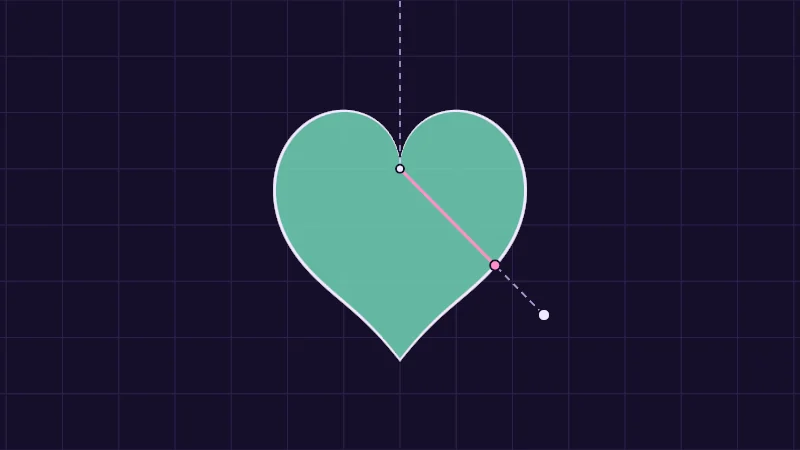
A shape can also be described by one edge radius for every angle. Inigo Quilez found a heart this way. Measure the angle from straight up, as a fraction of half a turn, so it is 0 at the top and 1 at the bottom:
Those numbers only bend the curve into a heart shape, so don’t worry about them. A pixel is inside when , with still the pixel’s distance from the centre. At the top is 0, which makes the dip. At the bottom it is 1, which makes the tip. The swapped inputs atan(x, y) turn angle 0 to point up, and the absolute value (the bars, which drop the minus sign) makes the left and right halves mirror each other.
Turn on JavaScript to run this demo.
Rendered in Unity 2022.3.22f1 from the Copy for Unity shader, with the settings this demo starts with.
// Uses the helper code shown with an earlier figure on this page.

// ----

// Inigo Quilez's polar heart: for each angle, a formula says how far out the edge is.
#include "diagram"

uniform float _Beat; // @toggle = 1 | Beat | Squash and stretch the heart with a wobble that fades out, once every 1.5 seconds.

static const float2 O = float2(0.0, 0.25);   // the heart's centre on screen
static const float SIZE = 0.85;

// The beat squashes x and y in opposite directions and settles again.
float2 beatScale()
{
    if (_Beat < 0.5) return float2(1.0, 1.0);
    float t = max(0.01, frac(_Time.y / 1.5));
    float s = pow(t, 0.2) * 0.5 + 0.5;
    s = 1.0 + s * 0.5 * sin(t * TAU * 3.0) * exp(-t * 4.0);
    return float2(0.5, 1.5) + s * float2(0.5, -0.5);
}

float4 shade(float2 uv)
{
    float2 p = centered(uv);
    float2 S = beatScale();
    float2 hp = (p - O) / SIZE * S;

    float h = abs(atan2(hp.x, hp.y)) / PI;           // 0 straight up, 1 straight down
    float d = length(hp) - heartRadius(h);

    float3 col = drawGrid(themeSurface(), p, 0.25);
    col = drawDashed(col, p, O, O + float2(0.0, 0.8), 1.5, themeMuted());
    col = lerp(col, tint(col, series1(), 0.75), fillAA(d));
    col = lerp(col, themeInk(), strokeAA(d, 2.0 * length(fwidth(hp))));

    // The spoke: drag to pick an angle; the solid part is the edge radius for that angle.
    float2 q = pointerCentered();
    float2 dir = normalize((q - O) / SIZE * S + float2(0.0, 1e-5));
    float hq = abs(atan2(dir.x, dir.y)) / PI;
    float2 edge = O + heartRadius(hq) * dir / S * SIZE;
    col = drawDashed(col, p, O, q, 1.5, themeMuted());
    col = drawLine(col, p, O, edge, 3.0, series2());
    col = drawDot(col, p, edge, 4.0, series2());
    col = drawDot(col, p, O, 3.0, themeInk());
    col = drawDot(col, p, q, 5.0, themeInk());
    return float4(col, 1.0);
}
// Uses the helper code shown with an earlier figure on this page.
// ----
// Inigo Quilez's polar heart: for each angle, a formula says how far out the edge is.
#include "diagram"
uniform float _Beat; // @toggle = 1 | Beat | Squash and stretch the heart with a wobble that fades out, once every 1.5 seconds.
const vec2 O = vec2(0.0, 0.25); // the heart's centre on screen
const float SIZE = 0.85;
// The beat squashes x and y in opposite directions and settles again.
vec2 beatScale()
{
if (_Beat < 0.5) return vec2(1.0, 1.0);
float t = max(0.01, fract(_Time.y / 1.5));
float s = pow(t, 0.2) * 0.5 + 0.5;
s = 1.0 + s * 0.5 * sin(t * TAU * 3.0) * exp(-t * 4.0);
return vec2(0.5, 1.5) + s * vec2(0.5, -0.5);
}
vec4 shade(vec2 uv)
{
vec2 p = centered(uv);
vec2 S = beatScale();
vec2 hp = (p - O) / SIZE * S;
float h = abs(atan(hp.x, hp.y)) / PI; // 0 straight up, 1 straight down
float d = length(hp) - heartRadius(h);
vec3 col = drawGrid(themeSurface(), p, 0.25);
col = drawDashed(col, p, O, O + vec2(0.0, 0.8), 1.5, themeMuted());
col = mix(col, tint(col, series1(), 0.75), fillAA(d));
col = mix(col, themeInk(), strokeAA(d, 2.0 * length(fwidth(hp))));
// The spoke: drag to pick an angle; the solid part is the edge radius for that angle.
vec2 q = pointerCentered();
vec2 dir = normalize((q - O) / SIZE * S + vec2(0.0, 1e-5));
float hq = abs(atan(dir.x, dir.y)) / PI;
vec2 edge = O + heartRadius(hq) * dir / S * SIZE;
col = drawDashed(col, p, O, q, 1.5, themeMuted());
col = drawLine(col, p, O, edge, 3.0, series2());
col = drawDot(col, p, edge, 4.0, series2());
col = drawDot(col, p, O, 3.0, themeInk());
col = drawDot(col, p, q, 5.0, themeInk());
return vec4(col, 1.0);
}Names in this code (46)
_Beat- Switch "Beat". Squash and stretch the heart with a wobble that fades out, once every 1.5 seconds.
_Time- Time since the level loaded, from Unity. _Time.y is seconds.
atan2- The angle of the point (x, y), written atan2(y, x) in HLSL. GLSL calls it atan(y, x).
beatScale- float2 beatScale(). The beat squashes x and y in opposite directions and settles again.
centered- float2 centered(float2 uv). Square coordinates with the origin in the middle: the short side of the picture spans -1..1. (common library)
col- Declared on line 28: float3 col = drawGrid(themeSurface(), p, 0.25);
d- Declared on line 26: float d = length(hp) - heartRadius(h);
dir- Declared on line 35: float2 dir = normalize((q - O) / SIZE * S + float2(0.0, 1e-5));
drawDashed- float3 drawDashed(float3 col, float2 p, float2 a, float2 b, float widthPx, float3 ink) (diagram library)
drawDot- float3 drawDot(float3 col, float2 p, float2 c, float radiusPx, float3 ink). A dot with a ring in the surface color around it. (diagram library)
drawGrid- float3 drawGrid(float3 col, float2 p, float spacing) (diagram library)
drawLine- float3 drawLine(float3 col, float2 p, float2 a, float2 b, float widthPx, float3 ink) (diagram library)
edge- Declared on line 37: float2 edge = O + heartRadius(hq) * dir / S * SIZE;
fillAA- float fillAA(float d). Anti-aliased coverage of a signed distance: 1 inside, 0 outside, a one pixel ramp at the edge. (common library)
frac- The part after the decimal point, in HLSL. GLSL calls it fract.
h- Declared on line 25: float h = abs(atan2(hp.x, hp.y)) / PI; // 0 straight up, 1 straight down
heartRadius- float heartRadius(float h). Inigo Quilez's polar heart (Shadertoy XsfGRn): the edge radius for h = angle from the top / PI. (this article's helper code)
hp- Declared on line 23: float2 hp = (p - O) / SIZE * S;
hq- Declared on line 36: float hq = abs(atan2(dir.x, dir.y)) / PI;
include- Pulls another file into this one, for example UnityCG.cginc.
lerp- HLSL's blend from a (t = 0) to b (t = 1). GLSL calls it mix.
O- Declared on line 6: static const float2 O = float2(0.0, 0.25); // the heart's centre on screen
p- Declared on line 21: float2 p = centered(uv);
pointerCentered- float2 pointerCentered(). The pointer (or the _Pointer material setting in Unity) in the same coordinates as centered(). (common library)
q- Declared on line 34: float2 q = pointerCentered();
s- Declared on line 14: float s = pow(t, 0.2) * 0.5 + 0.5;
S- Declared on line 22: float2 S = beatScale();
series1- float3 series1() (common library)
series2- float3 series2() (common library)
shade- float4 shade(float2 uv)
SIZE- Declared on line 7: static const float SIZE = 0.85;
strokeAA- float strokeAA(float d, float width). Anti-aliased line of a given width (same units as d) around the zero line of d. (common library)
t- Declared on line 13: float t = max(0.01, frac(_Time.y / 1.5));
themeInk- float3 themeInk() (common library)
themeMuted- float3 themeMuted() (common library)
themeSurface- float3 themeSurface(). The dusk stage colors, in linear light. Series colors are used in this order: mint, pink, butter. (common library)
tint- float3 tint(float3 a, float3 b, float t). Blends two colors in steps that look even to the eye (in sRGB), for value ramps such as distance bands. Edges and coverage still blend with lerp, in linear light, as light really adds up. (common library)
uv- A parameter of shade(), line 19: float2 uv.
abs- abs(x) is x without its minus sign. abs(-0.3) = 0.3.
exp- exp(x) is e to the power x. exp(0) = 1, and it falls towards 0 as x goes negative.
fwidth- fwidth(v) says how much v changes from this pixel to its neighbours, |dFdx(v)| + |dFdy(v)|. Edges one pixel wide are made with it.
length- length(v) says how long the vector v is, sqrt(x² + y²).
max- max(a, b) picks the larger of the two.
normalize- normalize(v) keeps the direction of v and makes its length 1.
pow- pow(x, y) is x to the power y, and undefined for x < 0.
sin- sin(a) is the sine of the angle a, in radians.
Drag the point round the heart. The pink spoke is for that angle. Beat squashes the picture with a wobble that fades out, once every 1.5 seconds.
This is not a true distance, though, so outlines and glows come out uneven. For those, a heart distance field works better.
In practice
Once you start looking, polar coordinates turn up wherever something is round: dials and clock faces, halos, spinning rings, magic circles, and the rings and rays of an eye. On a mesh, is usually the UV minus the centre of the circle. Three things to watch for in Unity:
- Stretched UVs. If the mesh part is wider or taller than its UV island, every ring becomes an oval. Multiply one axis of by that stretch first.
- Textures across the seam. The seam is back. Used as a texture coordinate, the angle’s jump looks like a huge change to the graphics card. It picks its blurriest copy of the texture there and draws a thin line along the seam.
tex2Dgradlets you tell it how fast the coordinate really changes. Or draw the pattern with math, as here. - The centre. Rays and spiral arms all meet at , where they get thinner than a pixel and flicker. Fade them out near the centre, or cover it up.
Here are the two helpers from this article, written for Unity:
// Which of 'count' slices p is in, and p turned back into slice 0.
float2 PolarRepeat(float2 p, float count, out float index)
{
    float slice = UNITY_TWO_PI / count;
    float k = round(atan2(p.y, p.x) / slice);
    index = k - count * floor(k / count);   // 0 to count - 1
    float s, c;
    sincos(-k * slice, s, c);
    return float2(c * p.x - s * p.y, s * p.x + c * p.y);
}

// The shorter way round from angle b to angle a, between -PI and PI.
float AngleDiff(float a, float b)
{
    return (frac((a - b) / UNITY_TWO_PI + 0.5) - 0.5) * UNITY_TWO_PI;
}
One small trap when you copy this is fmod. It looks like it does the same job, but fmod(-0.3, 1) is −0.3, so wrapping with fmod breaks for negative angles. Keep frac.
Credits
The polar heart and its heartbeat are from Inigo Quilez’s 2D heart shader on Shadertoy. The heart, box and circle distances in the ticks demo are from his 2D distance functions.
- Radius is , the distance from the centre. Angle is
atan(y, x), and it jumps by on the left (that’s the seam). fractof the radius gives rings, of the angle gives rays, and of both added gives spirals. Whole counts around the circle hide the seam.- To repeat a shape round a circle, turn each pixel back into the first slice and draw the shape once. That’s the whole trick.