Foundations, part 5
Linear color, HDR and taming light brighter than white
Why shader math works on light instead of screen numbers, what happens to a glow brighter than white, and how I tame it without losing its color.
My spells and eye shaders glow, and their light often goes far above what a screen can show. How I bring it back down decides whether you see a flat white band or a real glow, and whether a purple glow stays purple. Let’s look at linear light, values above 1, tone mapping and a cap that keeps the color.
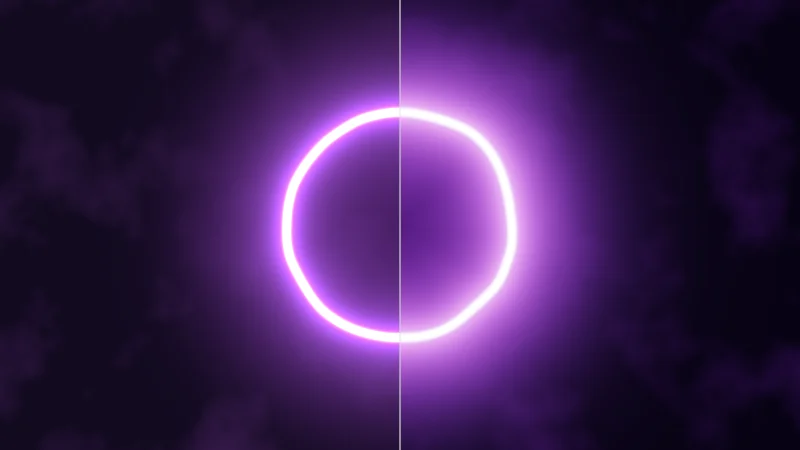
Turn on JavaScript to run this demo.
Rendered in Unity 2022.3.22f1 from the Copy for Unity shader, with the settings this demo starts with.
// A glowing rift ring whose light goes far above 1, shown two ways: clipped on the left, tone mapped on the right.
#include "noise"

static const float3 RIM_CORE = float3(1.0, 0.88, 1.0);
static const float3 RIM_GLOW = float3(0.52, 0.12, 1.0);

float4 shade(float2 uv)
{
    float2 p = centered(uv);
    float t = _Time.y;

    float a = atan2(p.y, p.x);
    float wob = 0.03 * gradientNoise(float2(cos(a), sin(a)) * 1.6 + 0.15 * t)
              + 0.006 * gradientNoise(float2(cos(a), sin(a)) * 3.0 - 0.2 * t);
    float d = abs(length(p) - 0.5 - wob);

    float glow = 2.0 + 0.8 * sin(t * 0.7);
    float core = exp(-pow(d / 0.012, 2.0));
    float halo = exp(-d * 8.0) * 0.18 + exp(-d * 30.0) * 0.5;

    float3 sky = lerp(float3(0.006, 0.003, 0.014), float3(0.06, 0.012, 0.12), smoothstep(1.2, 0.0, length(p)));
    sky += float3(0.05, 0.012, 0.09) * max(fbm(p * 2.2 + float2(0.05 * t, 0.0), 4), 0.0);

    float3 col = sky + (RIM_CORE * 3.0 * core + RIM_GLOW * 1.5 * halo) * glow;
    // A stand-in for world bloom: the light above 1 spreads into a wide soft halo.
    float3 bloom = (RIM_CORE * 0.03 + RIM_GLOW * 0.08) * glow * (exp(-d * 4.0) * 0.5 + exp(-d * 14.0));

    float split = pointerCentered().x;
    float3 shown = p.x < split ? saturate(col) : tonemapACES(col + bloom);
    float aspect = docmeAspect();
    float edge = aspect / min(aspect, 1.0);
    float divider = saturate(1.0 - abs(p.x - split) / pixelSize()) * saturate((edge - abs(split)) / pixelSize() - 1.0);
    shown = lerp(shown, srgbToLinear(float3(0.85, 0.85, 0.85)), 0.8 * divider);
    return float4(shown, 1.0);
}
// A glowing rift ring whose light goes far above 1, shown two ways: clipped on the left, tone mapped on the right.
#include "noise"
const vec3 RIM_CORE = vec3(1.0, 0.88, 1.0);
const vec3 RIM_GLOW = vec3(0.52, 0.12, 1.0);
vec4 shade(vec2 uv)
{
vec2 p = centered(uv);
float t = _Time.y;
float a = atan(p.y, p.x);
float wob = 0.03 * gradientNoise(vec2(cos(a), sin(a)) * 1.6 + 0.15 * t)
+ 0.006 * gradientNoise(vec2(cos(a), sin(a)) * 3.0 - 0.2 * t);
float d = abs(length(p) - 0.5 - wob);
float glow = 2.0 + 0.8 * sin(t * 0.7);
float core = exp(-pow(d / 0.012, 2.0));
float halo = exp(-d * 8.0) * 0.18 + exp(-d * 30.0) * 0.5;
vec3 sky = mix(vec3(0.006, 0.003, 0.014), vec3(0.06, 0.012, 0.12), hlslSmoothstep(1.2, 0.0, length(p)));
sky += vec3(0.05, 0.012, 0.09) * max(fbm(p * 2.2 + vec2(0.05 * t, 0.0), 4), 0.0);
vec3 col = sky + (RIM_CORE * 3.0 * core + RIM_GLOW * 1.5 * halo) * glow;
// A stand-in for world bloom: the light above 1 spreads into a wide soft halo.
vec3 bloom = (RIM_CORE * 0.03 + RIM_GLOW * 0.08) * glow * (exp(-d * 4.0) * 0.5 + exp(-d * 14.0));
float split = pointerCentered().x;
vec3 shown = p.x < split ? saturate(col) : tonemapACES(col + bloom);
float aspect = docmeAspect();
float edge = aspect / min(aspect, 1.0);
float divider = saturate(1.0 - abs(p.x - split) / pixelSize()) * saturate((edge - abs(split)) / pixelSize() - 1.0);
shown = mix(shown, srgbToLinear(vec3(0.85, 0.85, 0.85)), 0.8 * divider);
return vec4(shown, 1.0);
}Names in this code (42)
_Time- Time since the level loaded, from Unity. _Time.y is seconds.
a- Declared on line 12: float a = atan2(p.y, p.x);
aspect- Declared on line 30: float aspect = docmeAspect();
atan2- The angle of the point (x, y), written atan2(y, x) in HLSL. GLSL calls it atan(y, x).
bloom- Declared on line 26: float3 bloom = (RIM_CORE * 0.03 + RIM_GLOW * 0.08) * glow * (exp(-d * 4.0) * 0.5 + exp(-d * 14.0));
centered- float2 centered(float2 uv). Square coordinates with the origin in the middle: the short side of the picture spans -1..1. (common library)
col- Declared on line 24: float3 col = sky + (RIM_CORE * 3.0 * core + RIM_GLOW * 1.5 * halo) * glow;
core- Declared on line 18: float core = exp(-pow(d / 0.012, 2.0));
d- Declared on line 15: float d = abs(length(p) - 0.5 - wob);
divider- Declared on line 32: float divider = saturate(1.0 - abs(p.x - split) / pixelSize()) * saturate((edge - abs(split)) / pixelSize() - 1.0);
docmeAspect- float docmeAspect(). Width over height of the picture: the canvas on the site, the quad's scale in Unity. (common library)
edge- Declared on line 31: float edge = aspect / min(aspect, 1.0);
fbm- float fbm(float2 p, int octaves). Fractal noise: octaves of gradient noise, each twice as fine and half as strong. Range about -1..1. (noise library)
glow- Declared on line 17: float glow = 2.0 + 0.8 * sin(t * 0.7);
gradientNoise- float gradientNoise(float2 p). Gradient noise: random slopes on a grid. Smoother looking than value noise. Range about -1..1. (noise library)
halo- Declared on line 19: float halo = exp(-d * 8.0) * 0.18 + exp(-d * 30.0) * 0.5;
include- Pulls another file into this one, for example UnityCG.cginc.
lerp- HLSL's blend from a (t = 0) to b (t = 1). GLSL calls it mix.
p- Declared on line 9: float2 p = centered(uv);
pixelSize- float pixelSize() (common library)
pointerCentered- float2 pointerCentered(). The pointer (or the _Pointer material setting in Unity) in the same coordinates as centered(). (common library)
RIM_CORE- Declared on line 4: static const float3 RIM_CORE = float3(1.0, 0.88, 1.0);
RIM_GLOW- Declared on line 5: static const float3 RIM_GLOW = float3(0.52, 0.12, 1.0);
saturate- An HLSL function that clamps a value between 0 and 1.
shade- float4 shade(float2 uv)
shown- Declared on line 29: float3 shown = p.x < split ? saturate(col) : tonemapACES(col + bloom);
sky- Declared on line 21: float3 sky = lerp(float3(0.006, 0.003, 0.014), float3(0.06, 0.012, 0.12), smoothstep(1.2, 0.0, length(p)));
split- Declared on line 28: float split = pointerCentered().x;
srgbToLinear- float3 srgbToLinear(float3 c). Color. Shaders work in linear light, as Unity does in a linear project; the screen gets sRGB at the end. (common library)
t- Declared on line 10: float t = _Time.y;
tonemapACES- float3 tonemapACES(float3 x). Rolls HDR values above 1 off softly instead of clipping them. (common library)
uv- A parameter of shade(), line 7: float2 uv.
wob- Declared on line 13: float wob = 0.03 * gradientNoise(float2(cos(a), sin(a)) * 1.6 + 0.15 * t)
abs- abs(x) is x without its minus sign. abs(-0.3) = 0.3.
cos- cos(a) is the cosine of the angle a, in radians.
exp- exp(x) is e to the power x. exp(0) = 1, and it falls towards 0 as x goes negative.
length- length(v) says how long the vector v is, sqrt(x² + y²).
max- max(a, b) picks the larger of the two.
min- min(a, b) picks the smaller of the two.
pow- pow(x, y) is x to the power y, and undefined for x < 0.
sin- sin(a) is the sine of the angle a, in radians.
smoothstep- smoothstep(e0, e1, x) is 0 below e0, 1 above e1, and an S curve t² (3 - 2t) in between, where t = (x - e0) / (e1 - e0). GLSL leaves e0 >= e1 undefined.
The same light, shown two ways. Drag the line. On the left every value above 1 is cut off, and the ring turns into a flat white band. On the right the light is gently squeezed into the range a screen can show, with a soft halo on top, like in a VRChat world with bloom.
Stored numbers are not light
Inside a shader, color is light. Black is 0, the brightest white a screen shows is 1, and 0.5 is half as much light. That straight scale is called linear light. Image files play by different rules. Most store each channel (red, green, blue) as a level from 0 to 255, using sRGB. It’s a curve that spends more levels on dark tones, where eyes notice small changes.
Turn on JavaScript to run this demo.
- f1(x):
linearToSrgb(float3(x, x, x)).x - f2(x):
x
#define PLOT_X_RANGE float2(0.0, 1.05)
#define PLOT_Y_RANGE float2(0.0, 1.08)
#define PLOT_TICK float2(0.2, 0.2)
#include "plot"
uniform float _L; // @range 0 1 0.01 = 0.5 | Light | An amount of light, from black (0) to white (1).
float curve0(float x) { return linearToSrgb(float3(x, x, x)).x; }
float curve1(float x) { return x; }
float4 shade(float2 uv)
{
    float2 p = plotCoord(uv);
    float3 col = plotBackground(p);
    float h = plotPixel().x;
    col = plotGuideX(col, p, _L, themeMuted());
    col = plotCurveStyled(col, p, curve0(p.x), plotSlope(curve0(p.x - h), curve0(p.x), curve0(p.x + h), h), series1(), 0);
    col = plotCurveStyled(col, p, curve1(p.x), plotSlope(curve1(p.x - h), curve1(p.x), curve1(p.x + h), h), series2(), 1);
    col = plotPoint(col, p, float2(_L, linearToSrgb(float3(_L, _L, _L)).x), series1());
    return float4(col, 1.0);
}#define PLOT_X_RANGE vec2(0.0, 1.05)
#define PLOT_Y_RANGE vec2(0.0, 1.08)
#define PLOT_TICK vec2(0.2, 0.2)
#include "plot"
uniform float _L; // @range 0 1 0.01 = 0.5 | Light | An amount of light, from black (0) to white (1).
float curve0(float x) { return linearToSrgb(vec3(x, x, x)).x; }
float curve1(float x) { return x; }
vec4 shade(vec2 uv)
{
vec2 p = plotCoord(uv);
vec3 col = plotBackground(p);
float h = plotPixel().x;
col = plotGuideX(col, p, _L, themeMuted());
col = plotCurveStyled(col, p, curve0(p.x), plotSlope(curve0(p.x - h), curve0(p.x), curve0(p.x + h), h), series1(), 0);
col = plotCurveStyled(col, p, curve1(p.x), plotSlope(curve1(p.x - h), curve1(p.x), curve1(p.x + h), h), series2(), 1);
col = plotPoint(col, p, vec2(_L, linearToSrgb(vec3(_L, _L, _L)).x), series1());
return vec4(col, 1.0);
}Names in this code (22)
_L- Slider "Light". An amount of light, from black (0) to white (1). From 0 to 1, starts at 0.5.
col- Declared on line 11: float3 col = plotBackground(p);
curve0- float curve0(float x)
curve1- float curve1(float x)
h- Declared on line 12: float h = plotPixel().x;
include- Pulls another file into this one, for example UnityCG.cginc.
linearToSrgb- float3 linearToSrgb(float3 c) (common library)
p- Declared on line 10: float2 p = plotCoord(uv);
plotBackground- float3 plotBackground(float2 p) (plot library)
plotCoord- float2 plotCoord(float2 uv) (plot library)
plotCurveStyled- float3 plotCurveStyled(float3 col, float2 p, float y, float slope, float3 ink, int style). The same line, solid (style 0), dashed (1) or dotted (2), so curves differ by more than color. (plot library)
plotGuideX- float3 plotGuideX(float3 col, float2 p, float x, float3 ink). Dashed vertical guide at x. (plot library)
plotPixel- float2 plotPixel(). Size of one pixel in data units. (plot library)
plotPoint- float3 plotPoint(float3 col, float2 p, float2 at, float3 ink). A 5 px dot with a 2 px ring in the surface color, so it stays readable on top of a line. (plot library)
plotSlope- float plotSlope(float before, float here, float after, float h). f'(x) from f one pixel before, at and after x. Where f jumps (a step, a saw tooth), one side changes by many pixels and the other hardly at all: then the gentler side wins, so the line ends on each side of the jump instead of smearing up and down through it. (plot library)
series1- float3 series1() (common library)
series2- float3 series2() (common library)
shade- float4 shade(float2 uv)
themeMuted- float3 themeMuted() (common library)
uv- A parameter of shade(), line 8: float2 uv.
x- A parameter of curve0(), line 6: float x.
define- With #define NAME value, every NAME in the code is replaced by value before compiling.
Half the light, 0.5, is stored as 0.735. Now slide Light to 0.03, a faint glow, and you’ll see sRGB store it at level 48 of 255. Stored as plain light it would get level 8, far too few steps for a smooth haze.
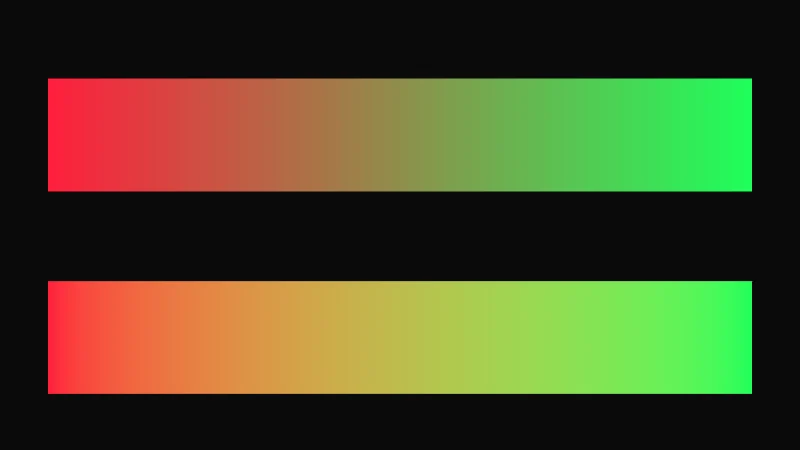
And here’s the catch. Mixing the stored numbers gives the wrong answer. A soft edge, a blur or a fade between two colors goes dark in the middle. So the math happens in linear light. VRChat projects use Unity’s Linear color space, so color textures are turned into light when the shader reads them. On its way to the screen, the result is turned back into sRGB.
Turn on JavaScript to run this demo.
Rendered in Unity 2022.3.22f1 from the Copy for Unity shader, with the settings this demo starts with.
// Blending two colors across the screen: on top the stored sRGB numbers are mixed, below the light is mixed.
uniform float3 _A; // @color = #ff1e3c | Color A | The color on the left.
uniform float3 _B; // @color = #1eff5a | Color B | The color on the right.

float4 shade(float2 uv)
{
    float2 p = centered(uv);
    float aspect = docmeAspect();
    float halfW = aspect / min(aspect, 1.0) * 0.88;
    float t = saturate((p.x + halfW) / (2.0 * halfW));

    float3 numbers = srgbToLinear(lerp(linearToSrgb(_A), linearToSrgb(_B), t));
    float3 light = lerp(_A, _B, t);

    float top = max(abs(p.x) - halfW, abs(p.y - 0.4) - 0.25);
    float bottom = max(abs(p.x) - halfW, abs(p.y + 0.5) - 0.25);
    float3 col = srgbToLinear(float3(0.04, 0.04, 0.04));
    col = lerp(col, numbers, fillAA(top));
    col = lerp(col, light, fillAA(bottom));
    return float4(col, 1.0);
}
// Blending two colors across the screen: on top the stored sRGB numbers are mixed, below the light is mixed.
uniform vec3 _A; // @color = #ff1e3c | Color A | The color on the left.
uniform vec3 _B; // @color = #1eff5a | Color B | The color on the right.
vec4 shade(vec2 uv)
{
vec2 p = centered(uv);
float aspect = docmeAspect();
float halfW = aspect / min(aspect, 1.0) * 0.88;
float t = saturate((p.x + halfW) / (2.0 * halfW));
vec3 numbers = srgbToLinear(mix(linearToSrgb(_A), linearToSrgb(_B), t));
vec3 light = mix(_A, _B, t);
float top = max(abs(p.x) - halfW, abs(p.y - 0.4) - 0.25);
float bottom = max(abs(p.x) - halfW, abs(p.y + 0.5) - 0.25);
vec3 col = srgbToLinear(vec3(0.04, 0.04, 0.04));
col = mix(col, numbers, fillAA(top));
col = mix(col, light, fillAA(bottom));
return vec4(col, 1.0);
}Names in this code (23)
_A- Color picker "Color A". The color on the left.
_B- Color picker "Color B". The color on the right.
aspect- Declared on line 8: float aspect = docmeAspect();
bottom- Declared on line 16: float bottom = max(abs(p.x) - halfW, abs(p.y + 0.5) - 0.25);
centered- float2 centered(float2 uv). Square coordinates with the origin in the middle: the short side of the picture spans -1..1. (common library)
col- Declared on line 17: float3 col = srgbToLinear(float3(0.04, 0.04, 0.04));
docmeAspect- float docmeAspect(). Width over height of the picture: the canvas on the site, the quad's scale in Unity. (common library)
fillAA- float fillAA(float d). Anti-aliased coverage of a signed distance: 1 inside, 0 outside, a one pixel ramp at the edge. (common library)
halfW- Declared on line 9: float halfW = aspect / min(aspect, 1.0) * 0.88;
lerp- HLSL's blend from a (t = 0) to b (t = 1). GLSL calls it mix.
light- Declared on line 13: float3 light = lerp(_A, _B, t);
linearToSrgb- float3 linearToSrgb(float3 c) (common library)
numbers- Declared on line 12: float3 numbers = srgbToLinear(lerp(linearToSrgb(_A), linearToSrgb(_B), t));
p- Declared on line 7: float2 p = centered(uv);
saturate- An HLSL function that clamps a value between 0 and 1.
shade- float4 shade(float2 uv)
srgbToLinear- float3 srgbToLinear(float3 c). Color. Shaders work in linear light, as Unity does in a linear project; the screen gets sRGB at the end. (common library)
t- Declared on line 10: float t = saturate((p.x + halfW) / (2.0 * halfW));
top- Declared on line 15: float top = max(abs(p.x) - halfW, abs(p.y - 0.4) - 0.25);
uv- A parameter of shade(), line 5: float2 uv.
abs- abs(x) is x without its minus sign. abs(-0.3) = 0.3.
max- max(a, b) picks the larger of the two.
min- min(a, b) picks the smaller of the two.
Red and green both start bright. The top strip mixes their sRGB numbers and goes muddy and dark in the middle. The bottom strip mixes their light and stays bright the whole way. Try a few other pairs too, like blue and yellow.
Brighter than white
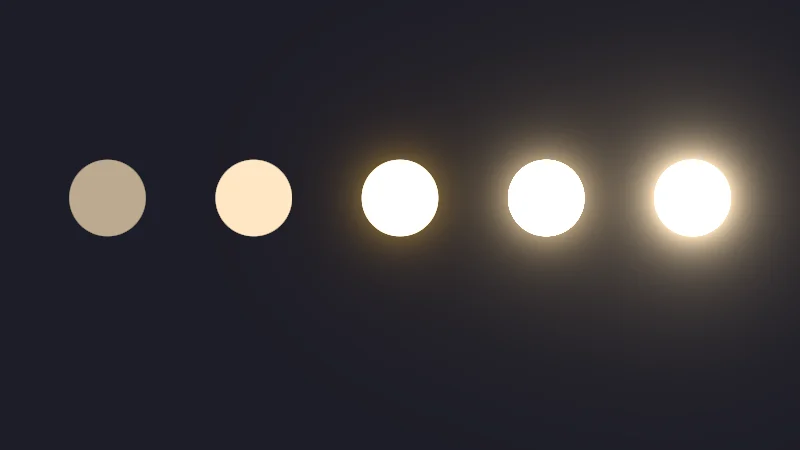
Nothing in the math stops at 1. A lamp can be 8 times brighter than white, and on PC a VRChat camera usually keeps that value. It renders in HDR, short for high dynamic range. The screen still tops out at 1, though, so 2, 4 and 8 all look like the same white.
What tells them apart is bloom. Many worlds run post processing, a last step over the whole picture. Bloom takes the light above a threshold, blurs it and adds it back as a halo. The brighter the light, the bigger the halo. With bloom my glows really glow, and without it they still read as bright shapes. That’s why I make them HDR.
Turn on JavaScript to run this demo.
Rendered in Unity 2022.3.22f1 from the Copy for Unity shader, with the settings this demo starts with.
// Five lamps at 0.5, 1, 2, 4 and 8 times white. The screen clips them; a bloom stand-in spreads the light above a threshold.
uniform float _Bloom;  // @toggle = 1 | Bloom | Spread the light above the threshold into a soft halo, as a world's bloom does.
uniform float _Thresh; // @range 0 4 0.1 = 1 | Threshold | Only light above this value blooms.
uniform float _Mark;   // @toggle = 0 | Mark above 1 | Stripe every lamp that holds more light than the screen can show.

static const float3 LAMP = float3(1.0, 0.8, 0.55);
static const float R = 0.17;

float4 shade(float2 uv)
{
    float2 p = centered(uv);
    float3 col = float3(0.012, 0.012, 0.02);
    float3 bloom = float3(0.0, 0.0, 0.0);
    float over = 0.0;

    for (int i = 0; i < 5; i++)
    {
        float level = 0.5 * exp2(float(i));
        float2 c = float2(-1.3 + 0.65 * float(i), 0.12);
        float d = length(p - c) - R;
        float3 light = LAMP * level;
        col = lerp(col, light, fillAA(d));
        if (level > 1.0) over = max(over, fillAA(d + 2.0 * pixelSize()));
        float o = max(d, 0.0);
        bloom += max(light - _Thresh, 0.0) * (exp(-o * 5.0) * 0.15 + exp(-o * 18.0)) * 0.12;
    }
    col += bloom * _Bloom;

    float3 shown = saturate(col);
    float2 px = p / pixelSize();
    float stripe = saturate(abs(frac((px.x + px.y) / 12.0) - 0.5) * 12.0 - 2.5);
    shown = lerp(shown, srgbToLinear(float3(0.1, 0.35, 0.95)), _Mark * over * stripe * 0.85);
    return float4(shown, 1.0);
}
// Five lamps at 0.5, 1, 2, 4 and 8 times white. The screen clips them; a bloom stand-in spreads the light above a threshold.
uniform float _Bloom; // @toggle = 1 | Bloom | Spread the light above the threshold into a soft halo, as a world's bloom does.
uniform float _Thresh; // @range 0 4 0.1 = 1 | Threshold | Only light above this value blooms.
uniform float _Mark; // @toggle = 0 | Mark above 1 | Stripe every lamp that holds more light than the screen can show.
const vec3 LAMP = vec3(1.0, 0.8, 0.55);
const float R = 0.17;
vec4 shade(vec2 uv)
{
vec2 p = centered(uv);
vec3 col = vec3(0.012, 0.012, 0.02);
vec3 bloom = vec3(0.0, 0.0, 0.0);
float over = 0.0;
for (int i = 0; i < 5; i++)
{
float level = 0.5 * exp2(float(i));
vec2 c = vec2(-1.3 + 0.65 * float(i), 0.12);
float d = length(p - c) - R;
vec3 light = LAMP * level;
col = mix(col, light, fillAA(d));
if (level > 1.0) over = max(over, fillAA(d + 2.0 * pixelSize()));
float o = max(d, 0.0);
bloom += max(light - _Thresh, 0.0) * (exp(-o * 5.0) * 0.15 + exp(-o * 18.0)) * 0.12;
}
col += bloom * _Bloom;
vec3 shown = saturate(col);
vec2 px = p / pixelSize();
float stripe = saturate(abs(fract((px.x + px.y) / 12.0) - 0.5) * 12.0 - 2.5);
shown = mix(shown, srgbToLinear(vec3(0.1, 0.35, 0.95)), _Mark * over * stripe * 0.85);
return vec4(shown, 1.0);
}Names in this code (31)
_Bloom- Switch "Bloom". Spread the light above the threshold into a soft halo, as a world's bloom does.
_Mark- Switch "Mark above 1". Stripe every lamp that holds more light than the screen can show.
_Thresh- Slider "Threshold". Only light above this value blooms. From 0 to 4, starts at 1.
bloom- Declared on line 13: float3 bloom = float3(0.0, 0.0, 0.0);
c- Declared on line 19: float2 c = float2(-1.3 + 0.65 * float(i), 0.12);
centered- float2 centered(float2 uv). Square coordinates with the origin in the middle: the short side of the picture spans -1..1. (common library)
col- Declared on line 12: float3 col = float3(0.012, 0.012, 0.02);
d- Declared on line 20: float d = length(p - c) - R;
fillAA- float fillAA(float d). Anti-aliased coverage of a signed distance: 1 inside, 0 outside, a one pixel ramp at the edge. (common library)
frac- The part after the decimal point, in HLSL. GLSL calls it fract.
LAMP- Declared on line 6: static const float3 LAMP = float3(1.0, 0.8, 0.55);
lerp- HLSL's blend from a (t = 0) to b (t = 1). GLSL calls it mix.
level- Declared on line 18: float level = 0.5 * exp2(float(i));
light- Declared on line 21: float3 light = LAMP * level;
o- Declared on line 24: float o = max(d, 0.0);
over- Declared on line 14: float over = 0.0;
p- Declared on line 11: float2 p = centered(uv);
pixelSize- float pixelSize() (common library)
px- Declared on line 30: float2 px = p / pixelSize();
R- Declared on line 7: static const float R = 0.17;
saturate- An HLSL function that clamps a value between 0 and 1.
shade- float4 shade(float2 uv)
shown- Declared on line 29: float3 shown = saturate(col);
srgbToLinear- float3 srgbToLinear(float3 c). Color. Shaders work in linear light, as Unity does in a linear project; the screen gets sRGB at the end. (common library)
stripe- Declared on line 31: float stripe = saturate(abs(frac((px.x + px.y) / 12.0) - 0.5) * 12.0 - 2.5);
uv- A parameter of shade(), line 9: float2 uv.
abs- abs(x) is x without its minus sign. abs(-0.3) = 0.3.
exp- exp(x) is e to the power x. exp(0) = 1, and it falls towards 0 as x goes negative.
exp2- exp2(x) is 2 to the power x.
length- length(v) says how long the vector v is, sqrt(x² + y²).
max- max(a, b) picks the larger of the two.
The bloom here is a stand-in, worked out from the lamps themselves. Turn on Mark above 1 to see which lamps hold more light than a screen can show. Then move Threshold to 0, as Silent’s guide to VRChat world post processing recommends, and watch the dim lamps get a faint halo too.
Bending light back into range
Before the picture reaches the screen, every value has to land between 0 and 1. A tone map is the curve that gets it there. Here are three common ones:
is one channel of the light, and picks the smaller of two numbers, so clip flattens everything above 1. Reinhard never quite reaches 1, so whites go grey. ACES is a color system made for film, and the ACES fit is a short formula that follows the shape of its curve, a little brighter. It bends the brightest values down softly and reaches white at about 7. And keep in mind that in VRChat the world picks the tone map, not the avatar.
Turn on JavaScript to run this demo.
- f1(x):
min(x, 1.0) - f2(x):
x / (1.0 + x) - f3(x):
tonemapACES(float3(x, x, x)).x
#define PLOT_X_RANGE float2(0.0, 8.0)
#define PLOT_Y_RANGE float2(0.0, 1.2)
#define PLOT_TICK float2(1.0, 0.2)
#include "plot"
uniform float _X; // @range 0 8 0.05 = 2 | Light x | How much light one channel holds.
float curve0(float x) { return min(x, 1.0); }
float curve1(float x) { return x / (1.0 + x); }
float curve2(float x) { return tonemapACES(float3(x, x, x)).x; }
float4 shade(float2 uv)
{
    float2 p = plotCoord(uv);
    float3 col = plotBackground(p);
    float h = plotPixel().x;
    col = plotGuideX(col, p, _X, themeMuted());
    col = plotCurveStyled(col, p, curve0(p.x), plotSlope(curve0(p.x - h), curve0(p.x), curve0(p.x + h), h), series1(), 0);
    col = plotCurveStyled(col, p, curve1(p.x), plotSlope(curve1(p.x - h), curve1(p.x), curve1(p.x + h), h), series2(), 1);
    col = plotCurveStyled(col, p, curve2(p.x), plotSlope(curve2(p.x - h), curve2(p.x), curve2(p.x + h), h), series3(), 2);
    col = plotPoint(col, p, float2(_X, min(_X, 1.0)), series1());
    col = plotPoint(col, p, float2(_X, _X / (1.0 + _X)), series2());
    col = plotPoint(col, p, float2(_X, tonemapACES(float3(_X, _X, _X)).x), series3());
    return float4(col, 1.0);
}#define PLOT_X_RANGE vec2(0.0, 8.0)
#define PLOT_Y_RANGE vec2(0.0, 1.2)
#define PLOT_TICK vec2(1.0, 0.2)
#include "plot"
uniform float _X; // @range 0 8 0.05 = 2 | Light x | How much light one channel holds.
float curve0(float x) { return min(x, 1.0); }
float curve1(float x) { return x / (1.0 + x); }
float curve2(float x) { return tonemapACES(vec3(x, x, x)).x; }
vec4 shade(vec2 uv)
{
vec2 p = plotCoord(uv);
vec3 col = plotBackground(p);
float h = plotPixel().x;
col = plotGuideX(col, p, _X, themeMuted());
col = plotCurveStyled(col, p, curve0(p.x), plotSlope(curve0(p.x - h), curve0(p.x), curve0(p.x + h), h), series1(), 0);
col = plotCurveStyled(col, p, curve1(p.x), plotSlope(curve1(p.x - h), curve1(p.x), curve1(p.x + h), h), series2(), 1);
col = plotCurveStyled(col, p, curve2(p.x), plotSlope(curve2(p.x - h), curve2(p.x), curve2(p.x + h), h), series3(), 2);
col = plotPoint(col, p, vec2(_X, min(_X, 1.0)), series1());
col = plotPoint(col, p, vec2(_X, _X / (1.0 + _X)), series2());
col = plotPoint(col, p, vec2(_X, tonemapACES(vec3(_X, _X, _X)).x), series3());
return vec4(col, 1.0);
}Names in this code (25)
_X- Slider "Light x". How much light one channel holds. From 0 to 8, starts at 2.
col- Declared on line 12: float3 col = plotBackground(p);
curve0- float curve0(float x)
curve1- float curve1(float x)
curve2- float curve2(float x)
h- Declared on line 13: float h = plotPixel().x;
include- Pulls another file into this one, for example UnityCG.cginc.
p- Declared on line 11: float2 p = plotCoord(uv);
plotBackground- float3 plotBackground(float2 p) (plot library)
plotCoord- float2 plotCoord(float2 uv) (plot library)
plotCurveStyled- float3 plotCurveStyled(float3 col, float2 p, float y, float slope, float3 ink, int style). The same line, solid (style 0), dashed (1) or dotted (2), so curves differ by more than color. (plot library)
plotGuideX- float3 plotGuideX(float3 col, float2 p, float x, float3 ink). Dashed vertical guide at x. (plot library)
plotPixel- float2 plotPixel(). Size of one pixel in data units. (plot library)
plotPoint- float3 plotPoint(float3 col, float2 p, float2 at, float3 ink). A 5 px dot with a 2 px ring in the surface color, so it stays readable on top of a line. (plot library)
plotSlope- float plotSlope(float before, float here, float after, float h). f'(x) from f one pixel before, at and after x. Where f jumps (a step, a saw tooth), one side changes by many pixels and the other hardly at all: then the gentler side wins, so the line ends on each side of the jump instead of smearing up and down through it. (plot library)
series1- float3 series1() (common library)
series2- float3 series2() (common library)
series3- float3 series3() (common library)
shade- float4 shade(float2 uv)
themeMuted- float3 themeMuted() (common library)
tonemapACES- float3 tonemapACES(float3 x). Rolls HDR values above 1 off softly instead of clipping them. (common library)
uv- A parameter of shade(), line 9: float2 uv.
x- A parameter of curve0(), line 6: float x.
define- With #define NAME value, every NAME in the code is replaced by value before compiling.
min- min(a, b) picks the smaller of the two.
Slide Light x to 1 and clip already shows full white, while the ACES fit shows about 0.8 and Reinhard only 0.5.
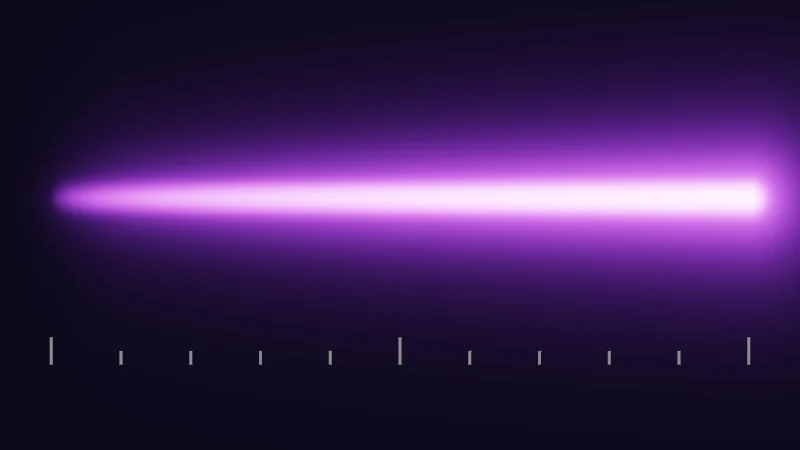
This next bit is a little tricky, so let’s take it slowly. In these demos, and in many games, the curve runs on each channel separately. A strong purple has much more blue than green. As it gets brighter, its blue reaches the top first while red and green keep climbing. So the color drifts to pink and then to white. On a glow, that’s the familiar white hot core with a colored halo.
Turn on JavaScript to run this demo.
Rendered in Unity 2022.3.22f1 from the Copy for Unity shader, with the settings this demo starts with.
// Helpers shared by this article's demos. All of them work on linear light.

// Scale the whole color down until its brightest channel is at most m. The hue stays the same.
float3 capBrightness(float3 c, float m)
{
    float peak = max(c.r, max(c.g, c.b));
    return peak > m ? c * (m / peak) : c;
}

float3 tonemapReinhard(float3 c)
{
    return c / (1.0 + c);
}

// 0 clips each channel at 1, 1 is Reinhard, 2 is the ACES fit.
float3 displayCurve(float3 c, float mode)
{
    int m = int(mode + 0.5);
    if (m == 0) return saturate(c);
    if (m == 1) return tonemapReinhard(c);
    return tonemapACES(c);
}


// ----

// A neon tube that gets brighter from 0 on the left to 10 on the right, limited and tone mapped in different ways.
#include "sdf2d"
uniform float _Curve; // @select = 2 | Tone map | Clip=0, Reinhard=1, ACES fit=2 | How the light is bent into the 0 to 1 a screen can show.
uniform float _Limit; // @select = 0 | Limit | None=0, Clamp each channel=1, Keep the hue=2 | How the shader limits its own output before the world sees it.
uniform float _Max;   // @range 1 10 0.1 = 4 | Max brightness M | The most light the shader may send out.
uniform float _Bloom; // @toggle = 1 | Bloom | Add a soft halo from the light, as a world's bloom does.
uniform float3 _Tint; // @color = #bf61ff | Color | The tube's color at brightness 1.

static const float HALF_LEN = 1.55;

float3 limitLight(float3 c)
{
    int m = int(_Limit + 0.5);
    if (m == 1) return min(c, float3(_Max, _Max, _Max));
    if (m == 2) return capBrightness(c, _Max);
    return c;
}

float4 shade(float2 uv)
{
    float2 p = centered(uv);
    float2 q = p - float2(0.0, 0.12);
    float level = 10.0 * saturate((q.x + HALF_LEN) / (2.0 * HALF_LEN));
    float3 light = _Tint * level;

    float y = length(float2(max(abs(q.x) - HALF_LEN, 0.0), q.y));
    float profile = exp(-pow(y / 0.05, 2.0)) + 0.25 * exp(-y * 14.0);
    float3 col = float3(0.01, 0.008, 0.02) + limitLight(light * profile);
    float r = saturate((q.x + HALF_LEN + 0.3) / (2.0 * HALF_LEN + 0.3));
    float3 haloLight = _Tint * 10.0 * r * smoothstep(0.0, 0.2, r);
    col += _Bloom * limitLight(haloLight) * (exp(-y * 5.0) * 0.06 + exp(-y * 16.0) * 0.1);

    float3 shown = displayCurve(col, _Curve);

    float step10 = 2.0 * HALF_LEN / 10.0;
    float k = clamp(floor((p.x + HALF_LEN) / step10 + 0.5), 0.0, 10.0);
    float major = 1.0 - step(0.5, fmod(k, 5.0));
    float tall = 0.03 + 0.03 * major;
    float tick = sdBox(p - float2(-HALF_LEN + k * step10, -0.62 + tall), float2(0.006, tall));
    shown = lerp(shown, srgbToLinear(float3(0.55, 0.55, 0.55)), fillAA(tick));
    return float4(shown, 1.0);
}
// Helpers shared by this article's demos. All of them work on linear light.
// Scale the whole color down until its brightest channel is at most m. The hue stays the same.
vec3 capBrightness(vec3 c, float m)
{
float peak = max(c.r, max(c.g, c.b));
return peak > m ? c * (m / peak) : c;
}
vec3 tonemapReinhard(vec3 c)
{
return c / (1.0 + c);
}
// 0 clips each channel at 1, 1 is Reinhard, 2 is the ACES fit.
vec3 displayCurve(vec3 c, float mode)
{
int m = int(mode + 0.5);
if (m == 0) return saturate(c);
if (m == 1) return tonemapReinhard(c);
return tonemapACES(c);
}
// ----
// A neon tube that gets brighter from 0 on the left to 10 on the right, limited and tone mapped in different ways.
#include "sdf2d"
uniform float _Curve; // @select = 2 | Tone map | Clip=0, Reinhard=1, ACES fit=2 | How the light is bent into the 0 to 1 a screen can show.
uniform float _Limit; // @select = 0 | Limit | None=0, Clamp each channel=1, Keep the hue=2 | How the shader limits its own output before the world sees it.
uniform float _Max; // @range 1 10 0.1 = 4 | Max brightness M | The most light the shader may send out.
uniform float _Bloom; // @toggle = 1 | Bloom | Add a soft halo from the light, as a world's bloom does.
uniform vec3 _Tint; // @color = #bf61ff | Color | The tube's color at brightness 1.
const float HALF_LEN = 1.55;
vec3 limitLight(vec3 c)
{
int m = int(_Limit + 0.5);
if (m == 1) return min(c, vec3(_Max, _Max, _Max));
if (m == 2) return capBrightness(c, _Max);
return c;
}
vec4 shade(vec2 uv)
{
vec2 p = centered(uv);
vec2 q = p - vec2(0.0, 0.12);
float level = 10.0 * saturate((q.x + HALF_LEN) / (2.0 * HALF_LEN));
vec3 light = _Tint * level;
float y = length(vec2(max(abs(q.x) - HALF_LEN, 0.0), q.y));
float profile = exp(-pow(y / 0.05, 2.0)) + 0.25 * exp(-y * 14.0);
vec3 col = vec3(0.01, 0.008, 0.02) + limitLight(light * profile);
float r = saturate((q.x + HALF_LEN + 0.3) / (2.0 * HALF_LEN + 0.3));
vec3 haloLight = _Tint * 10.0 * r * smoothstep(0.0, 0.2, r);
col += _Bloom * limitLight(haloLight) * (exp(-y * 5.0) * 0.06 + exp(-y * 16.0) * 0.1);
vec3 shown = displayCurve(col, _Curve);
float step10 = 2.0 * HALF_LEN / 10.0;
float k = clamp(floor((p.x + HALF_LEN) / step10 + 0.5), 0.0, 10.0);
float major = 1.0 - step(0.5, fmod(k, 5.0));
float tall = 0.03 + 0.03 * major;
float tick = sdBox(p - vec2(-HALF_LEN + k * step10, -0.62 + tall), vec2(0.006, tall));
shown = mix(shown, srgbToLinear(vec3(0.55, 0.55, 0.55)), fillAA(tick));
return vec4(shown, 1.0);
}Names in this code (48)
_Bloom- Switch "Bloom". Add a soft halo from the light, as a world's bloom does.
_Curve- Choice "Tone map". How the light is bent into the 0 to 1 a screen can show.
_Limit- Choice "Limit". How the shader limits its own output before the world sees it.
_Max- Slider "Max brightness M". The most light the shader may send out. From 1 to 10, starts at 4.
_Tint- Color picker "Color". The tube's color at brightness 1.
c- A parameter of limitLight(), line 11: float3 c.
capBrightness- float3 capBrightness(float3 c, float m). Scale the whole color down until its brightest channel is at most m. The hue stays the same. (this article's helper code)
centered- float2 centered(float2 uv). Square coordinates with the origin in the middle: the short side of the picture spans -1..1. (common library)
col- Declared on line 28: float3 col = float3(0.01, 0.008, 0.02) + limitLight(light * profile);
displayCurve- float3 displayCurve(float3 c, float mode). 0 clips each channel at 1, 1 is Reinhard, 2 is the ACES fit. (this article's helper code)
fillAA- float fillAA(float d). Anti-aliased coverage of a signed distance: 1 inside, 0 outside, a one pixel ramp at the edge. (common library)
fmod- The remainder of x / y in HLSL, with the sign of x (GLSL mod takes the sign of y).
HALF_LEN- Declared on line 9: static const float HALF_LEN = 1.55;
haloLight- Declared on line 30: float3 haloLight = _Tint * 10.0 * r * smoothstep(0.0, 0.2, r);
include- Pulls another file into this one, for example UnityCG.cginc.
k- Declared on line 36: float k = clamp(floor((p.x + HALF_LEN) / step10 + 0.5), 0.0, 10.0);
lerp- HLSL's blend from a (t = 0) to b (t = 1). GLSL calls it mix.
level- Declared on line 23: float level = 10.0 * saturate((q.x + HALF_LEN) / (2.0 * HALF_LEN));
light- Declared on line 24: float3 light = _Tint * level;
limitLight- float3 limitLight(float3 c)
m- Declared on line 13: int m = int(_Limit + 0.5);
major- Declared on line 37: float major = 1.0 - step(0.5, fmod(k, 5.0));
p- Declared on line 21: float2 p = centered(uv);
profile- Declared on line 27: float profile = exp(-pow(y / 0.05, 2.0)) + 0.25 * exp(-y * 14.0);
q- Declared on line 22: float2 q = p - float2(0.0, 0.12);
r- Declared on line 29: float r = saturate((q.x + HALF_LEN + 0.3) / (2.0 * HALF_LEN + 0.3));
saturate- An HLSL function that clamps a value between 0 and 1.
sdBox- float sdBox(float2 p, float2 halfSize) (sdf2d library)
shade- float4 shade(float2 uv)
shown- Declared on line 33: float3 shown = displayCurve(col, _Curve);
srgbToLinear- float3 srgbToLinear(float3 c). Color. Shaders work in linear light, as Unity does in a linear project; the screen gets sRGB at the end. (common library)
step10- Declared on line 35: float step10 = 2.0 * HALF_LEN / 10.0;
tall- Declared on line 38: float tall = 0.03 + 0.03 * major;
tick- Declared on line 39: float tick = sdBox(p - float2(-HALF_LEN + k * step10, -0.62 + tall), float2(0.006, tall));
tonemapACES- float3 tonemapACES(float3 x). Rolls HDR values above 1 off softly instead of clipping them. (common library)
tonemapReinhard- float3 tonemapReinhard(float3 c) (this article's helper code)
uv- A parameter of shade(), line 19: float2 uv.
y- Declared on line 26: float y = length(float2(max(abs(q.x) - HALF_LEN, 0.0), q.y));
abs- abs(x) is x without its minus sign. abs(-0.3) = 0.3.
clamp- clamp(x, lo, hi) holds x between lo and hi.
exp- exp(x) is e to the power x. exp(0) = 1, and it falls towards 0 as x goes negative.
floor- floor(x) rounds down to the largest whole number not above x. floor(2.7) = 2, floor(-0.5) = -1.
length- length(v) says how long the vector v is, sqrt(x² + y²).
max- max(a, b) picks the larger of the two.
min- min(a, b) picks the smaller of the two.
pow- pow(x, y) is x to the power y, and undefined for x < 0.
smoothstep- smoothstep(e0, e1, x) is 0 below e0, 1 above e1, and an S curve t² (3 - 2t) in between, where t = (x - e0) / (e1 - e0). GLSL leaves e0 >= e1 undefined.
step- A hard switch. step(edge, x) is 0 when x < edge, otherwise 1.
Brightness rises from 0 on the left to 10 on the right. Switch Tone map and compare: Clip turns the tube pink and then flat white, Reinhard leaves it dull, and the ACES fit keeps a white core inside a purple glow.
A cap that keeps the hue
Some worlds use harsh bloom, with a threshold near 1 and a strong halo. In a dark world, a glow at 10 or 20 then blinds everyone nearby. Not very friendly. So my effects cap their own output with a Max brightness .
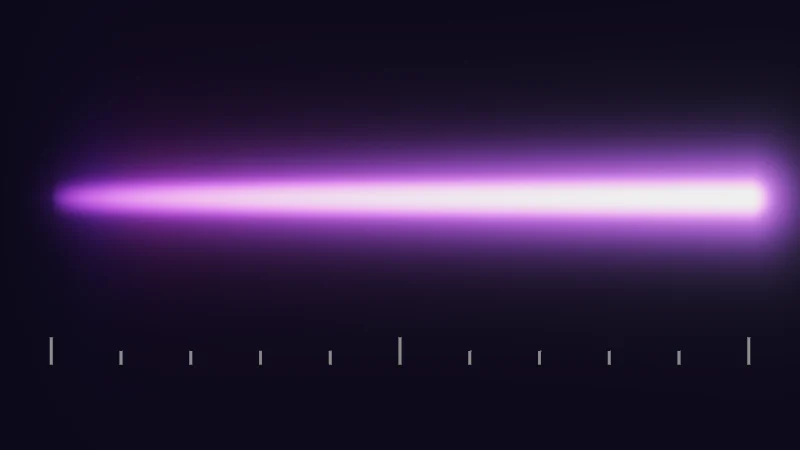
The tempting fix is clamping, cutting each channel off at the way clip cuts at 1. But that repeats the problem from above. Blue stops at , red keeps going, and the color shifts. Instead, I scale the whole color down until its brightest channel equals :
is the capped color, the color before the cap, its three channels, and picks the largest. Every channel is multiplied by the same number, so the ratio between them stays put, and with it the color. Only the brightness changes. The with 1 leaves colors already below alone. And that’s the whole trick.
Turn on JavaScript to run this demo.
Rendered in Unity 2022.3.22f1 from the Copy for Unity shader, with the settings this demo starts with.
// Uses the helper code shown with an earlier figure on this page.

// ----

// A neon tube that gets brighter from 0 on the left to 10 on the right, limited and tone mapped in different ways.
#include "sdf2d"
uniform float _Curve; // @select = 2 | Tone map | Clip=0, Reinhard=1, ACES fit=2 | How the light is bent into the 0 to 1 a screen can show.
uniform float _Limit; // @select = 0 | Limit | None=0, Clamp each channel=1, Keep the hue=2 | How the shader limits its own output before the world sees it.
uniform float _Max;   // @range 1 10 0.1 = 4 | Max brightness M | The most light the shader may send out.
uniform float _Bloom; // @toggle = 1 | Bloom | Add a soft halo from the light, as a world's bloom does.
uniform float3 _Tint; // @color = #bf61ff | Color | The tube's color at brightness 1.

static const float HALF_LEN = 1.55;

float3 limitLight(float3 c)
{
    int m = int(_Limit + 0.5);
    if (m == 1) return min(c, float3(_Max, _Max, _Max));
    if (m == 2) return capBrightness(c, _Max);
    return c;
}

float4 shade(float2 uv)
{
    float2 p = centered(uv);
    float2 q = p - float2(0.0, 0.12);
    float level = 10.0 * saturate((q.x + HALF_LEN) / (2.0 * HALF_LEN));
    float3 light = _Tint * level;

    float y = length(float2(max(abs(q.x) - HALF_LEN, 0.0), q.y));
    float profile = exp(-pow(y / 0.05, 2.0)) + 0.25 * exp(-y * 14.0);
    float3 col = float3(0.01, 0.008, 0.02) + limitLight(light * profile);
    float r = saturate((q.x + HALF_LEN + 0.3) / (2.0 * HALF_LEN + 0.3));
    float3 haloLight = _Tint * 10.0 * r * smoothstep(0.0, 0.2, r);
    col += _Bloom * limitLight(haloLight) * (exp(-y * 5.0) * 0.06 + exp(-y * 16.0) * 0.1);

    float3 shown = displayCurve(col, _Curve);

    float step10 = 2.0 * HALF_LEN / 10.0;
    float k = clamp(floor((p.x + HALF_LEN) / step10 + 0.5), 0.0, 10.0);
    float major = 1.0 - step(0.5, fmod(k, 5.0));
    float tall = 0.03 + 0.03 * major;
    float tick = sdBox(p - float2(-HALF_LEN + k * step10, -0.62 + tall), float2(0.006, tall));
    shown = lerp(shown, srgbToLinear(float3(0.55, 0.55, 0.55)), fillAA(tick));
    return float4(shown, 1.0);
}
// Uses the helper code shown with an earlier figure on this page.
// ----
// A neon tube that gets brighter from 0 on the left to 10 on the right, limited and tone mapped in different ways.
#include "sdf2d"
uniform float _Curve; // @select = 2 | Tone map | Clip=0, Reinhard=1, ACES fit=2 | How the light is bent into the 0 to 1 a screen can show.
uniform float _Limit; // @select = 0 | Limit | None=0, Clamp each channel=1, Keep the hue=2 | How the shader limits its own output before the world sees it.
uniform float _Max; // @range 1 10 0.1 = 4 | Max brightness M | The most light the shader may send out.
uniform float _Bloom; // @toggle = 1 | Bloom | Add a soft halo from the light, as a world's bloom does.
uniform vec3 _Tint; // @color = #bf61ff | Color | The tube's color at brightness 1.
const float HALF_LEN = 1.55;
vec3 limitLight(vec3 c)
{
int m = int(_Limit + 0.5);
if (m == 1) return min(c, vec3(_Max, _Max, _Max));
if (m == 2) return capBrightness(c, _Max);
return c;
}
vec4 shade(vec2 uv)
{
vec2 p = centered(uv);
vec2 q = p - vec2(0.0, 0.12);
float level = 10.0 * saturate((q.x + HALF_LEN) / (2.0 * HALF_LEN));
vec3 light = _Tint * level;
float y = length(vec2(max(abs(q.x) - HALF_LEN, 0.0), q.y));
float profile = exp(-pow(y / 0.05, 2.0)) + 0.25 * exp(-y * 14.0);
vec3 col = vec3(0.01, 0.008, 0.02) + limitLight(light * profile);
float r = saturate((q.x + HALF_LEN + 0.3) / (2.0 * HALF_LEN + 0.3));
vec3 haloLight = _Tint * 10.0 * r * smoothstep(0.0, 0.2, r);
col += _Bloom * limitLight(haloLight) * (exp(-y * 5.0) * 0.06 + exp(-y * 16.0) * 0.1);
vec3 shown = displayCurve(col, _Curve);
float step10 = 2.0 * HALF_LEN / 10.0;
float k = clamp(floor((p.x + HALF_LEN) / step10 + 0.5), 0.0, 10.0);
float major = 1.0 - step(0.5, fmod(k, 5.0));
float tall = 0.03 + 0.03 * major;
float tick = sdBox(p - vec2(-HALF_LEN + k * step10, -0.62 + tall), vec2(0.006, tall));
shown = mix(shown, srgbToLinear(vec3(0.55, 0.55, 0.55)), fillAA(tick));
return vec4(shown, 1.0);
}Names in this code (46)
_Bloom- Switch "Bloom". Add a soft halo from the light, as a world's bloom does.
_Curve- Choice "Tone map". How the light is bent into the 0 to 1 a screen can show.
_Limit- Choice "Limit". How the shader limits its own output before the world sees it.
_Max- Slider "Max brightness M". The most light the shader may send out. From 1 to 10, starts at 4.
_Tint- Color picker "Color". The tube's color at brightness 1.
c- A parameter of limitLight(), line 11: float3 c.
capBrightness- float3 capBrightness(float3 c, float m). Scale the whole color down until its brightest channel is at most m. The hue stays the same. (this article's helper code)
centered- float2 centered(float2 uv). Square coordinates with the origin in the middle: the short side of the picture spans -1..1. (common library)
col- Declared on line 28: float3 col = float3(0.01, 0.008, 0.02) + limitLight(light * profile);
displayCurve- float3 displayCurve(float3 c, float mode). 0 clips each channel at 1, 1 is Reinhard, 2 is the ACES fit. (this article's helper code)
fillAA- float fillAA(float d). Anti-aliased coverage of a signed distance: 1 inside, 0 outside, a one pixel ramp at the edge. (common library)
fmod- The remainder of x / y in HLSL, with the sign of x (GLSL mod takes the sign of y).
HALF_LEN- Declared on line 9: static const float HALF_LEN = 1.55;
haloLight- Declared on line 30: float3 haloLight = _Tint * 10.0 * r * smoothstep(0.0, 0.2, r);
include- Pulls another file into this one, for example UnityCG.cginc.
k- Declared on line 36: float k = clamp(floor((p.x + HALF_LEN) / step10 + 0.5), 0.0, 10.0);
lerp- HLSL's blend from a (t = 0) to b (t = 1). GLSL calls it mix.
level- Declared on line 23: float level = 10.0 * saturate((q.x + HALF_LEN) / (2.0 * HALF_LEN));
light- Declared on line 24: float3 light = _Tint * level;
limitLight- float3 limitLight(float3 c)
m- Declared on line 13: int m = int(_Limit + 0.5);
major- Declared on line 37: float major = 1.0 - step(0.5, fmod(k, 5.0));
p- Declared on line 21: float2 p = centered(uv);
profile- Declared on line 27: float profile = exp(-pow(y / 0.05, 2.0)) + 0.25 * exp(-y * 14.0);
q- Declared on line 22: float2 q = p - float2(0.0, 0.12);
r- Declared on line 29: float r = saturate((q.x + HALF_LEN + 0.3) / (2.0 * HALF_LEN + 0.3));
saturate- An HLSL function that clamps a value between 0 and 1.
sdBox- float sdBox(float2 p, float2 halfSize) (sdf2d library)
shade- float4 shade(float2 uv)
shown- Declared on line 33: float3 shown = displayCurve(col, _Curve);
srgbToLinear- float3 srgbToLinear(float3 c). Color. Shaders work in linear light, as Unity does in a linear project; the screen gets sRGB at the end. (common library)
step10- Declared on line 35: float step10 = 2.0 * HALF_LEN / 10.0;
tall- Declared on line 38: float tall = 0.03 + 0.03 * major;
tick- Declared on line 39: float tick = sdBox(p - float2(-HALF_LEN + k * step10, -0.62 + tall), float2(0.006, tall));
uv- A parameter of shade(), line 19: float2 uv.
y- Declared on line 26: float y = length(float2(max(abs(q.x) - HALF_LEN, 0.0), q.y));
abs- abs(x) is x without its minus sign. abs(-0.3) = 0.3.
clamp- clamp(x, lo, hi) holds x between lo and hi.
exp- exp(x) is e to the power x. exp(0) = 1, and it falls towards 0 as x goes negative.
floor- floor(x) rounds down to the largest whole number not above x. floor(2.7) = 2, floor(-0.5) = -1.
length- length(v) says how long the vector v is, sqrt(x² + y²).
max- max(a, b) picks the larger of the two.
min- min(a, b) picks the smaller of the two.
pow- pow(x, y) is x to the power y, and undefined for x < 0.
smoothstep- smoothstep(e0, e1, x) is 0 below e0, 1 above e1, and an S curve t² (3 - 2t) in between, where t = (x - e0) / (e1 - e0). GLSL leaves e0 >= e1 undefined.
step- A hard switch. step(edge, x) is 0 when x < edge, otherwise 1.
With Clamp each channel the right end turns white and the glow drifts to pink. Now switch Limit to Keep the hue. The tube stops at and stays purple. Raise Max brightness M and it turns paler, because the tone map still lifts each channel on its own.
In practice
Glowing shaders, from spells to eyes, send out HDR light (light above 1) and leave the rest to the world: its bloom, its tone map, or none at all. Quest worlds have no post processing, so there the light is clipped. It’s worth checking a glow twice, once in a dark world with bloom and once in a plain one.
In Unity, you pick a color property in sRGB and it’s turned into linear light for you. A color with an HDR picker also has an Intensity setting, and each step up doubles the light. Intensity 2 on white is four times as bright. Watch out for masks, though. A mask or other data texture needs sRGB (Color Texture) unticked in its import settings.
Sky Rift, my spell that cracks the sky, ends its sky and fog with the cap from above. Its material shows it as a Max Brightness slider from 0 to 10, set to 4.
My glass shaders also clean up broken pixels. A NaN is a value that is not a number, such as zero divided by zero. Bloom spreads one huge pixel into a blinding square, and a NaN into a black one. So my glass keeps every channel between 0 and 30, the bloom clamp Silent’s guide recommends for worlds. A channel at 30 already shows at full strength. On PC, max with a NaN gives back the other number, so the line also turns a NaN into 0:
#define GLASS_MAX_HDR 30.0
// ...
float3 glassSanitize(float3 c)
{
    return min(max(c, 0.0), GLASS_MAX_HDR);
}
Credits
- The ACES fit is Krzysztof Narkowicz’s ACES Filmic Tone Mapping Curve.
- The Reinhard curve is from Erik Reinhard and colleagues, Photographic Tone Reproduction for Digital Images (2002). The paper applies it to brightness alone; running it per channel is a common shortcut.
- What VRChat worlds do with bloom, and the bloom clamp of 30 my glass matches, come from Silent’s post processing guide.
- The sky behind the first demo uses gradient noise, Ken Perlin’s idea, in the form of Inigo Quilez, with Dave Hoskins’s Hash without Sine (MIT License); the noise lesson explains both.
- Do your color math on linear light. Unity turns it into sRGB once, at the end.
- Light above 1 is real. Bloom and tone mapping show it, and a plain screen clips it.
- To limit a color, scale all three channels by the same number, and the hue stays.