Foundations, part 6
Random numbers every GPU agrees on
The famous one line sine hash can roll different numbers on different GPUs. Here's why, and an integer hash that gives the same numbers everywhere.
In the noise article, a hash was a shader’s dice, a little arithmetic that turns a cell’s number into a random looking number from 0 to 1. There’s one famous hash you’ll find in shaders everywhere:
frac(sin(dot(p, float2(12.9898, 78.233))) * 43758.5453)It hides a nasty secret, though. On two different GPUs it can roll different numbers. Let’s find out why, then build a hash that rolls the very same numbers on every GPU.
Turn on JavaScript to run this demo.
Rendered in Unity 2022.3.22f1 from the Copy for Unity shader, with the settings this demo starts with.
// The two hashes this article compares. Both give a number from 0 to 1 for a cell.

// The popular one line sine hash.
float sinHash(float2 p)
{
    return frac(sin(dot(p, float2(12.9898, 78.233))) * 43758.5453);
}

// PCG hash (Jarzynski and Olano 2020, as Nathan Reed writes it): only 32 bit whole number math.
uint pcg(uint v)
{
    uint state = v * 747796405u + 2891336453u;
    uint word = ((state >> ((state >> 28u) + 4u)) ^ state) * 277803737u;
    return (word >> 22u) ^ word;
}

// Two whole numbers in, one out: the hash of y goes into the hash of x.
uint pcg2(uint2 v)
{
    return pcg(v.x + pcg(v.y));
}

// The top 24 bits as a number from 0 to 1. Every step is exact, so every GPU gets the same float.
float toUnit(uint h)
{
    return float(h >> 8u) * (1.0 / 16777216.0);
}


// ----

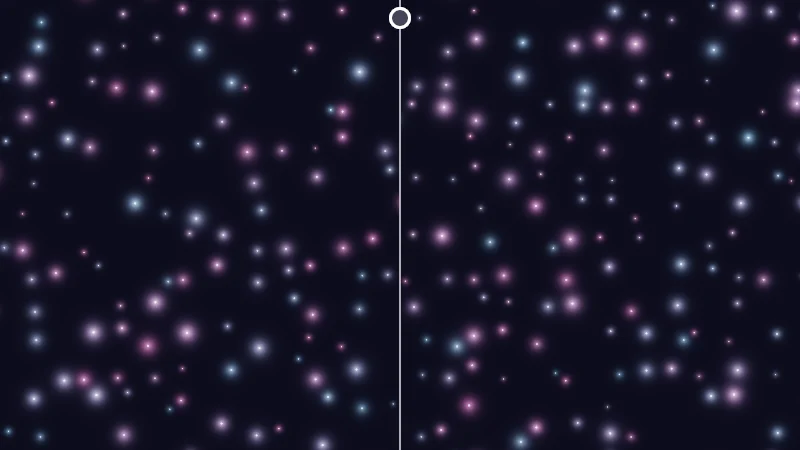
// Sparkles, one per cell, far from the origin. Left of the split line a float hash places them, right of it
// the integer hash. The cell numbers are exact whole numbers in both halves: only the hash differs.

uniform float _Far;  // @range 0 7 0.01 = 0 | Distance | How far the picture sits from the origin, as a power of ten. 6 is a million cells away.
uniform float _Left; // @select = 0 | Left half | Sine hash=0, Hash without Sine=1 | Which float hash fills the left half.
uniform float _Show; // @select = 0 | Show | Sparkles=0, Numbers=1 | Sparkles placed by the hash, or each cell's number as a shade of grey.

static const float CELLS = 14.0;

// Three random numbers for one cell.
float3 rollFloat(int2 c)
{
    float2 p = float2(c);
    if (_Left > 0.5) return float3(hash12(p), hash12(p + float2(0.31, 0.57)), hash12(p + float2(0.83, 0.19)));
    return float3(sinHash(p), sinHash(p + float2(0.31, 0.57)), sinHash(p + float2(0.83, 0.19)));
}
float3 rollPcg(int2 c)
{
    uint a = pcg2(uint2(c));
    uint b = pcg(a);
    return float3(toUnit(a), toUnit(b), toUnit(pcg(b)));
}

float4 shade(float2 uv)
{
    float2 p = centered(uv);
    float split = clamp(pointerCentered().x, -2.0, 2.0);
    int far = int(pow(10.0, _Far) + 0.5);

    bool useFloat = p.x < split;
    float2 g = p * 0.5 * CELLS;
    float2 f = frac(g);
    int2 cell = int2(floor(g)) + int2(far, far);
    float cellPx = (2.0 / CELLS) / pixelSize();

    float3 col = float3(0.010, 0.010, 0.022);
    if (_Show > 0.5)
    {
        float h = useFloat ? rollFloat(cell).x : rollPcg(cell).x;
        float2 edge = (0.5 - abs(f - 0.5)) * cellPx;
        col = lerp(col, srgbToLinear(float3(h, h, h)), saturate(min(edge.x, edge.y) - 0.5));
    }
    else
    {
        // Each cell holds at most one sparkle; its glow reaches into the neighbours, so look at all nine.
        // d is in pixels, so the core gets a one pixel soft edge without fwidth.
        for (int j = -1; j <= 1; j++)
        for (int i = -1; i <= 1; i++)
        {
            float3 r = useFloat ? rollFloat(cell + int2(i, j)) : rollPcg(cell + int2(i, j));
            if (r.z < 0.35) continue;
            float d = length(float2(i, j) + 0.15 + 0.7 * r.xy - f) * cellPx;
            float size = 0.12 * cellPx * r.z;
            float twinkle = 0.75 + 0.25 * sin(_Time.y * 1.2 + TAU * r.y);
            float3 hue = lerp(float3(1.0, 0.42, 0.85), float3(0.42, 0.72, 1.0), r.x);
            col += twinkle * hue * 0.9 * exp(-d / size) * r.z;
            col += twinkle * saturate(0.5 - d + 0.25 * size) * float3(1.0, 1.0, 1.0);
        }
    }
    col = tonemapACES(col);

    float divider = saturate(1.0 - abs(p.x - split) / pixelSize());
    float knob = length(p - float2(split, 0.92)) / pixelSize();
    col = lerp(col, float3(1.0, 1.0, 1.0), max(divider * 0.85, saturate(11.5 - knob)));
    col = lerp(col, float3(0.06, 0.06, 0.10), saturate(8.5 - knob));
    return float4(col, 1.0);
}
// The two hashes this article compares. Both give a number from 0 to 1 for a cell.
// The popular one line sine hash.
float sinHash(vec2 p)
{
return fract(sin(dot(p, vec2(12.9898, 78.233))) * 43758.5453);
}
// PCG hash (Jarzynski and Olano 2020, as Nathan Reed writes it): only 32 bit whole number math.
uint pcg(uint v)
{
uint state = v * 747796405u + 2891336453u;
uint word = ((state >> ((state >> 28u) + 4u)) ^ state) * 277803737u;
return (word >> 22u) ^ word;
}
// Two whole numbers in, one out: the hash of y goes into the hash of x.
uint pcg2(uvec2 v)
{
return pcg(v.x + pcg(v.y));
}
// The top 24 bits as a number from 0 to 1. Every step is exact, so every GPU gets the same float.
float toUnit(uint h)
{
return float(h >> 8u) * (1.0 / 16777216.0);
}
// ----
// Sparkles, one per cell, far from the origin. Left of the split line a float hash places them, right of it
// the integer hash. The cell numbers are exact whole numbers in both halves: only the hash differs.
uniform float _Far; // @range 0 7 0.01 = 0 | Distance | How far the picture sits from the origin, as a power of ten. 6 is a million cells away.
uniform float _Left; // @select = 0 | Left half | Sine hash=0, Hash without Sine=1 | Which float hash fills the left half.
uniform float _Show; // @select = 0 | Show | Sparkles=0, Numbers=1 | Sparkles placed by the hash, or each cell's number as a shade of grey.
const float CELLS = 14.0;
// Three random numbers for one cell.
vec3 rollFloat(ivec2 c)
{
vec2 p = vec2(c);
if (_Left > 0.5) return vec3(hash12(p), hash12(p + vec2(0.31, 0.57)), hash12(p + vec2(0.83, 0.19)));
return vec3(sinHash(p), sinHash(p + vec2(0.31, 0.57)), sinHash(p + vec2(0.83, 0.19)));
}
vec3 rollPcg(ivec2 c)
{
uint a = pcg2(uvec2(c));
uint b = pcg(a);
return vec3(toUnit(a), toUnit(b), toUnit(pcg(b)));
}
vec4 shade(vec2 uv)
{
vec2 p = centered(uv);
float split = clamp(pointerCentered().x, -2.0, 2.0);
int far = int(pow(10.0, _Far) + 0.5);
bool useFloat = p.x < split;
vec2 g = p * 0.5 * CELLS;
vec2 f = fract(g);
ivec2 cell = ivec2(floor(g)) + ivec2(far, far);
float cellPx = (2.0 / CELLS) / pixelSize();
vec3 col = vec3(0.010, 0.010, 0.022);
if (_Show > 0.5)
{
float h = useFloat ? rollFloat(cell).x : rollPcg(cell).x;
vec2 edge = (0.5 - abs(f - 0.5)) * cellPx;
col = mix(col, srgbToLinear(vec3(h, h, h)), saturate(min(edge.x, edge.y) - 0.5));
}
else
{
// Each cell holds at most one sparkle; its glow reaches into the neighbours, so look at all nine.
// d is in pixels, so the core gets a one pixel soft edge without fwidth.
for (int j = -1; j <= 1; j++)
for (int i = -1; i <= 1; i++)
{
vec3 r = useFloat ? rollFloat(cell + ivec2(i, j)) : rollPcg(cell + ivec2(i, j));
if (r.z < 0.35) continue;
float d = length(vec2(i, j) + 0.15 + 0.7 * r.xy - f) * cellPx;
float size = 0.12 * cellPx * r.z;
float twinkle = 0.75 + 0.25 * sin(_Time.y * 1.2 + TAU * r.y);
vec3 hue = mix(vec3(1.0, 0.42, 0.85), vec3(0.42, 0.72, 1.0), r.x);
col += twinkle * hue * 0.9 * exp(-d / size) * r.z;
col += twinkle * saturate(0.5 - d + 0.25 * size) * vec3(1.0, 1.0, 1.0);
}
}
col = tonemapACES(col);
float divider = saturate(1.0 - abs(p.x - split) / pixelSize());
float knob = length(p - vec2(split, 0.92)) / pixelSize();
col = mix(col, vec3(1.0, 1.0, 1.0), max(divider * 0.85, saturate(11.5 - knob)));
col = mix(col, vec3(0.06, 0.06, 0.10), saturate(8.5 - knob));
return vec4(col, 1.0);
}Names in this code (53)
_Far- Slider "Distance". How far the picture sits from the origin, as a power of ten. 6 is a million cells away. From 0 to 7, starts at 0.
_Left- Choice "Left half". Which float hash fills the left half.
_Show- Choice "Show". Sparkles placed by the hash, or each cell's number as a shade of grey.
_Time- Time since the level loaded, from Unity. _Time.y is seconds.
a- Declared on line 19: uint a = pcg2(uint2(c));
b- Declared on line 20: uint b = pcg(a);
c- A parameter of rollFloat(), line 11: int2 c.
cell- Declared on line 33: int2 cell = int2(floor(g)) + int2(far, far);
cellPx- Declared on line 34: float cellPx = (2.0 / CELLS) / pixelSize();
CELLS- Declared on line 8: static const float CELLS = 14.0;
centered- float2 centered(float2 uv). Square coordinates with the origin in the middle: the short side of the picture spans -1..1. (common library)
col- Declared on line 36: float3 col = float3(0.010, 0.010, 0.022);
d- Declared on line 52: float d = length(float2(i, j) + 0.15 + 0.7 * r.xy - f) * cellPx;
divider- Declared on line 62: float divider = saturate(1.0 - abs(p.x - split) / pixelSize());
edge- Declared on line 40: float2 edge = (0.5 - abs(f - 0.5)) * cellPx;
f- Declared on line 32: float2 f = frac(g);
far- Declared on line 28: int far = int(pow(10.0, _Far) + 0.5);
frac- The part after the decimal point, in HLSL. GLSL calls it fract.
g- Declared on line 31: float2 g = p * 0.5 * CELLS;
h- Declared on line 39: float h = useFloat ? rollFloat(cell).x : rollPcg(cell).x;
hash12- float hash12(float2 p) (common library)
hue- Declared on line 55: float3 hue = lerp(float3(1.0, 0.42, 0.85), float3(0.42, 0.72, 1.0), r.x);
knob- Declared on line 63: float knob = length(p - float2(split, 0.92)) / pixelSize();
lerp- HLSL's blend from a (t = 0) to b (t = 1). GLSL calls it mix.
p- Declared on line 13: float2 p = float2(c);
pcg- uint pcg(uint v). PCG hash (Jarzynski and Olano 2020, as Nathan Reed writes it): only 32 bit whole number math. (this article's helper code)
pcg2- uint pcg2(uint2 v). Two whole numbers in, one out: the hash of y goes into the hash of x. (this article's helper code)
pixelSize- float pixelSize() (common library)
pointerCentered- float2 pointerCentered(). The pointer (or the _Pointer material setting in Unity) in the same coordinates as centered(). (common library)
r- Declared on line 50: float3 r = useFloat ? rollFloat(cell + int2(i, j)) : rollPcg(cell + int2(i, j));
rollFloat- float3 rollFloat(int2 c). Three random numbers for one cell.
rollPcg- float3 rollPcg(int2 c)
saturate- An HLSL function that clamps a value between 0 and 1.
shade- float4 shade(float2 uv)
sinHash- float sinHash(float2 p). The popular one line sine hash. (this article's helper code)
size- Declared on line 53: float size = 0.12 * cellPx * r.z;
split- Declared on line 27: float split = clamp(pointerCentered().x, -2.0, 2.0);
srgbToLinear- float3 srgbToLinear(float3 c). Color. Shaders work in linear light, as Unity does in a linear project; the screen gets sRGB at the end. (common library)
tonemapACES- float3 tonemapACES(float3 x). Rolls HDR values above 1 off softly instead of clipping them. (common library)
toUnit- float toUnit(uint h). The top 24 bits as a number from 0 to 1. Every step is exact, so every GPU gets the same float. (this article's helper code)
twinkle- Declared on line 54: float twinkle = 0.75 + 0.25 * sin(_Time.y * 1.2 + TAU * r.y);
useFloat- Declared on line 30: bool useFloat = p.x < split;
uv- A parameter of shade(), line 24: float2 uv.
abs- abs(x) is x without its minus sign. abs(-0.3) = 0.3.
clamp- clamp(x, lo, hi) holds x between lo and hi.
dot- dot(a, b) multiplies matching parts and adds them up. For unit vectors it is the cosine of the angle between them.
exp- exp(x) is e to the power x. exp(0) = 1, and it falls towards 0 as x goes negative.
floor- floor(x) rounds down to the largest whole number not above x. floor(2.7) = 2, floor(-0.5) = -1.
length- length(v) says how long the vector v is, sqrt(x² + y²).
max- max(a, b) picks the larger of the two.
min- min(a, b) picks the smaller of the two.
pow- pow(x, y) is x to the power y, and undefined for x < 0.
sin- sin(a) is the sine of the angle a, in radians.
Left of the line the sine hash places one sparkle per cell, right of it the integer hash we’ll build. Slide Distance to 5, a hundred thousand cells from the origin, then to 6. On my PC the left sparkles bunch into rows, then vanish. Your GPU may break in its own way. Set Show to Numbers to see each cell’s raw number.
What sin really is on a GPU
A GPU doesn’t work out sine exactly. It runs a fast approximation in hardware, and the rules for how good it must be are loose:
- GLSL ES 3.00, the language behind WebGL 2, leaves the precision of sine undefined.
- Vulkan allows an error of , about 0.0005, but only between and .
- Direct3D allows 0.0008 between and .
Outside those ranges, nothing is promised at all. On my PC, sin is off by up to 0.0003 for inputs below three thousand, and by more further out. Mobile GPUs, like the ones in Quest headsets and Android phones, can run math written with half at 16 bit precision, where Vulkan allows sine an error of , almost 0.008.
The 43758 magnifier
Now let’s see what the hash does with that slightly wobbly sine:
and are the cell’s numbers, the angle they make, and the hash. Frac keeps only the part after the decimal point. Multiplying by 43758 turns every tiny wobble into a big one. If two GPUs disagree about by 0.00002, the products differ by almost 0.9, and after frac the two hashes have nothing in common.
Turn on JavaScript to run this demo.
- f1(x):
frac((sin(1.0) + x * 0.000001) * 43758.5453) - f2(x):
sin(1.0) + x * 0.000001
#define PLOT_X_RANGE float2(0.0, 60.0)
#define PLOT_Y_RANGE float2(-0.05, 1.05)
#define PLOT_TICK float2(10.0, 0.2)
#include "plot"
float curve0(float x) { return frac((sin(1.0) + x * 0.000001) * 43758.5453); }
float curve1(float x) { return sin(1.0) + x * 0.000001; }
float4 shade(float2 uv)
{
    float2 p = plotCoord(uv);
    float3 col = plotBackground(p);
    float h = plotPixel().x;
    col = plotCurveStyled(col, p, curve0(p.x), plotSlope(curve0(p.x - h), curve0(p.x), curve0(p.x + h), h), series1(), 0);
    col = plotCurveStyled(col, p, curve1(p.x), plotSlope(curve1(p.x - h), curve1(p.x), curve1(p.x + h), h), series2(), 1);
    return float4(col, 1.0);
}#define PLOT_X_RANGE vec2(0.0, 60.0)
#define PLOT_Y_RANGE vec2(-0.05, 1.05)
#define PLOT_TICK vec2(10.0, 0.2)
#include "plot"
float curve0(float x) { return fract((sin(1.0) + x * 0.000001) * 43758.5453); }
float curve1(float x) { return sin(1.0) + x * 0.000001; }
vec4 shade(vec2 uv)
{
vec2 p = plotCoord(uv);
vec3 col = plotBackground(p);
float h = plotPixel().x;
col = plotCurveStyled(col, p, curve0(p.x), plotSlope(curve0(p.x - h), curve0(p.x), curve0(p.x + h), h), series1(), 0);
col = plotCurveStyled(col, p, curve1(p.x), plotSlope(curve1(p.x - h), curve1(p.x), curve1(p.x + h), h), series2(), 1);
return vec4(col, 1.0);
}Names in this code (19)
col- Declared on line 10: float3 col = plotBackground(p);
curve0- float curve0(float x)
curve1- float curve1(float x)
frac- The part after the decimal point, in HLSL. GLSL calls it fract.
h- Declared on line 11: float h = plotPixel().x;
include- Pulls another file into this one, for example UnityCG.cginc.
p- Declared on line 9: float2 p = plotCoord(uv);
plotBackground- float3 plotBackground(float2 p) (plot library)
plotCoord- float2 plotCoord(float2 uv) (plot library)
plotCurveStyled- float3 plotCurveStyled(float3 col, float2 p, float y, float slope, float3 ink, int style). The same line, solid (style 0), dashed (1) or dotted (2), so curves differ by more than color. (plot library)
plotPixel- float2 plotPixel(). Size of one pixel in data units. (plot library)
plotSlope- float plotSlope(float before, float here, float after, float h). f'(x) from f one pixel before, at and after x. Where f jumps (a step, a saw tooth), one side changes by many pixels and the other hardly at all: then the gentler side wins, so the line ends on each side of the jump instead of smearing up and down through it. (plot library)
series1- float3 series1() (common library)
series2- float3 series2() (common library)
shade- float4 shade(float2 uv)
uv- A parameter of shade(), line 7: float2 uv.
x- A parameter of curve0(), line 5: float x.
define- With #define NAME value, every NAME in the code is replaced by value before compiling.
sin- sin(a) is the sine of the angle a, in radians.
The bottom axis shows how far a GPU’s sine of 1 is off, in millionths. The dashed pink sine looks flat, while the solid mint hash climbs from 0 to 1 every 23 millionths.
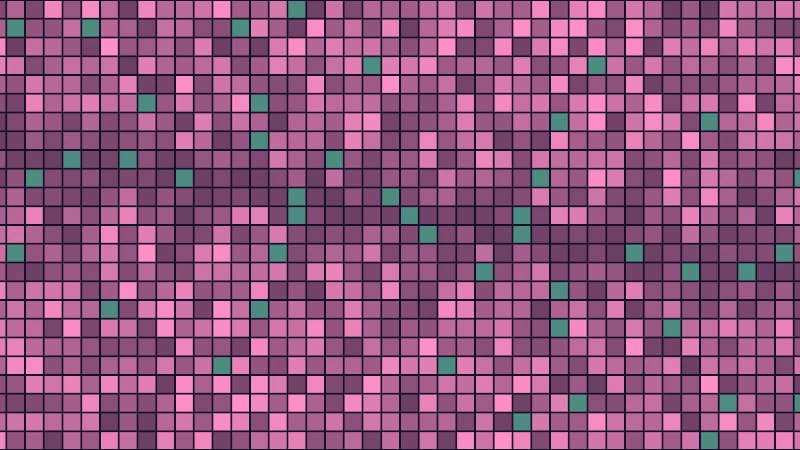
I can’t put a second GPU in your computer, so the next demo fakes one. It works out each cell’s hash twice, once with your GPU’s sin and once with a stand-in sine of mine built from a short polynomial.
Turn on JavaScript to run this demo.
Rendered in Unity 2022.3.22f1 from the Copy for Unity shader, with the settings this demo starts with.
// The sine hash worked out twice per cell: once with this GPU's sin, once with a stand-in sine that plays
// another GPU. Where the two numbers differ, the cell turns pink.
#include "diagram"

uniform float _Show;  // @select = 2 | Show | This GPU=0, Stand-in=1, Where they differ=2 | Which hash to draw, or the cells where the two disagree.
uniform float _Cells; // @range 8 64 1 = 24 | Cells N | How many cells fit across the short side of the picture.

// A stand-in for another GPU's sine: turn the angle into turns, keep the part after the whole turns,
// fold it into a quarter turn and finish with a short polynomial.
float otherSin(float x)
{
    float t = x * 0.15915494;
    t -= floor(t + 0.5);
    float a = 6.2831853 * (abs(t) > 0.25 ? sign(t) * 0.5 - t : t);
    float a2 = a * a;
    return a * (1.0 + a2 * (-1.0 / 6.0 + a2 * (1.0 / 120.0 + a2 * (-1.0 / 5040.0 + a2 * (1.0 / 362880.0)))));
}

float4 shade(float2 uv)
{
    float2 p = centered(uv);
    float2 g = p * 0.5 * _Cells;
    float2 c = floor(g);
    float angle = dot(c, float2(12.9898, 78.233));
    float h1 = frac(sin(angle) * 43758.5453);
    float h2 = frac(otherSin(angle) * 43758.5453);

    float3 col;
    int show = int(_Show + 0.5);
    if (show == 0) col = tint(themeSurface(), themeInk(), h1);
    else if (show == 1) col = tint(themeSurface(), themeInk(), h2);
    else
    {
        float diff = abs(h1 - h2);
        diff = min(diff, 1.0 - diff);
        col = diff < 0.01 ? tint(themeSurface(), series1(), 0.55) : tint(themeSurface(), series2(), 0.35 + 1.3 * diff);
    }

    float2 edge = (0.5 - abs(frac(g) - 0.5)) * (2.0 / _Cells) / pixelSize();
    col = lerp(themeSurface(), col, saturate(min(edge.x, edge.y) - 0.5));
    return float4(col, 1.0);
}
// The sine hash worked out twice per cell: once with this GPU's sin, once with a stand-in sine that plays
// another GPU. Where the two numbers differ, the cell turns pink.
#include "diagram"
uniform float _Show; // @select = 2 | Show | This GPU=0, Stand-in=1, Where they differ=2 | Which hash to draw, or the cells where the two disagree.
uniform float _Cells; // @range 8 64 1 = 24 | Cells N | How many cells fit across the short side of the picture.
// A stand-in for another GPU's sine: turn the angle into turns, keep the part after the whole turns,
// fold it into a quarter turn and finish with a short polynomial.
float otherSin(float x)
{
float t = x * 0.15915494;
t -= floor(t + 0.5);
float a = 6.2831853 * (abs(t) > 0.25 ? sign(t) * 0.5 - t : t);
float a2 = a * a;
return a * (1.0 + a2 * (-1.0 / 6.0 + a2 * (1.0 / 120.0 + a2 * (-1.0 / 5040.0 + a2 * (1.0 / 362880.0)))));
}
vec4 shade(vec2 uv)
{
vec2 p = centered(uv);
vec2 g = p * 0.5 * _Cells;
vec2 c = floor(g);
float angle = dot(c, vec2(12.9898, 78.233));
float h1 = fract(sin(angle) * 43758.5453);
float h2 = fract(otherSin(angle) * 43758.5453);
vec3 col;
int show = int(_Show + 0.5);
if (show == 0) col = tint(themeSurface(), themeInk(), h1);
else if (show == 1) col = tint(themeSurface(), themeInk(), h2);
else
{
float diff = abs(h1 - h2);
diff = min(diff, 1.0 - diff);
col = diff < 0.01 ? tint(themeSurface(), series1(), 0.55) : tint(themeSurface(), series2(), 0.35 + 1.3 * diff);
}
vec2 edge = (0.5 - abs(fract(g) - 0.5)) * (2.0 / _Cells) / pixelSize();
col = mix(themeSurface(), col, saturate(min(edge.x, edge.y) - 0.5));
return vec4(col, 1.0);
}Names in this code (36)
_Cells- Slider "Cells N". How many cells fit across the short side of the picture. From 8 to 64, starts at 24.
_Show- Choice "Show". Which hash to draw, or the cells where the two disagree.
a- Declared on line 14: float a = 6.2831853 * (abs(t) > 0.25 ? sign(t) * 0.5 - t : t);
a2- Declared on line 15: float a2 = a * a;
angle- Declared on line 24: float angle = dot(c, float2(12.9898, 78.233));
c- Declared on line 23: float2 c = floor(g);
centered- float2 centered(float2 uv). Square coordinates with the origin in the middle: the short side of the picture spans -1..1. (common library)
col- Declared on line 28: float3 col;
diff- Declared on line 34: float diff = abs(h1 - h2);
edge- Declared on line 39: float2 edge = (0.5 - abs(frac(g) - 0.5)) * (2.0 / _Cells) / pixelSize();
frac- The part after the decimal point, in HLSL. GLSL calls it fract.
g- Declared on line 22: float2 g = p * 0.5 * _Cells;
h1- Declared on line 25: float h1 = frac(sin(angle) * 43758.5453);
h2- Declared on line 26: float h2 = frac(otherSin(angle) * 43758.5453);
include- Pulls another file into this one, for example UnityCG.cginc.
lerp- HLSL's blend from a (t = 0) to b (t = 1). GLSL calls it mix.
otherSin- float otherSin(float x). A stand-in for another GPU's sine: turn the angle into turns, keep the part after the whole turns, fold it into a quarter turn and finish with a short polynomial.
p- Declared on line 21: float2 p = centered(uv);
pixelSize- float pixelSize() (common library)
saturate- An HLSL function that clamps a value between 0 and 1.
series1- float3 series1() (common library)
series2- float3 series2() (common library)
shade- float4 shade(float2 uv)
show- Declared on line 29: int show = int(_Show + 0.5);
t- Declared on line 12: float t = x * 0.15915494;
themeInk- float3 themeInk() (common library)
themeSurface- float3 themeSurface(). The dusk stage colors, in linear light. Series colors are used in this order: mint, pink, butter. (common library)
tint- float3 tint(float3 a, float3 b, float t). Blends two colors in steps that look even to the eye (in sRGB), for value ramps such as distance bands. Edges and coverage still blend with lerp, in linear light, as light really adds up. (common library)
uv- A parameter of shade(), line 19: float2 uv.
x- A parameter of otherSin(), line 10: float x.
abs- abs(x) is x without its minus sign. abs(-0.3) = 0.3.
dot- dot(a, b) multiplies matching parts and adds them up. For unit vectors it is the cosine of the angle between them.
floor- floor(x) rounds down to the largest whole number not above x. floor(2.7) = 2, floor(-0.5) = -1.
min- min(a, b) picks the smaller of the two.
sign- sign(x) gives -1 for negative x, 0 for zero and 1 for positive x.
sin- sin(a) is the sine of the angle a, in radians.
The stand-in sine plays another GPU. On my PC the two sines differ by less than 0.0002 here, yet nearly every cell is pink, meaning its two hashes disagree. Mint cells agree. Switch Show to see each hash alone. Both look like fine noise.
Large inputs make it worse even on one GPU. A float keeps about seven significant digits, so around a million, neighbouring floats are 0.0625 apart. Far from the origin runs into the millions, and its fine digits are gone before sin even starts. On my PC, sin’s answer out there can be off by more than 1. That’s the rows in the first demo. A hash fed _Time.y gets coarser the same way as a world runs on.
Why VRChat makes it matter
Every player in VRChat renders your avatar on their own GPU. With a sine hash, the glitter on your outfit can sparkle in different places for each viewer, and a pattern placed by world position far from the origin can turn streaky. On Quest and Android, avatars may only use VRChat’s mobile shaders, but world shaders run there, on mobile GPUs.
Hash without Sine gives steadier floats
Dave Hoskins’ Hash without Sine, the one from the noise article, skips sine. It only multiplies, adds and takes frac, and GLSL ES asks for every multiply and add to be rounded correctly. Pick it under Left half in the first demo. On my PC it holds up even ten million cells out.
A little wiggle room is left. A GPU may fuse a multiply and an add into one step that rounds once, and Direct3D lets hardware cut off the last bit instead of rounding it. Either can change a last digit, and a hash turns last digits into new numbers. Rare, but possible.
Whole numbers wrap the same everywhere
Integers never round. A uint holds exactly 32 bits, and when a sum or a product overflows, it wraps around and keeps the lowest 32 bits. GLSL ES 3.00 demands this, and Direct3D’s integer math works the same way. Same input, same bits, on every GPU.
PCG is a hash made of exactly that. Mark Jarzynski and Marc Olano tested over a hundred GPU hash variants for quality and speed, and PCG came out a good default. Nathan Reed puts it plainly. “It should probably be your default GPU hash function.”
uint pcg(uint v)
{
    uint state = v * 747796405u + 2891336453u;
    uint word = ((state >> ((state >> 28u) + 4u)) ^ state) * 277803737u;
    return (word >> 22u) ^ word;
}
Line one multiplies, adds and wraps. Line two shifts the bits by an amount they pick themselves and mixes them back in with xor (^). Line three folds the high bits into the low ones. For a cell’s two numbers, nest it: pcg(x + pcg(y)). The paper found that nesting keeps the quality, while adding weighted numbers first makes repeating patterns.
From bits to a number from 0 to 1
is the 32 bit hash. Dividing by and rounding down keeps its top 24 bits (n >> 8u), and runs from 0 up to a hair under 1. Why 24? A float holds every whole number up to exactly, and multiplying by a power of two only changes its exponent. Nothing rounds, so every GPU gets the exact same float. That’s toUnit in the code under the first demo.
From a position to a whole number
A shader’s positions are floats. Round down with floor, turn that into an int, and only then into a uint: uint2(int2(floor(p))).
Skipping the int is a trap. GLSL ES 3.00 leaves a negative float turned into a uint undefined, and Direct3D clamps it to 0. From int to uint, GLSL ES and HLSL both keep the bits, so -1 becomes 4294967295 and every cell keeps a number of its own.
Turn on JavaScript to run this demo.
Rendered in Unity 2022.3.22f1 from the Copy for Unity shader, with the settings this demo starts with.
// Uses the helper code shown with an earlier figure on this page.

// ----

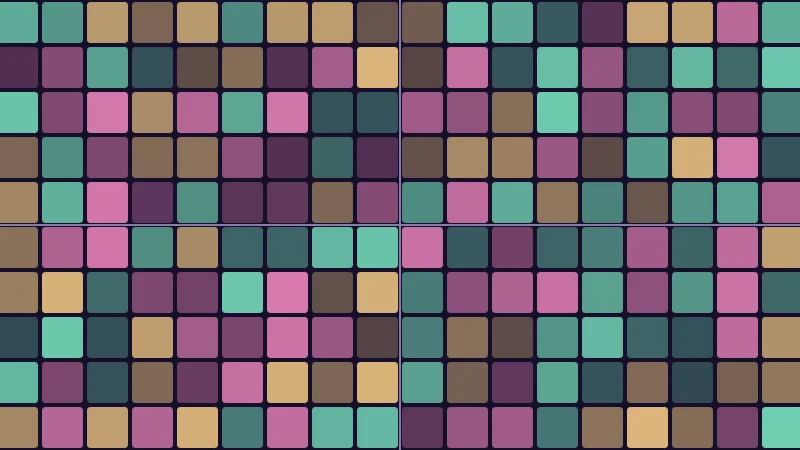
// Tiles colored by the integer hash. The position becomes the cell's whole number either through int first,
// or straight from float to uint, which goes wrong for negative positions.
#include "diagram"

uniform float _Convert; // @select = 0 | Convert | Through int=0, Straight to uint=1 | How the position turns into the cell's whole numbers.
uniform float _Cells;   // @range 4 24 1 = 10 | Cells N | How many cells fit across the short side of the picture.

float4 shade(float2 uv)
{
    float2 p = centered(uv);
    float2 g = p * 0.5 * _Cells;
    uint2 cell = _Convert < 0.5 ? uint2(int2(floor(g))) : uint2(floor(g));

    uint h = pcg2(cell);
    float pick = toUnit(h) * 3.0;
    float3 hue = pick < 1.0 ? series1() : pick < 2.0 ? series2() : series3();
    float shade = 0.25 + 0.6 * toUnit(pcg(h));

    float2 q = (frac(g) - 0.5) * (2.0 / _Cells);
    float2 box = abs(q) - (1.0 / _Cells - 6.0 * pixelSize());
    float d = length(max(box, 0.0)) + min(max(box.x, box.y), 0.0) - 4.0 * pixelSize();

    float3 col = drawAxes(themeSurface(), p);
    col = lerp(col, tint(themeSurface(), hue, shade), fillAA(d));
    return float4(col, 1.0);
}
// Uses the helper code shown with an earlier figure on this page.
// ----
// Tiles colored by the integer hash. The position becomes the cell's whole number either through int first,
// or straight from float to uint, which goes wrong for negative positions.
#include "diagram"
uniform float _Convert; // @select = 0 | Convert | Through int=0, Straight to uint=1 | How the position turns into the cell's whole numbers.
uniform float _Cells; // @range 4 24 1 = 10 | Cells N | How many cells fit across the short side of the picture.
vec4 shade(vec2 uv)
{
vec2 p = centered(uv);
vec2 g = p * 0.5 * _Cells;
uvec2 cell = _Convert < 0.5 ? uvec2(ivec2(floor(g))) : uvec2(floor(g));
uint h = pcg2(cell);
float pick = toUnit(h) * 3.0;
vec3 hue = pick < 1.0 ? series1() : pick < 2.0 ? series2() : series3();
float shade = 0.25 + 0.6 * toUnit(pcg(h));
vec2 q = (fract(g) - 0.5) * (2.0 / _Cells);
vec2 box = abs(q) - (1.0 / _Cells - 6.0 * pixelSize());
float d = length(max(box, 0.0)) + min(max(box.x, box.y), 0.0) - 4.0 * pixelSize();
vec3 col = drawAxes(themeSurface(), p);
col = mix(col, tint(themeSurface(), hue, shade), fillAA(d));
return vec4(col, 1.0);
}Names in this code (34)
_Cells- Slider "Cells N". How many cells fit across the short side of the picture. From 4 to 24, starts at 10.
_Convert- Choice "Convert". How the position turns into the cell's whole numbers.
box- Declared on line 20: float2 box = abs(q) - (1.0 / _Cells - 6.0 * pixelSize());
cell- Declared on line 12: uint2 cell = _Convert < 0.5 ? uint2(int2(floor(g))) : uint2(floor(g));
centered- float2 centered(float2 uv). Square coordinates with the origin in the middle: the short side of the picture spans -1..1. (common library)
col- Declared on line 23: float3 col = drawAxes(themeSurface(), p);
d- Declared on line 21: float d = length(max(box, 0.0)) + min(max(box.x, box.y), 0.0) - 4.0 * pixelSize();
drawAxes- float3 drawAxes(float3 col, float2 p) (diagram library)
fillAA- float fillAA(float d). Anti-aliased coverage of a signed distance: 1 inside, 0 outside, a one pixel ramp at the edge. (common library)
frac- The part after the decimal point, in HLSL. GLSL calls it fract.
g- Declared on line 11: float2 g = p * 0.5 * _Cells;
h- Declared on line 14: uint h = pcg2(cell);
hue- Declared on line 16: float3 hue = pick < 1.0 ? series1() : pick < 2.0 ? series2() : series3();
include- Pulls another file into this one, for example UnityCG.cginc.
lerp- HLSL's blend from a (t = 0) to b (t = 1). GLSL calls it mix.
p- Declared on line 10: float2 p = centered(uv);
pcg- uint pcg(uint v). PCG hash (Jarzynski and Olano 2020, as Nathan Reed writes it): only 32 bit whole number math. (this article's helper code)
pcg2- uint pcg2(uint2 v). Two whole numbers in, one out: the hash of y goes into the hash of x. (this article's helper code)
pick- Declared on line 15: float pick = toUnit(h) * 3.0;
pixelSize- float pixelSize() (common library)
q- Declared on line 19: float2 q = (frac(g) - 0.5) * (2.0 / _Cells);
series1- float3 series1() (common library)
series2- float3 series2() (common library)
series3- float3 series3() (common library)
shade- float4 shade(float2 uv)
themeSurface- float3 themeSurface(). The dusk stage colors, in linear light. Series colors are used in this order: mint, pink, butter. (common library)
tint- float3 tint(float3 a, float3 b, float t). Blends two colors in steps that look even to the eye (in sRGB), for value ramps such as distance bands. Edges and coverage still blend with lerp, in linear light, as light really adds up. (common library)
toUnit- float toUnit(uint h). The top 24 bits as a number from 0 to 1. Every step is exact, so every GPU gets the same float. (this article's helper code)
uv- A parameter of shade(), line 8: float2 uv.
abs- abs(x) is x without its minus sign. abs(-0.3) = 0.3.
floor- floor(x) rounds down to the largest whole number not above x. floor(2.7) = 2, floor(-0.5) = -1.
length- length(v) says how long the vector v is, sqrt(x² + y²).
max- max(a, b) picks the larger of the two.
min- min(a, b) picks the smaller of the two.
Switch Convert to Straight to uint. On my PC every negative number becomes 0, so rows and columns left of and below the middle repeat, and the bottom left is one block. Through int, every tile gets its own color.
In practice
A sparkle per UV cell, with pcg2 and toUnit from the code under the first demo:
uint2 cell = uint2(int2(floor(i.uv * _Cells)));
uint n = pcg2(cell);
float bright = toUnit(n);       // 0 to 1, the same on every GPU
float size = toUnit(pcg(n)); // a second, fresh number- Integers in Unity. Whole number math needs
#pragma target 3.5or higher. - Full precision. GLSL ES lets a
mediumpinteger be as small as 16 bits. Keep hashes in plainuint, nevermin16uint. - Steady input. A world position far from the origin has lost its fine digits before any hash sees it. Hash UVs or object positions when you can.
Credits
- PCG is Melissa O’Neill’s random number family. The GPU hash and its tests are from Mark Jarzynski and Marc Olano’s Hash Functions for GPU Rendering (JCGT, 2020); my
pcgfollows Nathan Reed’s summary. - Hash without Sine is by Dave Hoskins (MIT License). Inigo Quilez’s integer hashes are another family the paper tests.
- A GPU’s sine is an approximation with loose rules, and the sine hash blows its tiny errors up into different numbers.
- Hash without Sine is much steadier, and integer hashes such as PCG give the very same bits on every GPU.
- Turn positions into whole numbers through int, and hashes into 0 to 1 with their top 24 bits.